Generate Complete Database Schemas with Claude for SQL Databases

Workflow preview

Workflow preview
100%
Generate Complete Database Schemas with Claude for SQL Databases preview
Open on n8n.io

Important notice

This workflow is provided as-is. Please review and test before using in production.

1. Workflow Overview

Transform database design from weeks to minutes with this intelligent multi agent system. Perfect for agencies, consultancies, and SaaS companies offering database architecture as a lead magnet or ...

Best for

  • Lead Generation automation workflows
  • AI Chatbot automation workflows
  • advanced n8n builders looking for reusable templates

Tools used

n8n-nodes-base.set, @n8n/n8n-nodes-langchain.lmchatanthropic, @n8n/n8n-nodes-langchain.agent, n8n-nodes-base.if, n8n-nodes-base.form, n8n-nodes-base.postgres, n8n-nodes-base.stickynote, n8n-nodes-base.formtrigger

Source and attribution

This workflow is cataloged by N8N Workflows and links back to its original n8n.io source page by Evervise.

Original n8n.io source

1.1 Workflow description

Title
Generate Complete Database Schemas with Claude for SQL Databases
Workflow name
Generate Complete Database Schemas with Claude for SQL Databases

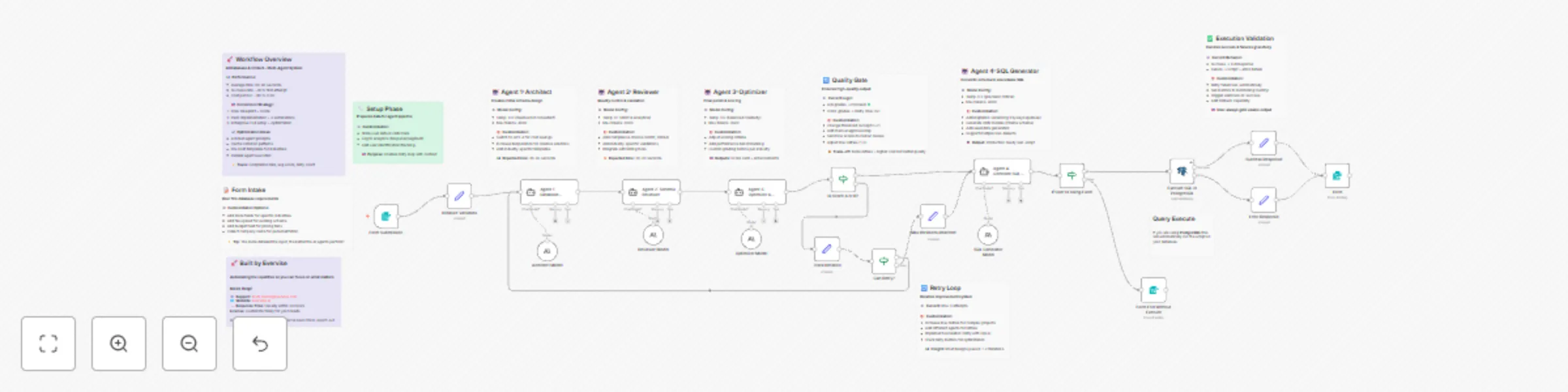
Transform database design from weeks to minutes with this intelligent multi-agent system. Perfect for agencies, consultancies, and SaaS companies offering database architecture as a lead magnet or service.

🤖 4 Specialized AI Agents:

  • Agent 1 (Architect): Designs complete schema with tables, relationships, indexes
  • Agent 2 (Reviewer): Validates design for performance, security, scalability
  • Agent 3 (Optimizer): Adds advanced features and scores the design (0-100)
  • Agent 4 (SQL Generator): Creates production-ready migration scripts

🔄 Smart Quality Loop: Automatically retries up to 3 times if score falls below B grade, feeding previous feedback to improve the design iteratively.

✨ What You Get:

  • Complete database schema (JSON)
  • Comprehensive score card with letter grade
  • Review feedback with severity levels (Critical/High/Medium/Low)
  • Production-ready SQL migration script
  • Optional auto-execution in PostgreSQL/MySQL
  • Iteration count and optimization recommendations

đź’Ľ Perfect For:

  • Digital agencies offering database design services
  • SaaS companies needing rapid prototyping
  • Consultancies creating lead magnets
  • Developers modernizing legacy systems
  • Startups validating data models

🎯 Use as Lead Magnet: Offer free database blueprints to capture leads, then upsell implementation, custom automations, and ongoing optimization services.

⚙️ Technical Highlights:

  • Optimized temperature settings per agent (0.1-0.5)
  • Claude Sonnet 4.5 for maximum quality
  • Structured JSON output for easy integration
  • Error handling and graceful degradation
  • Execution time: 60-90 seconds average
  • Cost: ~$0.15-0.30 per run

Use Cases

  1. Agency Lead Magnet Capture leads by offering free database architecture reviews and blueprints

  2. Rapid Prototyping Quickly generate database schemas for MVP development and validation

  3. Legacy System Modernization Help companies redesign outdated database structures with modern best practices

  4. Technical Consulting Provide instant database assessments and recommendations to clients

  5. Educational Tool Teach database design principles through AI-generated examples and feedback

  6. Pre-Sales Tool Demonstrate technical expertise to prospects before engagement

Key Features

âś… Multi-agent AI collaboration with specialized roles âś… Automatic quality control and iterative improvement (max 3 retries) âś… Support for PostgreSQL, MySQL, MSSQL, MariaDB âś… Production-ready SQL script generation âś… Comprehensive scoring system (Schema/Performance/Scalability/Security) âś… Optional automatic SQL execution âś… Detailed feedback with actionable recommendations âś… Customizable form fields for different industries âś… Error handling and graceful failures âś… Complete audit trail of all agent decisions

Setup Instructions

PREREQUISITES:

  • Anthropic API key (Claude Sonnet 4.5 access)
  • PostgreSQL/MySQL database (optional, for auto-execution)
  • n8n version 1.0+ with LangChain nodes

CONFIGURATION STEPS:

  1. Import the workflow JSON into your n8n instance

  2. Configure Anthropic API credentials:

    • Add your Anthropic API key in n8n credentials
    • Connect all 4 AI model nodes to your credential
  3. (Optional) Configure database connection:

    • In "Execute SQL in PostgreSQL" node, add your database credentials
    • Use a TEST/SANDBOX database, never production
    • Or disable this node if you prefer manual execution
  4. Customize the form (optional):

    • Edit form fields in "On form submission" node
    • Add industry-specific questions
    • Adjust required fields based on your needs
  5. Test the workflow:

    • Use the form URL to submit a test request
    • Check execution time and quality
    • Verify all agents are responding correctly
  6. Customize agent prompts (optional):

    • Adjust system messages for industry-specific requirements
    • Modify scoring criteria in Agent 3
    • Add custom validation rules in Agent 2
  7. Deploy:

    • Share the form URL as your lead magnet
    • Embed in website or landing pages
    • Set up email notifications for submissions

COST CONSIDERATIONS:

  • Each execution costs ~$0.15-0.30 in API calls
  • Failed attempts (retries) increase cost
  • Consider rate limiting for public forms

Requirements

REQUIRED:

  • Anthropic API Key (Claude access)
  • n8n version 1.0+
  • LangChain nodes enabled

OPTIONAL:

  • PostgreSQL/MySQL database connection (for auto-execution)
  • Email service (for result delivery)
  • CRM integration (for lead capture)

Tags

#ai-agents #database-design #postgresql #mysql #lead-generation #automation #langchain #claude #schema-design #multi-agent #consulting-tool #saas-tool #development #code-generation #sql-generator

đź“– Website: https://evervise.ai/ ✨ Support: [email protected]

N8N Link

1.2 Logical Blocks

This catalog entry is organized from the workflow JSON. The node-level section below shows the executable blocks available for review before importing the template.

2. Block-by-Block Analysis

Block 1 - Initialize Variables

Type / Role
n8n-nodes-base.set - set
Config choices
Version 3.4

Block 2 - Architect Model

Type / Role
@n8n/n8n-nodes-langchain.lmChatAnthropic - lmChatAnthropic
Config choices
Version 1.3

Block 3 - Reviewer Model

Type / Role
@n8n/n8n-nodes-langchain.lmChatAnthropic - lmChatAnthropic
Config choices
Version 1.3

Block 4 - Optimizer Model

Type / Role
@n8n/n8n-nodes-langchain.lmChatAnthropic - lmChatAnthropic
Config choices
Version 1.3

Block 5 - Agent 1: Database Architect

Type / Role
@n8n/n8n-nodes-langchain.agent - agent
Config choices
Version 2.2

Block 6 - Agent 2: Schema Reviewer

Type / Role
@n8n/n8n-nodes-langchain.agent - agent
Config choices
Version 2.2

Block 7 - Agent 3: Optimizer & Scorer

Type / Role
@n8n/n8n-nodes-langchain.agent - agent
Config choices
Version 2.2

Block 8 - Track Iteration

Type / Role
n8n-nodes-base.set - set
Config choices
Version 3.4

Block 9 - SQL Generator Model

Type / Role
@n8n/n8n-nodes-langchain.lmChatAnthropic - lmChatAnthropic
Config choices
Version 1.3

Block 10 - Agent 4: Generate SQL Script

Type / Role
@n8n/n8n-nodes-langchain.agent - agent
Config choices
Version 2.2

Block 11 - Success Response

Type / Role
n8n-nodes-base.set - set
Config choices
Version 3.4

Block 12 - Error Response

Type / Role
n8n-nodes-base.set - set
Config choices
Version 3.4

Block 13 - Max Iterations Reached

Type / Role
n8n-nodes-base.set - set
Config choices
Version 3.4

Block 14 - Is Score A or B?

Type / Role
n8n-nodes-base.if - if
Config choices
Version 2.2

Block 15 - Can Retry?

Type / Role
n8n-nodes-base.if - if
Config choices
Version 2.2

Block 16 - Form

Type / Role
n8n-nodes-base.form - form
Config choices
Version 2.3

Block 17 - Execute SQL in PostgreSQL

Type / Role
n8n-nodes-base.postgres - postgres
Config choices
Version 2.6

Block 18 - Sticky Note

Type / Role
n8n-nodes-base.stickyNote - stickyNote
Config choices
Version 1

Block 19 - Sticky Note1

Type / Role
n8n-nodes-base.stickyNote - stickyNote
Config choices
Version 1

Block 20 - Sticky Note2

Type / Role
n8n-nodes-base.stickyNote - stickyNote
Config choices
Version 1

Block 21 - Sticky Note3

Type / Role
n8n-nodes-base.stickyNote - stickyNote
Config choices
Version 1

Block 22 - Sticky Note4

Type / Role
n8n-nodes-base.stickyNote - stickyNote
Config choices
Version 1

Block 23 - Sticky Note5

Type / Role
n8n-nodes-base.stickyNote - stickyNote
Config choices
Version 1

Block 24 - Sticky Note6

Type / Role
n8n-nodes-base.stickyNote - stickyNote
Config choices
Version 1

Showing the first 24 of 32 workflow blocks. Download the JSON for the full node graph.

3. Summary Table

Workflow Generate Complete Database Schemas with Claude for SQL Databases
Complexity advanced
Nodes 32
Categories Lead Generation, AI Chatbot
Author Evervise
Published 13 Oct 2025

4. Reproducing the Workflow from Scratch

  1. 1. Download the workflow JSON

    Use the JSON export at /data/workflows/9544/9544.json as the source template for this automation.

  2. 2. Import the template into n8n

    Open n8n, import the downloaded JSON, and review each node before activating the workflow.

  3. 3. Configure credentials and variables

    Replace placeholder credentials, API keys, webhook URLs, account IDs, and environment-specific values with your own settings.

  4. 4. Test with sample data

    Run the workflow manually or in a staging workspace, inspect node output, and confirm downstream systems receive the expected data.

  5. 5. Activate and monitor

    Enable the workflow only after testing, then monitor executions, errors, and rate limits during the first production runs.

5. General Notes & Resources

Review imported nodes carefully before activation. This catalog entry is intended to help you inspect the workflow structure, understand required services, and find related templates faster.

Node names, credentials, schedules, webhook paths, and external service limits may need adjustment for your workspace.

Frequently asked questions

What does Generate Complete Database Schemas with Claude for SQL Databases do?

Transform database design from weeks to minutes with this intelligent multi agent system. Perfect for agencies, consultancies, and SaaS companies offering database architecture as a lead magnet or ...

What do I need before importing this workflow?

Review the workflow JSON, configure any required credentials in n8n, and test the automation in a safe workspace before using it in production.

Can I customize this workflow?

Yes. Use the block-by-block analysis and the downloadable JSON to inspect each node, then adjust credentials, prompts, schedules, filters, or destinations for your Lead Generation, AI Chatbot use case.