Block 1 - Sticky Note
- Type / Role
- n8n-nodes-base.stickyNote - stickyNote
- Config choices
- Version 1


 Early Deal
Use OpenAI to generate short, memorable brand names for your app and automatically check .com availability — results go straight into Google Sheets. Categories: AI, Marketing Description This n8n w...
n8n-nodes-base.stickynote, n8n-nodes-base.manualtrigger, n8n-nodes-base.googlesheets, n8n-nodes-base.code, n8n-nodes-base.httprequest, n8n-nodes-base.if, n8n-nodes-base.filter
This workflow is cataloged by N8N Workflows and links back to its original n8n.io source page by Pavel Zamorev.
Original n8n.io sourceUse OpenAI to generate short, memorable brand names for your app and automatically check .com availability — results go straight into Google Sheets.
Categories: AI, Marketing
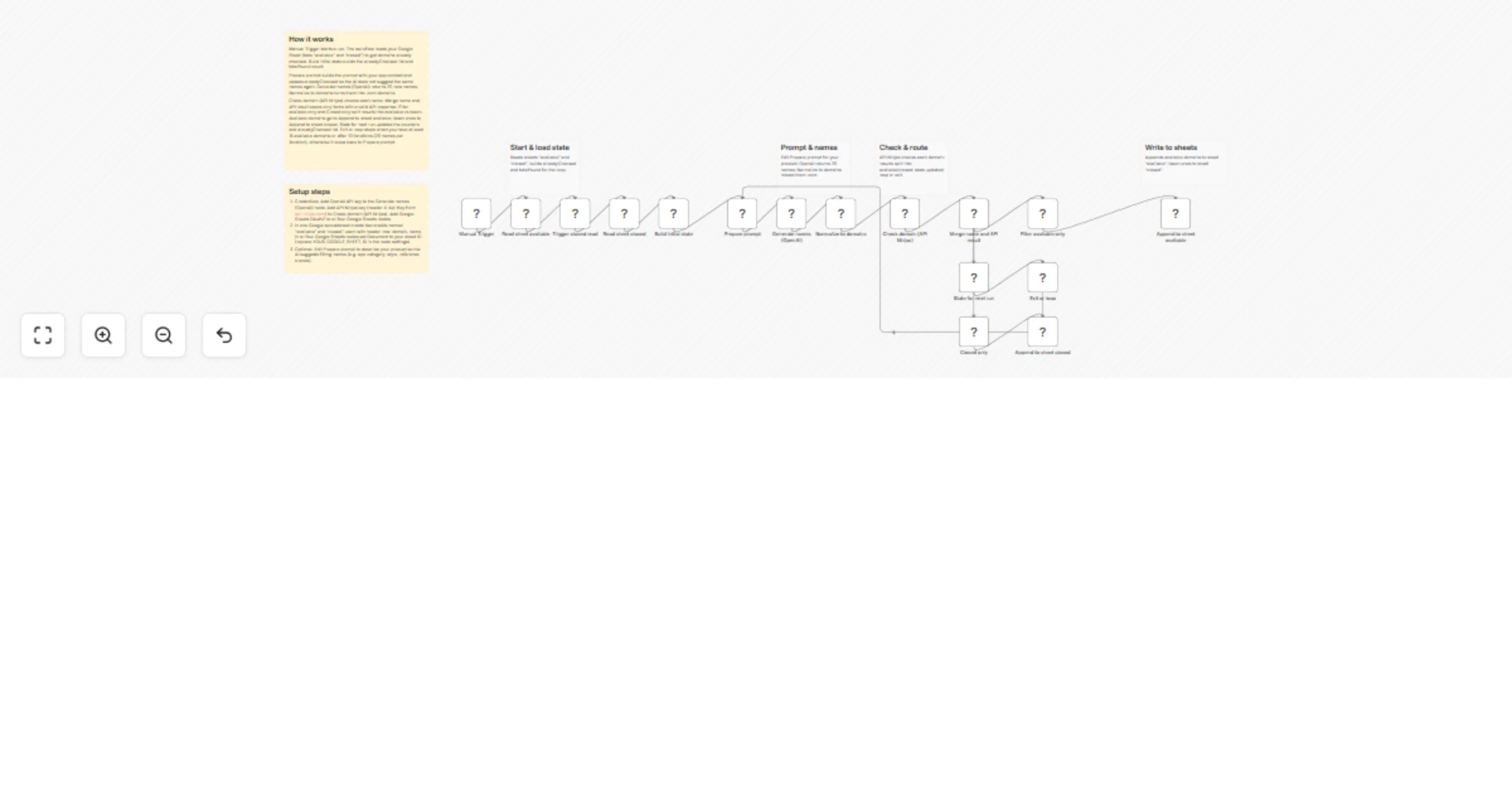
This n8n workflow helps you find an available .com domain for your product. It uses OpenAI to generate batches of creative, on-brand names (e.g. for a digital wardrobe / closet app, inspired by names like Whering, Acloset, Stylebook), then checks each suggestion via API Ninjas. Available domains are appended to a sheet, taken ones to a separate sheet. On each run it reads both sheets so it never suggests or re-checks the same names. The loop runs until you have at least 15 available domains or hit 10 iterations (20 names per iteration).
Start: Manual Trigger runs Read sheet available and Read sheet closed (in sequence). Build initial state builds alreadyChecked from both sheets and sets totalFound from the available count.
Prepare prompt builds a system and user prompt with your app context and the current alreadyChecked list, then Generate names (OpenAI) returns 20 new names. Normalize to domains cleans and turns them into .com domains.
Check domain (API Ninjas) checks each name. Merge name and API result combines normalized names with API results (only items with a valid available field).
Filter available only and Closed only split results; Append to sheet available and Append to sheet closed write to Google Sheets. State for next run updates totalFound, appends this round’s domains to alreadyChecked, and increments the iteration. Exit or loop stops when totalFound >= 15 or iteration > 10, otherwise loops back to Prepare prompt with the updated state.
X-Api-Key from api-ninjas.com), and Google Sheets account.domain, name. Set this document and sheet names in the four Google Sheets nodes (Read sheet available, Read sheet closed, Append to sheet available, Append to sheet closed).domain, name)totalFound > 15 to another number, or iteration = 10 to allow more rounds).This catalog entry is organized from the workflow JSON. The node-level section below shows the executable blocks available for review before importing the template.
| Workflow | Generate .com brand names with OpenAI and API Ninjas into Google Sheets |
|---|---|
| Complexity | advanced |
| Nodes | 22 |
| Categories | Market Research, Multimodal AI |
| Author | Pavel Zamorev |
| Published | 21 Feb 2026 |
Use the JSON export at /data/workflows/13571/13571.json as the source template for this automation.
Open n8n, import the downloaded JSON, and review each node before activating the workflow.
Replace placeholder credentials, API keys, webhook URLs, account IDs, and environment-specific values with your own settings.
Run the workflow manually or in a staging workspace, inspect node output, and confirm downstream systems receive the expected data.
Enable the workflow only after testing, then monitor executions, errors, and rate limits during the first production runs.
Review imported nodes carefully before activation. This catalog entry is intended to help you inspect the workflow structure, understand required services, and find related templates faster.
Node names, credentials, schedules, webhook paths, and external service limits may need adjustment for your workspace.
Use OpenAI to generate short, memorable brand names for your app and automatically check .com availability — results go straight into Google Sheets. Categories: AI, Marketing Description This n8n w...
Review the workflow JSON, configure any required credentials in n8n, and test the automation in a safe workspace before using it in production.
Yes. Use the block-by-block analysis and the downloadable JSON to inspect each node, then adjust credentials, prompts, schedules, filters, or destinations for your Market Research, Multimodal AI use case.