Generate beauty brand hashtags with Gemini AI, website analysis and SerpAPI

Workflow preview

Workflow preview
100%
Generate beauty brand hashtags with Gemini AI, website analysis and SerpAPI preview
Open on n8n.io

Important notice

This workflow is provided as-is. Please review and test before using in production.

1. Workflow Overview

Description This n8n template generates high quality, platform ready hashtags for beauty and skincare brands by combining AI, live website analysis, and current social media trends. It is designed ...

Best for

  • Social Media automation workflows
  • Multimodal AI automation workflows
  • advanced n8n builders looking for reusable templates

Tools used

n8n-nodes-base.formtrigger, @n8n/n8n-nodes-langchain.agent, @n8n/n8n-nodes-langchain.lmchatgooglegemini, @n8n/n8n-nodes-langchain.outputparserstructured, n8n-nodes-base.googlesheets, n8n-nodes-base.httprequest, @n8n/n8n-nodes-langchain.googlegemini, @n8n/n8n-nodes-langchain.toolserpapi

Source and attribution

This workflow is cataloged by N8N Workflows and links back to its original n8n.io source page by Dinakar Selvakumar.

Original n8n.io source

1.1 Workflow description

Title
Generate beauty brand hashtags with Gemini AI, website analysis and SerpAPI
Workflow name
Generate beauty brand hashtags with Gemini AI, website analysis and SerpAPI

Description

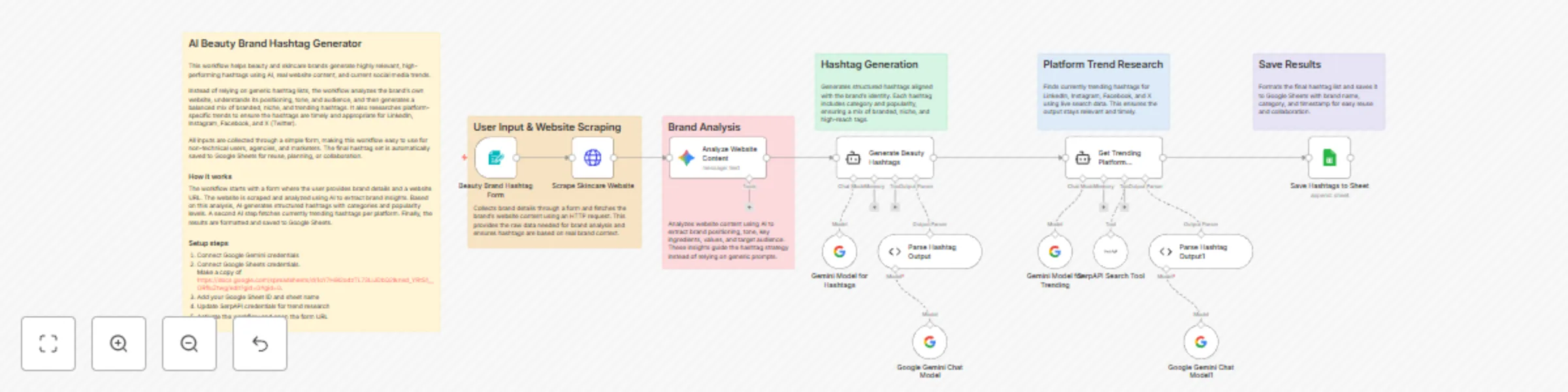
This n8n template generates high-quality, platform-ready hashtags for beauty and skincare brands by combining AI, live website analysis, and current social media trends. It is designed for marketers, agencies, and founders who want smarter hashtag strategies without manual research.

Use cases

  • Beauty & skincare brands building social media reach
  • Agencies managing multiple client accounts
  • Content teams creating Instagram, LinkedIn, or Facebook posts
  • Founders validating brand positioning through hashtags

What this template demonstrates

  • Form-based user input in n8n
  • Website scraping with HTTP Request
  • AI-driven brand analysis using Gemini
  • Structured AI outputs with output parsers
  • Live trend research using search tools
  • Automated storage in Google Sheets

How it works

Users submit brand details through a form. The workflow scrapes the brand’s website, analyzes it with AI, generates tailored hashtags, enriches them with platform-specific trends, and stores the final result in Google Sheets.

How to use

  1. Activate the workflow
  2. Open the form URL
  3. Enter brand details and website URL
  4. Submit the form
  5. View generated hashtags in Google Sheets

Requirements

  • Google Gemini API credentials
  • Google Sheets account
  • SerpAPI account for trend research

Good to know

  • Website scraping is best suited for public, text-rich sites
  • Hashtags are generated dynamically based on brand tone and audience
  • You can reuse the Google Sheet as a hashtag library

Customising this workflow

  • Change the number of hashtags generated
  • Modify the AI prompt for different industries
  • Add filters for banned or restricted hashtags
  • Extend the workflow to auto-post to social platforms

1.2 Logical Blocks

This catalog entry is organized from the workflow JSON. The node-level section below shows the executable blocks available for review before importing the template.

2. Block-by-Block Analysis

Block 1 - Beauty Brand Hashtag Form

Type / Role
n8n-nodes-base.formTrigger - formTrigger
Config choices
Version 2.3

Block 2 - Generate Beauty Hashtags

Type / Role
@n8n/n8n-nodes-langchain.agent - agent
Config choices
Version 2.2

Block 3 - Gemini Model for Hashtags

Type / Role
@n8n/n8n-nodes-langchain.lmChatGoogleGemini - lmChatGoogleGemini
Config choices
Version 1

Block 4 - Parse Hashtag Output

Type / Role
@n8n/n8n-nodes-langchain.outputParserStructured - outputParserStructured
Config choices
Version 1.3

Block 5 - Save Hashtags to Sheet

Type / Role
n8n-nodes-base.googleSheets - googleSheets
Config choices
Version 4.7

Block 6 - Google Gemini Chat Model

Type / Role
@n8n/n8n-nodes-langchain.lmChatGoogleGemini - lmChatGoogleGemini
Config choices
Version 1

Block 7 - Scrape Skincare Website

Type / Role
n8n-nodes-base.httpRequest - httpRequest
Config choices
Version 4.3

Block 8 - Analyze Website Content

Type / Role
@n8n/n8n-nodes-langchain.googleGemini - googleGemini
Config choices
Version 1

Block 9 - Get Trending Platform Hashtags

Type / Role
@n8n/n8n-nodes-langchain.agent - agent
Config choices
Version 2.2

Block 10 - Gemini Model for Trending

Type / Role
@n8n/n8n-nodes-langchain.lmChatGoogleGemini - lmChatGoogleGemini
Config choices
Version 1

Block 11 - SerpAPI Search Tool

Type / Role
@n8n/n8n-nodes-langchain.toolSerpApi - toolSerpApi
Config choices
Version 1

Block 12 - Parse Hashtag Output1

Type / Role
@n8n/n8n-nodes-langchain.outputParserStructured - outputParserStructured
Config choices
Version 1.3

Block 13 - Google Gemini Chat Model1

Type / Role
@n8n/n8n-nodes-langchain.lmChatGoogleGemini - lmChatGoogleGemini
Config choices
Version 1

Block 14 - Sticky Note

Type / Role
n8n-nodes-base.stickyNote - stickyNote
Config choices
Version 1

Block 15 - Sticky Note1

Type / Role
n8n-nodes-base.stickyNote - stickyNote
Config choices
Version 1

Block 16 - Sticky Note2

Type / Role
n8n-nodes-base.stickyNote - stickyNote
Config choices
Version 1

Block 17 - Sticky Note3

Type / Role
n8n-nodes-base.stickyNote - stickyNote
Config choices
Version 1

Block 18 - Sticky Note4

Type / Role
n8n-nodes-base.stickyNote - stickyNote
Config choices
Version 1

Block 19 - Sticky Note5

Type / Role
n8n-nodes-base.stickyNote - stickyNote
Config choices
Version 1

3. Summary Table

Workflow Generate beauty brand hashtags with Gemini AI, website analysis and SerpAPI
Complexity advanced
Nodes 19
Categories Social Media, Multimodal AI
Author Dinakar Selvakumar
Published 23 Dec 2025

4. Reproducing the Workflow from Scratch

  1. 1. Download the workflow JSON

    Use the JSON export at /data/workflows/12057/12057.json as the source template for this automation.

  2. 2. Import the template into n8n

    Open n8n, import the downloaded JSON, and review each node before activating the workflow.

  3. 3. Configure credentials and variables

    Replace placeholder credentials, API keys, webhook URLs, account IDs, and environment-specific values with your own settings.

  4. 4. Test with sample data

    Run the workflow manually or in a staging workspace, inspect node output, and confirm downstream systems receive the expected data.

  5. 5. Activate and monitor

    Enable the workflow only after testing, then monitor executions, errors, and rate limits during the first production runs.

5. General Notes & Resources

Review imported nodes carefully before activation. This catalog entry is intended to help you inspect the workflow structure, understand required services, and find related templates faster.

Node names, credentials, schedules, webhook paths, and external service limits may need adjustment for your workspace.

Frequently asked questions

What does Generate beauty brand hashtags with Gemini AI, website analysis and SerpAPI do?

Description This n8n template generates high quality, platform ready hashtags for beauty and skincare brands by combining AI, live website analysis, and current social media trends. It is designed ...

What do I need before importing this workflow?

Review the workflow JSON, configure any required credentials in n8n, and test the automation in a safe workspace before using it in production.

Can I customize this workflow?

Yes. Use the block-by-block analysis and the downloadable JSON to inspect each node, then adjust credentials, prompts, schedules, filters, or destinations for your Social Media, Multimodal AI use case.