Block 1 - Schedule Trigger1
- Type / Role
- n8n-nodes-base.scheduleTrigger - scheduleTrigger
- Config choices
- Version 1.3


 Early Deal
How it works This workflow automatically scrapes business leads from Google Maps on a daily schedule and ensures only high quality, unique leads are processed. New businesses are cleaned, validated...
n8n-nodes-base.scheduletrigger, n8n-nodes-base.googlesheets, n8n-nodes-base.code, n8n-nodes-base.if, n8n-nodes-base.splitinbatches, n8n-nodes-base.gmail, n8n-nodes-base.httprequest, n8n-nodes-base.merge
This workflow is cataloged by N8N Workflows and links back to its original n8n.io source page by Avkash Kakdiya.
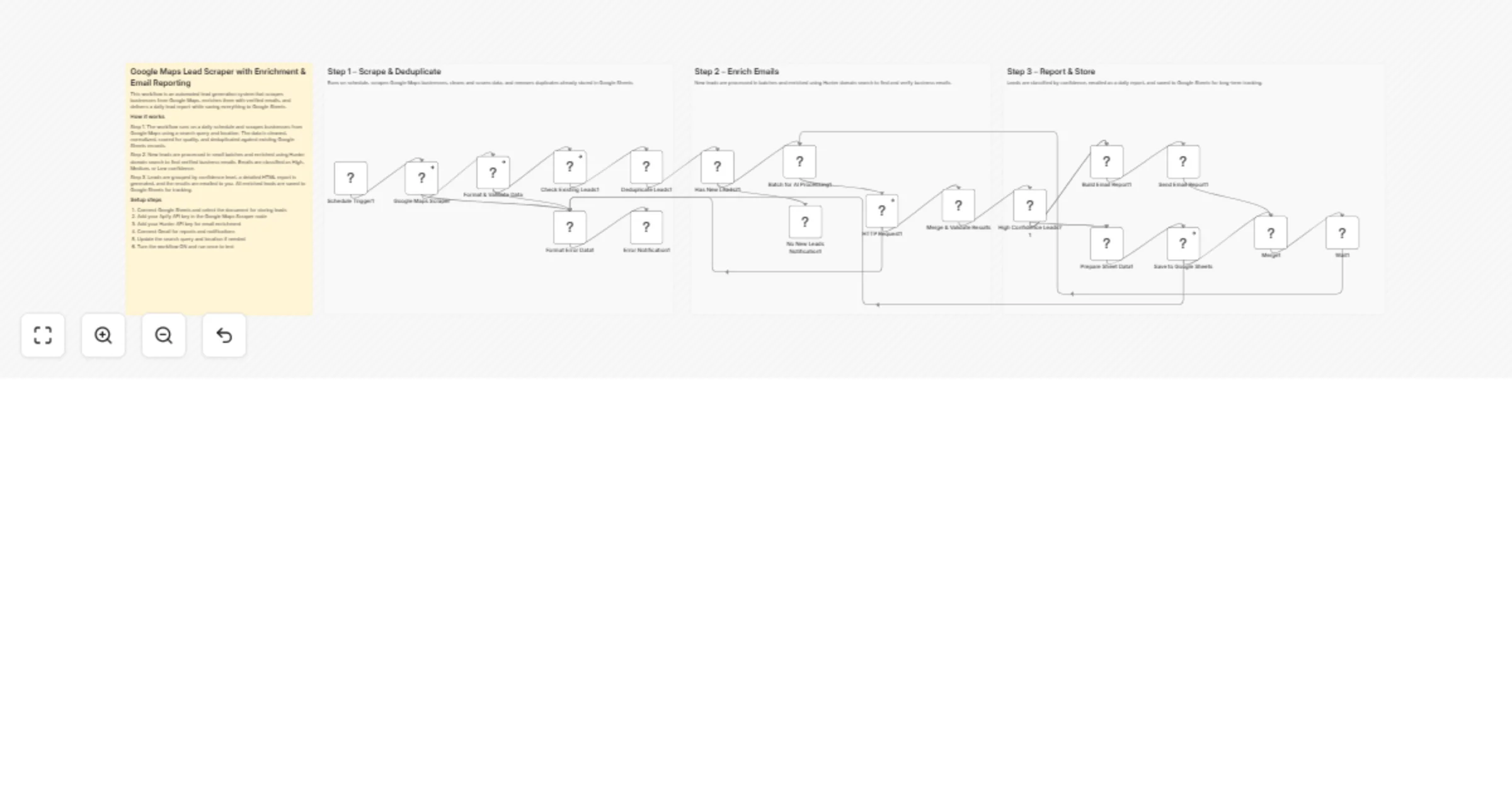
Original n8n.io sourceThis workflow automatically scrapes business leads from Google Maps on a daily schedule and ensures only high-quality, unique leads are processed. New businesses are cleaned, validated, and deduplicated against an existing Google Sheets database before enrichment begins. Verified emails are enriched using domain-based lookup and classified by confidence. Finally, the workflow sends a detailed email report and stores all enriched leads in Google Sheets for ongoing tracking.
Scrape & deduplicate leads
Schedule Trigger – Runs the workflow automatically at a fixed time each day.
Google Maps Scraper – Scrapes business listings based on search query and location.
Format & Validate Data – Cleans fields, normalizes data, and scores lead quality.
Check Existing Leads – Reads existing records from Google Sheets.
Deduplicate Leads – Removes businesses already stored in the database.
Format Error Data – Captures and structures scraper or processing errors.
Error Notification – Sends an email alert if the workflow fails.
Enrich emails
Has New Leads? – Checks whether any new unique leads remain after deduplication.
Batch for AI Processing – Splits leads into small batches to control API usage.
HTTP Request (Hunter) – Performs domain search to find professional emails.
Merge & Validate Results – Selects the best email and assigns confidence levels.
No New Leads Notification – Sends a message when no new leads are found.
Report & store results
High Confidence Leads? – Separates outreach-ready leads from lower-confidence ones.
Build Email Report – Generates a detailed HTML report with lead analytics.
Send Email Report – Emails the daily lead summary to stakeholders.
Prepare Sheet Data – Formats enriched leads for storage.
Save to Google Sheets – Appends or updates leads in the sheet.
Merge – Synchronizes parallel execution paths.
Wait – Controls workflow execution flow and batching cycles.
This catalog entry is organized from the workflow JSON. The node-level section below shows the executable blocks available for review before importing the template.
| Workflow | Generate and enrich Google Maps leads with Apify, Hunter and Google Sheets |
|---|---|
| Complexity | advanced |
| Nodes | 23 |
| Categories | Lead Generation, AI Summarization |
| Author | Avkash Kakdiya |
| Published | 13 Jan 2026 |
Use the JSON export at /data/workflows/12672/12672.json as the source template for this automation.
Open n8n, import the downloaded JSON, and review each node before activating the workflow.
Replace placeholder credentials, API keys, webhook URLs, account IDs, and environment-specific values with your own settings.
Run the workflow manually or in a staging workspace, inspect node output, and confirm downstream systems receive the expected data.
Enable the workflow only after testing, then monitor executions, errors, and rate limits during the first production runs.
Review imported nodes carefully before activation. This catalog entry is intended to help you inspect the workflow structure, understand required services, and find related templates faster.
Node names, credentials, schedules, webhook paths, and external service limits may need adjustment for your workspace.
How it works This workflow automatically scrapes business leads from Google Maps on a daily schedule and ensures only high quality, unique leads are processed. New businesses are cleaned, validated...
Review the workflow JSON, configure any required credentials in n8n, and test the automation in a safe workspace before using it in production.
Yes. Use the block-by-block analysis and the downloadable JSON to inspect each node, then adjust credentials, prompts, schedules, filters, or destinations for your Lead Generation, AI Summarization use case.