Generate AI videos with OpenAI Sora 2 & Google Veo 3.1 via parallel processing
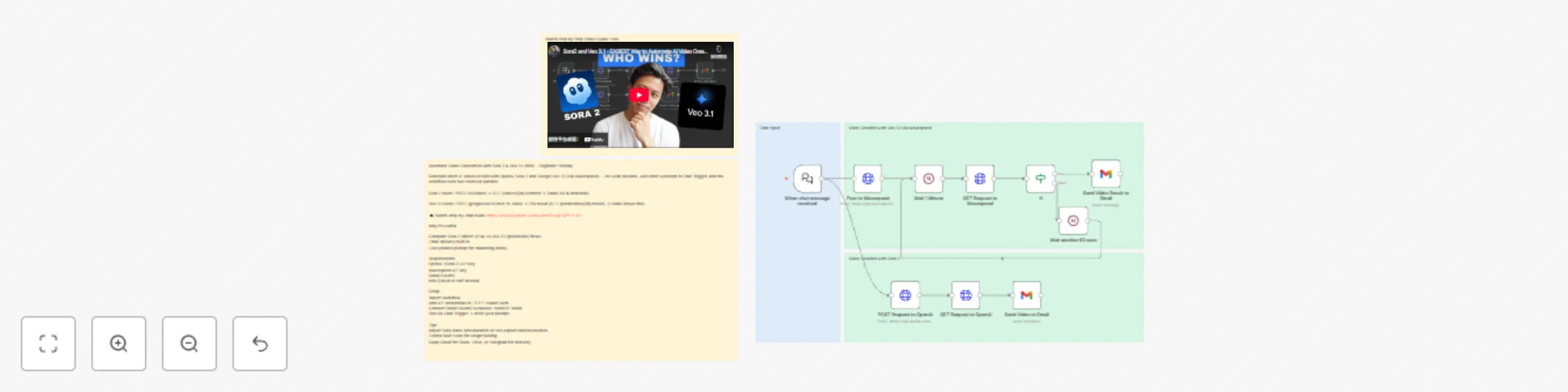
Workflow preview


 Early Deal
DISCOUNT 20%

Important notice
This workflow is provided as-is. Please review and test before using in production.
Overview
Automate Video Generation with Sora 2 & Veo 3.1 - For Beginners
Kick-start AI video generation in n8n with two popular paths: OpenAI Sora 2 and Google Veo 3.1 (via Wavespeed). This beginner-friendly template lets you type a prompt in Chat Trigger, then automatically:
Call Sora 2 to generate a short 720p clip and email the MP4.
Call Veo 3.1 through Wavespeed, poll until ready, and email the result link.
🎥 Watch the full step-by-step build: https://www.youtube.com/watch?v=qjFWfYvHxlY
What this template does
Chat input → Two video routes run in parallel: Sora 2 route: HTTP Request (POST /v1/videos) → HTTP Request (GET /videos/{id}/content) → Gmail (attach MP4). Veo 3.1 route (Wavespeed): HTTP Request (POST /google/veo3.1/text-to-video) → poll result with HTTP Request (GET /predictions/{id}/result) inside a Wait + IF loop → Gmail (send result URL). Includes pinned sample prompt for a marketing use case. Uses Sticky Notes to explain each lane and link to the tutorial.
Why it’s useful (for beginners)
No code required: fill credentials, paste your prompt, run. Side-by-side comparison: learn how Sora 2 vs Veo 3.1 flows differ (direct file vs polled URL). Email delivery built-in: get outputs in your inbox for quick review.
Requirements
OpenAI API key with access to Sora 2 video endpoint. Wavespeed API key (for Veo 3.1). Google Gmail OAuth2 (to send yourself the results). n8n (self-hosted or Cloud), with internet access.
Note: Replace any placeholder or demo credentials after import. Never commit real keys to public templates.
Credentials to set in n8n
HTTP Header Auth – OpenAI Sora 2 Header Name: Authorization Value: Bearer YOUR_OPENAI_API_KEY HTTP Header Auth – Wavespeed Header Name: Authorization Value: Bearer YOUR_WAVESPEED_API_KEY Gmail OAuth2 Connect your Google account. In the two Gmail nodes, change “sendTo” to your email.
How it works (nodes overview)
When chat message received (Chat Trigger) Receives your chatInput prompt. Veo 3.1 lane (top) HTTP Request — Post to Wavespeed POST https://api.wavespeed.ai/api/v3/google/veo3.1/text-to-video Body params (editable): aspect_ratio, duration, generate_audio, prompt, resolution. Wait 1 Minute → HTTP Request — Get result Polls GET /api/v3/predictions/{id}/result. IF (status === "completed") True → Gmail — Send Video Result to Email (sends the output URL). False → Wait another 60 secs → back to Wait 1 Minute (poll again). Sora 2 lane (bottom) HTTP Request — POST /v1/videos (OpenAI) Multipart form: prompt={{$json.chatInput}}, model="sora-2-pro", size="1280x720", seconds="8". HTTP Request — GET /v1/videos/{id}/content Downloads the MP4 as binary (video.mp4). Gmail — Send Video to Email Attaches video.mp4 and emails it to you.
Setup (step-by-step)
Import the template into n8n. Open each HTTP Request node and select the correct HTTP Header Auth credentials. Open both Gmail nodes and: Select your Gmail OAuth2 credential. Change “sendTo” to your email.
(Optional) Tweak defaults:
Sora 2: size (e.g., 1920x1080), seconds (e.g., 5–10). Veo 3.1 via Wavespeed: aspect_ratio (9:16, 16:9, 1:1), duration, resolution. Wait timing and max polling passes (add an extra IF to stop after N attempts). Execute Workflow and enter your prompt in the Chat window.
Customization tips
Different delivery: swap Gmail for Google Drive, Slack, or Telegram nodes. Approval loop: after email, branch to a Slack approval step before archiving the file. Brand presets: store common prompt fragments (tone, overlays, logo instructions) in an Item Lists/Set node and merge into the main prompt. Content length: Sora and Veo costs/latency grow with duration—start short (5–8s), then iterate.
Troubleshooting
403/401 errors: re-check API keys and header names (Authorization: Bearer …). Empty Veo output: confirm polling loop runs until status = completed; inspect the GET result JSON path used in email (data.outputs[0]). Sora content fetch fails: ensure the second GET uses the returned id path and outputs binary video.mp4. Email not received: verify Gmail OAuth2 scope and recipient; check n8n executions for errors. NSFW/safety blocks: refine the prompt to avoid restricted content.