Block 1 - When chat message received
- Type / Role
- @n8n/n8n-nodes-langchain.chatTrigger - chatTrigger
- Config choices
- Version 1.3


 Early Deal
This workflow is provided as-is. Please review and test before using in production.
Automate Video Generation with Sora 2 & Veo 3.1 For Beginners Kick start AI video generation in n8n with two popular paths: OpenAI Sora 2 and Google Veo 3.1 (via Wavespeed). This beginner friendly ...
@n8n/n8n-nodes-langchain.chattrigger, n8n-nodes-base.httprequest, n8n-nodes-base.gmail, n8n-nodes-base.if, n8n-nodes-base.wait, n8n-nodes-base.stickynote
This workflow is cataloged by N8N Workflows and links back to its original n8n.io source page by Automate With Marc.
Original n8n.io sourceKick-start AI video generation in n8n with two popular paths: OpenAI Sora 2 and Google Veo 3.1 (via Wavespeed). This beginner-friendly template lets you type a prompt in Chat Trigger, then automatically:
Call Sora 2 to generate a short 720p clip and email the MP4.
Call Veo 3.1 through Wavespeed, poll until ready, and email the result link.
🎥 Watch the full step-by-step build: https://www.youtube.com/watch?v=qjFWfYvHxlY
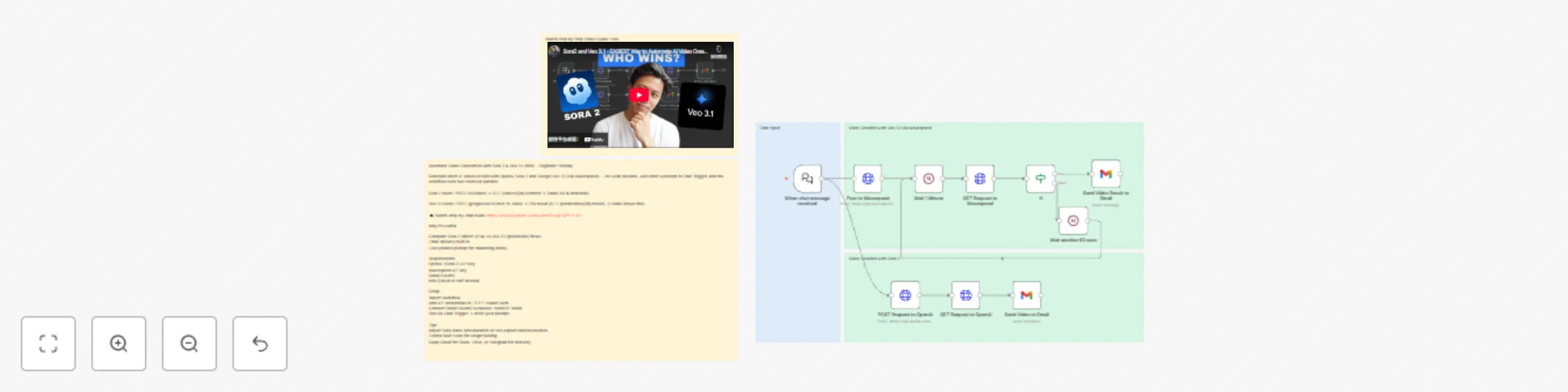
Chat input → Two video routes run in parallel: Sora 2 route: HTTP Request (POST /v1/videos) → HTTP Request (GET /videos/{id}/content) → Gmail (attach MP4). Veo 3.1 route (Wavespeed): HTTP Request (POST /google/veo3.1/text-to-video) → poll result with HTTP Request (GET /predictions/{id}/result) inside a Wait + IF loop → Gmail (send result URL). Includes pinned sample prompt for a marketing use case. Uses Sticky Notes to explain each lane and link to the tutorial.
No code required: fill credentials, paste your prompt, run. Side-by-side comparison: learn how Sora 2 vs Veo 3.1 flows differ (direct file vs polled URL). Email delivery built-in: get outputs in your inbox for quick review.
OpenAI API key with access to Sora 2 video endpoint. Wavespeed API key (for Veo 3.1). Google Gmail OAuth2 (to send yourself the results). n8n (self-hosted or Cloud), with internet access.
Note: Replace any placeholder or demo credentials after import. Never commit real keys to public templates.
HTTP Header Auth – OpenAI Sora 2 Header Name: Authorization Value: Bearer YOUR_OPENAI_API_KEY HTTP Header Auth – Wavespeed Header Name: Authorization Value: Bearer YOUR_WAVESPEED_API_KEY Gmail OAuth2 Connect your Google account. In the two Gmail nodes, change “sendTo” to your email.
When chat message received (Chat Trigger) Receives your chatInput prompt. Veo 3.1 lane (top) HTTP Request — Post to Wavespeed POST https://api.wavespeed.ai/api/v3/google/veo3.1/text-to-video Body params (editable): aspect_ratio, duration, generate_audio, prompt, resolution. Wait 1 Minute → HTTP Request — Get result Polls GET /api/v3/predictions/{id}/result. IF (status === "completed") True → Gmail — Send Video Result to Email (sends the output URL). False → Wait another 60 secs → back to Wait 1 Minute (poll again). Sora 2 lane (bottom) HTTP Request — POST /v1/videos (OpenAI) Multipart form: prompt={{$json.chatInput}}, model="sora-2-pro", size="1280x720", seconds="8". HTTP Request — GET /v1/videos/{id}/content Downloads the MP4 as binary (video.mp4). Gmail — Send Video to Email Attaches video.mp4 and emails it to you.
Import the template into n8n. Open each HTTP Request node and select the correct HTTP Header Auth credentials. Open both Gmail nodes and: Select your Gmail OAuth2 credential. Change “sendTo” to your email.
Sora 2: size (e.g., 1920x1080), seconds (e.g., 5–10). Veo 3.1 via Wavespeed: aspect_ratio (9:16, 16:9, 1:1), duration, resolution. Wait timing and max polling passes (add an extra IF to stop after N attempts). Execute Workflow and enter your prompt in the Chat window.
Different delivery: swap Gmail for Google Drive, Slack, or Telegram nodes. Approval loop: after email, branch to a Slack approval step before archiving the file. Brand presets: store common prompt fragments (tone, overlays, logo instructions) in an Item Lists/Set node and merge into the main prompt. Content length: Sora and Veo costs/latency grow with duration—start short (5–8s), then iterate.
403/401 errors: re-check API keys and header names (Authorization: Bearer …). Empty Veo output: confirm polling loop runs until status = completed; inspect the GET result JSON path used in email (data.outputs[0]). Sora content fetch fails: ensure the second GET uses the returned id path and outputs binary video.mp4. Email not received: verify Gmail OAuth2 scope and recipient; check n8n executions for errors. NSFW/safety blocks: refine the prompt to avoid restricted content.
This catalog entry is organized from the workflow JSON. The node-level section below shows the executable blocks available for review before importing the template.
| Workflow | Generate AI videos with OpenAI Sora 2 & Google Veo 3.1 via parallel processing |
|---|---|
| Complexity | advanced |
| Nodes | 15 |
| Categories | Content Creation, Multimodal AI |
| Author | Automate With Marc |
| Published | 30 Oct 2025 |
Use the JSON export at /data/workflows/10350/10350.json as the source template for this automation.
Open n8n, import the downloaded JSON, and review each node before activating the workflow.
Replace placeholder credentials, API keys, webhook URLs, account IDs, and environment-specific values with your own settings.
Run the workflow manually or in a staging workspace, inspect node output, and confirm downstream systems receive the expected data.
Enable the workflow only after testing, then monitor executions, errors, and rate limits during the first production runs.
Review imported nodes carefully before activation. This catalog entry is intended to help you inspect the workflow structure, understand required services, and find related templates faster.
Node names, credentials, schedules, webhook paths, and external service limits may need adjustment for your workspace.
Automate Video Generation with Sora 2 & Veo 3.1 For Beginners Kick start AI video generation in n8n with two popular paths: OpenAI Sora 2 and Google Veo 3.1 (via Wavespeed). This beginner friendly ...
Review the workflow JSON, configure any required credentials in n8n, and test the automation in a safe workspace before using it in production.
Yes. Use the block-by-block analysis and the downloadable JSON to inspect each node, then adjust credentials, prompts, schedules, filters, or destinations for your Content Creation, Multimodal AI use case.