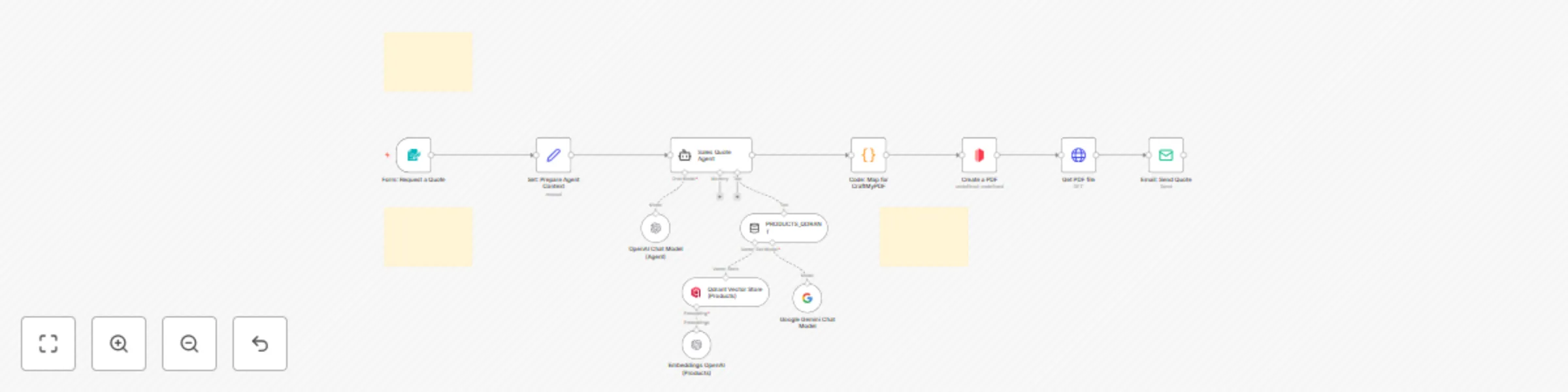
Generate AI-curated sales quotes with OpenAI, Qdrant & CraftMyPDF PDF delivery

Workflow preview

Workflow preview
100%
Generate AI-curated sales quotes with OpenAI, Qdrant & CraftMyPDF PDF delivery preview
Open on n8n.io

Important notice

This workflow is provided as-is. Please review and test before using in production.

1. Workflow Overview

Short Description Turn form submissions into AI curated quotes with SKU selection straight from Qdrant, branded PDF generation, and automatic email—now streamlined for quoting only (FAQ removed)...

Best for

  • Lead Nurturing automation workflows
  • AI RAG automation workflows
  • advanced n8n builders looking for reusable templates

Tools used

n8n-nodes-base.stickynote, n8n-nodes-base.formtrigger, n8n-nodes-base.set, @n8n/n8n-nodes-langchain.lmchatopenai, @n8n/n8n-nodes-langchain.agent, @n8n/n8n-nodes-langchain.vectorstoreqdrant, @n8n/n8n-nodes-langchain.embeddingsopenai, @n8n/n8n-nodes-langchain.toolvectorstore

Source and attribution

This workflow is cataloged by N8N Workflows and links back to its original n8n.io source page by Cong Nguyen.

Original n8n.io source

1.1 Workflow description

Title
Generate AI-curated sales quotes with OpenAI, Qdrant & CraftMyPDF PDF delivery
Workflow name
Generate AI-curated sales quotes with OpenAI, Qdrant & CraftMyPDF PDF delivery

👀 Short Description

Turn form submissions into AI-curated quotes with SKU selection straight from Qdrant, branded PDF generation, and automatic email—now streamlined for quoting only (FAQ removed). (Improved from the previous workflow: Automated Request-to-Quote System with OpenAI, Google Sheets & CraftMyPDF Email Delivery)

🎉What’s new vs. the old version

  • Products now come directly from Qdrant (no Google Sheets catalog in the loop).
  • Focused quote-only flow — removed FAQ/RAG nodes for a leaner, faster pipeline.
  • Agent enforces a JSON-only contract, keeping pricing/stock grounded in Qdrant payloads.
  • Easier to maintain; fewer moving parts and lower token usage.

📄 What this workflow does

  • Captures lead details via Form: Request a Quote.
  • Searches your Qdrant collection (products) for relevant SKUs by keyword, use-case, features, and budget hints.
  • An AI Agent (OpenAI) selects in-stock SKUs, respects min_qty, and returns a strict JSON quote (optional discount ≤ 10%).
  • A Code step computes line totals, discount, VAT, generates a unique invoice_number (e.g., Q-YYYYMMDD-ABCDE), and validates or falls back the due_date.
  • CraftMyPDF renders a branded PDF; the file is fetched and SMTP emails the quote to the customer.

👤 Who this is for

  • SMBs and sales teams needing instant, accurate quotes from website forms.
  • Ops teams storing product data in Qdrant and wanting AI-assisted SKU selection.
  • Agencies or shops that must generate consistent, branded PDFs and send them automatically.

✅ Requirements

  • Self-hosted n8n instance.
  • Qdrant collection (default: products) with payload fields:
  • sku, name, uom, unit_price, currency, in_stock (true/false), min_qty, handle/url, features.
  • Connected credentials: OpenAI (or compatible), Qdrant API, CraftMyPDF, SMTP.
  • A CraftMyPDF template aligned with the Code node output (invoice_number, items[], gross_total, etc.).

⚙️ How to set up

  1. Import the workflow JSON into n8n.
  2. In Qdrant Vector Store (Products), set collection=products and your Qdrant API credentials.
  3. In Sales Quote Agent, keep or change the model (default gpt-4.1-mini) and the JSON-only system prompt.
  4. In Create a PDF, set your CraftMyPDF templateId.
  5. In Email: Send Quote, set fromEmail and SMTP credentials.
  6. Submit a test form; verify: Agent JSON → PDF render → email delivery.
  7. (Optional) Adjust defaults in the Code node: vat_pct (default 10), payment_terms, currency fallback, valid_days.

🔁 How it works (end-to-end)

  1. Trigger → Form captures: Full Name, Email, Company, Requirements, Budget Min/Max, Need By, Notes.
  2. Product Search → Agent calls PRODUCTS_QDRANT to retrieve relevant SKUs and payload fields from Qdrant.
  3. Agent Quote → Selects SKUs and qty, applies pricing and ≤10% discount.

💡 About Margin AI

Margin AI is your AI Service Companion. We help organizations design intelligent, human-centric automation — from content pipelines and branding workflows to customer insights and sales enablement. Our tailored AI solutions scale marketing, operations, and creative processes with ease.

1.2 Logical Blocks

This catalog entry is organized from the workflow JSON. The node-level section below shows the executable blocks available for review before importing the template.

2. Block-by-Block Analysis

Block 1 - Sticky Note

Type / Role
n8n-nodes-base.stickyNote - stickyNote
Config choices
Version 1

Block 2 - Sticky Note1

Type / Role
n8n-nodes-base.stickyNote - stickyNote
Config choices
Version 1

Block 3 - Sticky Note2

Type / Role
n8n-nodes-base.stickyNote - stickyNote
Config choices
Version 1

Block 4 - Form: Request a Quote

Type / Role
n8n-nodes-base.formTrigger - formTrigger
Config choices
Version 2.2

Block 5 - Set: Prepare Agent Context

Type / Role
n8n-nodes-base.set - set
Config choices
Version 3.4

Block 6 - OpenAI Chat Model (Agent)

Type / Role
@n8n/n8n-nodes-langchain.lmChatOpenAi - lmChatOpenAi
Config choices
Version 1.2

Block 7 - Sales Quote Agent

Type / Role
@n8n/n8n-nodes-langchain.agent - agent
Config choices
Version 1.8

Block 8 - Qdrant Vector Store (Products)

Type / Role
@n8n/n8n-nodes-langchain.vectorStoreQdrant - vectorStoreQdrant
Config choices
Version 1

Block 9 - Embeddings OpenAI (Products)

Type / Role
@n8n/n8n-nodes-langchain.embeddingsOpenAi - embeddingsOpenAi
Config choices
Version 1.1

Block 10 - PRODUCTS_QDRANT

Type / Role
@n8n/n8n-nodes-langchain.toolVectorStore - toolVectorStore
Config choices
Version 1

Block 11 - Code: Map for CraftMyPDF

Type / Role
n8n-nodes-base.code - code
Config choices
Version 2

Block 12 - Create a PDF

Type / Role
n8n-nodes-craftmypdf.craftMyPdf - craftMyPdf
Config choices
Version 1

Block 13 - Get PDF file

Type / Role
n8n-nodes-base.httpRequest - httpRequest
Config choices
Version 4.2

Block 14 - Email: Send Quote

Type / Role
n8n-nodes-base.emailSend - emailSend
Config choices
Version 2.1

Block 15 - Google Gemini Chat Model

Type / Role
@n8n/n8n-nodes-langchain.lmChatGoogleGemini - lmChatGoogleGemini
Config choices
Version 1

3. Summary Table

Workflow Generate AI-curated sales quotes with OpenAI, Qdrant & CraftMyPDF PDF delivery
Complexity advanced
Nodes 15
Categories Lead Nurturing, AI RAG
Author Cong Nguyen
Published 09 Sept 2025

4. Reproducing the Workflow from Scratch

  1. 1. Download the workflow JSON

    Use the JSON export at /data/workflows/8402/8402.json as the source template for this automation.

  2. 2. Import the template into n8n

    Open n8n, import the downloaded JSON, and review each node before activating the workflow.

  3. 3. Configure credentials and variables

    Replace placeholder credentials, API keys, webhook URLs, account IDs, and environment-specific values with your own settings.

  4. 4. Test with sample data

    Run the workflow manually or in a staging workspace, inspect node output, and confirm downstream systems receive the expected data.

  5. 5. Activate and monitor

    Enable the workflow only after testing, then monitor executions, errors, and rate limits during the first production runs.

5. General Notes & Resources

Review imported nodes carefully before activation. This catalog entry is intended to help you inspect the workflow structure, understand required services, and find related templates faster.

Node names, credentials, schedules, webhook paths, and external service limits may need adjustment for your workspace.

Frequently asked questions

What does Generate AI-curated sales quotes with OpenAI, Qdrant & CraftMyPDF PDF delivery do?

Short Description Turn form submissions into AI curated quotes with SKU selection straight from Qdrant, branded PDF generation, and automatic email—now streamlined for quoting only (FAQ removed)...

What do I need before importing this workflow?

Review the workflow JSON, configure any required credentials in n8n, and test the automation in a safe workspace before using it in production.

Can I customize this workflow?

Yes. Use the block-by-block analysis and the downloadable JSON to inspect each node, then adjust credentials, prompts, schedules, filters, or destinations for your Lead Nurturing, AI RAG use case.