Block 1 - AI Agent
- Type / Role
- @n8n/n8n-nodes-langchain.agent - agent
- Config choices
- Version 2.1


 Early Deal
This workflow is provided as-is. Please review and test before using in production.
What Problem Does It Solve? Customers often ask product questions or prices in comments. Businesses waste time replying manually, leading to delays. Some comments only need a short thank you reply,...
@n8n/n8n-nodes-langchain.agent, @n8n/n8n-nodes-langchain.lmchatgooglegemini, n8n-nodes-base.facebookgraphapi, n8n-nodes-base.webhook, n8n-nodes-base.set, n8n-nodes-base.notion, n8n-nodes-base.httprequest, n8n-nodes-base.code
This workflow is cataloged by N8N Workflows and links back to its original n8n.io source page by Abdullah Alshiekh.
Original n8n.io sourceCustomers often ask product questions or prices in comments.
Businesses waste time replying manually, leading to delays.
Some comments only need a short thank-you reply, while others need a detailed private response.
This workflow solves these by:
Replying with a friendly public comment.
Sending a private message with details when needed.
Handling compliments, complaints, and unclear comments in a consistent way.
Facebook Setup
Connect your Facebook Page credentials in n8n.
Add the webhook URL from this workflow to your Facebook App/Webhook settings.
AI Setup
Add your Google Gemini API key (or swap for OpenAI/Claude).
The included prompt is generic — you can edit it to match your brand tone.
Optional Logging
If you want to track processed messages, connect a Notion database or another CRM.
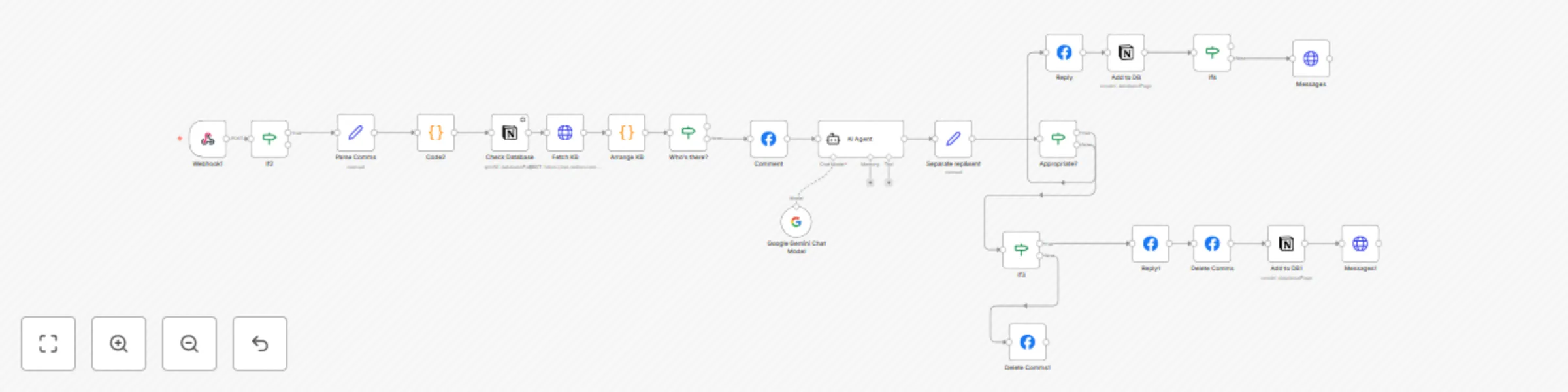
Webhook catches new Facebook comments.
AI Agent analyzes the comment and categorizes it (question, compliment, complaint, unclear, spam).
Replying:
For questions/requests → public reply + private message with full details.
For compliments → short thank-you reply.
For complaints → apology reply + private message for clarification.
For unclear comments → ask politely if they need help.
For spam/offensive → ignored (no reply).
Replies and messages are sent instantly via the Facebook Graph API.
Change the AI prompt to match your brand voice.
Add forwarding to Slack/Email if a human should review certain replies.
Log conversations in Notion, Google Sheets, or a CRM for reporting.
Expand to Instagram or WhatsApp with small adjustments.
If you need any help Get In Touch
This catalog entry is organized from the workflow JSON. The node-level section below shows the executable blocks available for review before importing the template.
| Workflow | Gemini-powered Facebook comment & DM assistant with Notion |
|---|---|
| Complexity | advanced |
| Nodes | 23 |
| Categories | Support Chatbot, AI Chatbot |
| Author | Abdullah Alshiekh |
| Published | 30 Aug 2025 |
Use the JSON export at /data/workflows/8066/8066.json as the source template for this automation.
Open n8n, import the downloaded JSON, and review each node before activating the workflow.
Replace placeholder credentials, API keys, webhook URLs, account IDs, and environment-specific values with your own settings.
Run the workflow manually or in a staging workspace, inspect node output, and confirm downstream systems receive the expected data.
Enable the workflow only after testing, then monitor executions, errors, and rate limits during the first production runs.
Review imported nodes carefully before activation. This catalog entry is intended to help you inspect the workflow structure, understand required services, and find related templates faster.
Node names, credentials, schedules, webhook paths, and external service limits may need adjustment for your workspace.
What Problem Does It Solve? Customers often ask product questions or prices in comments. Businesses waste time replying manually, leading to delays. Some comments only need a short thank you reply,...
Review the workflow JSON, configure any required credentials in n8n, and test the automation in a safe workspace before using it in production.
Yes. Use the block-by-block analysis and the downloadable JSON to inspect each node, then adjust credentials, prompts, schedules, filters, or destinations for your Support Chatbot, AI Chatbot use case.