Find Facebook hidden interests via Telegram

Workflow preview

Workflow preview
100%
Find Facebook hidden interests via Telegram preview
Open on n8n.io

Important notice

This workflow is provided as-is. Please review and test before using in production.

1. Workflow Overview

This n8n workflow is designed to extract specific interests from messages in a Telegram chat and retrieve related information using the Facebook Graph API. It aims to provide a streamlined solution...

Best for

  • Market Research automation workflows
  • intermediate n8n builders looking for reusable templates

Tools used

n8n-nodes-base.noop, n8n-nodes-base.telegramtrigger, n8n-nodes-base.if, n8n-nodes-base.code, n8n-nodes-base.facebookgraphapi, n8n-nodes-base.spreadsheetfile, n8n-nodes-base.telegram, n8n-nodes-base.stickynote

Source and attribution

This workflow is cataloged by N8N Workflows and links back to its original n8n.io source page by Ibrahim.

Original n8n.io source

1.1 Workflow description

Title
Find Facebook hidden interests via Telegram
Workflow name
Find Facebook hidden interests via Telegram

Overview

This n8n workflow is designed to extract specific interests from messages in a Telegram chat and retrieve related information using the Facebook Graph API. It aims to provide a streamlined solution for parsing and analyzing user-provided interests within the Telegram platform.

Features

  • Interest Extraction: Automatically identifies and extracts interests from messages that start with the hashtag "#interest".
  • Data Retrieval: Utilizes the Facebook Graph API to retrieve information related to the extracted interests.
  • Structured Outputs: Presents the retrieved data in an organized format for further analysis and review.

Requirements

  • Operational instance of n8n (self-hosted or cloud version).
  • Basic understanding of n8n workflows and nodes.

Setup and Configuration

  1. Import Workflow: Load the provided JSON workflow into your n8n instance.
  2. Configure Telegram Trigger Node: Ensure the Telegram trigger node is set up with the appropriate credentials and webhook ID.
  3. Configure and Test Nodes: Adjust node parameters as necessary and test the workflow to ensure proper functionality.

How it Works

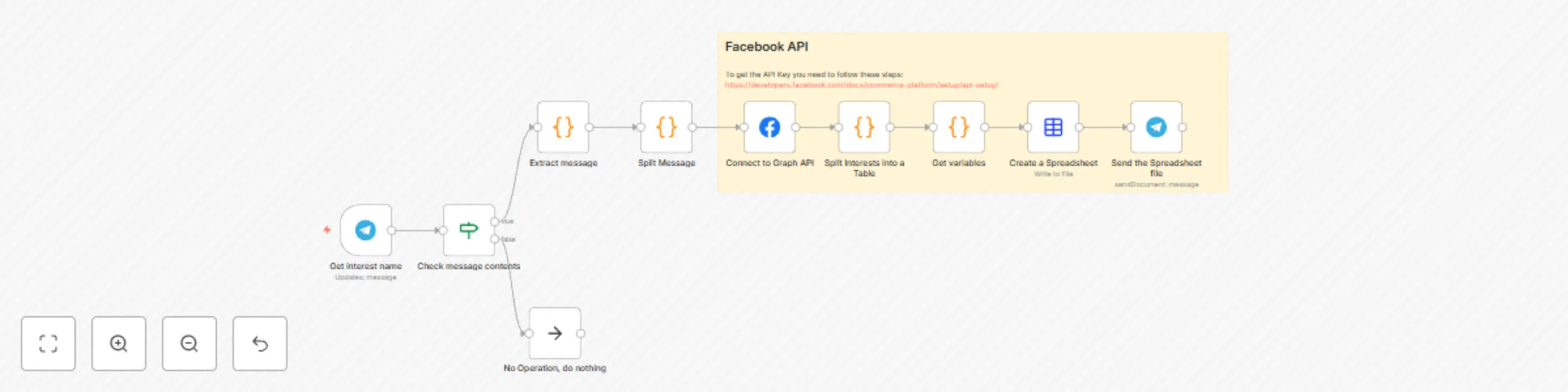
  1. Telegram Trigger: Listens for incoming messages in a specified Telegram chat.
  2. Check Message Contents: Verifies if the message begins with the specified hashtag and is from the designated chat ID.
  3. Extract Message: Extracts the content of the message for further processing.
  4. Split Message: Splits the extracted message to identify the interest and remaining content.
  5. Connect to Graph API: Utilizes the Facebook Graph API to search for information related to the extracted interest.
  6. Split Interests into a Table: Organizes the retrieved data into a structured table format.
  7. Get Variables: Maps the retrieved data to create a new JSON object containing specific fields related to the interest.
  8. Create a Spreadsheet: Generates a spreadsheet file in CSV format based on the retrieved and formatted data.
  9. Send the Spreadsheet File: Sends the generated spreadsheet file back to the original Telegram chat.

Customization

  • Modify the filtering conditions and fields to suit specific requirements.
  • Adjust the frequency of the trigger node based on preference.

Best Practices

  • Regularly test the workflow to ensure consistent performance.
  • Stay informed about any changes to external APIs that might affect the workflow's functionality.

Contributing

Your feedback and contributions are highly valued. Feel free to adapt, modify, and share enhancements with the n8n community.

1.2 Logical Blocks

This catalog entry is organized from the workflow JSON. The node-level section below shows the executable blocks available for review before importing the template.

2. Block-by-Block Analysis

Block 1 - No Operation, do nothing

Type / Role
n8n-nodes-base.noOp - noOp
Config choices
Version 1

Block 2 - Get interest name

Type / Role
n8n-nodes-base.telegramTrigger - telegramTrigger
Config choices
Version 1

Block 3 - Check message contents

Type / Role
n8n-nodes-base.if - if
Config choices
Version 1

Block 4 - Extract message

Type / Role
n8n-nodes-base.code - code
Config choices
Version 2

Block 5 - Split Message

Type / Role
n8n-nodes-base.code - code
Config choices
Version 2

Block 6 - Connect to Graph API

Type / Role
n8n-nodes-base.facebookGraphApi - facebookGraphApi
Config choices
Version 1

Block 7 - Split Interests into a Table

Type / Role
n8n-nodes-base.code - code
Config choices
Version 2

Block 8 - Get variables

Type / Role
n8n-nodes-base.code - code
Config choices
Version 2

Block 9 - Create a Spreadsheet

Type / Role
n8n-nodes-base.spreadsheetFile - spreadsheetFile
Config choices
Version 2

Block 10 - Send the Spreadsheet file

Type / Role
n8n-nodes-base.telegram - telegram
Config choices
Version 1

Block 11 - Sticky Note

Type / Role
n8n-nodes-base.stickyNote - stickyNote
Config choices
Version 1

3. Summary Table

Workflow Find Facebook hidden interests via Telegram
Complexity intermediate
Nodes 11
Categories Market Research
Author Ibrahim
Published 18 Jan 2024

4. Reproducing the Workflow from Scratch

  1. 1. Download the workflow JSON

    Use the JSON export at /data/workflows/2058/2058.json as the source template for this automation.

  2. 2. Import the template into n8n

    Open n8n, import the downloaded JSON, and review each node before activating the workflow.

  3. 3. Configure credentials and variables

    Replace placeholder credentials, API keys, webhook URLs, account IDs, and environment-specific values with your own settings.

  4. 4. Test with sample data

    Run the workflow manually or in a staging workspace, inspect node output, and confirm downstream systems receive the expected data.

  5. 5. Activate and monitor

    Enable the workflow only after testing, then monitor executions, errors, and rate limits during the first production runs.

5. General Notes & Resources

Review imported nodes carefully before activation. This catalog entry is intended to help you inspect the workflow structure, understand required services, and find related templates faster.

Node names, credentials, schedules, webhook paths, and external service limits may need adjustment for your workspace.

Frequently asked questions

What does Find Facebook hidden interests via Telegram do?

This n8n workflow is designed to extract specific interests from messages in a Telegram chat and retrieve related information using the Facebook Graph API. It aims to provide a streamlined solution...

What do I need before importing this workflow?

Review the workflow JSON, configure any required credentials in n8n, and test the automation in a safe workspace before using it in production.

Can I customize this workflow?

Yes. Use the block-by-block analysis and the downloadable JSON to inspect each node, then adjust credentials, prompts, schedules, filters, or destinations for your Market Research use case.