Find Facebook hidden interests via Telegram
### Overview
This n8n workflow is designed to extract specific interests from messages in a Telegram chat and retrieve related information using the Facebook Graph API. It aims to provide a streamlined solution for parsing and analyzing user-provided interests within the Telegram platform.
### Features
- **Interest Extraction:** Automatically identifies and extracts interests from messages that start with the hashtag "#interest".
- **Data Retrieval:** Utilizes the Facebook Graph API to retrieve information related to the extracted interests.
- **Structured Outputs:** Presents the retrieved data in an organized format for further analysis and review.
### Requirements
- Operational instance of n8n (self-hosted or cloud version).
- Basic understanding of n8n workflows and nodes.
### Setup and Configuration
1. **Import Workflow:** Load the provided JSON workflow into your n8n instance.
2. **Configure Telegram Trigger Node:** Ensure the Telegram trigger node is set up with the appropriate credentials and webhook ID.
3. **Configure and Test Nodes:** Adjust node parameters as necessary and test the workflow to ensure proper functionality.
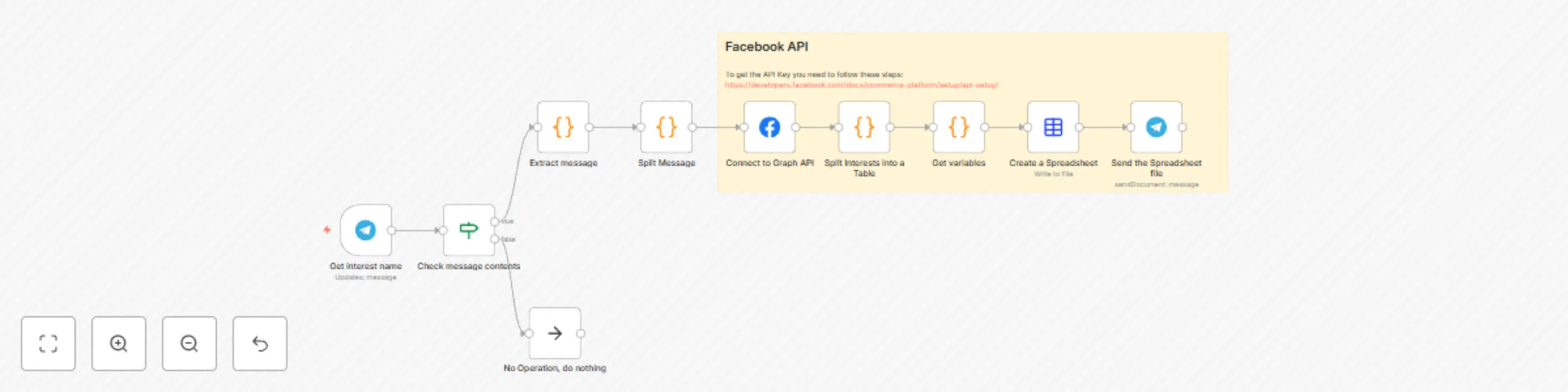
### How it Works
1. **Telegram Trigger:** Listens for incoming messages in a specified Telegram chat.
2. **Check Message Contents:** Verifies if the message begins with the specified hashtag and is from the designated chat ID.
3. **Extract Message:** Extracts the content of the message for further processing.
4. **Split Message:** Splits the extracted message to identify the interest and remaining content.
5. **Connect to Graph API:** Utilizes the Facebook Graph API to search for information related to the extracted interest.
6. **Split Interests into a Table:** Organizes the retrieved data into a structured table format.
7. **Get Variables:** Maps the retrieved data to create a new JSON object containing specific fields related to the interest.
8. **Create a Spreadsheet:** Generates a spreadsheet file in CSV format based on the retrieved and formatted data.
9. **Send the Spreadsheet File:** Sends the generated spreadsheet file back to the original Telegram chat.
### Customization
- Modify the filtering conditions and fields to suit specific requirements.
- Adjust the frequency of the trigger node based on preference.
### Best Practices
- Regularly test the workflow to ensure consistent performance.
- Stay informed about any changes to external APIs that might affect the workflow's functionality.
### Contributing
Your feedback and contributions are highly valued. Feel free to adapt, modify, and share enhancements with the n8n community.