Block 1 - Initial User Message
- Type / Role
- n8n-nodes-base.telegramTrigger - telegramTrigger
- Config choices
- Version 1.2


 Early Deal
This workflow is provided as-is. Please review and test before using in production.
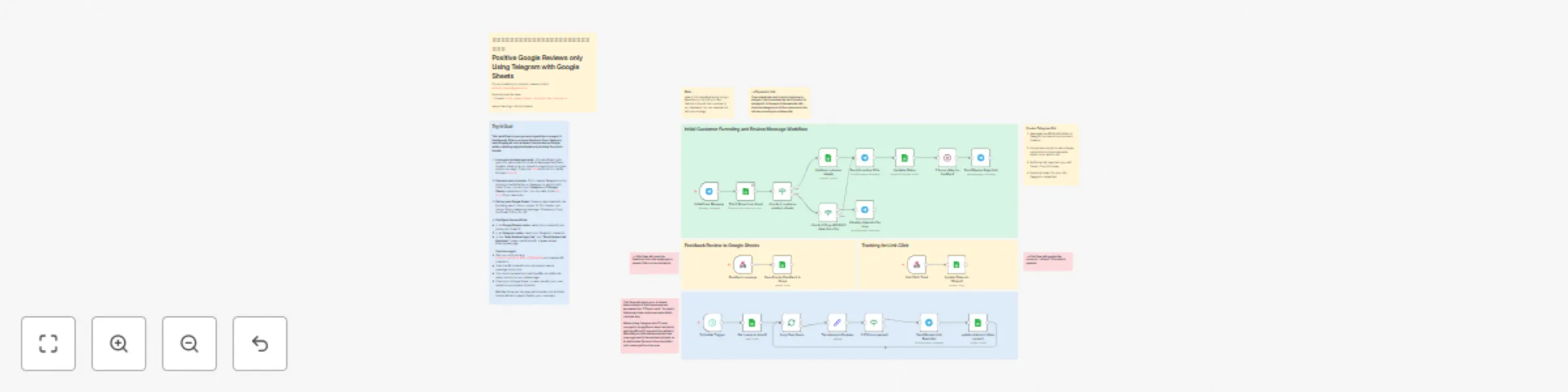
This workflow is a powerful reputation management tool designed to proactively filter customer reviews. It helps you encourage positive reviews on Google while capturing negative feedback privately...
n8n-nodes-base.telegramtrigger, n8n-nodes-base.googlesheets, n8n-nodes-base.telegram, n8n-nodes-base.webhook, n8n-nodes-base.stickynote, n8n-nodes-base.scheduletrigger, n8n-nodes-base.splitinbatches, n8n-nodes-base.if
This workflow is cataloged by N8N Workflows and links back to its original n8n.io source page by Anirudh Aeran.
Original n8n.io sourceThis workflow is a powerful reputation management tool designed to proactively filter customer reviews. It helps you encourage positive reviews on Google while capturing negative feedback privately before it impacts your public rating. By using an incentive, it maximizes the number of customers who enter this review funnel, giving you control over your online reputation.
This template is essential for any business where Google Reviews are critical: restaurants, clinics, retail stores, local services, and more. If you want to improve your Google star rating by systematically encouraging happy customers to post public reviews and addressing unhappy customers privately, this is the perfect solution.
The main job of this workflow is to send customers to a special review landing page. On this page, only reviews of 4 stars or more are directed to your Google Review page, while lower-rated feedback is captured in a private form.
Trigger: A customer scans a QR code (e.g., in your store) and sends a message to your Telegram bot.
Incentivize: The bot checks if the user is new. If so, it sends them a small discount or offer as a thank-you for their business and to encourage them to provide feedback.
Send to Filter Page: After a short delay, the workflow sends a message with a link to your review filtering webpage.
Track & Follow Up: The workflow tracks whether the link has been clicked (updating the status in a Google Sheet). If a user doesn't click the link after 23 hours, an automated reminder is sent to maximize engagement.
Crucial Prerequisite: This workflow sends users to a review-filtering webpage. You must have this webpage already built. The page should have logic to send 4+ star reviewers to Google and capture other feedback internally. code
Create a Telegram Bot: Use the BotFather on Telegram to create a bot and get your API token.
Google Sheet: Create a Google Sheet with columns like: ID, First Name, Status, Feedback Message, Timestamp.
Credentials: Add your Google Sheets API and Telegram Bot API credentials to n8n.
Configure Nodes:
In all Google Sheets nodes, select your credential and paste your Sheet ID.
In all Telegram nodes, select your Telegram credential.
In the "Send Review Page Link" and "Send Review Link Reminder" nodes, update the URL to point to your review filtering page.
Create a QR Code: Generate a QR code for your bot's link (e.g., https://t.me/YOUR_BOT_USERNAME) and display it for your customers.
Activate Workflow: Save and activate the workflow.
A pre-built review filtering webpage. code
An active n8n instance.
Google Sheets API credentials.
A Telegram Bot and its API token.
This catalog entry is organized from the workflow JSON. The node-level section below shows the executable blocks available for review before importing the template.
Showing the first 24 of 33 workflow blocks. Download the JSON for the full node graph.
| Workflow | Filter for positive Google reviews using Telegram, web form & Google Sheets |
|---|---|
| Complexity | advanced |
| Nodes | 33 |
| Categories | Lead Nurturing |
| Author | Anirudh Aeran |
| Published | 08 Oct 2025 |
Use the JSON export at /data/workflows/9379/9379.json as the source template for this automation.
Open n8n, import the downloaded JSON, and review each node before activating the workflow.
Replace placeholder credentials, API keys, webhook URLs, account IDs, and environment-specific values with your own settings.
Run the workflow manually or in a staging workspace, inspect node output, and confirm downstream systems receive the expected data.
Enable the workflow only after testing, then monitor executions, errors, and rate limits during the first production runs.
Review imported nodes carefully before activation. This catalog entry is intended to help you inspect the workflow structure, understand required services, and find related templates faster.
Node names, credentials, schedules, webhook paths, and external service limits may need adjustment for your workspace.
This workflow is a powerful reputation management tool designed to proactively filter customer reviews. It helps you encourage positive reviews on Google while capturing negative feedback privately...
Review the workflow JSON, configure any required credentials in n8n, and test the automation in a safe workspace before using it in production.
Yes. Use the block-by-block analysis and the downloadable JSON to inspect each node, then adjust credentials, prompts, schedules, filters, or destinations for your Lead Nurturing use case.