Block 1 - When clicking 'Test workflow'
- Type / Role
- n8n-nodes-base.manualTrigger - manualTrigger
- Config choices
- Version 1


 Early Deal
This workflow is provided as-is. Please review and test before using in production.
Extract Zillow Property Data to Google Sheets with Scrape.do This template requires a self hosted n8n instance to run. A complete n8n automation that extracts property listing data from Zillow U...
n8n-nodes-base.manualtrigger, n8n-nodes-base.googlesheets, n8n-nodes-base.httprequest, n8n-nodes-base.code, n8n-nodes-base.if
This workflow is cataloged by N8N Workflows and links back to its original n8n.io source page by Onur.
Original n8n.io sourceThis template requires a self-hosted n8n instance to run.
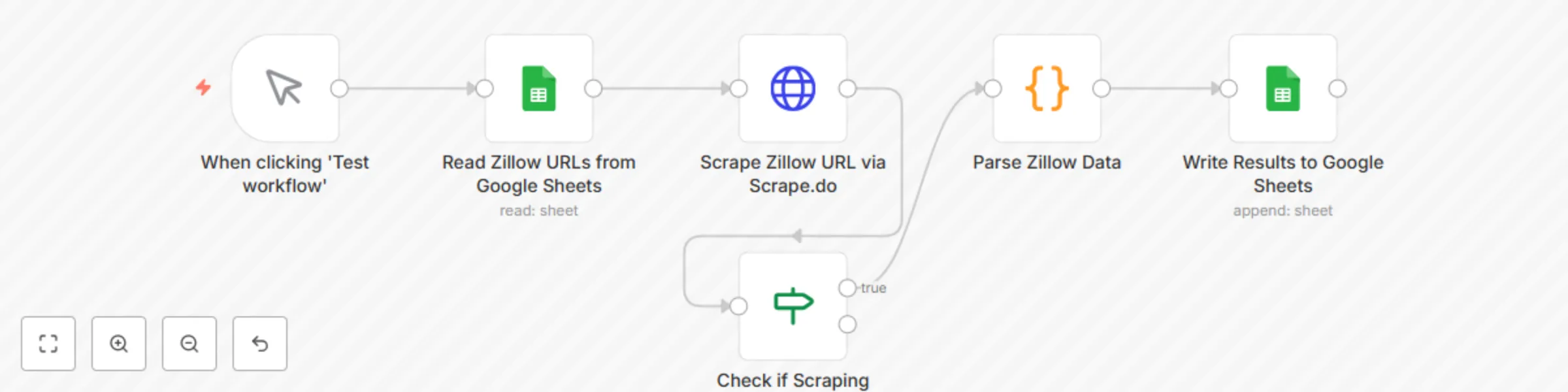
A complete n8n automation that extracts property listing data from Zillow URLs using Scrape.do web scraping API, parses key property information, and saves structured results into Google Sheets for real estate analysis, market research, and property tracking.
This workflow provides a lightweight real estate data extraction solution that pulls property details from Zillow listings and organizes them into a structured spreadsheet. Ideal for real estate professionals, investors, market analysts, and property managers who need automated property data collection without manual effort.
Who is this for?
What problem does this workflow solve?
| Field | Description | Example |
|---|---|---|
| URL | Original Zillow listing URL | https://www.zillow.com/homedetails/... |
| Price | Property listing price | $300,000 |
| Address | Street address | 8926 Silver City |
| City | City name | San Antonio |
| State | State abbreviation | TX |
| Days on Zillow | How long listed | 5 |
| Zestimate | Zillow's estimated value | $297,800 |
| Scraped At | Timestamp of extraction | 2025-01-29T12:00:00.000Z |
This workflow uses one Google Sheet with two tabs:
Input Tab: "Sheet1"
| Column | Type | Description | Example |
|---|---|---|---|
| URLs | URL | Zillow listing URL | https://www.zillow.com/homedetails/123... |
Output Tab: "Results"
| Column | Type | Description | Example |
|---|---|---|---|
| URL | URL | Original listing URL | https://www.zillow.com/homedetails/... |
| Price | Text | Property price | $300,000 |
| Address | Text | Street address | 8926 Silver City |
| City | Text | City name | San Antonio |
| State | Text | State code | TX |
| Days on Zillow | Number | Days listed | 5 |
| Zestimate | Text | Estimated value | $297,800 |
| Scraped At | Timestamp | When scraped | 2025-01-29T12:00:00.000Z |
Import Workflow: Copy the JSON → n8n → Workflows → + Add → Import from JSON
Configure Scrape.do API:
YOUR_SCRAPE_DO_TOKEN with your actual tokensuper=true for premium residential proxies (10 credits per request)Configure Google Sheets:
YOUR_SPREADSHEET_ID with your actual Google Sheet IDYOUR_GOOGLE_SHEETS_CREDENTIAL_ID with your credential IDRun & Test:
super=true)| Problem | Solution |
|---|---|
| API error 400 | Check your Scrape.do token and credits |
| URL showing "undefined" | Verify Google Sheet column name is "URLs" (capital U) |
| No data parsed | Check if Zillow changed their HTML structure |
| Permission denied | Re-authenticate Google Sheets OAuth2 in n8n |
| 50000 character error | Verify Parse Zillow Data code is extracting fields, not returning raw HTML |
| Price shows HTML/CSS | Update price extraction regex in Parse Zillow Data node |
This workflow provides a repeatable foundation for extracting Zillow property data with Scrape.do and saving to Google Sheets. You can extend it with:
Important: Scrape.do handles all anti-bot bypassing (PerimeterX, CAPTCHAs) automatically with rotating residential proxies, so you only pay for successful requests. Always use super=true parameter for Zillow to ensure high success rates.
This catalog entry is organized from the workflow JSON. The node-level section below shows the executable blocks available for review before importing the template.
| Workflow | Extract Zillow property data to Google Sheets with Scrape.do |
|---|---|
| Complexity | intermediate |
| Nodes | 6 |
| Categories | Market Research |
| Author | Onur |
| Published | 02 Oct 2025 |
Use the JSON export at /data/workflows/9182/9182.json as the source template for this automation.
Open n8n, import the downloaded JSON, and review each node before activating the workflow.
Replace placeholder credentials, API keys, webhook URLs, account IDs, and environment-specific values with your own settings.
Run the workflow manually or in a staging workspace, inspect node output, and confirm downstream systems receive the expected data.
Enable the workflow only after testing, then monitor executions, errors, and rate limits during the first production runs.
Review imported nodes carefully before activation. This catalog entry is intended to help you inspect the workflow structure, understand required services, and find related templates faster.
Node names, credentials, schedules, webhook paths, and external service limits may need adjustment for your workspace.
Extract Zillow Property Data to Google Sheets with Scrape.do This template requires a self hosted n8n instance to run. A complete n8n automation that extracts property listing data from Zillow U...
Review the workflow JSON, configure any required credentials in n8n, and test the automation in a safe workspace before using it in production.
Yes. Use the block-by-block analysis and the downloadable JSON to inspect each node, then adjust credentials, prompts, schedules, filters, or destinations for your Market Research use case.