Block 1 - XML
- Type / Role
- n8n-nodes-base.xml - xml
- Config choices
- Version 1


 Early Deal
This workflow is provided as-is. Please review and test before using in production.
This n8n workflow automates the process of crawling a website's sitemap to extract URLs, which is particularly useful for SEO analysis, website auditing, or content monitoring. By leveraging n8n's ...
n8n-nodes-base.xml, n8n-nodes-base.manualtrigger, n8n-nodes-base.splitout, n8n-nodes-base.set, n8n-nodes-base.converttofile, n8n-nodes-base.httprequest, n8n-nodes-base.stickynote
This workflow is cataloged by N8N Workflows and links back to its original n8n.io source page by Le Thua Phu.
Original n8n.io sourceThis n8n workflow automates the process of crawling a website's sitemap to extract URLs, which is particularly useful for SEO analysis, website auditing, or content monitoring. By leveraging n8n's nodes, the workflow fetches the sitemap from a specified URL, processes the XML data, and extracts individual URLs, which can then be converted into a downloadable file or integrated with tools like Google Sheets.
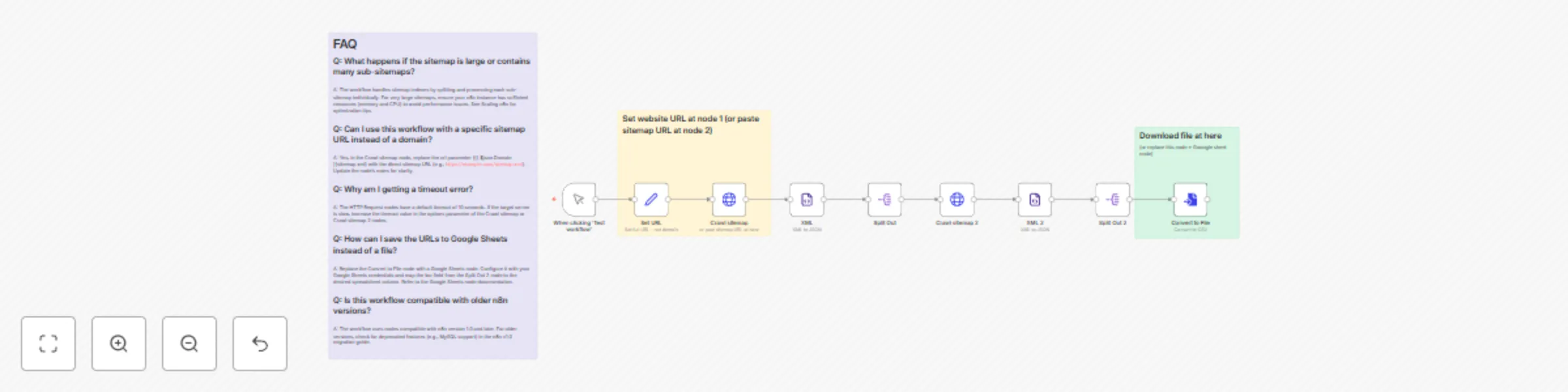
The workflow operates in a sequential manner, utilizing a series of nodes to fetch, parse, and process sitemap data:
Manual Trigger node).https://phu.io.vn/) for the sitemap (Set URL node).sitemap.xml) from the specified domain using an HTTP request (Crawl sitemap node).XML node).<sitemap> tags) from the parsed data (Split Out node).Crawl sitemap 2 node).XML 2 node).<url> tags) from the sub-sitemap (Split Out 2 node).Convert to File node).This workflow supports both single sitemap files and sitemap indexes that reference multiple sub-sitemaps, ensuring comprehensive URL extraction.
To implement this workflow in n8n, follow these steps:
Extract Website URLs from Sitemap.XML for SEO Analysis.json file and import it into your n8n instance via the workflow editor.Set URL node, update the Domain parameter with the target website's base URL (e.g., https://example.com/).Crawl sitemap node, directly paste the full sitemap URL if known (e.g., https://example.com/sitemap.xml).Manual Trigger node.Convert to File node generates a file containing the extracted URLs.Crawl sitemap and Crawl sitemap 2) have a 10-second timeout. Adjust the timeout parameter in the node settings if dealing with slow-responding servers.Q: What happens if the sitemap is large or contains many sub-sitemaps?
A: The workflow handles sitemap indexes by splitting and processing each sub-sitemap individually. For very large sitemaps, ensure your n8n instance has sufficient resources (memory and CPU) to avoid performance issues. See Scaling n8n for optimization tips.
Q: Can I use this workflow with a specific sitemap URL instead of a domain?
A: Yes, in the Crawl sitemap node, replace the url parameter ({{ $json.Domain }}sitemap.xml) with the direct sitemap URL (e.g., https://example.com/sitemap.xml). Update the node’s notes for clarity.
Q: Why am I getting a timeout error?
A: The HTTP Request nodes have a default timeout of 10 seconds. If the target server is slow, increase the timeout value in the options parameter of the Crawl sitemap or Crawl sitemap 2 nodes.
Q: How can I save the URLs to Google Sheets instead of a file?
A: Replace the Convert to File node with a Google Sheets node. Configure it with your Google Sheets credentials and map the loc field from the Split Out 2 node to the desired spreadsheet column. Refer to the Google Sheets node documentation.
Q: Is this workflow compatible with older n8n versions?
A: The workflow uses nodes compatible with n8n version 1.0 and later. For older versions, check for deprecated features (e.g., MySQL support) in the n8n v1.0 migration guide.
Q: Can I automate this workflow to run periodically?
A: Yes, replace the Manual Trigger node with a Schedule Trigger node to run the workflow at set intervals. See Trigger Nodes for configuration details.
For further assistance, consult the n8n Community Forum or submit an issue on the n8n GitHub repository.
Contact me for consulting and support or add me on Facebook or email.
This catalog entry is organized from the workflow JSON. The node-level section below shows the executable blocks available for review before importing the template.
| Workflow | Extract Website URLs from Sitemap.XML for SEO Analysis |
|---|---|
| Complexity | intermediate |
| Nodes | 12 |
| Categories | Market Research |
| Author | Le Thua Phu |
| Published | 05 Jun 2025 |
Use the JSON export at /data/workflows/4671/4671.json as the source template for this automation.
Open n8n, import the downloaded JSON, and review each node before activating the workflow.
Replace placeholder credentials, API keys, webhook URLs, account IDs, and environment-specific values with your own settings.
Run the workflow manually or in a staging workspace, inspect node output, and confirm downstream systems receive the expected data.
Enable the workflow only after testing, then monitor executions, errors, and rate limits during the first production runs.
Review imported nodes carefully before activation. This catalog entry is intended to help you inspect the workflow structure, understand required services, and find related templates faster.
Node names, credentials, schedules, webhook paths, and external service limits may need adjustment for your workspace.
This n8n workflow automates the process of crawling a website's sitemap to extract URLs, which is particularly useful for SEO analysis, website auditing, or content monitoring. By leveraging n8n's ...
Review the workflow JSON, configure any required credentials in n8n, and test the automation in a safe workspace before using it in production.
Yes. Use the block-by-block analysis and the downloadable JSON to inspect each node, then adjust credentials, prompts, schedules, filters, or destinations for your Market Research use case.