Block 1 - Workflow Overview
- Type / Role
- n8n-nodes-base.stickyNote - stickyNote
- Config choices
- Version 1


 Early Deal
This workflow is provided as-is. Please review and test before using in production.
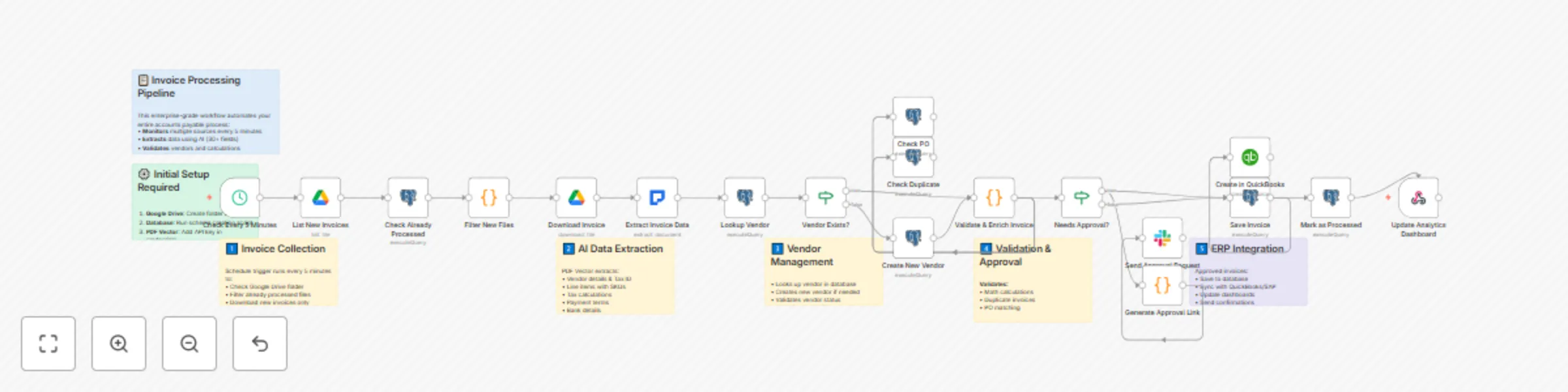
Transform your accounts payable department with this enterprise grade invoice processing solution. This workflow automates the entire invoice lifecycle from document ingestion through payment proce...
n8n-nodes-base.stickynote, n8n-nodes-base.scheduletrigger, n8n-nodes-base.googledrive, n8n-nodes-base.postgres, n8n-nodes-base.code, n8n-nodes-pdfvector.pdfvector, n8n-nodes-base.if, n8n-nodes-base.slack
This workflow is cataloged by N8N Workflows and links back to its original n8n.io source page by PDF Vector.
Original n8n.io sourceTransform your accounts payable department with this enterprise-grade invoice processing solution. This workflow automates the entire invoice lifecycle - from document ingestion through payment processing. It handles invoices from multiple sources (Google Drive, email attachments, API submissions), extracts data using AI, validates against purchase orders, routes for appropriate approvals based on amount thresholds, and integrates seamlessly with your ERP system. The solution includes vendor master data management, duplicate invoice detection, real-time spend analytics, and complete audit trails for compliance.
This comprehensive workflow creates an intelligent invoice processing pipeline that monitors multiple input channels (Google Drive, email, webhooks) for new invoices and automatically extracts data from PDFs, images, and scanned documents using AI. It validates vendor information against your master database, matches invoices to purchase orders, and detects discrepancies. The workflow implements multi-level approval routing based on invoice amount and department, prevents duplicate payments through intelligent matching algorithms, and integrates with QuickBooks, SAP, or other ERP systems. Additionally, it generates real-time dashboards showing processing metrics and cash flow insights while sending automated reminders for pending approvals.
Perfect for medium to large businesses, accounting departments, and financial service providers processing more than 100 invoices monthly across multiple vendors. Ideal for organizations that need to enforce approval hierarchies and spending limits, require integration with existing ERP/accounting systems, want to reduce processing time from days to minutes, need audit trails and compliance reporting, and seek to eliminate manual data entry errors and duplicate payments.
Manual invoice processing creates significant operational challenges including data entry errors (3-5% error rate), processing delays (8-10 days per invoice), duplicate payments (0.1-0.5% of invoices), approval bottlenecks causing late fees, lack of visibility into pending invoices and cash commitments, and compliance issues from missing audit trails. This workflow reduces processing time by 80%, eliminates data entry errors, prevents duplicate payments, and provides complete visibility into your payables process.
This workflow can be customized to add industry-specific extraction fields, implement GL coding rules based on vendor or amount, create department-specific approval workflows, add currency conversion for international invoices, integrate with additional systems (banks, expense management), configure custom dashboards and reporting, set up vendor portals for invoice status inquiries, and implement machine learning for automatic GL coding suggestions.
Note: This workflow uses the PDF Vector community node. Make sure to install it from the n8n community nodes collection before using this template.
This catalog entry is organized from the workflow JSON. The node-level section below shows the executable blocks available for review before importing the template.
Showing the first 24 of 26 workflow blocks. Download the JSON for the full node graph.
| Workflow | Extract & store invoice data with PDF vector, Google Drive & database |
|---|---|
| Complexity | advanced |
| Nodes | 26 |
| Categories | Invoice Processing, AI RAG |
| Author | PDF Vector |
| Published | 12 Sept 2025 |
Use the JSON export at /data/workflows/8494/8494.json as the source template for this automation.
Open n8n, import the downloaded JSON, and review each node before activating the workflow.
Replace placeholder credentials, API keys, webhook URLs, account IDs, and environment-specific values with your own settings.
Run the workflow manually or in a staging workspace, inspect node output, and confirm downstream systems receive the expected data.
Enable the workflow only after testing, then monitor executions, errors, and rate limits during the first production runs.
Review imported nodes carefully before activation. This catalog entry is intended to help you inspect the workflow structure, understand required services, and find related templates faster.
Node names, credentials, schedules, webhook paths, and external service limits may need adjustment for your workspace.
Transform your accounts payable department with this enterprise grade invoice processing solution. This workflow automates the entire invoice lifecycle from document ingestion through payment proce...
Review the workflow JSON, configure any required credentials in n8n, and test the automation in a safe workspace before using it in production.
Yes. Use the block-by-block analysis and the downloadable JSON to inspect each node, then adjust credentials, prompts, schedules, filters, or destinations for your Invoice Processing, AI RAG use case.