P

PDF Vector

20
Workflows

Workflows by PDF Vector

Workflow preview: Process documents with OCR, analytics & Google Drive using PDF Vector
Free intermediate

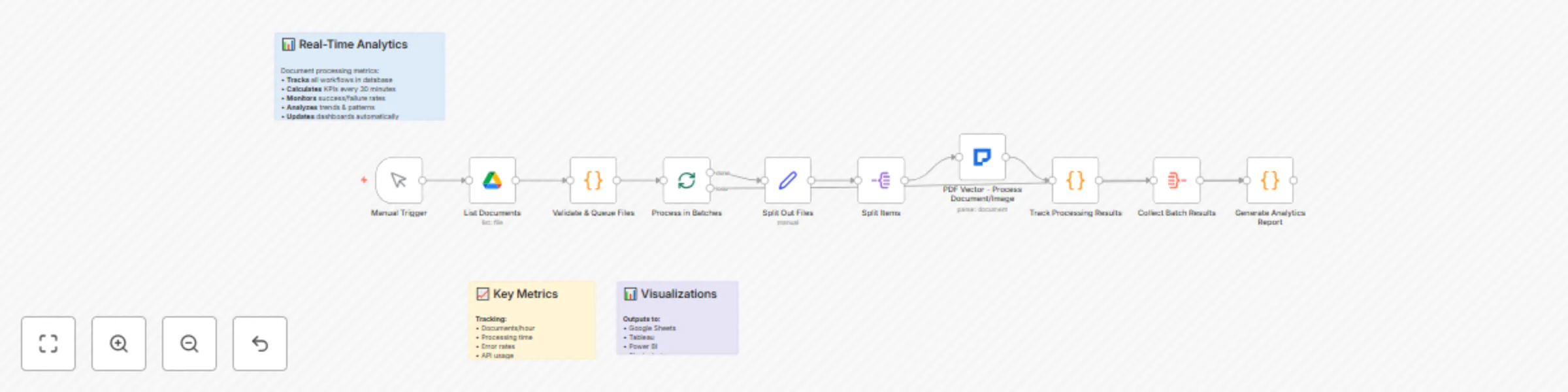
Process documents with OCR, analytics & Google Drive using PDF Vector

## Overview Organizations dealing with high-volume document processing face challenges in efficiently handling diverse document types while maintaining quality and tracking performance metrics. This enterprise-grade workflow provides a scalable solution for batch processing documents including PDFs, scanned documents, and images (JPG, PNG) with comprehensive analytics, error handling, and quality assurance. ## What You Can Do - Process thousands of documents in parallel batches efficiently - Monitor performance metrics and success rates in real-time - Handle diverse document formats with automatic format detection - Generate comprehensive analytics dashboards and reports - Implement automated quality assurance and error handling ## Who It's For Large organizations, document processing centers, digital transformation teams, enterprise IT departments, and businesses that need to process thousands of documents reliably with detailed performance tracking and analytics. ## The Problem It Solves High-volume document processing without proper monitoring leads to bottlenecks, quality issues, and inefficient resource usage. Organizations struggle to track processing success rates, identify problematic document types, and optimize their workflows. This template provides enterprise-grade batch processing with comprehensive analytics and automated quality assurance. **Setup Instructions:** 1. Configure Google Drive credentials for document folder access 2. Install the PDF Vector community node from the n8n marketplace 3. Configure PDF Vector API credentials with appropriate rate limits 4. Set up batch processing parameters (batch size, retry logic) 5. Configure quality thresholds and validation rules 6. Set up analytics dashboard and reporting preferences 7. Configure error handling and notification systems **Key Features:** - Parallel batch processing for maximum throughput - Support for mixed document formats (PDFs, Word docs, images) - OCR processing for handwritten and scanned documents - Comprehensive analytics dashboard with success rates and performance metrics - Automatic document prioritization based on size and complexity - Intelligent error handling with automatic retry logic - Quality assurance checks and validation - Real-time processing monitoring and alerts **Customization Options:** - Configure custom document categories and processing rules - Set up specific extraction templates for different document types - Implement automated workflows for documents that fail quality checks - Configure credit usage optimization to minimize costs - Set up custom analytics and reporting dashboards - Add integration with existing document management systems - Configure automated notifications for processing completion or errors **Implementation Details:** The workflow uses intelligent batching to process documents efficiently while monitoring performance metrics in real-time. It automatically handles different document formats, applies OCR when needed, and provides detailed analytics to help organizations optimize their document processing operations. The system includes sophisticated error recovery and quality assurance mechanisms. **Note:** This workflow uses the PDF Vector community node. Make sure to install it from the n8n community nodes collection before using this template.

P
PDF Vector
Document Extraction
12 Sep 2025
844
0
Workflow preview: Extract & validate legal citations from documents with PDF Vector AI
Free intermediate

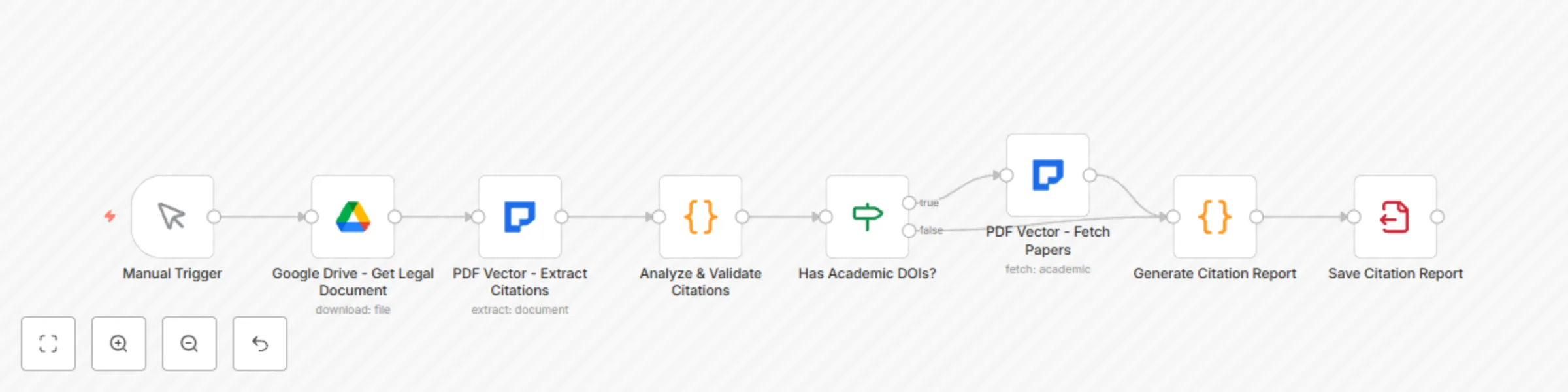
Extract & validate legal citations from documents with PDF Vector AI

Legal professionals spend countless hours manually checking citations and building citation indexes for briefs, memoranda, and legal opinions. This workflow automates the extraction, validation, and analysis of legal citations from any legal document, including scanned court documents, photographed case files, and image-based legal materials (PDFs, JPGs, PNGs). **Target Audience:** Attorneys, paralegals, legal researchers, judicial clerks, law students, and legal writing professionals who need to extract, validate, and manage legal citations efficiently across multiple jurisdictions. **Problem Solved:** Manual citation checking is extremely time-consuming and error-prone. Legal professionals struggle to ensure citation accuracy, verify case law is still good law, and build comprehensive citation indexes. This template automates the entire citation management process while ensuring compliance with citation standards like Bluebook format. **Setup Instructions:** 1. Configure Google Drive credentials for secure legal document access 2. Install the PDF Vector community node from the n8n marketplace 3. Configure PDF Vector API credentials 4. Set up connections to legal databases (Westlaw, LexisNexis if available) 5. Configure jurisdiction-specific citation rules 6. Set up validation preferences and citation format standards 7. Configure citation reporting and export formats **Key Features:** - Automatic retrieval of legal documents from Google Drive - OCR support for handwritten annotations and scanned legal documents - Comprehensive extraction of case law, statutes, regulations, and academic citations - Bluebook citation format validation and standardization - Automated Shepardizing to verify cases are still good law - Pinpoint citation detection and parenthetical extraction - Citation network analysis showing case relationships - Support for federal, state, and international law references **Customization Options:** - Set jurisdiction-specific citation rules and formats - Configure automated alerts for superseded statutes or overruled cases - Customize citation validation criteria and standards - Set up integration with legal research platforms (Westlaw, LexisNexis) - Configure export formats for different legal document types - Add support for specialty legal domains (tax law, patent law, etc.) - Set up collaborative citation checking for legal teams **Implementation Details:** The workflow uses advanced legal domain knowledge to identify and extract citations in various formats across multiple jurisdictions. It processes both digital and scanned documents, validates citations against legal standards, and builds comprehensive citation networks. The system automatically checks citation accuracy and provides detailed reports for legal document preparation. **Note:** This workflow uses the PDF Vector community node. Make sure to install it from the n8n community nodes collection before using this template.

P
PDF Vector
Document Extraction
12 Sep 2025
377
0
Workflow preview: Automate academic literature reviews with GPT-4 and multi-database search
Free intermediate

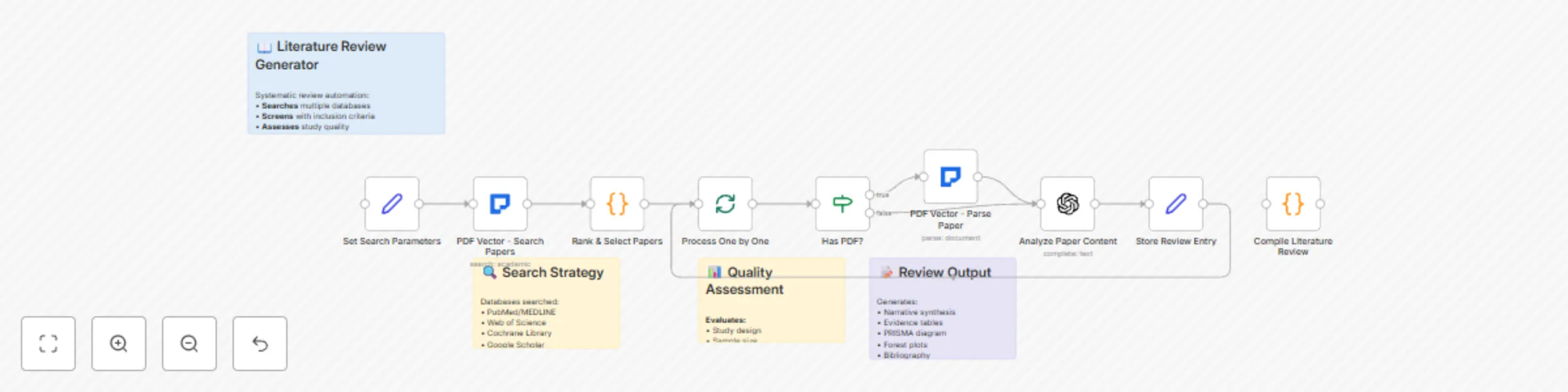
Automate academic literature reviews with GPT-4 and multi-database search

## Overview Conducting comprehensive literature reviews is one of the most time-consuming aspects of academic research. This workflow revolutionizes the process by automating literature search, paper analysis, and review generation across multiple academic databases. It handles both digital papers and scanned documents (PDFs, JPGs, PNGs), using OCR technology for older publications or image-based content. ## What You Can Do - Automate searches across multiple academic databases simultaneously - Analyze and rank papers by relevance, citations, and impact - Generate comprehensive literature reviews with proper citations - Process both digital and scanned documents with OCR - Identify research gaps and emerging trends systematically ## Who It's For Researchers, graduate students, academic institutions, literature review teams, and academic writers who need to conduct comprehensive literature reviews efficiently while maintaining high quality and thoroughness. ## The Problem It Solves Manual literature reviews are extremely time-consuming and often miss relevant papers across different databases. Researchers struggle to synthesize large volumes of academic papers, track citations properly, and identify research gaps systematically. This template automates the entire process from search to synthesis, ensuring comprehensive coverage and proper citation management. **Setup Instructions:** 1. Configure PDF Vector API credentials with academic search access 2. Set up search parameters including databases and date ranges 3. Define inclusion and exclusion criteria for paper selection 4. Choose citation style (APA, MLA, Chicago, etc.) 5. Configure output format preferences 6. Set up reference management software integration if needed 7. Define research topic and keywords for search **Key Features:** - Simultaneous search across PubMed, arXiv, Semantic Scholar, and other databases - Intelligent paper ranking based on citation count, recency, and relevance - OCR support for scanned documents and older publications - Automatic extraction of methodologies, findings, and limitations - Citation network analysis to identify seminal works - Automatic theme organization and research gap identification - Multiple citation format support (APA, MLA, Chicago) - Quality scoring based on journal impact factors **Customization Options:** - Configure search parameters for specific research domains - Set up automated searches for ongoing literature monitoring - Integrate with reference management software (Zotero, Mendeley) - Customize output format and structure - Add collaborative review features for research teams - Set up quality filters based on journal rankings - Configure notification systems for new relevant papers **Implementation Details:** The workflow uses advanced algorithms to search multiple academic databases simultaneously, ranking papers by relevance and impact. It processes full-text PDFs when available and uses OCR for scanned documents. The system automatically extracts key information, organizes findings by themes, and generates structured literature reviews with proper citations and reference management. **Note:** This workflow uses the PDF Vector community node. Make sure to install it from the n8n community nodes collection before using this template.

P
PDF Vector
AI RAG
12 Sep 2025
1083
0
Workflow preview: Extract clinical data from medical documents with PDF vector & HIPAA compliance
Free intermediate

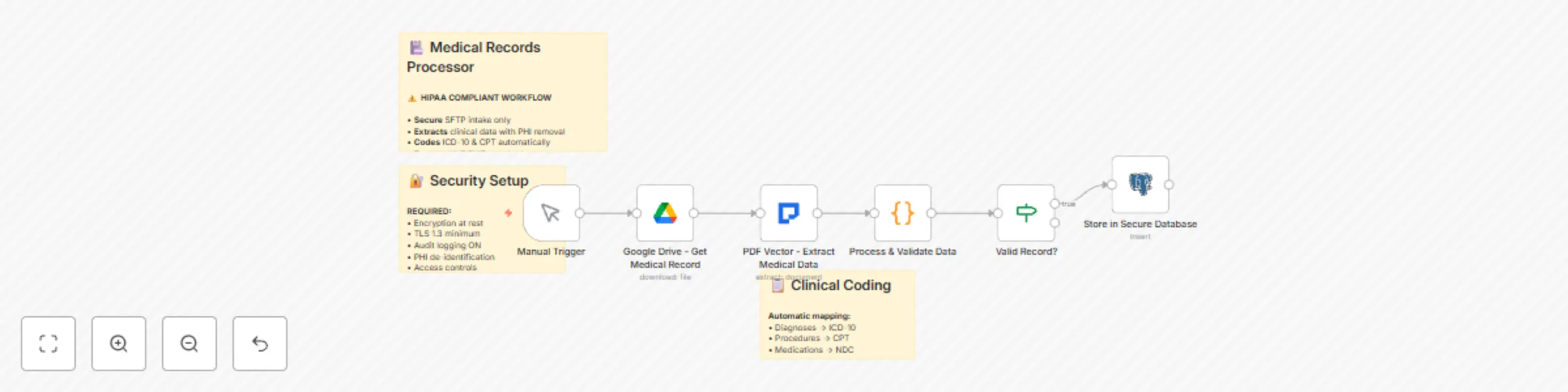
Extract clinical data from medical documents with PDF vector & HIPAA compliance

## Overview Healthcare organizations face significant challenges in digitizing and processing medical records while maintaining strict HIPAA compliance. This workflow provides a secure, automated solution for extracting clinical data from various medical documents including discharge summaries, lab reports, clinical notes, prescription records, and scanned medical images (JPG, PNG). ## What You Can Do - Extract clinical data from medical documents while maintaining HIPAA compliance - Process handwritten notes and scanned medical images with OCR - Automatically identify and protect PHI (Protected Health Information) - Generate structured data from various medical document formats - Maintain audit trails for regulatory compliance ## Who It's For Healthcare providers, medical billing companies, clinical research organizations, health information exchanges, and medical practice administrators who need to digitize and extract data from medical records while maintaining HIPAA compliance. ## The Problem It Solves Manual medical record processing is time-consuming, error-prone, and creates compliance risks. Healthcare organizations struggle to extract structured data from handwritten notes, scanned documents, and various medical forms while protecting PHI. This template automates the extraction process while maintaining the highest security standards for Protected Health Information. **Setup Instructions:** 1. Configure Google Drive credentials with proper medical record access controls 2. Install the PDF Vector community node from the n8n marketplace 3. Configure PDF Vector API credentials with HIPAA-compliant settings 4. Set up secure database storage with encryption at rest 5. Define PHI handling rules and extraction parameters 6. Configure audit logging for regulatory compliance 7. Set up integration with your Electronic Health Record (EHR) system **Key Features:** - Secure retrieval of medical documents from Google Drive - HIPAA-compliant processing with automatic PHI masking - OCR support for handwritten notes and scanned medical images - Automatic extraction of diagnoses with ICD-10 code validation - Medication list processing with dosage and frequency information - Lab results extraction with reference ranges and flagging - Vital signs capture and normalization - Complete audit trail for regulatory compliance - Integration-ready format for EHR systems **Customization Options:** - Define institution-specific medical terminology and abbreviations - Configure automated alerts for critical lab values or abnormal results - Set up custom extraction fields for specialized medical forms - Implement medication interaction warnings and contraindication checks - Add support for multiple languages and international medical coding systems - Configure integration with specific EHR platforms (Epic, Cerner, etc.) - Set up automated quality assurance checks and validation rules **Implementation Details:** The workflow uses advanced AI with medical domain knowledge to understand clinical terminology and extract relevant information while automatically identifying and protecting PHI. It processes various document formats including handwritten prescriptions, lab reports, discharge summaries, and clinical notes. The system maintains strict security protocols with encryption at rest and in transit, ensuring full HIPAA compliance throughout the processing pipeline. **Note:** This workflow uses the PDF Vector community node. Make sure to install it from the n8n community nodes collection before using this template.

P
PDF Vector
Document Extraction
12 Sep 2025
642
0
Workflow preview: Automated receipt processing with tax categorization using PDF vector & Google Drive
Free intermediate

Automated receipt processing with tax categorization using PDF vector & Google Drive

## Overview Businesses and freelancers often struggle with the tedious task of manually processing receipts for expense tracking and tax purposes. This workflow automates the entire receipt processing pipeline, extracting detailed information from receipts (including scanned images, photos, PDFs, JPGs, and PNGs) and intelligently categorizing them for tax deductions. ## What You Can Do - Automatically process receipts from various formats (PDFs, JPGs, PNGs, scanned images) - Extract detailed expense information with OCR technology - Intelligently categorize expenses for tax deductions - Maintain compliance with accounting standards and tax regulations - Track expenses efficiently throughout the year ## Who It's For Accountants, small business owners, freelancers, finance teams, and individual professionals who need to process large volumes of receipts efficiently for expense tracking and tax preparation. ## The Problem It Solves Manual receipt processing is time-consuming and error-prone, especially during tax season. People struggle to organize receipts, extract accurate data from various formats, and categorize expenses properly for tax deductions. This template automates the entire process while ensuring compliance with accounting standards and tax regulations. **Setup Instructions:** 1. Configure Google Drive credentials for receipt storage access 2. Install the PDF Vector community node from the n8n marketplace 3. Configure PDF Vector API credentials 4. Set up tax category definitions based on your jurisdiction 5. Configure accounting software integration (QuickBooks, Xero, etc.) 6. Set up validation rules for expense categories 7. Configure reporting and export formats **Key Features:** - Automatic retrieval of receipts from Google Drive folders - OCR support for photos and scanned receipts - Intelligent tax category assignment based on merchant and expense type - Multi-currency support for international transactions - Automatic detection of meal expenses with deduction percentages - Financial validation to catch calculation errors - Audit trail maintenance for compliance - Integration with popular accounting software **Customization Options:** - Define custom tax categories specific to your business type - Set up automated rules for recurring merchants - Configure expense approval workflows for team members - Add mileage tracking integration for travel expenses - Set up automated notifications for high-value expenses - Customize export formats for different accounting systems - Add multi-language support for international receipts **Implementation Details:** The workflow uses advanced OCR technology to extract information from various receipt formats, including handwritten receipts and low-quality scans. It applies intelligent categorization rules based on merchant type, expense amount, and business context. The system includes built-in validation to ensure data accuracy and tax compliance. **Note:** This workflow uses the PDF Vector community node. Make sure to install it from the n8n community nodes collection before using this template.

P
PDF Vector
AI Summarization
12 Sep 2025
396
0
Workflow preview: Research paper analysis system with PDF vector, OCR, GPT-4, and Google Drive
Free intermediate

Research paper analysis system with PDF vector, OCR, GPT-4, and Google Drive

## Overview Researchers and academic institutions need efficient ways to process and analyze large volumes of research papers and academic documents, including scanned PDFs and image-based materials (JPG, PNG). Manual review of academic literature is time-consuming and makes it difficult to identify trends, track citations, and synthesize findings across multiple papers. This workflow automates the extraction and analysis of research papers and scanned documents using OCR technology, creating a searchable knowledge base of academic insights from both digital and image-based sources. ## What You Can Do - Extract key information from research papers automatically, including methodologies, findings, and citations - Build a searchable database of academic insights from both digital and image-based sources - Track citations and identify research trends across multiple papers - Synthesize findings from large volumes of academic literature efficiently ## Who It's For Research institutions, university libraries, R&D departments, academic researchers, literature review teams, and organizations tracking scientific developments in their field. ## The Problem It Solves Literature reviews require reading hundreds of papers to identify relevant findings and methodologies. This template automates the extraction of key information from research papers, including methodologies, findings, and citations. It builds a searchable database that helps researchers quickly find relevant studies and identify research gaps. **Setup Instructions:** 1. Install the PDF Vector community node with academic features 2. Configure PDF Vector API with academic search enabled 3. Configure Google Drive credentials for document access 4. Set up database for storing extracted research data 5. Configure citation tracking preferences 6. Set up automated paper ingestion from sources 7. Configure summary generation parameters **Key Features:** - Google Drive integration for research paper retrieval (PDFs, JPGs, PNGs) - OCR processing for scanned documents and images - Automatic extraction of paper metadata and structure from any format - Methodology and findings summarization from PDFs and images - Citation network analysis and metrics - Multi-paper trend identification - Searchable research database creation - Integration with academic search engines **Customization Options:** - Add field-specific extraction templates - Configure automated paper discovery from arXiv, PubMed, etc. - Implement citation alert systems - Create research trend visualizations - Add collaboration features for research teams - Build API endpoints for research queries - Integrate with reference management tools **Implementation Details:** The workflow uses PDF Vector's academic features to understand research paper structure and extract meaningful insights. It processes papers from various sources, identifies key contributions, and creates structured summaries. The system tracks citations to measure impact and identifies emerging research trends by analyzing multiple papers in a field. **Note:** This workflow uses the PDF Vector community node. Make sure to install it from the n8n community nodes collection before using this template.

P
PDF Vector
Document Extraction
12 Sep 2025
729
0
Workflow preview: Build document Q&A API with PDF vector and webhooks
Free intermediate

Build document Q&A API with PDF vector and webhooks

## Overview Organizations struggle to make their document repositories searchable and accessible. Users waste time searching through lengthy PDFs, manuals, and documentation to find specific answers. This workflow creates a powerful API service that instantly answers questions about any document or image, perfect for building customer support chatbots, internal knowledge bases, or interactive documentation systems. ## What You Can Do This workflow creates a RESTful webhook API that accepts questions about documents and returns intelligent, contextual answers. It processes various document formats including PDFs, Word documents, text files, and images using OCR when needed. The system maintains conversation context through session management, caches responses for performance, provides source references with page numbers, handles multiple concurrent requests, and integrates seamlessly with chatbots, support systems, or custom applications. ## Who It's For Perfect for developer teams building conversational interfaces, customer support departments creating self-service solutions, technical writers making documentation interactive, organizations with extensive knowledge bases, and SaaS companies wanting to add document Q&A features. Ideal for anyone who needs to make large document repositories instantly searchable through natural language queries. ## The Problem It Solves Traditional document search returns entire pages or sections, forcing users to read through irrelevant content to find answers. Support teams repeatedly answer the same questions that are already documented. This template creates an intelligent Q&A system that provides precise, contextual answers to specific questions, reducing support tickets by up to 60% and improving user satisfaction. ## Setup Instructions 1. Install the PDF Vector community node from n8n marketplace 2. Configure your PDF Vector API key 3. Set up the webhook URL for your API endpoint 4. Configure Redis or database for session management 5. Set response caching parameters 6. Test the API with sample documents and questions ## Key Features - **RESTful API Interface**: Easy integration with any application - **Multi-Format Support**: Handle PDFs, Word docs, text files, and images - **OCR Processing**: Extract text from scanned documents and screenshots - **Contextual Answers**: Provide relevant responses with source citations - **Session Management**: Enable conversational follow-up questions - **Response Caching**: Improve performance for frequently asked questions - **Analytics Tracking**: Monitor usage patterns and popular queries - **Error Handling**: Graceful fallbacks for unsupported documents ## API Usage Example ```bash POST https://your-n8n-instance.com/webhook/doc-qa Content-Type: application/json { "documentUrl": "https://example.com/user-manual.pdf", "question": "How do I reset my password?", "sessionId": "user-123", "includePageNumbers": true } ``` ## Customization Options Add authentication and rate limiting for production use, implement multi-document search across entire repositories, create specialized prompts for technical documentation or legal documents, add automatic language detection and translation, build conversation history tracking for better context, integrate with Zendesk, Intercom, or other support systems, and enable direct file upload support for local documents. **Note:** This workflow uses the PDF Vector community node. Make sure to install it from the n8n community nodes collection before using this template.

P
PDF Vector
Internal Wiki
12 Sep 2025
337
0
Workflow preview: Enterprise contract lifecycle management with AI risk analysis
Free advanced

Enterprise contract lifecycle management with AI risk analysis

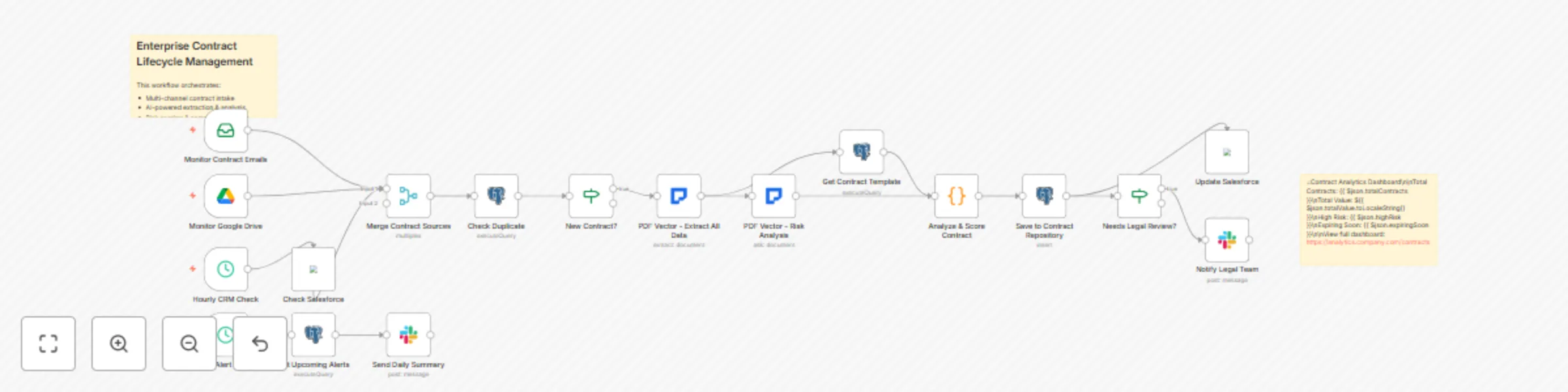
## Overview Transform your contract management process with this enterprise-grade workflow that handles the complete contract lifecycle - from initial intake through execution, monitoring, and renewal. This comprehensive solution combines AI-powered contract analysis with automated risk scoring, clause comparison, obligation tracking, and proactive alerts. It integrates with multiple data sources including email, SharePoint, contract CLM systems, and creates a centralized contract intelligence hub that prevents revenue leakage, ensures compliance, and accelerates deal velocity. ## What You Can Do This advanced workflow orchestrates a complete contract management ecosystem that monitors multiple channels (email, Google Drive, SharePoint, APIs) for new contracts and amendments. It extracts and analyzes over 50 contract data points using AI, performs multi-dimensional risk assessment across legal, financial, and operational factors, compares clauses against your approved template library, tracks all obligations and key dates with automated reminders, integrates with Salesforce/CRM for deal alignment, routes contracts through dynamic approval workflows based on risk scores, generates executive dashboards with contract analytics, and maintains a searchable repository with version control. The system handles complex scenarios including multi-party agreements, framework contracts with statements of work, international contracts requiring jurisdiction analysis, and M&A due diligence requiring bulk contract review. ## Who It's For Designed for enterprise legal operations teams managing thousands of contracts annually, procurement departments negotiating complex vendor agreements, contract managers overseeing multi-million dollar portfolios, compliance teams ensuring regulatory adherence across jurisdictions, sales operations needing faster contract turnaround, and C-suite executives requiring contract intelligence for strategic decisions. Essential for organizations in regulated industries (healthcare, finance, government) and companies undergoing digital transformation of their legal operations. ## The Problem It Solves Manual contract management creates massive operational risks and inefficiencies. Organizations typically have contracts scattered across emails, shared drives, and filing cabinets with no central visibility. This leads to missed renewal deadlines costing 5-10% of contract value, unauthorized contract variations creating compliance risks, obligation failures resulting in penalties and damaged relationships, and inability to leverage favorable terms across similar contracts. Studies show that inefficient contract management costs organizations up to 9% of annual revenue. This workflow creates a single source of truth for all contracts, automates tracking and compliance, and provides predictive insights to prevent issues before they occur. ## Setup Instructions 1. **Multi-Channel Integration**: Configure connectors for email (Office 365/Gmail), Google Drive, SharePoint, and contract management systems 2. **PDF Vector Setup**: Install PDF Vector node and configure API with enterprise rate limits 3. **Database Configuration**: Set up PostgreSQL/MySQL for contract repository with proper indexing 4. **Template Library**: Upload your standard contract templates and approved clause library 5. **Risk Framework**: Configure risk scoring matrix for your industry (legal, financial, operational risks) 6. **Approval Matrix**: Define approval routing based on contract value, type, and risk score 7. **CRM Integration**: Connect to Salesforce/HubSpot for opportunity and account alignment 8. **Notification Setup**: Configure Slack/Teams channels and email distribution lists 9. **Dashboard Creation**: Set up Tableau/PowerBI connectors for executive reporting 10. **Security Configuration**: Enable encryption, audit logging, and role-based access controls ## Key Features - **Intelligent Intake System**: Monitor email attachments, shared folders, CRM uploads, and API submissions - **Advanced AI Extraction**: Extract 50+ data points including nested obligations and conditional terms - **Multi-Dimensional Risk Scoring**: Analyze legal, financial, operational, and reputational risks - **Clause Library Comparison**: Compare against approved templates and flag deviations - **Obligation Management**: Track deliverables, milestones, and SLAs with automated alerts - **Dynamic Approval Routing**: Route based on AI risk score, contract value, and deviation analysis - **Version Control & Redlining**: Track all changes and maintain complete audit trail - **Salesforce Integration**: Sync contract data with opportunities and accounts - **Predictive Analytics**: Forecast renewal likelihood and negotiation outcomes - **Bulk Processing**: Handle M&A due diligence with parallel processing of hundreds of contracts - **Multi-Language Support**: Process contracts in 15+ languages with automatic translation - **Executive Dashboards**: Real-time visibility into contract portfolio and risk exposure ## Customization Options Implement industry-specific modules for healthcare (BAAs, DPAs), financial services (ISDAs, loan agreements), technology (SaaS, licensing), or government contracting. Add AI models trained on your historical contracts for better extraction accuracy. Create custom risk factors for emerging regulations like AI governance or ESG compliance. Build integration with specific CLM systems (Ironclad, Docusign CLM, Icertis). Implement advanced analytics including contract similarity scoring, win-rate analysis by clause variations, and automatic playbook generation. Add blockchain integration for smart contract execution and configure automated contract assembly for standard agreements. **Note:** This workflow uses the PDF Vector community node. Make sure to install it from the n8n community nodes collection before using this template.

P
PDF Vector
Document Extraction
12 Sep 2025
413
0
Workflow preview: Parse and score resumes with PDF Vector AI
Free intermediate

Parse and score resumes with PDF Vector AI

## Overview HR departments and recruiters spend countless hours manually reviewing resumes, often missing qualified candidates due to time constraints. This workflow automates the entire resume screening process by extracting structured data from resumes in any format (PDF, Word documents, or even photographed/scanned resume images), calculating experience scores, and creating comprehensive candidate profiles ready for your ATS system. ## What You Can Do This workflow automatically retrieves resumes from Google Drive and uses AI to extract all relevant candidate information including personal details, work experience with dates, education, skills, and certifications. It intelligently handles various resume formats including PDFs, Word documents, and even scanned or photographed resumes using OCR. The workflow calculates total years of experience, tracks skill-specific experience, generates proficiency scores for each skill, and provides an AI-powered assessment of candidate strengths and suitability for different roles. ## Who It's For Perfect for HR departments processing high volumes of applications, recruitment agencies managing multiple clients, talent acquisition teams seeking to improve candidate quality, and hiring managers who want data-driven insights for decision making. Ideal for organizations that need to maintain consistent evaluation standards across different reviewers and want to reduce time-to-hire while improving candidate match quality. ## The Problem It Solves Manual resume screening is inefficient and inconsistent. Different reviewers may evaluate the same resume differently, leading to missed opportunities and bias. This workflow standardizes the extraction process, automatically calculates years of experience for each skill, and provides objective scoring metrics to help identify the best candidates faster while reducing human bias in the initial screening process. ## Setup Instructions 1. Configure Google Drive credentials in n8n 2. Install the PDF Vector community node from the n8n marketplace 3. Configure your PDF Vector API credentials 4. Set up your preferred data storage (database or spreadsheet) 5. Customize the skill categories for your industry 6. Configure the scoring algorithm based on your requirements 7. Connect to your existing ATS system if needed ## Key Features - **Automatic Resume Retrieval**: Pull resumes from Google Drive folders automatically - **Universal Format Support**: Process PDFs, Word documents, and photographed resumes - **OCR Capabilities**: Extract text from scanned or photographed documents - **Experience Calculation**: Automatically compute total and skill-specific experience - **Proficiency Scoring**: Generate objective skill proficiency ratings - **AI Assessment**: Get intelligent insights on candidate fit and strengths - **Multi-Language Support**: Handle resumes in various languages - **ATS Integration**: Output structured data compatible with major ATS systems ## Customization Options Define custom skill categories relevant to your industry, adjust scoring weights for different experience types, add specific extraction fields for your organization, implement keyword matching for job requirements, set up automated candidate ranking systems, create role-specific evaluation criteria, and integrate with LinkedIn or other professional networks for enhanced candidate insights. **Note:** This workflow uses the PDF Vector community node. Make sure to install it from the n8n community nodes collection before using this template.

P
PDF Vector
HR
12 Sep 2025
388
0
Workflow preview: Extract & store invoice data with PDF vector, Google Drive & database
Free advanced

Extract & store invoice data with PDF vector, Google Drive & database

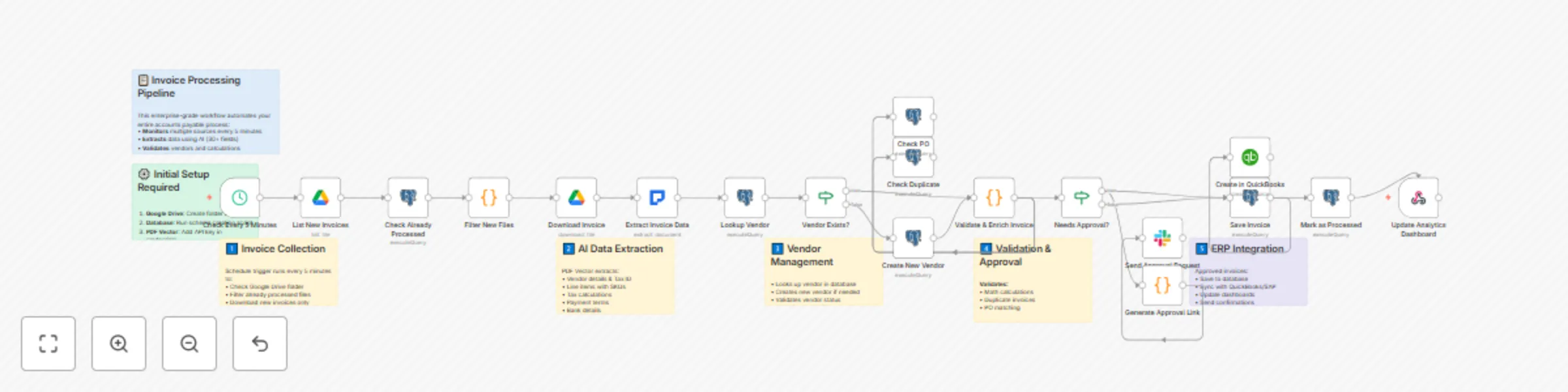
## Overview Transform your accounts payable department with this enterprise-grade invoice processing solution. This workflow automates the entire invoice lifecycle - from document ingestion through payment processing. It handles invoices from multiple sources (Google Drive, email attachments, API submissions), extracts data using AI, validates against purchase orders, routes for appropriate approvals based on amount thresholds, and integrates seamlessly with your ERP system. The solution includes vendor master data management, duplicate invoice detection, real-time spend analytics, and complete audit trails for compliance. ## What You Can Do This comprehensive workflow creates an intelligent invoice processing pipeline that monitors multiple input channels (Google Drive, email, webhooks) for new invoices and automatically extracts data from PDFs, images, and scanned documents using AI. It validates vendor information against your master database, matches invoices to purchase orders, and detects discrepancies. The workflow implements multi-level approval routing based on invoice amount and department, prevents duplicate payments through intelligent matching algorithms, and integrates with QuickBooks, SAP, or other ERP systems. Additionally, it generates real-time dashboards showing processing metrics and cash flow insights while sending automated reminders for pending approvals. ## Who It's For Perfect for medium to large businesses, accounting departments, and financial service providers processing more than 100 invoices monthly across multiple vendors. Ideal for organizations that need to enforce approval hierarchies and spending limits, require integration with existing ERP/accounting systems, want to reduce processing time from days to minutes, need audit trails and compliance reporting, and seek to eliminate manual data entry errors and duplicate payments. ## The Problem It Solves Manual invoice processing creates significant operational challenges including data entry errors (3-5% error rate), processing delays (8-10 days per invoice), duplicate payments (0.1-0.5% of invoices), approval bottlenecks causing late fees, lack of visibility into pending invoices and cash commitments, and compliance issues from missing audit trails. This workflow reduces processing time by 80%, eliminates data entry errors, prevents duplicate payments, and provides complete visibility into your payables process. ## Setup Instructions 1. **Google Drive Setup**: Create dedicated folders for invoice intake and configure access permissions 2. **PDF Vector Configuration**: Set up API credentials with appropriate rate limits for your volume 3. **Database Setup**: Deploy the provided schema for vendor master and invoice tracking tables 4. **Email Integration**: Configure IMAP credentials for invoice email monitoring (optional) 5. **ERP Connection**: Set up API access to your accounting system (QuickBooks, SAP, etc.) 6. **Approval Rules**: Define approval thresholds and routing rules in the configuration node 7. **Notification Setup**: Configure Slack/email for approval notifications and alerts ## Key Features - **Multi-Channel Invoice Ingestion**: Automatically collect invoices from Google Drive, email attachments, and API uploads - **Advanced OCR and AI Extraction**: Process any invoice format including handwritten notes and poor quality scans - **Vendor Master Integration**: Validate and enrich vendor data, maintaining a clean vendor database - **3-Way Matching**: Automatically match invoices to purchase orders and goods receipts - **Dynamic Approval Routing**: Route based on amount, department, vendor, or custom rules - **Duplicate Detection**: Prevent duplicate payments using fuzzy matching algorithms - **Real-Time Analytics**: Track KPIs like processing time, approval delays, and early payment discounts - **Exception Handling**: Intelligent routing of problematic invoices for manual review - **Audit Trail**: Complete tracking of all actions, approvals, and system modifications - **Payment Scheduling**: Optimize payment timing to capture discounts and manage cash flow ## Customization Options This workflow can be customized to add industry-specific extraction fields, implement GL coding rules based on vendor or amount, create department-specific approval workflows, add currency conversion for international invoices, integrate with additional systems (banks, expense management), configure custom dashboards and reporting, set up vendor portals for invoice status inquiries, and implement machine learning for automatic GL coding suggestions. **Note:** This workflow uses the PDF Vector community node. Make sure to install it from the n8n community nodes collection before using this template.

P
PDF Vector
Invoice Processing
12 Sep 2025
707
0
Workflow preview: Build academic knowledge graph from research papers with PDF vector, GPT-4 and Neo4j
Free intermediate

Build academic knowledge graph from research papers with PDF vector, GPT-4 and Neo4j

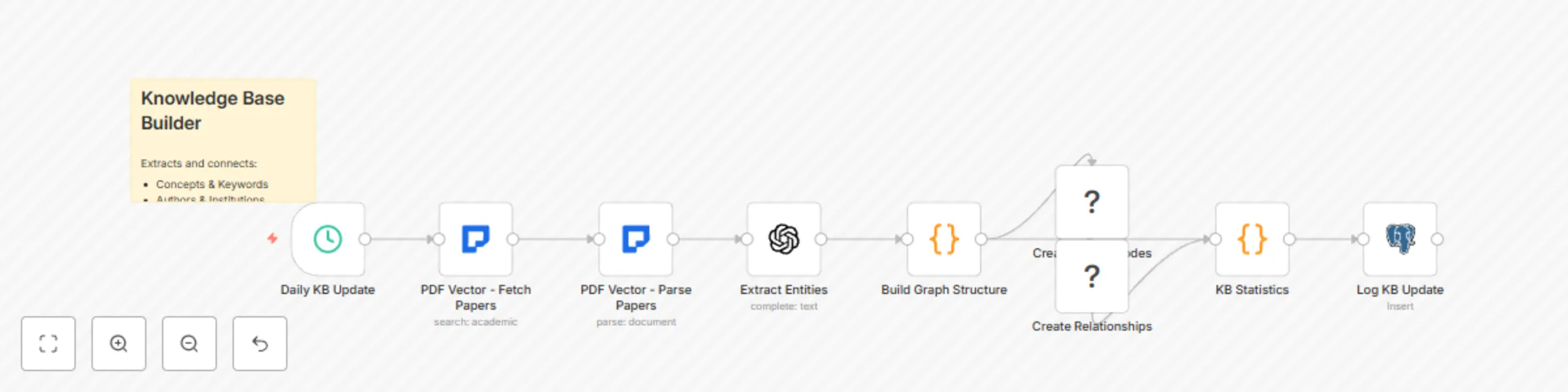
*This workflow contains community nodes that are only compatible with the self-hosted version of n8n.* ## Transform Research Papers into a Searchable Knowledge Graph This workflow automatically builds and maintains a comprehensive knowledge graph from academic papers, enabling researchers to discover connections between concepts, track research evolution, and perform semantic searches across their field of study. By combining PDF Vector's paper parsing capabilities with GPT-4's entity extraction and Neo4j's graph database, this template creates a powerful research discovery tool. ### Target Audience & Problem Solved This template is designed for: - **Research institutions** building internal knowledge repositories - **Academic departments** tracking research trends and collaborations - **R&D teams** mapping technology landscapes - **Libraries and archives** creating searchable research collections It solves the problem of information silos in academic research by automatically extracting and connecting key concepts, methods, authors, and findings across thousands of papers. ### Prerequisites - n8n instance with PDF Vector node installed - OpenAI API key for GPT-4 access - Neo4j database instance (local or cloud) - Basic understanding of graph databases - At least 100 API credits for PDF Vector (processes ~50 papers) ### Step-by-Step Setup Instructions 1. **Configure PDF Vector Credentials** - Navigate to Credentials in n8n - Add new PDF Vector credentials with your API key - Test the connection to ensure it's working 2. **Set Up Neo4j Database** - Install Neo4j locally or create a cloud instance at [Neo4j Aura](https://neo4j.com/cloud/aura/) - Note your connection URI, username, and password - Create database constraints for better performance: ```cypher CREATE CONSTRAINT paper_id IF NOT EXISTS ON (p:Paper) ASSERT p.id IS UNIQUE; CREATE CONSTRAINT author_name IF NOT EXISTS ON (a:Author) ASSERT a.name IS UNIQUE; CREATE CONSTRAINT concept_name IF NOT EXISTS ON (c:Concept) ASSERT c.name IS UNIQUE; ``` 3. **Configure OpenAI Integration** - Add OpenAI credentials in n8n - Ensure you have GPT-4 access (GPT-3.5 can be used with reduced accuracy) - Set appropriate rate limits to avoid API throttling 4. **Import and Configure the Workflow** - Import the template JSON into n8n - Update the search query in the "PDF Vector - Fetch Papers" node to your research domain - Adjust the schedule trigger frequency based on your needs - Configure the PostgreSQL connection for logging (optional) 5. **Test with Sample Papers** - Manually trigger the workflow - Monitor the execution for any errors - Check Neo4j browser to verify nodes and relationships are created - Adjust entity extraction prompts if needed for your domain ### Implementation Details The workflow operates in several stages: 1. **Paper Discovery**: Uses PDF Vector's academic search to find relevant papers 2. **Content Parsing**: Leverages LLM-enhanced parsing for accurate text extraction 3. **Entity Extraction**: GPT-4 identifies concepts, methods, datasets, and relationships 4. **Graph Construction**: Creates nodes and relationships in Neo4j 5. **Statistics Tracking**: Logs processing metrics for monitoring ### Customization Guide **Adjusting Entity Types:** Edit the GPT-4 prompt in the "Extract Entities" node to include domain-specific entities: ```javascript // Add custom entity types like: // - Algorithms // - Datasets // - Institutions // - Funding sources ``` **Modifying Relationship Types:** Extend the "Build Graph Structure" node to create custom relationships: ```javascript // Examples: // COLLABORATES_WITH (between authors) // EXTENDS (between papers) // FUNDED_BY (paper to funding source) ``` **Changing Search Scope:** - Modify providers array to include/exclude databases - Adjust year range for historical or recent focus - Add keyword filters for specific subfields **Scaling Considerations:** - For large-scale processing (>1000 papers/day), implement batching - Use Redis for deduplication across runs - Consider implementing incremental updates to avoid reprocessing ### Knowledge Base Features: - Automatic concept extraction with GPT-4 - Research timeline tracking - Author collaboration networks - Topic evolution visualization - Semantic search interface via Neo4j ### Components: 1. **Paper Ingestion**: Continuous monitoring and parsing 2. **Entity Extraction**: Identify key concepts, methods, datasets 3. **Relationship Mapping**: Connect papers, authors, concepts 4. **Knowledge Graph**: Store in graph database 5. **Search Interface**: Query by concept, author, or topic 6. **Visualization**: Interactive knowledge exploration

P
PDF Vector
AI RAG
14 Aug 2025
1880
0
Workflow preview: Pdf report monitor with GPT-3.5 insights and Slack/Email alerts
Free intermediate

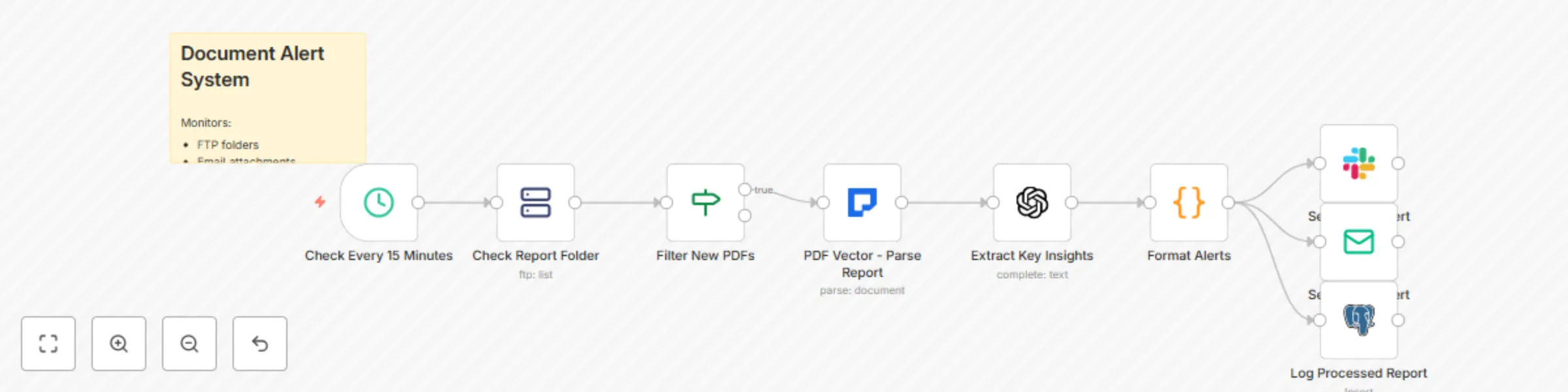
Pdf report monitor with GPT-3.5 insights and Slack/Email alerts

*This workflow contains community nodes that are only compatible with the self-hosted version of n8n.* ## Intelligent Document Monitoring and Alert System This workflow creates an automated monitoring system that watches for new PDF reports across multiple sources, extracts key insights using AI, and sends formatted alerts to your team via Slack or email. By combining PDF Vector's parsing capabilities with GPT-powered analysis, teams can stay informed about critical documents without manual review, ensuring important information never gets missed. ### Target Audience & Problem Solved This template is designed for: - **Finance teams** monitoring quarterly reports and regulatory filings - **Compliance officers** tracking policy updates and audit reports - **Research departments** alerting on new publications and preprints - **Operations teams** monitoring supplier reports and KPI documents - **Executive assistants** summarizing board materials and briefings It solves the problem of information overload by automatically processing incoming documents, extracting only the most relevant insights, and delivering them in digestible formats to the right people at the right time. ### Prerequisites - n8n instance with PDF Vector node installed - PDF Vector API credentials with parsing capabilities - OpenAI API key for insight extraction - Slack workspace admin access (for Slack alerts) - SMTP credentials (for email alerts) - FTP/Cloud storage access for document sources - Minimum 50 API credits for continuous monitoring ### Step-by-Step Setup Instructions 1. **Configure Document Sources** - Set up FTP credentials in n8n for folder monitoring - Or configure Google Drive/Dropbox integration - Define the folder paths to monitor - Set file naming patterns to watch (e.g., "*report*.pdf") 2. **Set Up API Integrations** - Add PDF Vector credentials in n8n - Configure OpenAI credentials with appropriate model access - Set up Slack app and add webhook URL - Configure SMTP settings for email alerts 3. **Configure Monitoring Schedule** - Open the "Check Every 15 Minutes" node - Adjust frequency based on your needs: ```javascript // For hourly checks: "interval": 60 // For real-time monitoring (every 5 min): "interval": 5 ``` 4. **Customize Alert Channels** - **Slack Setup**: - Create dedicated channels (#reports, #alerts) - Configure webhook for each channel - Set up user mentions for urgent alerts - **Email Setup**: - Define recipient lists by document type - Configure email templates - Set up priority levels for subject lines 5. **Define Alert Rules** - Modify the "Extract Key Insights" prompt for your domain - Set conditions for high-priority alerts - Configure which metrics trigger notifications - Define sentiment thresholds ### Implementation Details The workflow implements a comprehensive monitoring pipeline: 1. **Source Monitoring**: Polls multiple sources for new PDFs 2. **Intelligent Parsing**: Uses LLM-enhanced parsing for complex documents 3. **Insight Extraction**: AI analyzes content for key information 4. **Priority Classification**: Determines alert urgency based on content 5. **Multi-Channel Delivery**: Sends formatted alerts via configured channels 6. **Audit Trail**: Logs all processed documents for compliance ### Customization Guide **Adding Custom Document Types:** Extend the routing logic for specific document types: ```javascript // In "Route by Document Type" node: const documentTypes = { 'invoice': /invoice|bill|payment/i, 'contract': /contract|agreement|terms/i, 'report': /report|analysis|summary/i, 'compliance': /audit|compliance|regulatory/i }; ``` **Customizing Insight Extraction:** Modify the AI prompt for domain-specific analysis: ```javascript // Financial documents: "Extract: 1) Revenue figures 2) YoY growth 3) Risk factors 4) Guidance changes" // Compliance documents: "Extract: 1) Policy changes 2) Deadlines 3) Required actions 4) Penalties" // Research papers: "Extract: 1) Key findings 2) Methodology 3) Implications 4) Future work" ``` **Advanced Alert Formatting:** Create rich Slack messages with interactive elements: ```javascript // Add buttons for quick actions: { "type": "actions", "elements": [ { "type": "button", "text": { "type": "plain_text", "text": "View Full Report" }, "url": documentUrl }, { "type": "button", "text": { "type": "plain_text", "text": "Mark as Read" }, "action_id": "mark_read" } ] } ``` **Implementing Alert Conditions:** Add sophisticated filtering based on content: ```javascript // Alert only if certain conditions are met: if (insights.metrics.revenue_change < -10) { priority = 'urgent'; alertChannel = '#executive-alerts'; } if (insights.findings.includes('compliance violation')) { additionalRecipients.push('[email protected]'); } ``` **Adding Document Comparison:** Track changes between document versions: ```javascript // Compare with previous version: const previousDoc = await getLastVersion(documentType); const changes = compareDocuments(previousDoc, currentDoc); if (changes.significant) { alertMessage += `\n⚠️ Significant changes detected: ${changes.summary}`; } ``` ### Alert Features: - Monitor multiple document sources (FTP, cloud storage, email) - Extract key metrics and findings with AI - Send rich, formatted notifications - Track document processing history - Conditional alerts based on content analysis - Multi-channel alert routing ### Use Cases: - Financial report monitoring - Compliance document tracking - Research publication alerts - Customer report distribution - Board material summarization - Regulatory filing notifications ### Advanced Configuration **Performance Optimization:** - Implement caching to avoid reprocessing - Use batch processing for multiple documents - Set up parallel processing for different sources **Security Considerations:** - Encrypt sensitive document storage - Implement access controls for different alert channels - Audit log all document access

P
PDF Vector
AI Summarization
14 Aug 2025
146
0
Workflow preview: Academic research search across five databases with PDF vector & multiple exports
Free intermediate

Academic research search across five databases with PDF vector & multiple exports

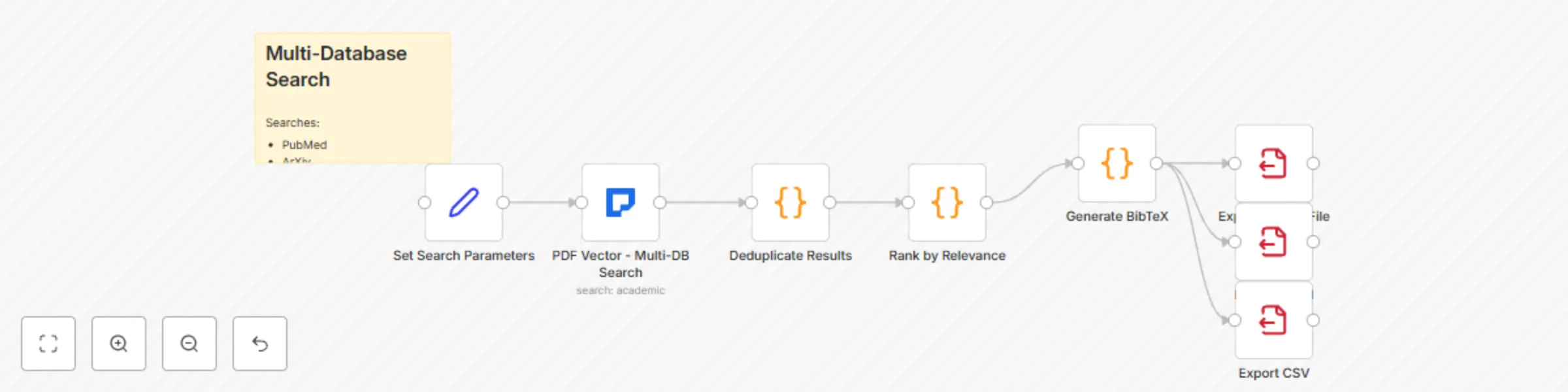
*This workflow contains community nodes that are only compatible with the self-hosted version of n8n.* **Description:** ## Unified Academic Search Across Major Research Databases This powerful workflow enables researchers to search multiple academic databases simultaneously, automatically deduplicate results, and export formatted bibliographies. By leveraging PDF Vector's multi-database search capabilities, researchers can save hours of manual searching and ensure comprehensive literature coverage across PubMed, ArXiv, Google Scholar, Semantic Scholar, and ERIC databases. ### Target Audience & Problem Solved This template is designed for: - **Graduate students** conducting systematic literature reviews - **Researchers** ensuring comprehensive coverage of their field - **Librarians** helping patrons with complex searches - **Academic teams** building shared bibliographies It solves the critical problem of fragmented academic search by providing a single interface to query all major databases, eliminating duplicate results, and standardizing output formats. ### Prerequisites - n8n instance with PDF Vector node installed - PDF Vector API credentials with search permissions - Basic understanding of academic search syntax - Optional: PostgreSQL for search history logging - Minimum 50 API credits for comprehensive searches ### Step-by-Step Setup Instructions 1. **Configure PDF Vector Credentials** - Go to n8n Credentials section - Create new PDF Vector credentials - Enter your API key from pdfvector.io - Test the connection to verify setup 2. **Import the Workflow Template** - Copy the template JSON code - In n8n, click "Import Workflow" - Paste the JSON and save - Review all nodes for any configuration needs 3. **Customize Search Parameters** - Open the "Set Search Parameters" node - Modify the default search query for your field - Adjust the year range (default: 2020-present) - Set results per source limit (default: 25) 4. **Configure Export Options** - Choose your preferred export formats (BibTeX, CSV, JSON) - Set the output directory for files - Configure file naming conventions - Enable/disable specific export types 5. **Test Your Configuration** - Run the workflow with a sample query - Check that all databases return results - Verify deduplication is working correctly - Confirm export files are created properly ### Implementation Details The workflow implements a sophisticated search pipeline: 1. **Parallel Database Queries**: Searches all configured databases simultaneously for efficiency 2. **Smart Deduplication**: Uses DOI matching and fuzzy title comparison to remove duplicates 3. **Relevance Scoring**: Combines citation count, title relevance, and recency for ranking 4. **Format Generation**: Creates properly formatted citations in multiple styles 5. **Batch Processing**: Handles large result sets without memory issues ### Customization Guide **Adding Custom Databases:** ```javascript // In the PDF Vector search node, add to providers array: "providers": ["pubmed", "semantic_scholar", "arxiv", "google_scholar", "eric", "your_custom_db"] ``` **Modifying Relevance Algorithm:** Edit the "Rank by Relevance" node to adjust scoring weights: ```javascript // Adjust these weights for your needs: const titleWeight = 10; // Title match importance const citationWeight = 5; // Citation count importance const recencyWeight = 10; // Recent publication bonus const fulltextWeight = 15; // Full-text availability bonus ``` **Custom Export Formats:** Add new format generators in the workflow: ```javascript // Example: Add APA format export const apaFormat = papers.map(p => { const authors = p.authors.slice(0, 3).join(', '); return `${authors} (${p.year}). ${p.title}. ${p.journal || 'Preprint'}.`; }); ``` **Advanced Filtering:** Implement additional filters: - Journal impact factor thresholds - Open access only options - Language restrictions - Methodology filters for systematic reviews ### Search Features: - Query multiple databases in parallel - Advanced filtering and deduplication - Citation format export (BibTeX, RIS, etc.) - Relevance ranking across sources - Full-text availability checking ### Workflow Process: 1. **Input**: Search query and parameters 2. **Parallel Search**: Query all databases 3. **Merge & Deduplicate**: Combine results 4. **Rank**: Sort by relevance/citations 5. **Enrich**: Add full-text links 6. **Export**: Multiple format options

P
PDF Vector
AI RAG
14 Aug 2025
1087
0
Workflow preview: Generate multi-format research paper summaries with GPT-4 and PDF vector
Free intermediate

Generate multi-format research paper summaries with GPT-4 and PDF vector

*This workflow contains community nodes that are only compatible with the self-hosted version of n8n.* ## Transform Complex Research Papers into Accessible Summaries This workflow automatically generates multiple types of summaries from research papers, making complex academic content accessible to different audiences. By combining PDF Vector's advanced parsing capabilities with GPT-4's language understanding, researchers can quickly digest papers outside their expertise, communicate findings to diverse stakeholders, and create social media-friendly research highlights. ### Target Audience & Problem Solved This template is designed for: - **Research communicators** translating complex findings for public audiences - **Journal editors** creating accessible abstracts and highlights - **Science journalists** quickly understanding technical papers - **Academic institutions** improving research visibility and impact - **Funding agencies** reviewing large volumes of research outputs It solves the critical challenge of research accessibility by automatically generating summaries tailored to different audience needs - from technical experts to the general public. ### Prerequisites - n8n instance with PDF Vector node installed - OpenAI API key with GPT-4 or GPT-3.5 access - PDF Vector API credentials - Basic understanding of webhook setup - Optional: Slack/Email integration for notifications - Minimum 20 API credits per paper summarized ### Step-by-Step Setup Instructions 1. **Configure API Credentials** - Navigate to n8n Credentials section - Add PDF Vector credentials with your API key - Add OpenAI credentials with your API key - Test both connections to ensure they work 2. **Set Up the Webhook Endpoint** - Import the workflow template into n8n - Note the webhook URL from the "Webhook - Paper URL" node - This URL will receive POST requests with paper URLs - Example request format: ```json { "paperUrl": "https://example.com/paper.pdf" } ``` 3. **Configure Summary Models** - Review the OpenAI model settings in each summary node - GPT-4 recommended for executive and technical summaries - GPT-3.5-turbo suitable for lay and social media summaries - Adjust temperature settings for creativity vs accuracy 4. **Customize Output Formats** - Modify the "Combine All Summaries" node for your needs - Add additional fields or metadata as required - Configure response format (JSON, HTML, plain text) 5. **Test the Workflow** - Use a tool like Postman or curl to send a test request - Monitor the execution for any errors - Verify all four summary types are generated - Check response time and adjust timeout if needed ### Implementation Details The workflow implements a sophisticated summarization pipeline: 1. **PDF Parsing**: Uses LLM-enhanced parsing for accurate extraction from complex layouts 2. **Parallel Processing**: Generates all summary types simultaneously for efficiency 3. **Audience Targeting**: Each summary type uses specific prompts and constraints 4. **Quality Control**: Structured prompts ensure consistent, high-quality outputs 5. **Flexible Output**: Returns all summaries in a single API response ### Customization Guide **Adding Custom Summary Types:** Create new summary nodes with specialized prompts: ```javascript // Example: Policy Brief Summary { "content": "Create a policy brief (max 300 words) highlighting: 1. Policy-relevant findings 2. Recommendations for policymakers 3. Societal implications 4. Implementation considerations Paper content: {{ $json.content }}" } ``` **Modifying Summary Lengths:** Adjust word limits in each summary prompt: ```javascript // In Executive Summary node: "max 500 words" // Change to your desired length // In Tweet Summary node: "max 280 characters" // Twitter limit ``` **Adding Language Translation:** Extend the workflow with translation nodes: ```javascript // After summary generation, add: "Translate this summary to Spanish: {{ $json.executiveSummary }}" ``` **Implementing Caching:** Add a caching layer to avoid reprocessing: - Use Redis or n8n's static data - Cache based on paper DOI or URL hash - Set appropriate TTL for cache entries **Batch Processing Enhancement:** For multiple papers, modify the workflow: - Accept array of paper URLs - Use SplitInBatches node for processing - Aggregate results before responding ### Summary Types: 1. **Executive Summary**: 1-page overview for decision makers 2. **Technical Summary**: Detailed summary for researchers 3. **Lay Summary**: Plain language for general audience 4. **Social Media**: Tweet-sized key findings ### Key Features: - Parse complex academic PDFs with LLM enhancement - Generate multiple summary types simultaneously - Extract and highlight key methodology and findings - Create audience-appropriate language and depth - API-driven for easy integration ### Advanced Features **Quality Metrics:** Add a quality assessment node: ```javascript // Evaluate summary quality const qualityChecks = { hasKeyFindings: summary.includes('findings'), appropriateLength: summary.length <= maxLength, noJargon: !technicalTerms.some(term => summary.includes(term)) }; ``` **Template Variations:** Create field-specific templates: - Medical research: Include clinical implications - Engineering papers: Focus on technical specifications - Social sciences: Emphasize methodology and limitations

P
PDF Vector
AI Summarization
14 Aug 2025
630
0
Workflow preview: Automated academic paper monitoring with PDF vector, GPT-3.5, & Slack alerts
Free intermediate

Automated academic paper monitoring with PDF vector, GPT-3.5, & Slack alerts

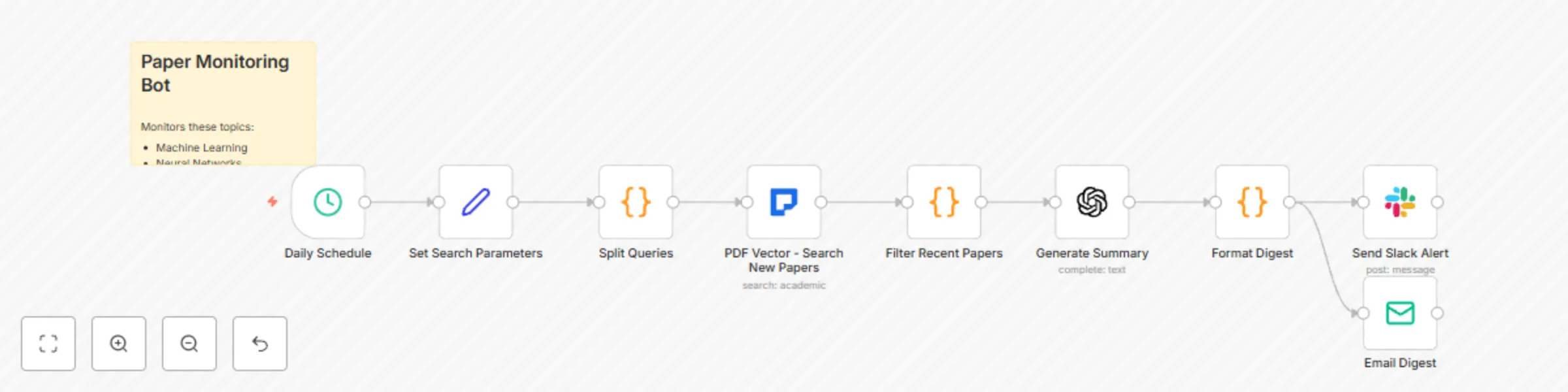
*This workflow contains community nodes that are only compatible with the self-hosted version of n8n.* ## Automated Academic Paper Monitoring Stay updated with the latest research in your field. This bot monitors multiple academic databases for new papers matching your interests and sends personalized alerts. ### Bot Features: - Monitor keywords across multiple databases - Filter by authors, journals, or institutions - Daily/weekly digest emails - Slack notifications for high-impact papers - Automatic paper summarization ### Workflow Components: 1. **Schedule**: Run daily/weekly checks 2. **Search**: Query latest papers across databases 3. **Filter**: Apply custom criteria 4. **Summarize**: Generate paper summaries 5. **Notify**: Send alerts via email/Slack 6. **Archive**: Store papers for future reference ### Perfect For: - Research groups tracking their field - PhD students monitoring specific topics - Labs following competitor publications

P
PDF Vector
Personal Productivity
14 Aug 2025
550
0
Workflow preview: Extract data from documents with GPT-4, PDFVector & PostgreSQL export
Free intermediate

Extract data from documents with GPT-4, PDFVector & PostgreSQL export

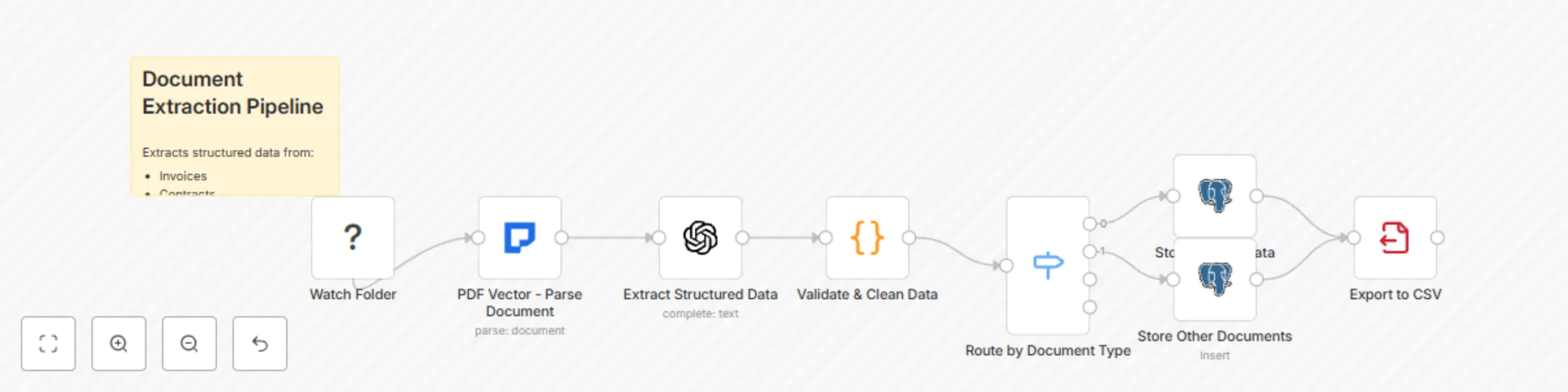
## Intelligent Document Processing & Data Extraction Extract structured data from unstructured documents like invoices, contracts, reports, and forms. Uses AI to identify and extract key information automatically. ### Pipeline Features: - Process multiple document types (PDFs, Word docs) - AI-powered field extraction - Custom extraction templates - Data validation and cleaning - Export to databases or spreadsheets ### Workflow Steps: 1. **Document Input**: Various sources supported 2. **Parse Document**: Convert to structured text 3. **Extract Fields**: AI identifies key data points 4. **Validate Data**: Check extracted values 5. **Transform**: Format for destination system 6. **Store/Export**: Save to database or file ### Use Cases: - Invoice processing automation - Contract data extraction - Form digitization - Report mining

P
PDF Vector
Document Extraction
14 Aug 2025
1068
0
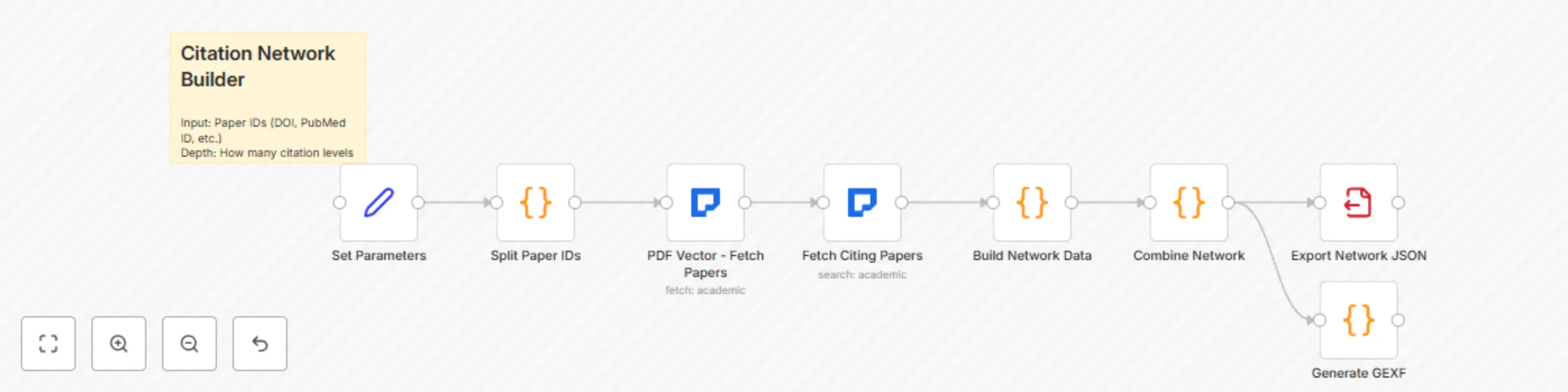
Workflow preview: Build academic citation networks with PDF Vector API for Gephi visualization
Free intermediate

Build academic citation networks with PDF Vector API for Gephi visualization

*This workflow contains community nodes that are only compatible with the self-hosted version of n8n.* ## Build Citation Networks from Research Papers Automatically build and visualize citation networks by fetching papers and their references. Discover influential works and research trends in any field. ### Workflow Features: - Start with seed papers (DOIs, PubMed IDs, etc.) - Fetch cited and citing papers recursively - Build network graph data - Export to visualization tools (Gephi, Cytoscape) - Identify key papers and research clusters ### Process Flow: 1. **Input**: Seed paper identifiers 2. **Fetch Papers**: Get paper details and references 3. **Expand Network**: Fetch cited papers (configurable depth) 4. **Build Graph**: Create nodes and edges 5. **Analyze**: Calculate metrics (centrality, clusters) 6. **Export**: Generate visualization-ready data ### Applications: - Research trend analysis - Finding seminal papers in a field - Grant proposal background research

P
PDF Vector
Document Extraction
14 Aug 2025
366
0
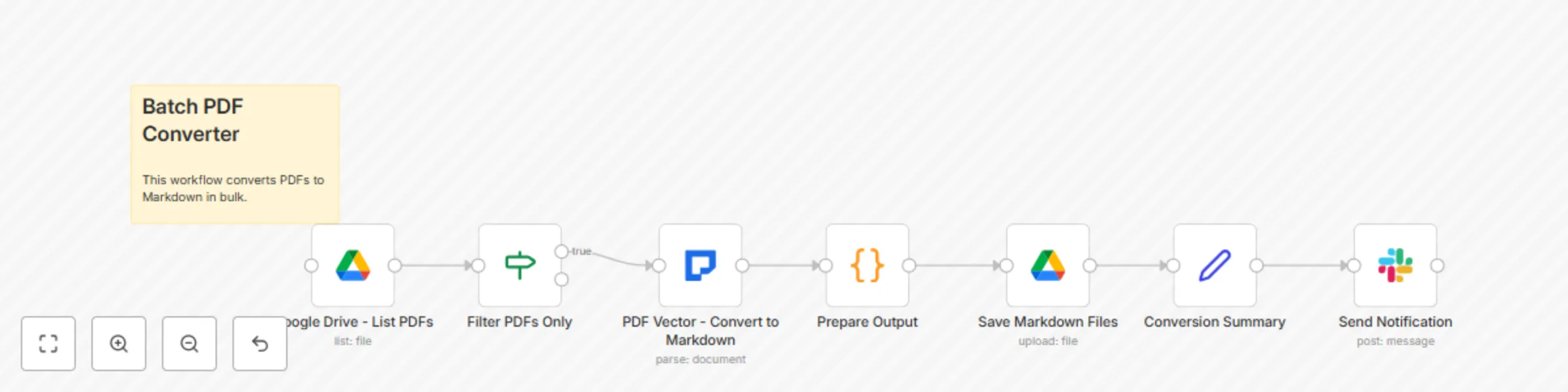
Workflow preview: Bulk PDF to markdown conversion with Google Drive & LLM-powered parsing
Free intermediate

Bulk PDF to markdown conversion with Google Drive & LLM-powered parsing

*This workflow contains community nodes that are only compatible with the self-hosted version of n8n.* ## High-Volume PDF to Markdown Conversion Convert multiple PDF documents to clean, structured Markdown format in bulk. Perfect for documentation teams, content managers, and anyone needing to process large volumes of PDFs. ### Key Features: - Process PDFs from multiple sources (URLs, Google Drive, Dropbox) - Intelligent LLM-based parsing for complex layouts - Preserve formatting, tables, and structure - Export to various destinations ### Workflow Components: 1. **Input Sources**: Multiple file sources supported 2. **Batch Processing**: Handle hundreds of PDFs efficiently 3. **Smart Parsing**: Auto-detect when LLM parsing is needed 4. **Quality Check**: Validate conversion results 5. **Export Options**: Save to cloud storage or database ### Ideal For: - Converting technical documentation - Migrating legacy PDF content - Building searchable knowledge bases

P
PDF Vector
Content Creation
14 Aug 2025
830
0
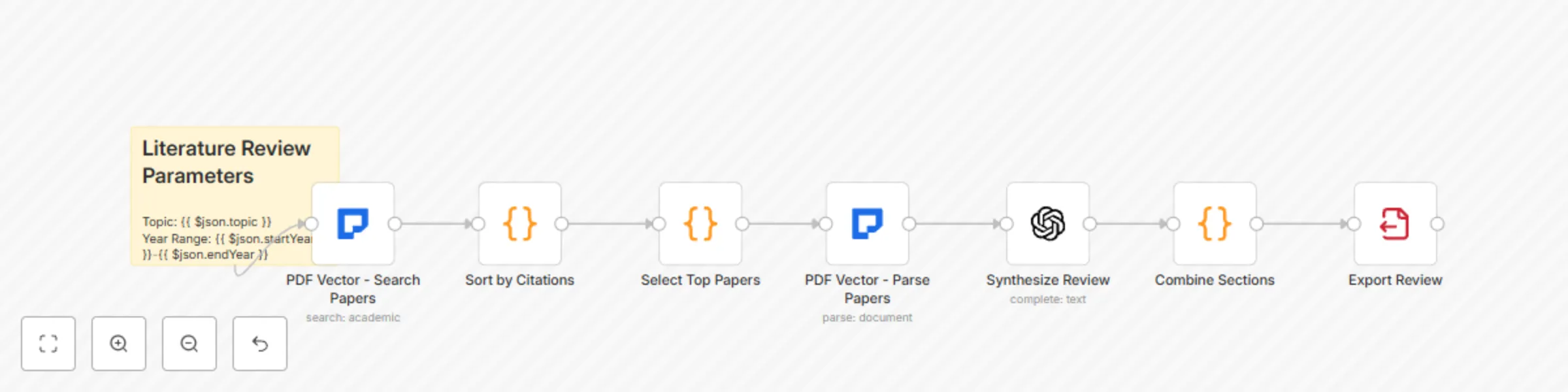
Workflow preview: Build comprehensive literature reviews with GPT-4 and multi-database search
Free intermediate

Build comprehensive literature reviews with GPT-4 and multi-database search

*This workflow contains community nodes that are only compatible with the self-hosted version of n8n.* ## Comprehensive Literature Review Automation Automate your literature review process by searching across multiple academic databases, parsing papers, and organizing findings into a structured review document. ### Features: - Search multiple academic databases simultaneously (PubMed, ArXiv, Google Scholar, etc.) - Parse and analyze top papers automatically - Generate citation-ready summaries - Export to various formats (Markdown, Word, PDF) ### Workflow Steps: 1. **Input**: Research topic and parameters 2. **PDF Vector Search**: Query multiple academic databases 3. **Filter & Rank**: Select top relevant papers 4. **Parse Papers**: Extract content from PDFs 5. **Synthesize**: Create literature review sections 6. **Export**: Generate final document ### Use Cases: - PhD students conducting systematic reviews - Researchers exploring new fields - Grant writers needing background sections

P
PDF Vector
Document Extraction
14 Aug 2025
804
0
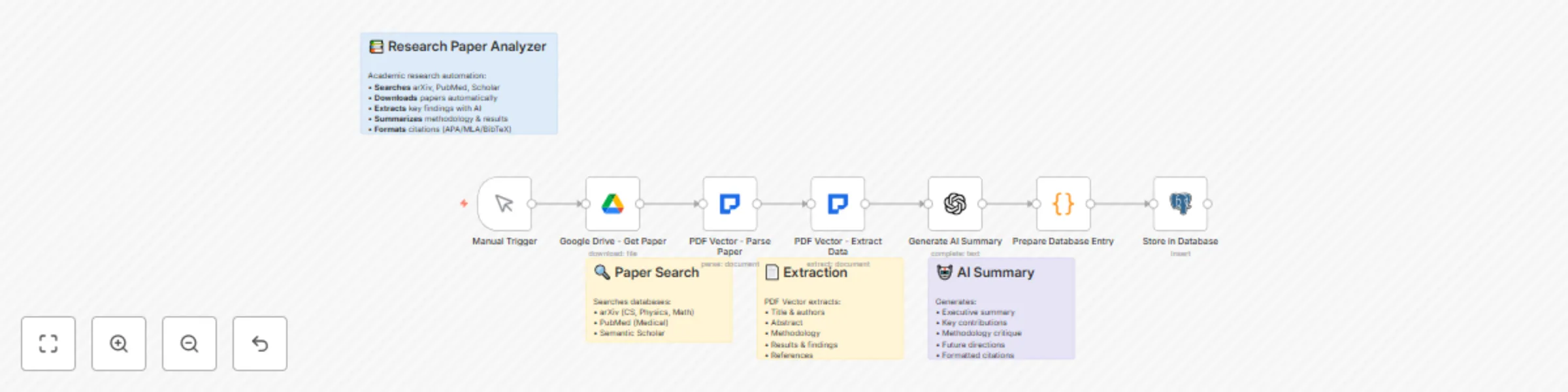
Workflow preview: Parse & analyze research papers with PDF vector, GPT-4 and database storage
Free beginner

Parse & analyze research papers with PDF vector, GPT-4 and database storage

## Automated Research Paper Analysis Pipeline This workflow automatically analyzes research papers by: - Parsing PDF documents into clean Markdown format - Extracting key information using AI analysis - Generating concise summaries and insights - Storing results in a database for future reference Perfect for researchers, students, and academics who need to quickly understand the key points of multiple research papers. ### How it works: 1. **Trigger**: Manual trigger or webhook with PDF URL 2. **PDF Vector**: Parses the PDF document with LLM enhancement 3. **OpenAI**: Analyzes the parsed content to extract key findings, methodology, and conclusions 4. **Database**: Stores the analysis results 5. **Output**: Returns structured analysis data ### Setup: - Configure PDF Vector credentials - Set up OpenAI API key - Connect your preferred database (PostgreSQL, MySQL, etc.)

P
PDF Vector
Document Extraction
14 Aug 2025
839
0