Extract & process specific links from sitemap.xml
Workflow preview

$20/month : Unlimited workflows
2500 executions/month

THE #1 IN WEB SCRAPING
Scrape any website without limits
HOSTINGER  Early Deal
DISCOUNT 20% Try free
Early DealDISCOUNT 20%
Self-hosted n8n
Unlimited workflows - from $4.99/mo

#1 hub for scraping, AI & automation
6000+ actors - $5 credits/mo
Important notice
This workflow is provided as-is. Please review and test before using in production.
Overview
Description
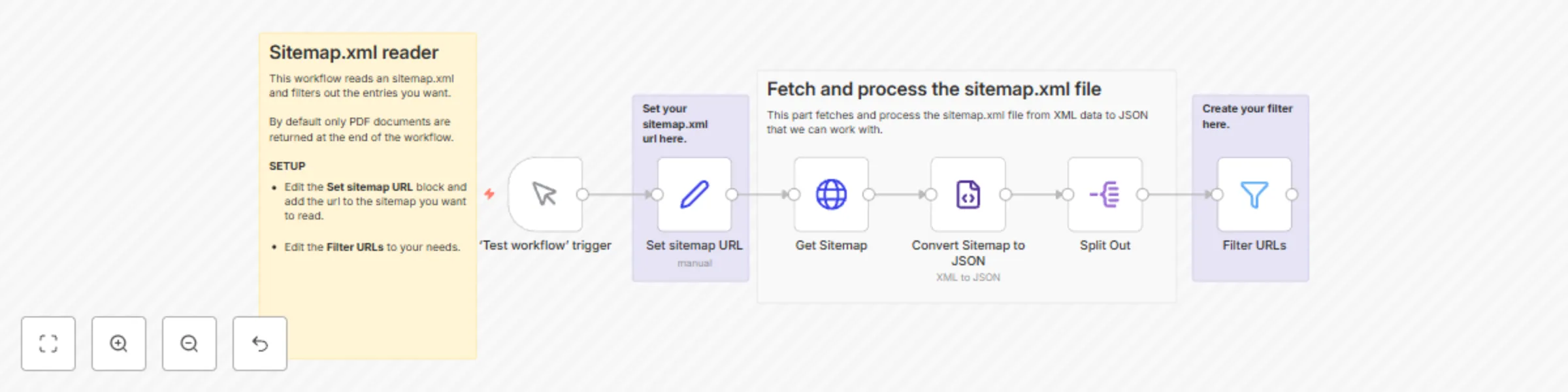
This workflow reads a sitemap.xml file, extracts all URLs, and allows you to filter out specific types of links—such as PDF files, images, or any other content—based on your needs.
Who Is This For?
- SEO Specialists looking to analyze specific URLs in their sitemap.
- Developers who need to extract links for automated processing.
- Content Managers filtering out downloadable assets like PDFs or images.
How It Works
- Fetch
sitemap.xml– The workflow reads the sitemap file from a given URL. - Extract URLs – Parses all the URLs listed in the sitemap.
- Filter URLs – Use a simple filter to extract only the links you need (e.g., *.pdf).
- Export or Process – The filtered list can be sent via email, stored in a database, or used in another workflow.
Customization
- Edit the Set sitemap URL block and edit the
sitemapUrlvalue to the sitemap you want to fetch. - Edit the Filter URLs block and edit the filter conditions to meet your needs.