Extract named entities from web pages with Google Natural Language API

Workflow preview

Workflow preview
100%
Extract named entities from web pages with Google Natural Language API preview
Open on n8n.io

Important notice

This workflow is provided as-is. Please review and test before using in production.

1. Workflow Overview

Who is this for? Content strategists analyzing web page semantic content SEO professionals conducting entity based analysis Data analysts extracting structured data from web pages Marketers researc...

Best for

  • Market Research automation workflows
  • AI Summarization automation workflows
  • intermediate n8n builders looking for reusable templates

Tools used

n8n-nodes-base.respondtowebhook, n8n-nodes-base.httprequest, n8n-nodes-base.stickynote, n8n-nodes-base.webhook, n8n-nodes-base.code

Source and attribution

This workflow is cataloged by N8N Workflows and links back to its original n8n.io source page by Hueston.

Original n8n.io source

1.1 Workflow description

Title
Extract named entities from web pages with Google Natural Language API
Workflow name
Extract named entities from web pages with Google Natural Language API

Who is this for?

  • Content strategists analyzing web page semantic content
  • SEO professionals conducting entity-based analysis
  • Data analysts extracting structured data from web pages
  • Marketers researching competitor content strategies
  • Researchers organizing and categorizing web content
  • Anyone needing to automatically extract entities from web pages

What problem is this workflow solving?

Manually identifying and categorizing entities (people, organizations, locations, etc.) on web pages is time-consuming and error-prone. This workflow solves this challenge by:

  • Automating the extraction of named entities from any web page
  • Leveraging Google's powerful Natural Language API for accurate entity recognition
  • Processing web pages through a simple webhook interface
  • Providing structured entity data that can be used for analysis or further processing
  • Eliminating hours of manual content analysis and categorization

What this workflow does

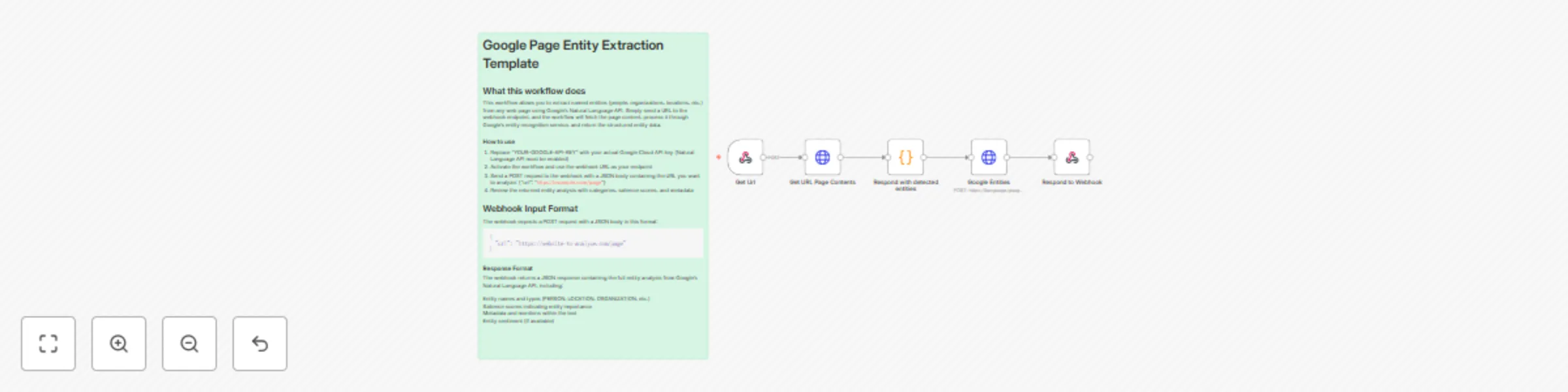
This workflow creates an automated pipeline between a webhook and Google's Natural Language API to:

  1. Receive a URL through a webhook endpoint
  2. Fetch the HTML content from the specified URL
  3. Clean and prepare the HTML for processing
  4. Submit the HTML to Google's Natural Language API for entity analysis
  5. Return the structured entity data through the webhook response
  6. Extract entities including people, organizations, locations, and more with their salience scores

Setup

Prerequisites:

  • An n8n instance (cloud or self-hosted)
  • Google Cloud Platform account with Natural Language API enabled
  • Google API key with access to the Natural Language API

Google Cloud Setup:

  • Create a project in Google Cloud Platform
  • Enable the Natural Language API for your project
  • Create an API key with access to the Natural Language API
  • Copy your API key for use in the workflow

n8n Setup:

  • Import the workflow JSON into your n8n instance
  • Replace "YOUR-GOOGLE-API-KEY" in the "Google Entities" node with your actual API key
  • Activate the workflow to enable the webhook endpoint
  • Copy the webhook URL from the "Webhook" node for later use

Testing:

  • Use a tool like Postman or cURL to send a POST request to your webhook URL
  • Include a JSON body with the URL you want to analyze: {"url": "https://example.com"}
  • Verify that you receive a response containing the entity analysis data

How to customize this workflow to your needs

Analyzing Specific Entity

  • Modify the "Google Entities" node parameters to include entityType filters
  • Add a "Function" node after "Google Entities" to filter specific entity types
  • Create conditions to extract only entities of interest (people, organizations, etc.)

Processing Multiple URLs in Batch:

  • Replace the webhook with a different trigger (HTTP Request, Google Sheets, etc.)
  • Add a "Split In Batches" node to process multiple URLs
  • Use a "Merge" node to combine results before sending the response

Enhancing Entity Data:

  • Add additional API calls to enrich extracted entities with more information
  • Implement sentiment analysis alongside entity extraction
  • Create a data transformation node to format entities by type or relevance

Additional Notes

  • This workflow respects Google's API rate limits by processing one URL at a time
  • The Natural Language API may not identify all entities on a page, particularly for highly technical content
  • HTML content is trimmed to 100,000 characters if longer to avoid API limitations
  • Consider legal and privacy implications when analyzing and storing entity data from web pages
  • You may want to adjust the HTML cleaning process for specific website structures

❤️ Hueston SEO Team

1.2 Logical Blocks

This catalog entry is organized from the workflow JSON. The node-level section below shows the executable blocks available for review before importing the template.

2. Block-by-Block Analysis

Block 1 - Respond to Webhook

Type / Role
n8n-nodes-base.respondToWebhook - respondToWebhook
Config choices
Version 1.1

Block 2 - Google Entities

Type / Role
n8n-nodes-base.httpRequest - httpRequest
Config choices
Version 4.2

Block 3 - Sticky Note

Type / Role
n8n-nodes-base.stickyNote - stickyNote
Config choices
Version 1

Block 4 - Get Url

Type / Role
n8n-nodes-base.webhook - webhook
Config choices
Version 2

Block 5 - Get URL Page Contents

Type / Role
n8n-nodes-base.httpRequest - httpRequest
Config choices
Version 4.2

Block 6 - Respond with detected entities

Type / Role
n8n-nodes-base.code - code
Config choices
Version 2

3. Summary Table

Workflow Extract named entities from web pages with Google Natural Language API
Complexity intermediate
Nodes 6
Categories Market Research, AI Summarization
Author Hueston
Published 08 May 2025

4. Reproducing the Workflow from Scratch

  1. 1. Download the workflow JSON

    Use the JSON export at /data/workflows/3950/3950.json as the source template for this automation.

  2. 2. Import the template into n8n

    Open n8n, import the downloaded JSON, and review each node before activating the workflow.

  3. 3. Configure credentials and variables

    Replace placeholder credentials, API keys, webhook URLs, account IDs, and environment-specific values with your own settings.

  4. 4. Test with sample data

    Run the workflow manually or in a staging workspace, inspect node output, and confirm downstream systems receive the expected data.

  5. 5. Activate and monitor

    Enable the workflow only after testing, then monitor executions, errors, and rate limits during the first production runs.

5. General Notes & Resources

Review imported nodes carefully before activation. This catalog entry is intended to help you inspect the workflow structure, understand required services, and find related templates faster.

Node names, credentials, schedules, webhook paths, and external service limits may need adjustment for your workspace.

Frequently asked questions

What does Extract named entities from web pages with Google Natural Language API do?

Who is this for? Content strategists analyzing web page semantic content SEO professionals conducting entity based analysis Data analysts extracting structured data from web pages Marketers researc...

What do I need before importing this workflow?

Review the workflow JSON, configure any required credentials in n8n, and test the automation in a safe workspace before using it in production.

Can I customize this workflow?

Yes. Use the block-by-block analysis and the downloadable JSON to inspect each node, then adjust credentials, prompts, schedules, filters, or destinations for your Market Research, AI Summarization use case.