Extract medical reports & generate AI health advice with Mistral AI & GPT-4
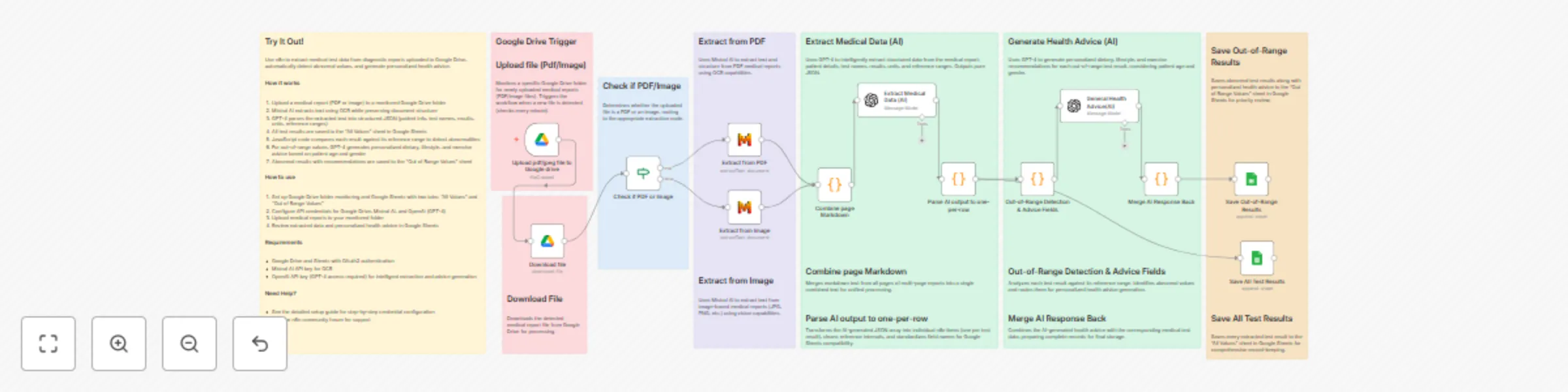
Workflow preview

$20/month : Unlimited workflows
2500 executions/month

THE #1 IN WEB SCRAPING
Scrape any website without limits
HOSTINGER  Early Deal
DISCOUNT 20% Try free
Early DealDISCOUNT 20%
Self-hosted n8n
Unlimited workflows - from $4.99/mo

#1 hub for scraping, AI & automation
6000+ actors - $5 credits/mo
Important notice
This workflow is provided as-is. Please review and test before using in production.
Overview
Try It Out!
Use n8n to extract medical test data from diagnostic reports uploaded to Google Drive, automatically detect abnormal values, and generate personalized health advice.
How it works
- Upload a medical report (PDF or image) to a monitored Google Drive folder
- Mistral AI extracts text using OCR while preserving document structure
- GPT-4 parses the extracted text into structured JSON (patient info, test names, results, units, reference ranges)
- All test results are saved to the "All Values" sheet in Google Sheets
- JavaScript code compares each result against its reference range to detect abnormalities
- For out-of-range values, GPT-4 generates personalized dietary, lifestyle, and exercise advice based on patient age and gender
- Abnormal results with recommendations are saved to the "Out of Range Values" sheet
How to use
- Set up Google Drive folder monitoring and Google Sheets with two tabs: "All Values" and "Out of Range Values"
- Configure API credentials for Google Drive, Mistral AI, and OpenAI (GPT-4)
- Upload medical reports to your monitored folder
- Review extracted data and personalized health advice in Google Sheets
Requirements
- Google Drive and Sheets with OAuth2 authentication
- Mistral AI API key for OCR
- OpenAI API key (GPT-4 access required) for intelligent extraction and advice generation
Need Help?
- See the detailed Read Me file at https://drive.google.com/file/d/1Wv7dfcBLsHZlPcy1QWPYk6XSyrS3H534/view?usp=sharing
- Join the n8n community forum for support