S

Sridevi Edupuganti

10
Workflows

Workflows by Sridevi Edupuganti

Workflow preview: Generate 5-level AI explanations for different audiences from Telegram to Google Docs with GPT-4.1-mini
Free advanced

Generate 5-level AI explanations for different audiences from Telegram to Google Docs with GPT-4.1-mini

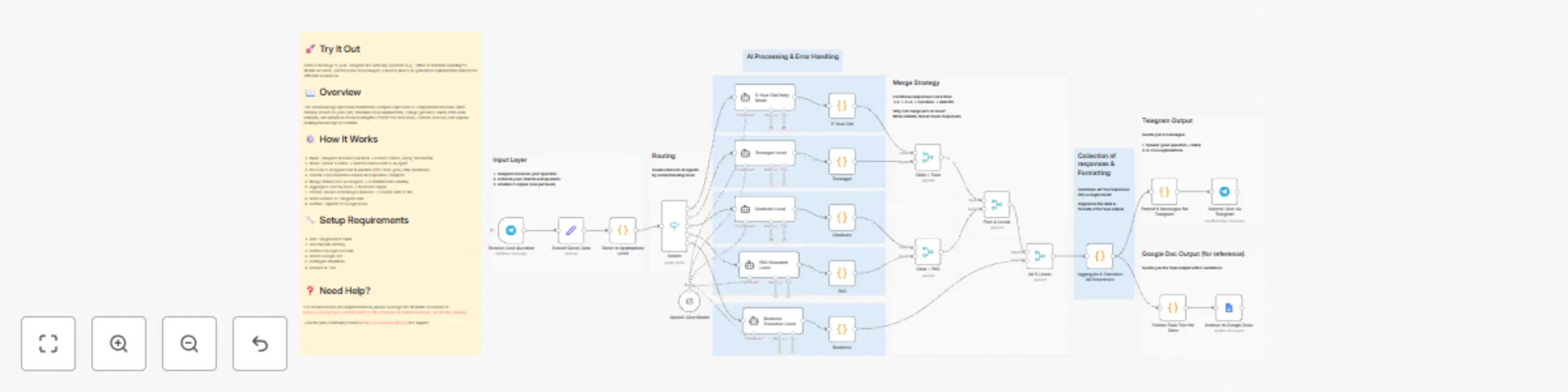
### Description Ask any question and get five different answers instantly. Each answer is written for a different audience—from kids to business executives. Your Telegram bot delivers all five explanations in under 10 seconds and saves them to Google Docs automatically. Perfect for teachers, writers, and anyone who needs to explain things to different people. ### Who's It For • **Educators** creating multi-grade curriculum content • **Content creators** generating material for diverse audiences • **Technical writers** producing documentation at different expertise levels • **Parents** explaining complex topics to children • **Anyone** who needs to explain things to different people. ### How It Works • Transforms any question into five distinct explanations: kid-friendly stories (5-year-olds), relatable content (teenagers), professional explanations (graduates), academic analysis (PhD researchers), and strategic insights (business executives) • Five AI agents process simultaneously for 3-8 second response times • Delivers six formatted Telegram messages (header + five explanations) • Automatically archives complete conversations to Google Docs • Uses binary tree merge architecture for reliable data handling ### How to Set Up • Create Telegram bot via @BotFather and add token to n8n credentials • Obtain OpenAI API key and add to n8n credentials • Connect Google account to grant Docs access • Create blank Google Doc and paste URL in workflow's Google Docs node • Activate workflow and test with any question ### Requirements • Telegram Bot API token (free) • OpenAI API key (pay-per-use • Google account with Docs access (free) • n8n instance (cloud or self-hosted) ### How to Customize • Modify AI prompts in 'Create 5 Items' node for different tones and styles • Adjust character limits in formatting nodes to control message length • Change output destinations from Telegram to Slack, email, or other platforms • Switch AI providers from OpenAI to alternatives • Add additional comprehension levels by duplicating AI agent nodes ### Need Help? For detailed notes and implementation, please leverage the README document at: https://drive.google.com/file/d/19Fx-FoihL70qpOi4CnEwQ6Sud2dbUnE_/view?usp=sharing Join the Discord (https://discord.com/invite/XPKeKXeB7d) or Join the n8n community forum (https://community.n8n.io/) for support

S
Sridevi Edupuganti
Content Creation
30 Dec 2025
41
0
Workflow preview: Generate natural health remedies guides with Claude AI & auto quality assurance
Free advanced

Generate natural health remedies guides with Claude AI & auto quality assurance

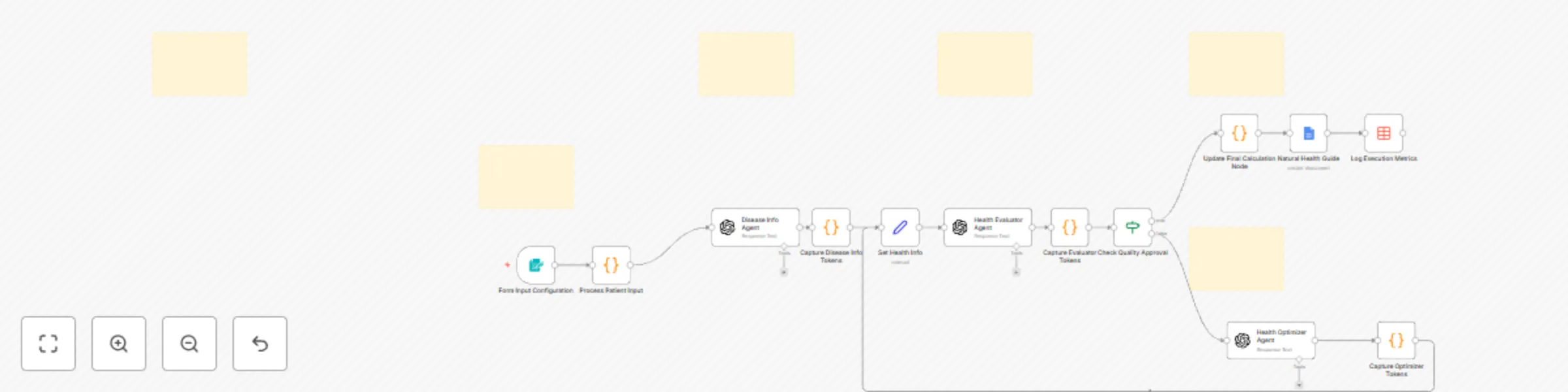
## DESCRIPTION This workflow automates the creation of personalized natural health guides using Claude AI with built-in quality assurance. It generates comprehensive, medically-informed content tailored to specific diseases and patient demographics, featuring prevention strategies, natural remedies, and healing recipes. The workflow includes an intelligent quality loop that automatically refines content until it meets professional standards, eliminating generic templates and placeholders. Perfect for healthcare practitioners, wellness coaches, and health content creators who need accurate, personalized medical information at scale. ## KEY FEATURES **AI-Powered Content Generation:** Creates disease-specific health guides with natural remedies, prevention strategies, and healing recipes **Automated Quality Assurance:** Intelligent evaluator reviews content for completeness and accuracy **Iterative Improvement Loop:** Automatically refines content through AI optimization until quality standards are met **Patient Customization:** Tailors information based on disease, age, and gender **Dual Timezone Display:** Shows timestamps in both local time and UTC for global users **Professional Google Docs Export:** Generates formatted documents with consistent styling and emoji section markers **Execution Tracking:** Logs metrics including tokens used, processing time, and quality iterations **Template-Free Output:** Eliminates placeholders through strict prompt engineering ## HOW IT WORKS The workflow automates health content creation through intelligent AI agents: Users submit patient information via web form, triggering comprehensive content generation including medical information, natural remedies, and healing recipes. An automated quality evaluator reviews output for completeness and accuracy, initiating refinement loops as needed (max 5 iterations). Approved content is professionally formatted with dual timezone timestamps and exported to Google Docs, while execution metrics are logged for performance tracking. ## HOW TO USE **Setup:** Configure LLM's API key and Google account credentials. **Customize:** Optionally adjust AI prompts, quality criteria, and timezone settings. **Run:** Submit patient information (disease, age, gender) via web form. **Access:** Download generated health guide from Google Docs. **Track:** Monitor execution metrics and performance in data table. ## REQUIREMENTS **Essential:** • LLM's API account with OpenAI/Claude • Google account for Google Docs export • N8N data table to track and store the metrics(Alternate option if Google sheets) • n8n version 1.0+

S
Sridevi Edupuganti
Content Creation
26 Dec 2025
17
0
Workflow preview: AI-powered RAG configuration assistant: From form to email recommendations
Free advanced

AI-powered RAG configuration assistant: From form to email recommendations

## Description An intelligent RAG Configuration Assistant that analyzes your retrieval-augmented generation requirements and delivers AI-powered recommendations via email. Get expert guidance on embedding models, chunk sizes, vector stores, and cost estimates—all automated through a simple form submission. ## Key Features • AI-powered analysis using LLM • 14 predefined use cases (Document Q&A, Chatbot, Legal, Medical, etc.) • Optional document upload for enhanced analysis • Beautiful HTML email reports with modern dashboard design • Customized n8n workflow JSON attachment • Cost estimation based on budget and usage • Deterministic AI (temperature=0) for consistent results • Dual-branch architecture (file upload or manual input) ## How it works 1. **Form Submission**: User provides use case, document type, pages, budget, query volume 2. **AI Analysis**: Claude evaluates requirements and complexity 3. **Recommendation Engine**: Generates optimal configuration (embedding model, chunk size, vector store) 4. **Report Generation**: Creates professional HTML email with all recommendations 5. **Workflow Creation**: Builds customized n8n workflow JSON 6. **Email Delivery**: Sends report + workflow attachment via Gmail ## How to use 1. **Setup credentials**: Add OpenRouter API key and Gmail OAuth 2. **Activate workflow**: Enable the Form Trigger 3. **Share form URL**: Distribute to your team or clients 4. **Receive requests**: Users fill out the form 5. **Get results**: Recipients receive email with recommendations + workflow file 6. **Import workflow**: Download attached JSON and import to n8n ## Requirements **Essential:** - n8n instance (v1.0+) - OpenRouter account + API key - Gmail account with OAuth2 setup

S
Sridevi Edupuganti
Engineering
21 Dec 2025
68
0
Workflow preview: Strip secrets from JSON file via AI Formatter + Merge node&send mail report
Free advanced

Strip secrets from JSON file via AI Formatter + Merge node&send mail report

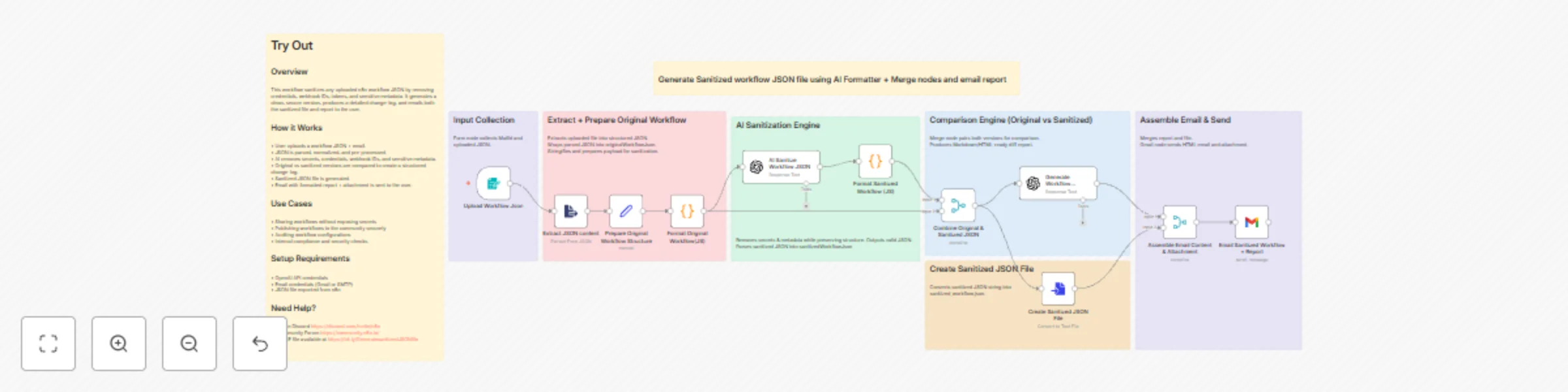
## Description This workflow sanitizes any uploaded n8n workflow JSON by removing credentials, webhook IDs, and sensitive metadata. Using AI and structured comparison, it generates a clean, secure workflow version, creates a downloadable sanitized file, and emails a detailed change-log report to the user. ## Key Features • AI-powered sanitization of workflow JSON • Automatic removal of secrets, credentials, webhook IDs, and metadata • Node-level change detection and comparison • Generates sanitized workflow file (JSON) • Sends formatted HTML email report with attachment • Supports customization for additional filtering rules ## How It Works The user uploads a workflow JSON file, which is extracted and formatted. AI then sanitizes the workflow and returns a secure version. Both original and sanitized workflows are merged for analysis, and a structured change-log is generated. A sanitized JSON file is created and emailed to the user with the report. ## How to Use Upload your workflow JSON via the form. The workflow processes it automatically, generates a sanitized version, creates a change-log, and emails both the report and sanitized JSON file to you. ## Requirements • OpenAI credentials • Gmail or SMTP credentials • n8n workflow JSON exported from the editor ## Customising This Workflow Modify sanitization rules, formatting logic, or email templates inside the JS and AI nodes to suit organizational security policies or custom metadata filtering. ## Support: Join n8n Discord https://discord.com/invite/n8n or Community Forum https://community.n8n.io/ README file available at https://bit.ly/GeneratesanitizedJSONfile

S
Sridevi Edupuganti
Document Extraction
21 Nov 2025
140
0
Workflow preview: Translate PDFs into multiple languages with Google Translate & ConvertAPI cost tracking
Free advanced

Translate PDFs into multiple languages with Google Translate & ConvertAPI cost tracking

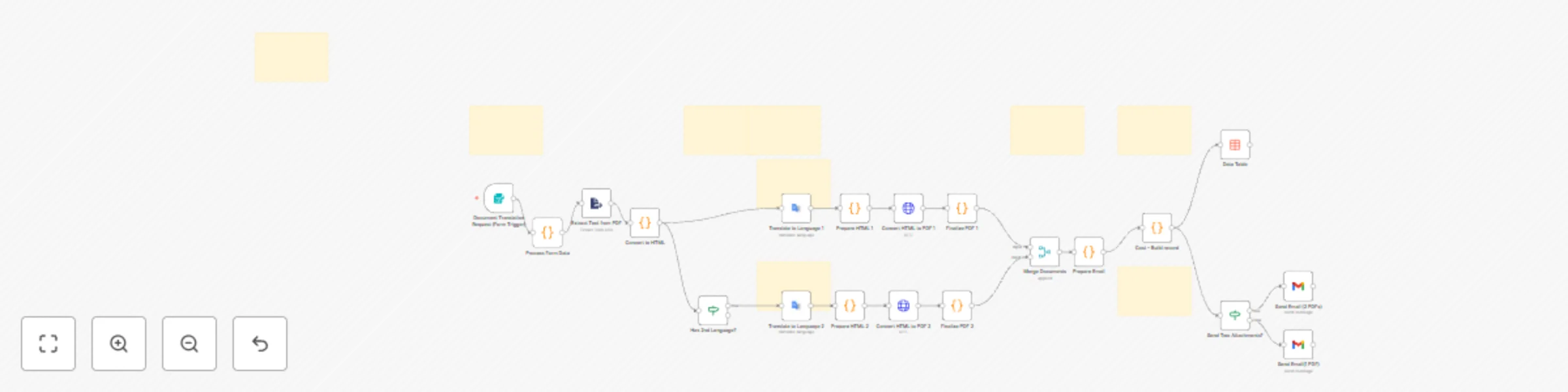
# Description This n8n template automates PDF translation into 1 or 2 target languages while maintaining professional formatting. Users submit PDFs via web form and receive translated documents via email with preserved headings, paragraphs, and bullet points. ## Use Cases • International Business Contracts • Multilingual Product Documentation • Educational Content Distribution • Healthcare Patient Information for Diverse patient population • Marketing Campaign Materials ## What it does • Accepts PDF uploads via web form • Extracts and converts text to structured HTML • Translates using Google Translate API (20+ languages including Hindi, Telugu, Spanish, French, German, Chinese) • Converts to professional PDFs with ConvertAPI • Emails translated PDFs with cost breakdown • Tracks expenses in data table for analytics ## Set up • Configure Google Cloud Service Account (Translation API enabled) • Add ConvertAPI Query Auth credentials • Set up Gmail OAuth2 with send permissions • Create n8n Data Table named cost_tracking • Activate workflow and access form via webhook URL ## Requirements • Google Cloud account with Translation API • ConvertAPI account with credits • Gmail account for delivery • PDF files with selectable text (not scanned images) ## Customize • Edit CSS in "Prepare HTML" nodes for PDF styling • Update pricing in "Cost – Build record" node • Add languages in "Process Form Data" and form dropdown • Modify email template in Gmail nodes ## Support: Join n8n Discord or Community Forum

S
Sridevi Edupuganti
Document Extraction
15 Nov 2025
99
0
Workflow preview: Track & query expenses via Telegram with GPT-4.1 mini & Google Sheets
Free advanced

Track & query expenses via Telegram with GPT-4.1 mini & Google Sheets

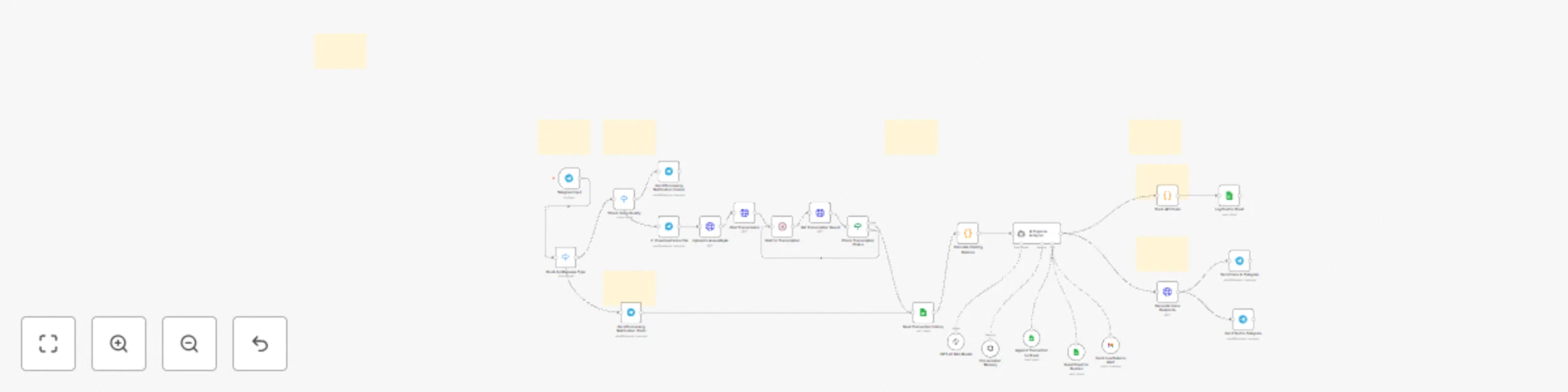
## Description Track and query your expenses effortlessly through Telegram using voice or text messages. This AI-powered workflow transcribes voice input via AssemblyAI, processes transactions with a GPT-4.1 mini agent, stores data in Google Sheets with comprehensive timestamp metadata, and responds with both voice and text confirmations. **Key Features:** - **Multi-modal input:** Send expenses via voice messages or text - **Intelligent processing:** AI agent automatically categorizes transactions, calculates running balance, and handles multiple expenses in a single message - **Conversational queries:** Ask questions like "What did I spend on food last week?" - **Voice responses:** Get spoken confirmations using OpenAI TTS - **Smart alerts:** Automatic Gmail notifications for low balance thresholds - **Cost tracking:** Monitors and logs all API usage costs (LLM + TTS) in USD and INR **Perfect for:** - Personal finance management with minimal effort - Small business expense tracking with audit trails - Shared household or team budgets - API cost monitoring for developers Each transaction includes detailed metadata (timestamps, categories, run IDs, source text) enabling powerful time-based analytics and queries. **Requirements:** Telegram bot, Google Sheets OAuth, OpenAI API key, AssemblyAI API key, Gmail OAuth (optional) **Support:** Join [n8n Discord](https://discord.com/invite/n8n) or [Community Forum](https://community.n8n.io/) README file available at https://drive.google.com/file/d/1mh9FRm7zemdazNpjyEq9uhHSc_9go7PN/view?usp=sharing

S
Sridevi Edupuganti
Personal Productivity
30 Oct 2025
239
0
Workflow preview: Send multi-city weather forecasts with AI-enhanced formatting from OpenWeatherMap to Gmail
Free advanced

Send multi-city weather forecasts with AI-enhanced formatting from OpenWeatherMap to Gmail

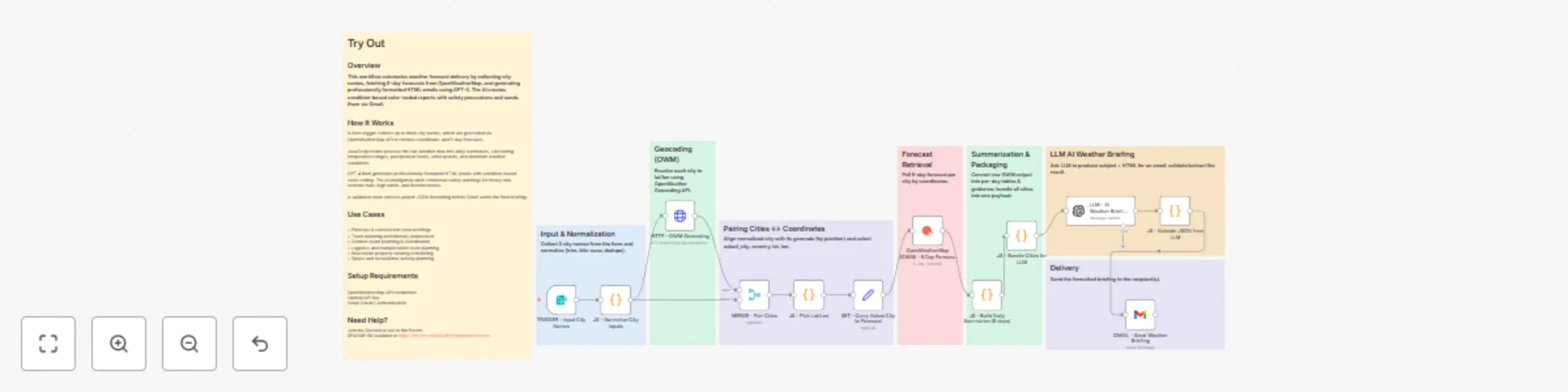
## Overview This workflow automates weather forecast delivery by collecting city names, fetching 5-day forecasts from OpenWeatherMap, and generating professionally formatted HTML emails using GPT-4. The AI creates condition-based color-coded reports with safety precautions and sends them via Gmail. ## How It Works A form trigger collects up to three city names, which are geocoded via OpenWeatherMap API to retrieve coordinates and 5-day forecasts. JavaScript nodes process the raw weather data into daily summaries, calculating temperature ranges, precipitation levels, wind speeds, and dominant weather conditions. GPT-4 then generates professionally formatted HTML emails with condition-based color coding: The AI intelligently adds contextual safety warnings for heavy rain, extreme heat, high winds, and thunderstorms. A validation node ensures proper JSON formatting before Gmail sends the final briefing. ## Use Cases • Field ops & construction crew briefings • Travel planning and itinerary preparation • Outdoor event planning & coordination • Logistics and transportation route planning • Real estate property viewing scheduling • Sports and recreational activity planning ## Setup Requirements 1) OpenWeatherMap API credentials 2) OpenAI API key 3) Gmail OAuth2 authentication ## Need Help? Join the [Discord](https://discord.com/invite/XPKeKXeB7d) or ask in the [Forum](https://community.n8n.io/)! README file available at https://tinyurl.com/MulticityWeatherForecast

S
Sridevi Edupuganti
Personal Productivity
20 Oct 2025
1390
0
Workflow preview: Extract medical reports & generate AI health advice with Mistral AI & GPT-4
Free advanced

Extract medical reports & generate AI health advice with Mistral AI & GPT-4

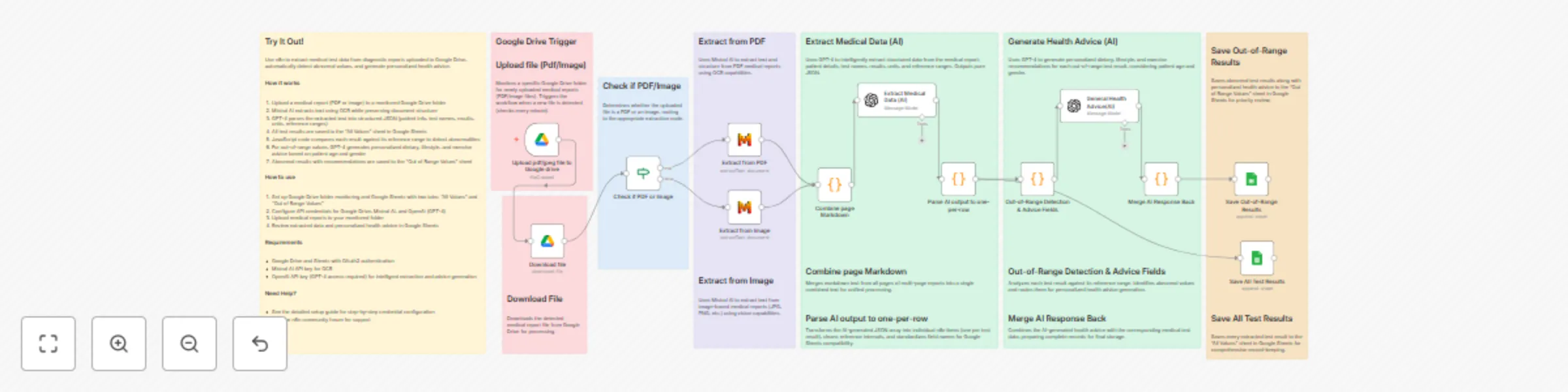
## Try It Out! Use n8n to extract medical test data from diagnostic reports uploaded to Google Drive, automatically detect abnormal values, and generate personalized health advice. ### How it works 1. Upload a medical report (PDF or image) to a monitored Google Drive folder 2. Mistral AI extracts text using OCR while preserving document structure 3. GPT-4 parses the extracted text into structured JSON (patient info, test names, results, units, reference ranges) 4. All test results are saved to the "All Values" sheet in Google Sheets 5. JavaScript code compares each result against its reference range to detect abnormalities 6. For out-of-range values, GPT-4 generates personalized dietary, lifestyle, and exercise advice based on patient age and gender 7. Abnormal results with recommendations are saved to the "Out of Range Values" sheet ### How to use 1. Set up Google Drive folder monitoring and Google Sheets with two tabs: "All Values" and "Out of Range Values" 2. Configure API credentials for Google Drive, Mistral AI, and OpenAI (GPT-4) 3. Upload medical reports to your monitored folder 4. Review extracted data and personalized health advice in Google Sheets ### Requirements * Google Drive and Sheets with OAuth2 authentication * Mistral AI API key for OCR * OpenAI API key (GPT-4 access required) for intelligent extraction and advice generation ### Need Help? * See the detailed Read Me file at https://drive.google.com/file/d/1Wv7dfcBLsHZlPcy1QWPYk6XSyrS3H534/view?usp=sharing * Join the n8n community forum for support

S
Sridevi Edupuganti
Document Extraction
17 Oct 2025
465
0
Workflow preview: Audio to executive brief: Transcribe & analyze with AssemblyAI and GPT-4
Free advanced

Audio to executive brief: Transcribe & analyze with AssemblyAI and GPT-4

# 🎙️ Audio-to-Insights Workflow (Form Upload + Google Drive Link) ## Description This workflow enables seamless **speech-to-text transcription, AI-powered summarization, sentiment analysis, and automated email delivery**. It supports two different input modes: - **Form Upload (Local File)** - **Form Submission (Google Drive Link)** --- ## How it Works 1. **Input** - Form 1: Upload an audio file (e.g., .mp3,.wav,.mp4) - Form 2: Submit a Google Drive link 2. **File Handling** - Local uploads go directly to AssemblyAI. - Drive links are parsed → File ID extracted → File fetched → Sent to AssemblyAI. 3. **Transcription** - AssemblyAI generates transcript text with punctuation and highlights. - Workflow loops with `Wait + If` until transcript status = `completed`. 4. **AI Analysis** - Transcript is passed to OpenAI. - Generates a structured output including: - Executive summary - Sentiment label & score - Key points - Action items - Notable quotes - Topics 5. **Email Delivery** - A formatted email is sent via Gmail with the summary and insights. --- ## Features - Dual input support: Google Drive OR direct upload - Handles long-running jobs with `Wait + If` polling - AI-powered transcript analysis with structured JSON - Automated sentiment scoring and summary generation - Professional HTML email reports --- ## Requirements - AssemblyAI API Key – transcription - Google Drive OAuth2 – file fetch - OpenAI API Key – summarization & sentiment analysis - Gmail OAuth2 – email delivery --- ## How to Use 1. Import this workflow into your n8n instance. 2. Add and configure the required credentials. 3. Update placeholders for: - AssemblyAI API Key - Google Drive Link - Gmail ID 4. Trigger via either form (local file or Google Drive link). 5. 5.For long recordings, split before uploading (10–20 min per chunk, 2–5s overlap).Keep audio consistent (e.g., WAV/MP3, 16 kHz mono if possible).Process chunks sequentially and combine summaries/action items at the end. --- ## Customising this Workflow - Adjust the OpenAI prompt to fit your reporting style (executive summary, bullet points, etc.). - Extend email formatting with logos or branding. - Add Slack, CRM, or Notion integrations for distribution. --- ## Use Cases - Meeting or lecture transcription with summaries - Podcast analysis with highlights and quotes - Business call reviews with action item extraction - Academic seminar notes emailed automatically

S
Sridevi Edupuganti
Document Extraction
16 Sep 2025
429
0
Workflow preview: Transcribe & analyze Telegram voice messages with AssemblyAI & GPT-4.1 to Gmail
Free advanced

Transcribe & analyze Telegram voice messages with AssemblyAI & GPT-4.1 to Gmail

## Telegram Voice → AI Summary & Sentiment Analysis via Gmail This n8n template demonstrates how to capture Telegram voice messages, transcribe them into text using AssemblyAI, analyze the transcript with AI for summary and sentiment insights, and finally deliver a structured email report via Gmail. ## Use cases - Automating meeting or lecture voice note transcriptions. - Gathering student feedback or training session insights from voice messages. - Quickly summarizing Telegram-delivered audio inputs into structured reports. - Reducing manual effort in capturing sentiment and key action items from conversations. ## How it works 1. A voice message is sent to a connected Telegram Bot. 2. The workflow fetches the file and uploads it to AssemblyAI. 3. AssemblyAI generates a transcript from the audio. 4. The transcript is analyzed by OpenAI to extract: - Executive summary (120–180 words) - Sentiment label and score - Key points - Action items (if any) - Notable quotes - Topics 5. The formatted analysis is sent as an email report using Gmail. 6. The workflow ends with a clean summary email containing actionable insights. ## How to use 1. Import this workflow into your n8n instance. 2. Set up and connect the required credentials: - Telegram Bot API token - AssemblyAI API key - OpenAI API key - Gmail OAuth2 account 3. Replace placeholders (e.g., `<<YOUR_EMAIL ID>>` and `<<YOUR_ASSEMBLYAI_API_KEY>>`) with your actual values. 4. Start the workflow. Whenever a voice message is received on the Telegram Bot, the workflow will process it end-to-end and deliver a polished email report. ## Requirements - Telegram Bot account (API token) - AssemblyAI account with API key - OpenAI account with API key - Gmail OAuth2 credentials configured in n8n - Active n8n instance ## Customising this workflow You can customize the email formatting, sentiment thresholds, or extend the workflow to save transcripts into Google Drive, Airtable, or any other connected apps. Additionally, you can trigger the same workflow from multiple input sources (e.g., local audio files, Google Drive links, or Telegram).

S
Sridevi Edupuganti
AI Summarization
16 Sep 2025
258
0