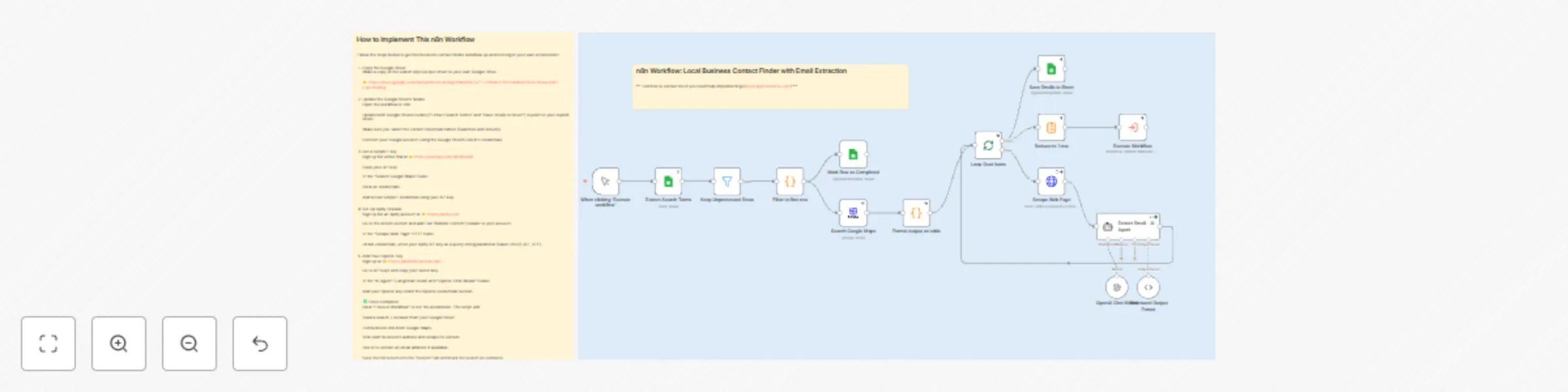
Extract local business contacts with Google Sheets, SerpAPI, Apify & GPT-4o

Workflow preview

Workflow preview
100%
Extract local business contacts with Google Sheets, SerpAPI, Apify & GPT-4o preview
Open on n8n.io

Important notice

This workflow is provided as-is. Please review and test before using in production.

1. Workflow Overview

Extract Local Business Contacts with Google Sheets, SerpAPI & GPT‑4o Status: Ready for Use Disclaimer: This workflow relies on community nodes that are not part of n8n’s core package. Install the...

Best for

  • Lead Generation automation workflows
  • AI Summarization automation workflows
  • advanced n8n builders looking for reusable templates

Tools used

n8n-nodes-base.manualtrigger, @n8n/n8n-nodes-langchain.lmchatopenai, @n8n/n8n-nodes-langchain.outputparserstructured, n8n-nodes-base.splitinbatches, n8n-nodes-base.executeworkflow, n8n-nodes-base.googlesheets, n8n-nodes-base.filter, n8n-nodes-base.code

Source and attribution

This workflow is cataloged by N8N Workflows and links back to its original n8n.io source page by Robert Breen.

Original n8n.io source

1.1 Workflow description

Title
Extract local business contacts with Google Sheets, SerpAPI, Apify & GPT-4o
Workflow name
Extract local business contacts with Google Sheets, SerpAPI, Apify & GPT-4o

Extract Local Business Contacts with Google Sheets, SerpAPI & GPT‑4o

Status: Ready for Use ✅
Disclaimer: This workflow relies on community nodes that are not part of n8n’s core package.
Install the following from n8n → Community Nodes before running:

  • n8n-nodes-langchain
  • n8n-nodes-openai (Structured Output Parser)
  • n8n-nodes-apify

📝 Description

This n8n workflow automates discovery of local‑business contact details by search term and location, then enriches the results with publicly listed email addresses using GPT‑4o AI.


🔑 Key Features

🔗 Google Sheets Integration
  • Reads search terms and locations from a Google Sheet.
  • Processes only rows that are not marked Complete, preventing duplicates.
🗺️ Google Maps Search via SerpAPI
  • Queries Google Maps through SerpAPI for every search‑term‑and‑location pair.
  • Retrieves the following fields: business name, website, street address, and phone number.
🧠 Website Scraping & Email Extraction
  1. Scrapes the business homepage content with Apify’s Fast Website Content Crawler.
  2. Sends the scraped HTML to a GPT‑4o AI Agent.
  3. Extracts any publicly listed email address.
  4. Returns a clean, structured JSON object for downstream use.
💾 Data Storage & Tracking
  • Writes every result to a Results tab in the same Google Sheet.
  • Marks the corresponding row in the Searches tab as Complete once finished.
🧱 Extensible Design

The workflow uses modular sub‑workflows and AI agents.
You can easily extend it to add:

  • Phone‑number verification with Twilio
  • Social‑media enrichment with Clearbit
  • Exports to HubSpot, Salesforce, Airtable, PostgreSQL, or CSV files

📄 Google Sheet Setup

Create a Searches tab with these exact columns (one header row):

Search | Area | Area Name | Complete

Create a results tab with these columns

title | website | address | phone | Search | Search Name | Area | email (Manual Entry)


⚙️ Prerequisites

  1. Google Cloud Project with Google Sheets API and Google Drive API enabled
  2. SerpAPI account (free trial or paid) – obtain an API key
  3. Apify account (free trial or paid) with the Fast Website Content Crawler actor installed
  4. OpenAI account with an API key that can access GPT‑4o models

🚀 Setup Instructions

  1. Copy the Google Sheet

  2. Configure Google Sheets nodes in n8n

    • Open the workflow.
    • Update the nodes Extract Search Terms and Save Emails to Sheet to point at your copied sheet.
    • Authenticate using Google OAuth2 credentials that have access to the sheet.
  3. Add SerpAPI credentials

    • Sign in at <https://serpapi.com>.
    • Copy your API key.
    • In the Search Google Maps node, create a new credential and paste the key.
  4. Set up Apify

    • Sign up at <https://apify.com>.
    • Add the Fast Website Content Crawler actor to your account.
    • In the Scrape Web Page HTTP node, append ?token=YOUR_API_KEY to the actor URL.
  5. Add your OpenAI API key


✅ Running the Workflow

  1. Click Execute Workflow in n8n.
  2. For each unprocessed row in the Searches tab, the automation will:
    1. Retrieve business information from Google Maps via SerpAPI.
    2. Scrape the business website using Apify.
    3. Use GPT‑4o to extract a public email address.
    4. Write all collected data to the Results tab.
    5. Mark the original row as Complete.

🧩 Example Use Cases

  • Build highly targeted lead lists for sales and marketing outreach.
  • Compile local business directories for regional websites or apps.
  • Automate contact‑information collection for lead‑generation campaigns and reduce manual data entry.

🤝 Connect with Me

Description

I’m Robert Breen, founder of Ynteractive — a consulting firm that helps businesses automate operations using n8n, AI agents, and custom workflows. I’ve helped clients build everything from intelligent chatbots to complex sales automations, and I’m always excited to collaborate or support new projects.

If you found this workflow helpful or want to talk through an idea, I’d love to hear from you.

Links

🌐 Website: https://www.ynteractive.com
📺 YouTube: @ynteractivetraining
💼 LinkedIn: https://www.linkedin.com/in/robert-breen
📬 Email: [email protected]

1.2 Logical Blocks

This catalog entry is organized from the workflow JSON. The node-level section below shows the executable blocks available for review before importing the template.

2. Block-by-Block Analysis

Block 1 - When clicking ‘Execute workflow’

Type / Role
n8n-nodes-base.manualTrigger - manualTrigger
Config choices
Version 1

Block 2 - OpenAI Chat Model

Type / Role
@n8n/n8n-nodes-langchain.lmChatOpenAi - lmChatOpenAi
Config choices
Version 1.2

Block 3 - Structured Output Parser

Type / Role
@n8n/n8n-nodes-langchain.outputParserStructured - outputParserStructured
Config choices
Version 1.2

Block 4 - Loop Over Items

Type / Role
n8n-nodes-base.splitInBatches - splitInBatches
Config choices
Version 3

Block 5 - Execute Workflow

Type / Role
n8n-nodes-base.executeWorkflow - executeWorkflow
Config choices
Version 1.2

Block 6 - Extract Search Terms

Type / Role
n8n-nodes-base.googleSheets - googleSheets
Config choices
Version 4.6

Block 7 - Keep Unprocessed Rows

Type / Role
n8n-nodes-base.filter - filter
Config choices
Version 2.2

Block 8 - Filter to first row

Type / Role
n8n-nodes-base.code - code
Config choices
Version 2

Block 9 - Mark Row as Completed

Type / Role
n8n-nodes-base.googleSheets - googleSheets
Config choices
Version 4.6

Block 10 - Search Google Maps

Type / Role
n8n-nodes-serpapi.serpApi - serpApi
Config choices
Version 1

Block 11 - Format output as table

Type / Role
n8n-nodes-base.code - code
Config choices
Version 2

Block 12 - Save Emails to Sheet

Type / Role
n8n-nodes-base.googleSheets - googleSheets
Config choices
Version 4.6

Block 13 - Scrape Web Page

Type / Role
n8n-nodes-base.httpRequest - httpRequest
Config choices
Version 4.2

Block 14 - Extract Email - AI Agent

Type / Role
@n8n/n8n-nodes-langchain.agent - agent
Config choices
Version 2

Block 15 - Reduce to 1 row

Type / Role
n8n-nodes-base.summarize - summarize
Config choices
Version 1.1

Block 16 - Sticky Note

Type / Role
n8n-nodes-base.stickyNote - stickyNote
Config choices
Version 1

Block 17 - Sticky Note1

Type / Role
n8n-nodes-base.stickyNote - stickyNote
Config choices
Version 1

Block 18 - Sticky Note2

Type / Role
n8n-nodes-base.stickyNote - stickyNote
Config choices
Version 1

3. Summary Table

Workflow Extract local business contacts with Google Sheets, SerpAPI, Apify & GPT-4o
Complexity advanced
Nodes 18
Categories Lead Generation, AI Summarization
Author Robert Breen
Published 23 Jul 2025

4. Reproducing the Workflow from Scratch

  1. 1. Download the workflow JSON

    Use the JSON export at /data/workflows/6330/6330.json as the source template for this automation.

  2. 2. Import the template into n8n

    Open n8n, import the downloaded JSON, and review each node before activating the workflow.

  3. 3. Configure credentials and variables

    Replace placeholder credentials, API keys, webhook URLs, account IDs, and environment-specific values with your own settings.

  4. 4. Test with sample data

    Run the workflow manually or in a staging workspace, inspect node output, and confirm downstream systems receive the expected data.

  5. 5. Activate and monitor

    Enable the workflow only after testing, then monitor executions, errors, and rate limits during the first production runs.

5. General Notes & Resources

Review imported nodes carefully before activation. This catalog entry is intended to help you inspect the workflow structure, understand required services, and find related templates faster.

Node names, credentials, schedules, webhook paths, and external service limits may need adjustment for your workspace.

Frequently asked questions

What does Extract local business contacts with Google Sheets, SerpAPI, Apify & GPT-4o do?

Extract Local Business Contacts with Google Sheets, SerpAPI & GPT‑4o Status: Ready for Use Disclaimer: This workflow relies on community nodes that are not part of n8n’s core package. Install the...

What do I need before importing this workflow?

Review the workflow JSON, configure any required credentials in n8n, and test the automation in a safe workspace before using it in production.

Can I customize this workflow?

Yes. Use the block-by-block analysis and the downloadable JSON to inspect each node, then adjust credentials, prompts, schedules, filters, or destinations for your Lead Generation, AI Summarization use case.