Block 1 - Information Extractor
- Type / Role
- @n8n/n8n-nodes-langchain.informationExtractor - informationExtractor
- Config choices
- Version 1


 Early Deal
This workflow is provided as-is. Please review and test before using in production.
Built by Setidure Technologies This smart n8n automation extracts invoice details from PDF files uploaded to Google Drive using AI, logs them to a Google Sheet, and notifies the billing team via em...
@n8n/n8n-nodes-langchain.informationextractor, n8n-nodes-base.gmail, n8n-nodes-base.noop, @n8n/n8n-nodes-langchain.lmollama, @n8n/n8n-nodes-langchain.vectorstorepgvector, n8n-nodes-base.stickynote, n8n-nodes-base.googledrivetrigger, n8n-nodes-base.googledrive
This workflow is cataloged by N8N Workflows and links back to its original n8n.io source page by Aashit Sharma.
Original n8n.io sourceBuilt by Setidure Technologies This smart n8n automation extracts invoice details from PDF files uploaded to Google Drive using AI, logs them to a Google Sheet, and notifies the billing team via email — all without manual intervention.
⚠️ Note: This workflow requires a self-hosted n8n instance with LangChain, LLM, and Google integrations configured.
📦 What This Workflow Does Monitors a Google Drive folder for new invoice uploads
Extracts text and parses key invoice details using LLM via LangChain
Logs extracted data into a Google Sheet (Invoice Database)
Generates a summary email using GPT-4O-MINI (Greenie)
Sends the email to the billing team via Gmail
✅ Prerequisites A Google Drive folder to monitor for PDF uploads
A Google Sheet named Invoice Database with the following columns:
Invoice Number, Client Name, Client Email, Client Address, Client Phone, Invoice Date, Due Date, Total Amount
Service account or OAuth credentials for:
Google Drive
Google Sheets
Gmail
LangChain + Ollama integration for LLM responses
🔧 Step-by-Step Setup Instructions Clone this workflow into your self-hosted n8n instance
Set up credentials:
Google Drive (for folder trigger)
Google Sheets (for data logging)
Gmail (for sending email)
Ollama (local LLM) or any connected LangChain provider
Configure the trigger node to watch your specific Invoice Uploads folder
Update the Google Sheet node with your Invoice Database sheet URL and column mapping
Test with a sample invoice to validate the AI extraction and email generation
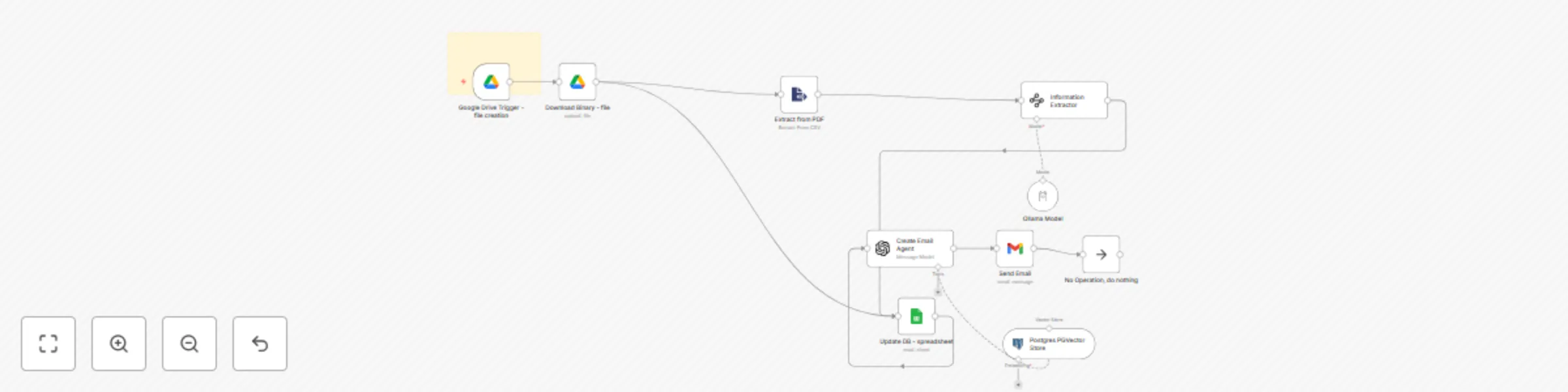
🔄 Workflow Steps
Node Name: Watch for New Invoices Type: Google Drive Trigger
Event: fileCreated
Triggers when a new PDF file is uploaded to a designated folder
Node Name: Download Invoice PDF Type: Download Binary
Downloads the invoice file from Google Drive
Node Name: Extract PDF Text Type: Extract from File
Extracts unstructured text content from the downloaded PDF
Node Name: Parse Invoice Data with LLM Type: LangChain Agent
LLM is prompted to extract:
Invoice Number
Client Name, Email, Address, Phone
Invoice Date, Due Date, Total Amount
Fields not found are skipped
Node Name: Log to Invoice Database Type: Google Sheets
Appends a new row with the extracted fields to the Invoice Database spreadsheet
Node Name: Generate Billing Email Summary Type: LangChain Agent (GPT-4O-MINI)
Prompt instructs AI to:
Act as “Greenie” from Green Grass Corp
Inform billing that a new invoice was processed
Confirm logging into the Invoice Database
Node Name: Email Billing Team Type: Gmail Send
Subject and body injected from LLM output
Node Name: End Type: No Operation
Used to cleanly terminate the flow
Subject: New Invoice Logged – Client: ABC Corp
Hi Billing Team,
A new invoice has been received and processed automatically. The following details have been extracted and logged into the Invoice Database:
Please review the Invoice Database for full details.
Regards,
Greenie
Green Grass Corp
This catalog entry is organized from the workflow JSON. The node-level section below shows the executable blocks available for review before importing the template.
| Workflow | Extract invoice data from PDFs with AI - Google Sheets Email alerts |
|---|---|
| Complexity | intermediate |
| Nodes | 11 |
| Categories | Invoice Processing, AI Summarization |
| Author | Aashit Sharma |
| Published | 07 Jun 2025 |
Use the JSON export at /data/workflows/4763/4763.json as the source template for this automation.
Open n8n, import the downloaded JSON, and review each node before activating the workflow.
Replace placeholder credentials, API keys, webhook URLs, account IDs, and environment-specific values with your own settings.
Run the workflow manually or in a staging workspace, inspect node output, and confirm downstream systems receive the expected data.
Enable the workflow only after testing, then monitor executions, errors, and rate limits during the first production runs.
Review imported nodes carefully before activation. This catalog entry is intended to help you inspect the workflow structure, understand required services, and find related templates faster.
Node names, credentials, schedules, webhook paths, and external service limits may need adjustment for your workspace.
Built by Setidure Technologies This smart n8n automation extracts invoice details from PDF files uploaded to Google Drive using AI, logs them to a Google Sheet, and notifies the billing team via em...
Review the workflow JSON, configure any required credentials in n8n, and test the automation in a safe workspace before using it in production.
Yes. Use the block-by-block analysis and the downloadable JSON to inspect each node, then adjust credentials, prompts, schedules, filters, or destinations for your Invoice Processing, AI Summarization use case.