Extract and upload files from zip archives to Google Drive
Workflow preview

$20/month : Unlimited workflows
2500 executions/month

THE #1 IN WEB SCRAPING
Scrape any website without limits
HOSTINGER  Early Deal
DISCOUNT 20% Try free
Early DealDISCOUNT 20%
Self-hosted n8n
Unlimited workflows - from $4.99/mo

#1 hub for scraping, AI & automation
6000+ actors - $5 credits/mo
Important notice
This workflow is provided as-is. Please review and test before using in production.
Overview
Extract and Upload Files from Zip to Google Drive
How it works
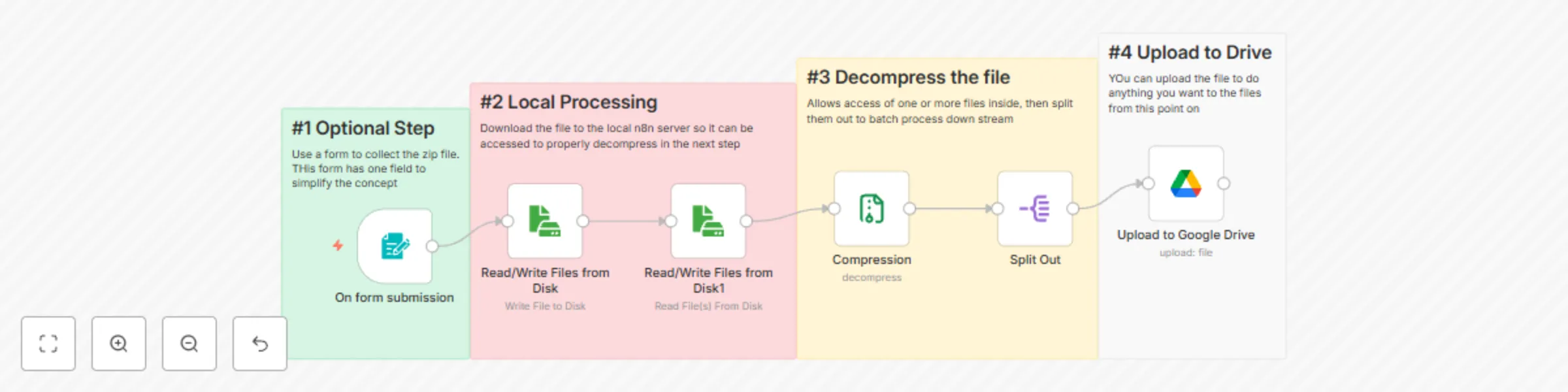
This workflow automatically extracts all files from an uploaded zip archive and uploads each file individually to Google Drive.
Flow:
- User submits a zip file via form
- Zip file is temporarily saved to disk (workaround for compression node limitation)
- Zip file is read back and decompressed
- Split Out node separates each file into individual items
- Each file is uploaded to Google Drive with its original filename
Key features:
- Handles zip files with any number of files dynamically
- Preserves original filenames from inside the zip
- No hardcoded file counts - works with 1 or 100 files
Set up steps
- Connect Google Drive: Add your Google Drive OAuth2 credentials to the "Upload to Google Drive" node
- Select destination folder: In the Google Drive node, choose which folder to upload files to (default is root)
- Update temp path (optional): Change the temporary file path in "Read/Write Files from Disk" node if needed (default:
c:/temp_n8n.zip)
Requirements
- Google Drive account and OAuth2 credentials
- Write access to local filesystem for temporary zip storage
Tags
automation, file processing, google drive, zip extraction, file upload