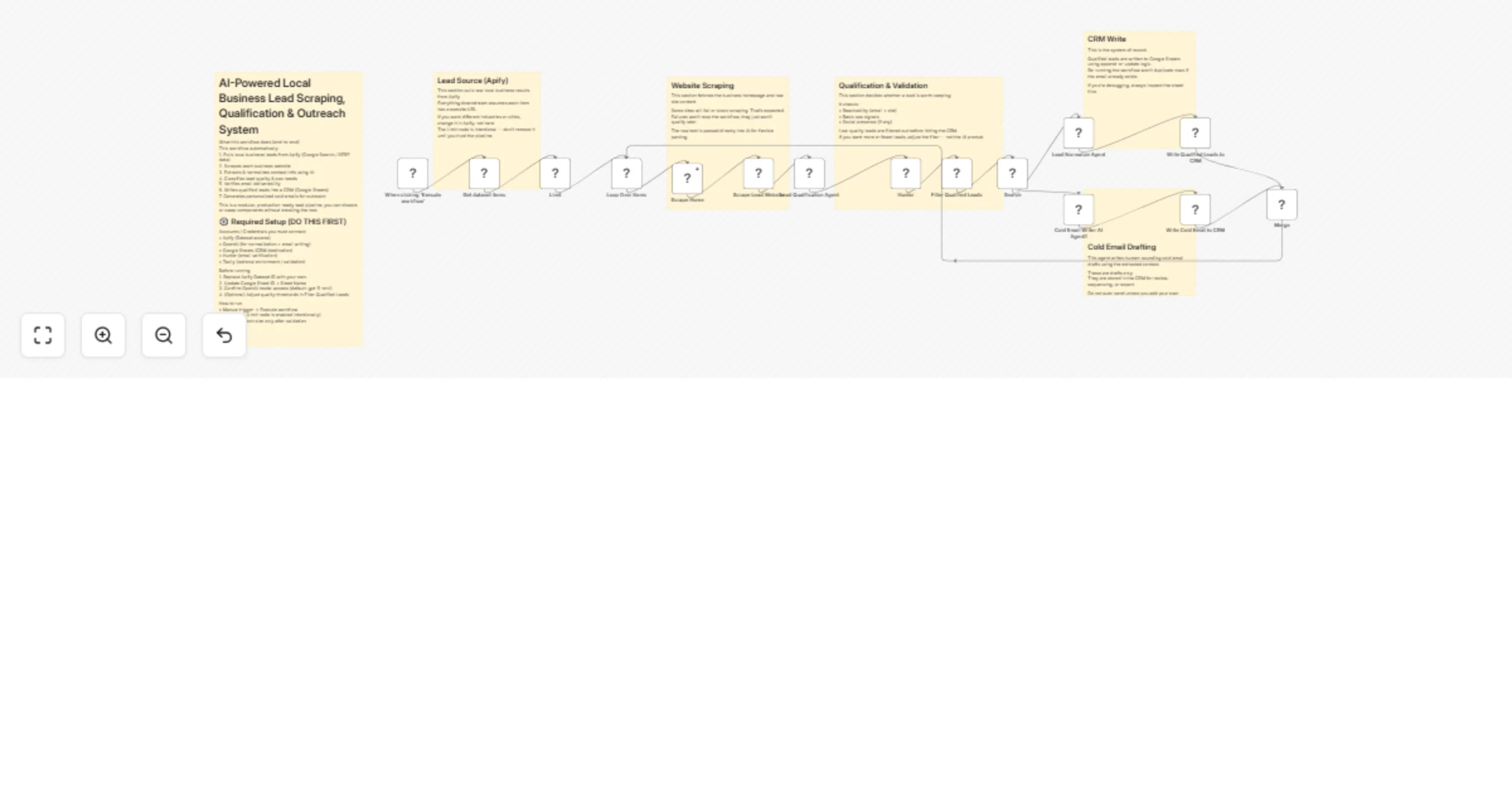
Extract and qualify local business leads and draft cold emails with OpenAI, Apify and Hunter

Workflow preview

Workflow preview
100%
Extract and qualify local business leads and draft cold emails with OpenAI, Apify and Hunter preview
Open on n8n.io

1. Workflow Overview

AI Powered Business Lead Scraping, Qualification & Outreach System Description Search → Scrape → Qualify → CRM → Email Draft Automation Categories: Lead Generation, Sales Automation, AI Enrichment,...

Best for

  • Lead Generation automation workflows
  • AI Summarization automation workflows
  • advanced n8n builders looking for reusable templates

Tools used

n8n-nodes-base.html, n8n-nodes-base.filter, n8n-nodes-base.googlesheets, @apify/n8n-nodes-apify.apify, n8n-nodes-base.manualtrigger, n8n-nodes-base.limit, n8n-nodes-base.httprequest, n8n-nodes-base.splitinbatches

Source and attribution

This workflow is cataloged by N8N Workflows and links back to its original n8n.io source page by Chris Zhang.

Original n8n.io source

1.1 Workflow description

Title
Extract and qualify local business leads and draft cold emails with OpenAI, Apify and Hunter
Workflow name
Extract and qualify local business leads and draft cold emails with OpenAI, Apify and Hunter

AI-Powered Business Lead Scraping, Qualification & Outreach System

Description

Search → Scrape → Qualify → CRM → Email Draft Automation

Categories: Lead Generation, Sales Automation, AI Enrichment, Revenue Ops


This workflow automatically finds local businesses, extracts real contact details from their websites, qualifies them, and writes everything into a CRM — with personalized cold email drafts ready to send.

It’s designed to remove the manual grind from lead sourcing and first-touch outreach.

Search → leads → context → drafts → done.


What This Workflow Does

This automation takes raw local business results and turns them into usable, qualified leads:

  • Pulls local business websites from a search dataset
  • Scrapes each site for real contact information
  • Normalizes emails, phones, names, and addresses
  • Qualifies leads based on reachability and ops signals
  • Writes clean, deduplicated records into a CRM
  • Generates human-sounding cold email drafts

No copying websites. No guessing emails. No messy spreadsheets.


Why This Exists

Most lead gen systems fail before outreach even starts.

They rely on:

  • Shallow scraped data
  • Guessy enrichment
  • Low-quality lists
  • Manual cleanup

This system fixes that by grounding everything in what actually exists on the business website, then using AI only where it makes sense.

Human judgment at the edges. Automation in the middle.


How It Works (High Level)

1. Lead Source Ingestion (Apify Dataset)

The workflow starts with a dataset of local business search results.

This can be:

  • Google search results
  • Industry-specific directories
  • Any Apify-powered source that includes URLs

Batch size is intentionally limited for safety.


2. Website Scraping

Each business website is fetched and stripped down to raw text.

Failures are allowed — broken sites simply don’t qualify later.

The raw content becomes the single source of truth.


3. AI Contact Extraction & Normalization

AI parses the site content to extract:

  • Emails and phones
  • Company name and address
  • Contact people and titles
  • Social links and contact pages
  • Context snippets for traceability

Everything is normalized and returned as strict JSON. If something isn’t clearly present, it stays empty.


4. Lead Qualification

Leads are scored based on:

  • Reachability (email + website)
  • Basic operational signals
  • Optional social presence

Low-quality or unreachable leads are filtered out automatically.


5. CRM Write (Google Sheets)

Qualified leads are written into a lightweight CRM:

  • Append-or-update by email
  • Safe to re-run
  • Easy to inspect and debug

This sheet becomes the system of record.


6. Cold Email Draft Generation

For each qualified lead, AI generates a personalized cold email draft:

  • Casual, human tone
  • Uses real site context
  • Stored as drafts only
  • Never auto-sent

Perfect for review, sequencing, or export into an outreach tool.


Tools Used

  • n8n — workflow orchestration
  • Apify — lead sourcing
  • OpenAI — extraction, qualification, email drafting
  • Google Sheets — lightweight CRM
  • Hunter — email verification
  • Tavily — optional enrichment & validation

Who This Is For

  • Automation and AI agencies
  • Consultants doing outbound
  • Freelancers selling repeatable services
  • Local-service lead gen operators
  • Anyone tired of low-quality scraped lists

Customization Notes

  • Swap Google Sheets for Airtable, HubSpot, or Notion
  • Adjust qualification thresholds to control lead volume
  • Replace Apify source with any directory or search dataset
  • Plug drafts into any outbound sequencing tool
  • Extend metadata for analytics or CRM sync

Difficulty & Cost

Difficulty: Intermediate (Simple concept, careful execution)

Estimated setup time: 30–45 minutes

Ongoing cost: OpenAI + Apify + verification APIs only


Summary

This is not just a scraper.

It’s a lead intelligence pipeline that turns raw search results into real, usable outbound opportunities.

Search → scrape → qualify → CRM → drafts No guessing. No junk leads. No manual cleanup.

1.2 Logical Blocks

This catalog entry is organized from the workflow JSON. The node-level section below shows the executable blocks available for review before importing the template.

2. Block-by-Block Analysis

Block 1 - Scrape Lead Website

Type / Role
n8n-nodes-base.html - html
Config choices
Version 1.2

Block 2 - Filter Qualified Leads

Type / Role
n8n-nodes-base.filter - filter
Config choices
Version 2.3

Block 3 - Write Qualified Leads to CRM

Type / Role
n8n-nodes-base.googleSheets - googleSheets
Config choices
Version 4.7

Block 4 - Write Cold Email to CRM

Type / Role
n8n-nodes-base.googleSheets - googleSheets
Config choices
Version 4.7

Block 5 - Get dataset items

Type / Role
@apify/n8n-nodes-apify.apify - apify
Config choices
Version 1

Block 6 - When clicking ‘Execute workflow’

Type / Role
n8n-nodes-base.manualTrigger - manualTrigger
Config choices
Version 1

Block 7 - Limit

Type / Role
n8n-nodes-base.limit - limit
Config choices
Version 1

Block 8 - Scrape Home

Type / Role
n8n-nodes-base.httpRequest - httpRequest
Config choices
Version 4.2

Block 9 - Loop Over Items

Type / Role
n8n-nodes-base.splitInBatches - splitInBatches
Config choices
Version 3

Block 10 - Merge

Type / Role
n8n-nodes-base.merge - merge
Config choices
Version 3.2

Block 11 - Lead Normalize Agent

Type / Role
@n8n/n8n-nodes-langchain.openAi - openAi
Config choices
Version 2.1

Block 12 - Cold Email Writer AI Agent1

Type / Role
@n8n/n8n-nodes-langchain.openAi - openAi
Config choices
Version 2.1

Block 13 - Hunter

Type / Role
n8n-nodes-base.hunter - hunter
Config choices
Version 1

Block 14 - Search

Type / Role
@tavily/n8n-nodes-tavily.tavily - tavily
Config choices
Version 1

Block 15 - Sticky Note

Type / Role
n8n-nodes-base.stickyNote - stickyNote
Config choices
Version 1

Block 16 - Sticky Note1

Type / Role
n8n-nodes-base.stickyNote - stickyNote
Config choices
Version 1

Block 17 - Sticky Note2

Type / Role
n8n-nodes-base.stickyNote - stickyNote
Config choices
Version 1

Block 18 - Lead Qualification Agent

Type / Role
@n8n/n8n-nodes-langchain.openAi - openAi
Config choices
Version 2.1

Block 19 - Sticky Note3

Type / Role
n8n-nodes-base.stickyNote - stickyNote
Config choices
Version 1

Block 20 - Sticky Note4

Type / Role
n8n-nodes-base.stickyNote - stickyNote
Config choices
Version 1

Block 21 - Sticky Note5

Type / Role
n8n-nodes-base.stickyNote - stickyNote
Config choices
Version 1

3. Summary Table

Workflow Extract and qualify local business leads and draft cold emails with OpenAI, Apify and Hunter
Complexity advanced
Nodes 21
Categories Lead Generation, AI Summarization
Author Chris Zhang
Published 20 Jan 2026

4. Reproducing the Workflow from Scratch

  1. 1. Download the workflow JSON

    Use the JSON export at /data/workflows/12855/12855.json as the source template for this automation.

  2. 2. Import the template into n8n

    Open n8n, import the downloaded JSON, and review each node before activating the workflow.

  3. 3. Configure credentials and variables

    Replace placeholder credentials, API keys, webhook URLs, account IDs, and environment-specific values with your own settings.

  4. 4. Test with sample data

    Run the workflow manually or in a staging workspace, inspect node output, and confirm downstream systems receive the expected data.

  5. 5. Activate and monitor

    Enable the workflow only after testing, then monitor executions, errors, and rate limits during the first production runs.

5. General Notes & Resources

Review imported nodes carefully before activation. This catalog entry is intended to help you inspect the workflow structure, understand required services, and find related templates faster.

Node names, credentials, schedules, webhook paths, and external service limits may need adjustment for your workspace.

Frequently asked questions

What does Extract and qualify local business leads and draft cold emails with OpenAI, Apify and Hunter do?

AI Powered Business Lead Scraping, Qualification & Outreach System Description Search → Scrape → Qualify → CRM → Email Draft Automation Categories: Lead Generation, Sales Automation, AI Enrichment,...

What do I need before importing this workflow?

Review the workflow JSON, configure any required credentials in n8n, and test the automation in a safe workspace before using it in production.

Can I customize this workflow?

Yes. Use the block-by-block analysis and the downloadable JSON to inspect each node, then adjust credentials, prompts, schedules, filters, or destinations for your Lead Generation, AI Summarization use case.