Extract & analyze competitor reviews with Firecrawl & GPT-4o mini for intelligence reports

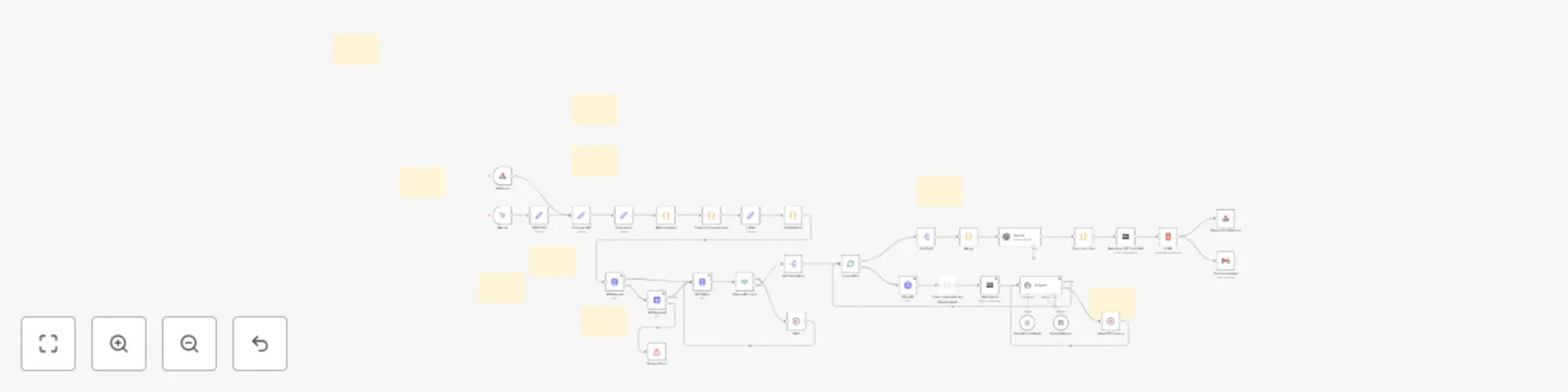
Workflow preview

Workflow preview
100%
Extract & analyze competitor reviews with Firecrawl & GPT-4o mini for intelligence reports preview
Open on n8n.io

Important notice

This workflow is provided as-is. Please review and test before using in production.

1. Workflow Overview

Competitor Review Based Report (Firecrawl + GPT) for n8n The most automated , innovative , and actionable competitor review workflow. Who is this workflow for? This workflow is designed for prof...

Best for

  • Market Research automation workflows
  • AI Summarization automation workflows
  • advanced n8n builders looking for reusable templates

Tools used

n8n-nodes-base.wait, @n8n/n8n-nodes-langchain.agent, @n8n/n8n-nodes-langchain.lmchatopenai, n8n-nodes-base.code, n8n-nodes-base.splitout, @n8n/n8n-nodes-langchain.openai, n8n-nodes-base.html, n8n-nodes-base.respondtowebhook

Source and attribution

This workflow is cataloged by N8N Workflows and links back to its original n8n.io source page by Oriol Seguí.

Original n8n.io source

1.1 Workflow description

Title
Extract & analyze competitor reviews with Firecrawl & GPT-4o mini for intelligence reports
Workflow name
Extract & analyze competitor reviews with Firecrawl & GPT-4o mini for intelligence reports

🥇 Competitor Review-Based Report (Firecrawl + GPT) for n8n

The most automated, innovative, and actionable competitor review workflow.


Who is this workflow for?

This workflow is designed for professionals, companies, and agencies that want to automate competitive analysis based on public reviews and opinions found on the Internet. It is especially useful for:

  • Restaurants and local businesses seeking to identify the strengths and weaknesses of their direct competitors.
  • Marketing departments and analysts interested in monitoring the reputation of rival brands or services.
  • Consultants and agencies offering competitive intelligence or benchmarking services to their clients.
  • Entrepreneurs and product managers looking for inspiration and opportunities for improvement through real user feedback.
  • Market researchers who need to collect and analyze large volumes of opinions in an automated and structured way.
  • Automation enthusiasts and curious users interested in exploring advanced workflow solutions.

The workflow is accessible to both users without advanced technical experience and to developers who wish to customize and adapt it for new industries or specific needs.


🚀 What does this workflow do?

  • Automates competitor benchmarking and review analysis.
  • Searches, extracts, and summarizes user opinions from the web about any business or topic you choose.
  • Uses Firecrawl API for advanced web scraping and GPT-4o mini (OpenAI) for AI-powered summarization and actionable reporting.
  • Delivers a final competitive intelligence report to your email, Webhook, or any connected service, in your preferred language.

🔥Why is it unique?

  • Zero manual work: Just set the target (e.g., “opinions restaurant Karlos Arguiñano”) and let the workflow do all the crawling, cleaning, extracting, summarizing, and reporting.
  • Multi-source: Scrapes multiple sources automatically for comprehensive coverage.
  • Highly configurable: Choose any business or search topic, any language, and your desired delivery method.
  • Minimal token usage: Efficiently parses and converts HTML to markdown for light, fast, and cheap AI calls.
  • Error-proof: Includes robust error handling and anti-duplication logic.
  • User-friendly: Includes clear onboarding, API guides, multi-language support, and customizable notification emails.

💸 API Cost Info

  • Firecrawl API: Free up to generous limits. Each scan consumes only 0.01% of your free API usage.
  • OpenAI GPT-4o Mini: Just $0.02 per scan (est.), making it the most affordable way to get world-class AI competitor analysis.

🧩 How it works (Simplified steps)

  1. Input: Start via webhook or manual trigger. Enter your objective (e.g., “opinions restaurant [name]”).
  2. Scraping: Firecrawl extracts URLs with user reviews & opinions about your target.
  3. Content Extraction: Visits each URL, cleans the HTML (removes scripts, head, images, and classes), and converts to markdown.
  4. AI Analysis: GPT-4o scans for negative/neutral reviews and user suggestions, then merges all insights.
  5. Competitive Report: AI generates a structured report, highlighting weaknesses, opportunities, and recommendations—delivered to your email or webhook.
  6. Multi-language: Configure language output to fit your team.

⚙️ Requirements

  • Firecrawl API (Free account: https://www.firecrawl.dev/app)
  • OpenAI API Key (for GPT-4o mini, free tier available for new users)
  • Email account for informs.

💡 Example use cases

  • Restaurants: Benchmark yourself against local or global competitors
  • E-commerce: See what real users dislike (and love) about rival shops
  • SaaS & Agencies: Automate competitive intelligence for clients
  • Market research: Validate product ideas or market fit through real reviews

> ℹ️ User Note > > This workflow clearly informs users how to obtain all required APIs and includes a detailed README explaining how the code works, making it easy to understand and modify if needed.


🙏 Welcome & Thanks

Thank you for supporting this workflow and its creator! Your feedback enables new features and helps bring advanced AI automations to the whole n8n community.

Questions, support or customization? [email protected]


Enjoy one of the most innovative workflows in n8n. Save hours of research and get ahead of your competition—automatically!


Inform example (1 inform):

(imgbb URL)

Inform 1 png
Inform 2 png
Inform 3 png

1.2 Logical Blocks

This catalog entry is organized from the workflow JSON. The node-level section below shows the executable blocks available for review before importing the template.

2. Block-by-Block Analysis

Block 1 - Wait

Type / Role
n8n-nodes-base.wait - wait
Config choices
Version 1.1

Block 2 - AI Agent

Type / Role
@n8n/n8n-nodes-langchain.agent - agent
Config choices
Version 2

Block 3 - OpenAI Chat Model

Type / Role
@n8n/n8n-nodes-langchain.lmChatOpenAi - lmChatOpenAi
Config choices
Version 1.2

Block 4 - UA Rotativo1

Type / Role
n8n-nodes-base.code - code
Config choices
Version 2

Block 5 - Split Out1

Type / Role
n8n-nodes-base.splitOut - splitOut
Config choices
Version 1

Block 6 - OpenAI

Type / Role
@n8n/n8n-nodes-langchain.openAi - openAi
Config choices
Version 1.8

Block 7 - Merge

Type / Role
n8n-nodes-base.code - code
Config choices
Version 2

Block 8 - HTML

Type / Role
n8n-nodes-base.html - html
Config choices
Version 1.2

Block 9 - Respond to Webhook

Type / Role
n8n-nodes-base.respondToWebhook - respondToWebhook
Config choices
Version 1.4

Block 10 - LANG

Type / Role
n8n-nodes-base.set - set
Config choices
Version 3.4

Block 11 - API Request

Type / Role
n8n-nodes-base.httpRequest - httpRequest
Config choices
Version 4.2

Block 12 - API Status

Type / Role
n8n-nodes-base.httpRequest - httpRequest
Config choices
Version 4.2

Block 13 - Webhook

Type / Role
n8n-nodes-base.webhook - webhook
Config choices
Version 2

Block 14 - Send a message

Type / Role
n8n-nodes-base.gmail - gmail
Config choices
Version 2.1

Block 15 - Email send

Type / Role
n8n-nodes-base.set - set
Config choices
Version 3.4

Block 16 - Method detect

Type / Role
n8n-nodes-base.code - code
Config choices
Version 2

Block 17 - OBJETIVE

Type / Role
n8n-nodes-base.set - set
Config choices
Version 3.4

Block 18 - API Request1

Type / Role
n8n-nodes-base.httpRequest - httpRequest
Config choices
Version 4.2

Block 19 - Simple Memory

Type / Role
@n8n/n8n-nodes-langchain.memoryBufferWindow - memoryBufferWindow
Config choices
Version 1.3

Block 20 - Reset GPT tokens

Type / Role
n8n-nodes-base.wait - wait
Config choices
Version 1.1

Block 21 - Req URL

Type / Role
n8n-nodes-base.httpRequest - httpRequest
Config choices
Version 4.2

Block 22 - Sticky Note

Type / Role
n8n-nodes-base.stickyNote - stickyNote
Config choices
Version 1

Block 23 - Markdown1

Type / Role
n8n-nodes-base.markdown - markdown
Config choices
Version 1

Block 24 - Sticky Note1

Type / Role
n8n-nodes-base.stickyNote - stickyNote
Config choices
Version 1

Showing the first 24 of 41 workflow blocks. Download the JSON for the full node graph.

3. Summary Table

Workflow Extract & analyze competitor reviews with Firecrawl & GPT-4o mini for intelligence reports
Complexity advanced
Nodes 41
Categories Market Research, AI Summarization
Author Oriol Seguí
Published 05 Jul 2025

4. Reproducing the Workflow from Scratch

  1. 1. Download the workflow JSON

    Use the JSON export at /data/workflows/5695/5695.json as the source template for this automation.

  2. 2. Import the template into n8n

    Open n8n, import the downloaded JSON, and review each node before activating the workflow.

  3. 3. Configure credentials and variables

    Replace placeholder credentials, API keys, webhook URLs, account IDs, and environment-specific values with your own settings.

  4. 4. Test with sample data

    Run the workflow manually or in a staging workspace, inspect node output, and confirm downstream systems receive the expected data.

  5. 5. Activate and monitor

    Enable the workflow only after testing, then monitor executions, errors, and rate limits during the first production runs.

5. General Notes & Resources

Review imported nodes carefully before activation. This catalog entry is intended to help you inspect the workflow structure, understand required services, and find related templates faster.

Node names, credentials, schedules, webhook paths, and external service limits may need adjustment for your workspace.

Frequently asked questions

What does Extract & analyze competitor reviews with Firecrawl & GPT-4o mini for intelligence reports do?

Competitor Review Based Report (Firecrawl + GPT) for n8n The most automated , innovative , and actionable competitor review workflow. Who is this workflow for? This workflow is designed for prof...

What do I need before importing this workflow?

Review the workflow JSON, configure any required credentials in n8n, and test the automation in a safe workspace before using it in production.

Can I customize this workflow?

Yes. Use the block-by-block analysis and the downloadable JSON to inspect each node, then adjust credentials, prompts, schedules, filters, or destinations for your Market Research, AI Summarization use case.