Oriol Seguí
Workflows by Oriol Seguí

Generate AI-powered Strava performance evolution reports with Google Sheets & GPT-5-nano
Automatically analyze your full sports performance evolution using your Strava activities, enriched with AI insights and delivered directly to your email — all powered by your own n8n instance. --- ## ✨ Why this workflow? Stop manually reviewing your training history. This workflow automates the entire analysis: collecting activities, filtering by date range, comparing progress, generating a structured AI report, storing it, and emailing it to you. * **Battle-tested:** refined across multiple Strava accounts to ensure strong error handling and stable performance. * **Fully documented:** each block is cleanly structured; logic is easy to follow. * **Safe & robust:** handles missing fields, invalid dates, empty ranges, and malformed inputs. * **Flexible:** change the analysis period (week/month/year/total), language, and recipient in one single node (OPTIONS). * **Zero manual work:** reports arrive automatically. --- ## 🧠 What does the workflow do? * Reads your entire Strava activity dataset from Google Sheets. * Filters activities by your chosen range (last week, last month, last year, or all time). * Formats each activity as “Activity 1, Activity 2, …” (from newest to oldest). * Sends the full historical dataset + the previous AI report (if available) to GPT-5-nano. * Generates a complete performance report with six sections: * Evolution * Best improvements * Setbacks * Performance patterns * Current state * Recommendations * Saves the new report in a separate Google Sheet for long-term tracking. * Converts the AI output into clean, professional Markdown → HTML. * Sends you a styled email with the final report. --- ## 🛠️ Technologies & APIs Used * **n8n** (cloud or self-hosted) * **OpenAI** (GPT-5-nano for analysis) * **Google Sheets API** (activity log + report archive) * **Gmail/SMTP** (email delivery) * **Strava data imported into Sheets** (activity database) --- ## ⚡ Who is this for? * Athletes who want automated tracking of their evolution. * Coaches who need structured, periodic reports. * Data-driven users who love learning from their training history. * Anyone who wants AI-powered insights without subscriptions or external dashboards. * n8n fans exploring advanced automations. --- ## 🎯 Problems Solved * No more manual comparison of activities. * Automatic detection of improvements and regressions. * A complete evolution report is always stored and searchable. * Every analysis is emailed in clean, easy-to-read formatting. * Eliminates the need for external reporting tools. --- ## 📝 Quick Setup 1. Import the `.json` workflow into your n8n. 2. Add your credentials: * OpenAI API key * Google Sheets * Email (SMTP or Gmail) 3. Make sure your Strava activities are synced into the main Sheet. 4. Adjust name, email, language, and range in **OPTIONS**. 5. Run manually or let the scheduler handle it automatically. 6. Also keep in mind that each generated report has an approximate cost of **$0.01** in OpenAI API usage. --- ## 📦 What’s included? * n8n workflow file (`.json`) * Internal documentation inside the flow * Automatic report archiving * Basic support by email * Professional AI-generated performance reports sent directly to you --- Please note that the price of this workflow may increase in future updates, although all updates will remain free for existing users.
Private secret santa assignment & notification system with Gmail & verification
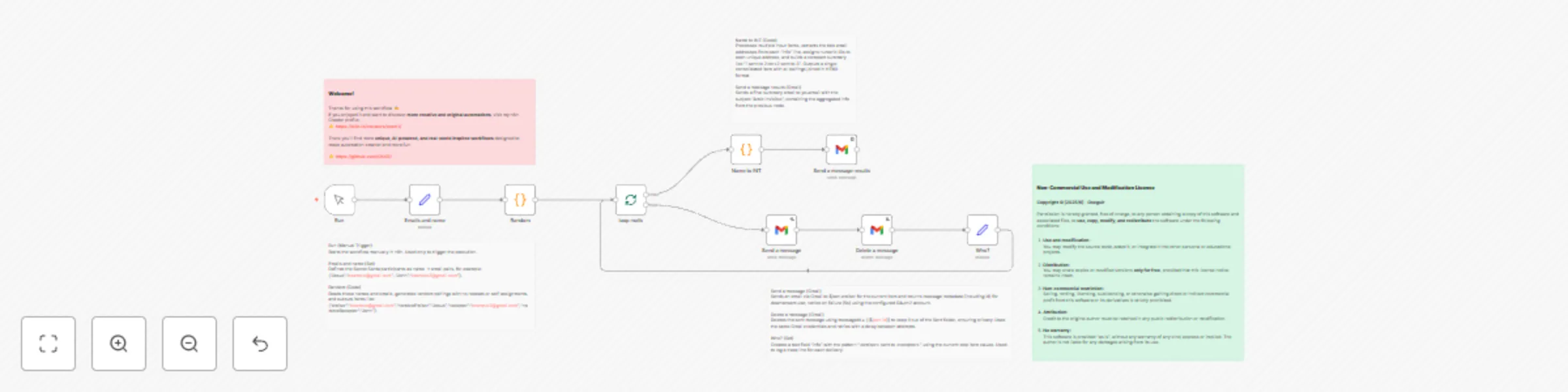
### **Secret Santa (Amigo Invisible) Automation 🎁** This workflow fully automates a **Secret Santa** (Amic Invisible) event — perfect for friends, families, or office teams who want to make their gift exchange fun, fair, and completely private. It takes a simple list of participant names and emails, then automatically pairs everyone using a **non-repeating random assignment system (derangement algorithm)** — meaning no one is ever assigned to themselves and every participant both gives and receives a gift exactly once. Once the pairs are generated, the workflow sends each participant a beautifully formatted email revealing only their assigned recipient. After each email is sent, it is **automatically deleted from the “Sent” folder** to ensure the organizer cannot see or trace who got whom, keeping the surprise intact. At the end of the process, the workflow generates a **numerical summary** like “1 sent to 2, 2 sent to 3…” — allowing the organizer to verify that everything worked correctly **without revealing the actual names or emails** of the participants. This automation combines creativity, privacy, and transparency — making it perfect for anyone who wants to manage a Secret Santa game with ease, fairness, and a touch of automation magic. Created by [oxsr11](https://n8n.io/creators/oxsr11/) — explore more original and innovative workflows on my n8n profile.
Technical SEO audits with GPT-4o-mini & multi-format reporting (Sheets/Email)
Instantly map all internal URLs, perform **AI-powered (ChatGPT)** analysis, and deliver results in **HTML via webhook, Google Sheets, or email.** *All from your own n8n instance!* --- ## 💡 Why this workflow? * **Forget expensive tools:** Run deep, visual audits replacing Screaming Frog or Ahrefs. * **Real URL mapping:** Reads the sitemap, filters only internal URLs, and analyzes each one individually. * **AI-powered analysis:** ChatGPT detects critical issues, recommendations, and best practices on every page. * **Error handling:** The workflow includes robust error handling and guides you on what to do in each case. * **Client-ready results:** Receive a professional HTML report, an email summary, or push it to Google Sheets for team collaboration. * **Automate by webhook or manually:** Use it in backend integrations or trigger with a button. --- ## 🧠 What does the workflow do? 1. Automatically detects the sitemap (`robots.txt → sitemap.xml`). 2. Filters only internal URLs (ignores assets, images, scripts, etc). 3. Fetches the full HTML content of each URL. 4. Uses **ChatGPT (GPT-4o-mini)** for professional diagnostics (meta tags, headings, hreflang, Open Graph, links, duplicate content, etc). 5. Groups results (critical issues, recommendations, best practices) and presents them as: * 📄 Professional **HTML report** (ready to send/share) * 📊 **Google Sheets** (collaborative structure) * 🔗 **Webhook or HTML email** (for automation) --- ## 🛠️ Technologies / APIs Used * **n8n** (self-hosted or cloud instance required) * **ChatGPT API** (required, approx. cost: €0.01 per 20 URLs analyzed) * **Google Drive/Sheets API** (only for Google Sheets output) * **Email SMTP/Gmail** (for notifications) --- ## ⚡ Who should use it? * SEOs and agencies needing technical reports in minutes * Freelancers automating client SEO audits * Web developers and growth hackers * Website owners/businesses with multiple sites --- ## 🎯 Problems solved * Slow, manual SEO auditing * Dependence on expensive SaaS * Lack of full-site coverage → every URL is checked with actionable recommendations * Fast, visual delivery to clients (HTML “copy-paste” report and/or collaborative sheet) --- ## 📝 Quick Setup 1. Import the `.json` into your n8n. 2. Add your credentials: * **OpenAI (ChatGPT) API Key** * **Google account** (only for Google Sheets output) 3. Run manually or via webhook (you can pass the URL as a parameter). 4. View the results in the generated **HTML**, **Google Sheets**, or your **email**. --- ## 💡 Details & Tips * Enter only the domain (e.g., `example.com`) — **no** `https://` and no trailing slash. * If any error occurs (unusual sitemap, robots blocked, etc.), the messages are explained clearly. * You can change the **analysis language** (default: Spanish). * 100% **customizable and extendable** for other outputs (Notion, Slack, etc). --- ## 📦 What’s included? * 🧩 `n8n workflow file` → `SEO n8n.json` * 📘 Quick install guide (`README`) * 💬 Direct support: [[email protected]](mailto:[email protected]) * 📸 More info and photos: [[email protected]](mailto:[email protected])
Generate domain insights with WHOIS lookup and GPT-5-Nano via RapidAPI
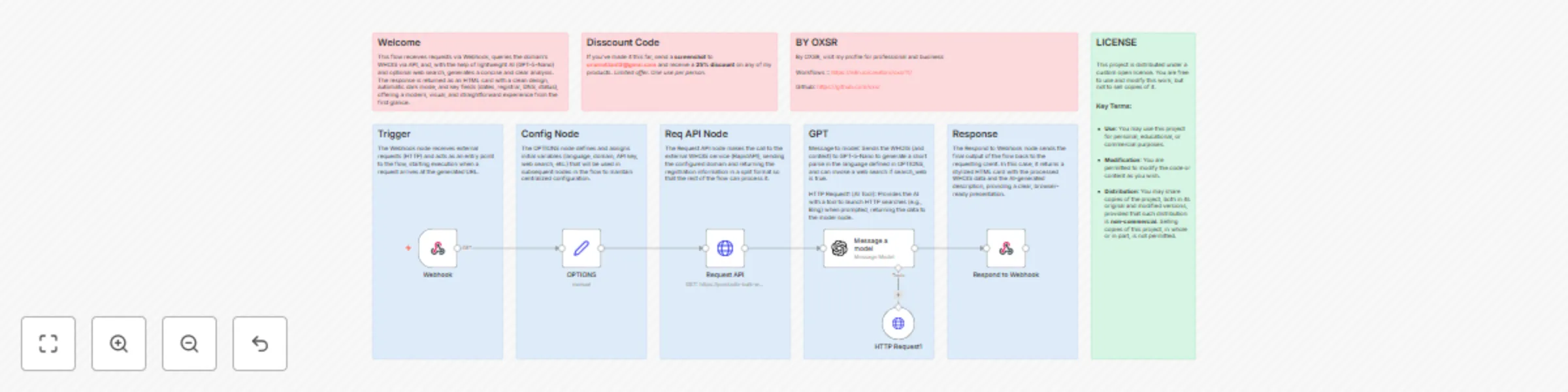
This template allows you to automatically fetch WHOIS data for any domain and display it in a clean, modern HTML card. It doesn’t just stop at showing raw registry data — it also uses a lightweight AI model to generate a short analysis or conclusion about the domain. It’s designed for **SEO specialists, web developers, sysadmins, digital marketers, and cybersecurity enthusiasts** who want quick and structured access to domain ownership and status details without wasting time on manual searches. #### What it does: * Receives a domain name via webhook. * Queries the WHOIS API through RapidAPI. * Extracts and formats key details (registrar, creation date, expiry date, DNS, domain status, etc.). * Uses AI (GPT-5-Nano) to generate a short descriptive insight about the domain. * Returns everything in a **responsive, styled HTML card** (light + dark mode included). #### Requirements: * A free account on [RapidAPI.com](https://rapidapi.com). * Use of the **Bulk WHOIS API** (includes up to 1,000 requests per month free, no credit card required). #### Who is it for? * **SEO professionals** who need to quickly check domain lifespans, expirations, and registrar info. * **Web developers** who want to integrate WHOIS checks into dashboards, apps, or chatbots. * **IT admins & security teams** who monitor domains for fraud, abuse, or expiry. * **Entrepreneurs & marketers** researching competitors’ domains. This template saves time, improves workflows, and makes WHOIS data both **actionable** and **user-friendly**.
Seo FAQ generator for websites using GPT 5 Nano and Google Sheets
### General Description This workflow is designed for **SEO professionals, digital agencies, content creators, and WordPress site owners** who want to improve their search engine rankings automatically. It’s also perfect for **curious automation enthusiasts**, who want to explore how AI and n8n can work together to save both time and money. ### Main Uses * Automatically generate **SEO-optimized FAQs** directly from your website content. * Store and organize all FAQs in **Google Sheets**, ready to manage or implement. * Send an **automatic email report** confirming the update. ### Key Features * Includes an **intelligent configuration to extract all URLs from the sitemap** and process them one by one in a loop. * As an alternative, if you don’t want to spend too much on API calls, you can enable a **configurable limit** to process only X number of URLs per run. * Comes with an **OPTIONS node** that centralizes the **workflow’s configuration for the user**, making it easy to customize key aspects like language, notification email, company name, keywords, or the number of FAQs per page. * In addition, users can choose to **inject keywords directly into the generated FAQs**, making the output even more aligned with their SEO strategy. ### Save Time and Money This workflow automates a process that would normally take hours of manual work. On average, the cost is only **\$0.20 for every 20 to 40 pages processed**, depending on the content length (using the **ChatGPT 5 Nano** model). ### Support and Documentation The workflow includes **detailed documentation**, and almost every node comes with explanations and alternative solutions in case of errors. In addition, any failure is covered with clear error messages explaining **what happened and why**, making it easier to fix quickly. In short, this template is a complete tool that combines **automation, artificial intelligence, smart URL extraction, keyword injection, a centralized configuration system, and SEO best practices**, so you can focus on what really matters: **growing your business and boosting your online visibility**. IMG Google Sheet: https://ibb.co/Yg4KMNk
Automate WordPress SEO optimization with GPT-5 nano + Yoast SEO
Optimize your WordPress titles and meta descriptions with AI (OpenAI), update them directly in Yoast SEO, log results in Google Sheets, and receive a styled report by email. All from your own n8n instance. --- ## ✨ Why this workflow? Forget spending hours editing metadata manually: this flow automates SEO generation and updates with the help of AI. * **Fully documented**: every block includes notes so you can easily understand how it works. * **Error-proof**: reinforced with alternatives and clear alerts if something fails (nested sitemaps, blocks, etc). * **Flexible and easy to modify**: change language, keywords, or domain in one single node (`OPTIONS`). * **Basic support included**: designed so anyone can set it up without being an expert. --- ## 🧠 What does the workflow do? * Reads the sitemap or internal WordPress URLs (posts or pages). * The website content is sent to **ChatGPT (GPT-5-nano)**, which analyzes it and generates a **personalized SEO title and meta description for higher precision**. * Updates the **Yoast SEO fields** in WordPress automatically. * Logs each result (URL, TITLE, META) into **Google Sheets**. * Sends a **professional HTML email report** with a summary of the updates. --- ## 🛠️ Technologies & APIs Used * **n8n** (cloud or self-hosted instance). * **OpenAI** (GPT-5-nano / GPT-4o-mini). * **Google Sheets API** (to store results). * **Gmail/SMTP** (for notifications). * **Yoast SEO plugin in WordPress** (required to update meta fields). --- ## ⚡ Who is it for? * **Agencies & SEOs** managing multiple sites. * **Freelancers** delivering extra value to clients. * **Businesses with WordPress** wanting to improve SEO without expensive SaaS. * **Webmasters & marketers** needing clear, automated reporting. * Curious in the world of n8n --- ## 🎯 Problems solved * No more manual editing of metadata for each post or page. * Eliminates dependence on overpriced third-party tools. * Creates an automatic SEO history of your site in Google Sheets. * Sends clear, professional reports of every update. --- ## 📝 Quick Setup 1. Import the `.json` into your n8n. 2. Add your credentials: * **WordPress API** (Yoast SEO installed required). * **OpenAI API Key**. * **Google Sheets** (optional). * **Email (SMTP or Gmail)**. 3. Adjust language, keywords, and domain in the `OPTIONS` node. 4. Run manually or via webhook. --- ## 💡 Tips * Change the language in `OPTIONS` to adapt SEO outputs to your target market. * If an error occurs (invalid sitemap, blocked URLs, etc.), the workflow catches it and gives you instructions. * 100% customizable: extend it to Notion, Slack, or other outputs. --- ## 📦 What’s included? * **n8n workflow file (.json)**. * Internal documentation notes inside the flow. * Basic email support. --- 👉 This workflow is your **SEO co-pilot**: fast, automated, documented, and robust.
Build a smart chatbot with GPT-5-nano, web search & conversational memory
This is an n8n workflow designed to implement an **advanced AI chatbot** with real-time conversation and search capabilities. Configured with a minimalist European design, this chatbot is ready to be integrated into any website. --- #### What Does This Workflow Do? The workflow uses a combination of nodes to create a complete chatbot: 1. **Chat Trigger**: Starts the process when a user sends a message. The configuration includes a customized visual design (minimalist European CSS), welcome messages, and titles. 2. **AI Agent**: Acts as the chatbot's brain. It coordinates interaction with the language model, memory, and tools to generate intelligent responses. 3. **Conversational Memory**: Allows the chatbot to remember the context of the conversation, providing a smoother and more coherent experience. 4. **Language Model (GPT)**: Generates the chat responses. 5. **Search Tool**: Enables the AI agent to search for information on the web and answer questions it doesn't already know. 6. **Respond to Chat**: Sends the final response back to the user. --- #### Use Cases * **Customer Support**: Answers frequently asked questions and transfers complex conversations to a human agent. * **Virtual Assistant**: Provides information about products or services, helps users navigate your website, or completes simple tasks. * **Content Generator**: Serves as an assistant for generating ideas, writing drafts, or summarizing texts. --- #### Who Is This For? This workflow is ideal for: * **Businesses and developers** looking for a versatile and customizable chatbot solution without having to build it from scratch. * **Business owners** who want to improve customer service and user interaction in an automated way. * **Curious individuals** and AI enthusiasts who want to explore how chatbots are built and experiment with their own configurations. This workflow includes **detailed documentation** that explains how each node works and how to customize it for your needs.
Autonomous blog publishing from YouTube videos with ChatGPT, Sheets, Apify, Pexels & WordPress
# Autonomous YouTube - Blog Builder / SEO Autopublisher (Sheets, ChatGPT, Apify, Pexels, WordPress) – Multilanguage **100% autonomous** workflow that transforms **YouTube videos** into **unique, high-quality, SEO-optimized blog articles** and automatically publishes them to WordPress. No human intervention required: it uses **YouTube as the main source** for fresh, original content ideas, manages a **keyword bank in Google Sheets**, finds relevant videos via **Apify**, **transcribes**, **writes**, **formats**, selects a **featured image** via Pexels, generates **SEO metadata**, and **publishes**. When all keywords are used, it will **automatically generate new ones** (avoiding duplicates) to keep producing content without interruptions. **Estimated cost per post** (including ChatGPT + Apify (free 5$ new user)) → **\$0.01 – \$0.03** depending on video length. Includes: * **Access to APIs with 7-day free trials** (Apify, Pexels, etc.). * **Step-by-step documentation** to get each API key. * **Basic setup support** to get you started. ## Who it’s for * Agencies and creators looking to **scale blogging** from video content. * SEO teams needing **automation with quality control**. * Technical bloggers who want **hands-off publishing** with tracking. ## SEO * SEO teams needing **automation with quality control (modifiable from the options node like including h1, hierarchy among other SEO options)**. * The title and description of the page (SEO) is based on the language in which the blog was created * Allows you to add keywords ## How it works (phase summary) **Part 1 – Keyword initialization** * Manual or scheduled trigger. * Checks if the Google Sheet is empty; if so, **generates 10 keywords** based on a seed idea and saves them. **Part 2 – Keyword management & blog settings** * Includes an **“options” node** to configure global blog language and formatting rules (H1, headings, bold, intro, conclusion, etc.). * Selects a keyword with `false` status (unused), marks it `true` with a **usage date**, and if none are left, **generates new ones** while avoiding duplicates. **Part 3 – Video search & duplicate filtering** * Searches YouTube via **Apify** using the keyword, retrieves \~30 results, **excludes Shorts**, and selects **2 videos** based on title/description/hashtags. * Checks for duplicates; if found, **retries up to 5 times** with variations. * If still duplicated, discards the keyword and selects another. ## Error Handling & Continuity Includes **fallbacks and failure alerts in every critical node** to ensure the workflow keeps running even if a step fails. **Part 4 – Article creation** 1. **Transcribes** the video (cost included in \$0.01–\$0.03). 2. ChatGPT writes a formal blog post in the **language set** in the “options” node. 3. A second ChatGPT step applies the formatting rules (structure, H1/H2…, intro/conclusion). 4. Ensures **SEO compliance**. 5. Converts **Markdown → HTML** and **publishes** to WordPress (more info results screenshots). **Part 5 – Image & final publishing** * Searches **Pexels API** for images using the post keyword. * ChatGPT chooses the most suitable image; it’s **downloaded and attached** to the post. * Generates an SEO **title** and **meta description** based on the content. * Sends an **email confirmation** with the published URL (with the chosen language, more info screenshots). ## Requirements * **OpenAI / ChatGPT** (or compatible provider for transcription and writing). * **Google Sheets** (keyword storage and usage tracking). * **Apify** (YouTube search (free 5$ new user)). * **Pexels API** (image sourcing (free api)). * **WordPress REST API** (user with permissions to create posts/media). ## Costs & limits (important) * **Cost per post:** **\$0.01 – \$0.03** (ChatGPT + Apify included (free 5$ new user)). * **Rate limits**: respect YouTube/Apify, Pexels, and OpenAI limits. ## Thoroughly Tested for Reliability and Performance * This workflow has been **carefully tested in multiple scenarios** to ensure optimal functionality, stability, and accuracy. * Various edge cases and potential failure points were simulated, and fallback mechanisms were implemented to handle unexpected situations. * The result is a **robust and reliable automation** you can run confidently in production environments. The workflow is multi-language and it has been tested to create blogs in (Russian, Spanish, English, German and French) all the results were verified and good ## Screenshots - [Is it really autonomous?](https://i.ibb.co/HLbrHmhq/Screenshot-20250811-193829-Chrome.jpg) - [Blog example (Eng) – P1](https://i.ibb.co/T914gbr/example-blog-eng-lang.jpg) - [Blog example (Eng) – P2](https://i.ibb.co/vvDpS1CV/example-blog-eng-lang-2.jpg) - [Blog example (IT)](https://i.ibb.co/zhzHFjHn/example-blog-it-lang.jpg) - [Email received](https://i.ibb.co/przyrwQz/blog-created-email.jpg) **More info and photos:** [[email protected]](mailto:[email protected])
Crawl websites & answer questions with GPT-5 nano and Google Sheets
## **Web Consultation & Crawling Chatbot with Google Sheets Memory** **Who is this workflow for?** This workflow is designed for **SEO analysts, content creators, marketing agencies, and developers** who need to index a website and then interact with its content as if it were a chatbot. ⚠ **Note:** if the site contains many pages, AI token consumption can generate **high costs**, especially during the initial crawling and analysis phase. --- ### **1. Initial Mode (first use with a URL)** When the user enters a URL for the first time: 1. **URL validation** using AI (gpt-5-nano). 2. **Automatic sitemap discovery** via `robots.txt`. 3. **Relevant sitemap selection** (pages, posts, categories, or tags) using GPT-4o according to configured options. *(Includes “OPTIONS” node to precisely choose which types of URLs to process)* 4. **Crawling of all selected pages**: * Downloads HTML of each page. * Converts HTML to Markdown. * AI analysis to extract: * Detected language. * Heading hierarchy (H1, H2, etc.). * Internal and external links. * Content summary. 5. **Structured storage** in Google Sheets: * Lang * H1 and hierarchy * External URLs * Internal URLs * Summary Content * Data schema (flag to enable agent mode) When finished, the sheet is marked with **`Data schema = true`**, signaling that the site is indexed. --- ### **2. Agent Mode (subsequent queries)** If the URL has already been indexed (`Data schema = true`): 1. The chat becomes a **LangChain Agent** that: * Reads the database in Google Sheets. * Can perform **real-time HTTP requests** if it needs updated information. * Responds **as if it were the website**, using stored and live data. This allows the user to ask questions such as: * *"What’s on the contact page?"* * *"How many external links are there on the homepage?"* * *"Give me all the H1 headings from the services pages"* * *"What CTA would you suggest for my page?"* * *"How would you expand X content?"* --- ### **Use cases** * Build a chatbot that answers questions about a website’s content. * Index and analyze full websites for future queries. * SEO tool to list headings, links, and content summaries. * Assistant for quick exploration of a site’s structure. * Generate improvement recommendations and content strategies from site data.
AI-powered automatic analysis of YouTube product reviews with Apify + GPT
# AI-Powered Automatic Analysis of YouTube Product Reviews With Apify This **n8n** workflow automates the process of searching, transcribing, and analyzing product reviews extracted from YouTube videos, generating a clear, ready-to-use report in **HTML format and/or email**. --- ## 📌 Usage and How It Works 1. **Enter the product name** (via webhook or manually). 2. The workflow **searches YouTube videos** related to the product using **Apify**. 3. **Extracts the text** (transcription) from the selected videos. 4. **Merges and separates** each video's content to maintain context. 5. Analyzes the texts with **GPT-4o-mini** to obtain: - **Strengths** (pros, advantages, what users value most). - **Weaknesses** (cons, problems, criticisms). - Other relevant points mentioned in the reviews. 6. Returns an **HTML report** (via email or webhook), ready for reading or presentation. The entire process is **fully automated** and multi-language (language configured in the `LANG` node). --- ## 💡 Why Buy This Workflow - **Save hours of work** searching and manually analyzing reviews. - **Reliable results**: the analysis is based only on what is said in the videos, without inventing data. - **Complete integration**: scraping, transcription, processing, and delivery, all in a single flow. - **Multi-language** configurable in seconds. - **Low cost per use** (see below). - **Configurable**: Designed to be easy to set up and adapt. --- ## 🎯 Who It’s For - **E-commerce and online stores** wanting to know product pros/cons before selling. - **Marketing and SEO agencies** looking for real user insights. - **Brands** seeking genuine feedback on their products. - **Market researchers** needing aggregated opinions. - **n8n enthusiasts** wanting to see a practical and complete example of advanced automation. --- ## 💰 Usage Costs - **Approximate cost:** $0.03 USD per report *(GPT-4o-mini + Apify)*. - **Apify** offers **$5 free without a credit card**, which equals **~130 free reports** before incurring any costs. - After that, you only pay for what you use. --- ## 🔧 Technologies Used - **Apify** for video search and transcript extraction. - **OpenAI GPT-4o-mini** for text analysis and report generation. --- ## 📬 Basic Support For questions or basic support, email: **[email protected]** --- ## Example result 
Extract & analyze competitor reviews with Firecrawl & GPT-4o mini for intelligence reports
# 🥇 Competitor Review-Based Report (Firecrawl + GPT) for n8n ### The most **automated**, **innovative**, and **actionable** competitor review workflow. --- ### Who is this workflow for? This workflow is designed for professionals, companies, and agencies that want to automate competitive analysis based on public reviews and opinions found on the Internet. It is especially useful for: - **Restaurants and local businesses** seeking to identify the strengths and weaknesses of their direct competitors. - **Marketing departments and analysts** interested in monitoring the reputation of rival brands or services. - **Consultants and agencies** offering competitive intelligence or benchmarking services to their clients. - **Entrepreneurs and product managers** looking for inspiration and opportunities for improvement through real user feedback. - **Market researchers** who need to collect and analyze large volumes of opinions in an automated and structured way. - **Automation enthusiasts and curious users** interested in exploring advanced workflow solutions. The workflow is accessible to both users without advanced technical experience and to developers who wish to customize and adapt it for new industries or specific needs. --- ## 🚀 What does this workflow do? - **Automates competitor benchmarking and review analysis.** - Searches, extracts, and summarizes user opinions from the web about any business or topic you choose. - Uses **Firecrawl API** for advanced web scraping and **GPT-4o mini** (OpenAI) for AI-powered summarization and actionable reporting. - Delivers a final competitive intelligence report to your email, Webhook, or any connected service, in your preferred language. --- ## 🔥Why is it unique? - **Zero manual work:** Just set the target (e.g., “opinions restaurant Karlos Arguiñano”) and let the workflow do all the crawling, cleaning, extracting, summarizing, and reporting. - **Multi-source:** Scrapes multiple sources automatically for comprehensive coverage. - **Highly configurable:** Choose any business or search topic, any language, and your desired delivery method. - **Minimal token usage:** Efficiently parses and converts HTML to markdown for light, fast, and cheap AI calls. - **Error-proof:** Includes robust error handling and anti-duplication logic. - **User-friendly:** Includes clear onboarding, API guides, multi-language support, and customizable notification emails. --- ## 💸 API Cost Info - **Firecrawl API:** Free up to generous limits. Each scan consumes only **0.01%** of your free API usage. - **OpenAI GPT-4o Mini:** Just **$0.02 per scan** (est.), making it the most affordable way to get world-class AI competitor analysis. --- ## 🧩 How it works (Simplified steps) 1. **Input**: Start via webhook or manual trigger. Enter your objective (e.g., “opinions restaurant [name]”). 2. **Scraping**: Firecrawl extracts URLs with user reviews & opinions about your target. 3. **Content Extraction**: Visits each URL, cleans the HTML (removes scripts, head, images, and classes), and converts to markdown. 4. **AI Analysis**: GPT-4o scans for negative/neutral reviews and user suggestions, then merges all insights. 5. **Competitive Report**: AI generates a structured report, highlighting weaknesses, opportunities, and recommendations—delivered to your email or webhook. 6. **Multi-language**: Configure language output to fit your team. --- ## ⚙️ Requirements - Firecrawl API (Free account: [https://www.firecrawl.dev/app](https://www.firecrawl.dev/app)) - OpenAI API Key (for GPT-4o mini, free tier available for new users) - Email account for informs. --- ## 💡 Example use cases - **Restaurants**: Benchmark yourself against local or global competitors - **E-commerce**: See what real users dislike (and love) about rival shops - **SaaS & Agencies**: Automate competitive intelligence for clients - **Market research**: Validate product ideas or market fit through real reviews --- > ℹ️ **User Note** > > This workflow clearly informs users how to obtain all required APIs and includes a detailed README explaining how the code works, making it easy to understand and modify if needed. --- ## 🙏 Welcome & Thanks Thank you for supporting this workflow and its creator! Your feedback enables new features and helps bring advanced AI automations to the whole n8n community. **Questions, support or customization?** [[email protected]](mailto:[email protected]) --- **Enjoy one of the most innovative workflows in n8n. Save hours of research and get ahead of your competition—automatically!** --- ### Inform example (1 inform): (imgbb URL) [Inform 1 png](https://ibb.co/V0SpCw38) [Inform 2 png](https://ibb.co/Y4SDnk69) [Inform 3 png](https://ibb.co/zhhvGG4R)
Generate & email personalized jokes with GPT-4o-mini and Gmail
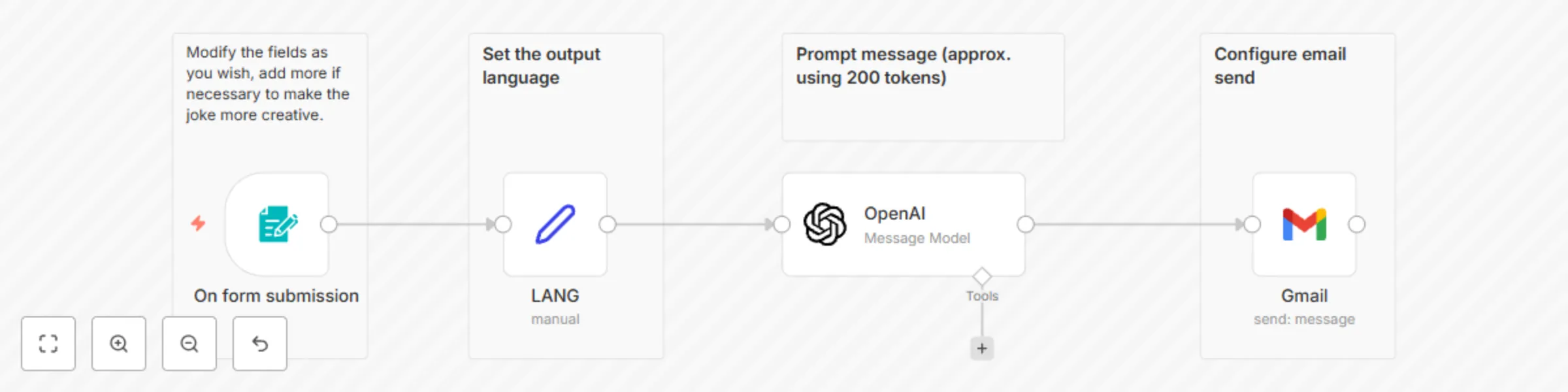
This fun workflow automates the generation and delivery of personalized jokes by email based on the names or objects entered in the form. The process works as follows: ## On form submission The workflow starts when someone submits a form with the required names or objects to create the joke. You can modify the form fields to make the jokes more creative. ## Set the output language Manually define the language in which you want to receive the joke. ## OpenAI Message Model Uses the OpenAI model to generate the joke based on the prompt and in the chosen language. (The response is limited to around 200 tokens.) ## Gmail: send message The generated joke is automatically sent to the specified email address via Gmail.
Automatic monitoring of multiple URLs with downtime alerts
This n8n workflow allows you to automatically monitor the status of multiple URLs in a simple and efficient way. You just need to enter the URLs you want to scan and run the workflow (either manually or scheduled). For each URL, an availability check is performed. The results are logged in a Google Sheet, clearly distinguishing between successful checks and failures (downtime). If any URL fails, the system filters these errors and automatically sends an email alert notifying you of the detected outages. The workflow includes help messages in both English and Spanish, integrates with Google Sheets and Gmail, and is suitable for both one-off tasks and scheduled monitoring. ### For Who? - Webmasters - SEO & Marketing Teams - SysAdmins - Anyone needing automated website uptime monitoring ### How it works? Enter the URLs to scan in the “URLs” field. Trigger the workflow manually or schedule it to run automatically. For each URL, the workflow: Checks if the URL is online or down. Logs the status (success or error) in a Google Sheet. At the end, filters the failed URLs (crashes) and sends an email alert l