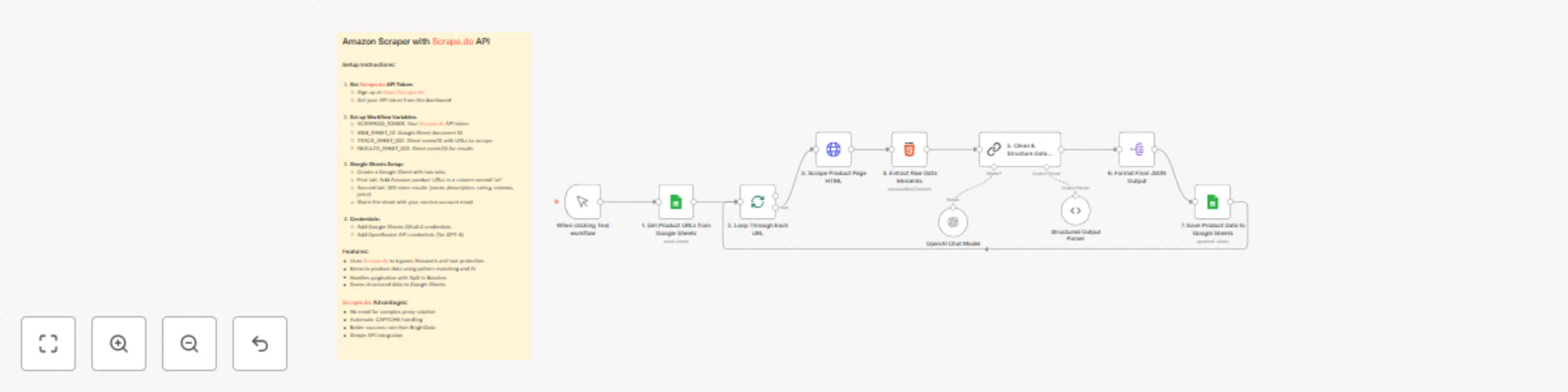
Extract Amazon product data with Scrape.do, GPT-4 & Google Sheets

Workflow preview

Workflow preview
100%
Extract Amazon product data with Scrape.do, GPT-4 & Google Sheets preview
Open on n8n.io

Important notice

This workflow is provided as-is. Please review and test before using in production.

1. Workflow Overview

Amazon Product Scraper with Scrape.do & AI Enrichment This workflow is a fully automated Amazon product data extraction engine. It reads product URLs from a Google Sheet, uses Scrape.do to rel...

Best for

  • Market Research automation workflows
  • AI Summarization automation workflows
  • intermediate n8n builders looking for reusable templates

Tools used

n8n-nodes-base.manualtrigger, @n8n/n8n-nodes-langchain.lmchatopenai, @n8n/n8n-nodes-langchain.outputparserstructured, n8n-nodes-base.googlesheets, n8n-nodes-base.splitinbatches, n8n-nodes-base.httprequest, n8n-nodes-base.html, @n8n/n8n-nodes-langchain.chainllm

Source and attribution

This workflow is cataloged by N8N Workflows and links back to its original n8n.io source page by Onur.

Original n8n.io source

1.1 Workflow description

Title
Extract Amazon product data with Scrape.do, GPT-4 & Google Sheets
Workflow name
Extract Amazon product data with Scrape.do, GPT-4 & Google Sheets

Amazon Product Scraper with Scrape.do & AI Enrichment

> This workflow is a fully automated Amazon product data extraction engine. It reads product URLs from a Google Sheet, uses Scrape.do to reliably fetch each product page’s HTML without getting blocked, and then applies an AI-powered extraction process to capture key product details such as name, price, rating, review count, and description. All structured results are neatly stored back into a Google Sheet for easy access and analysis.

This template is designed for consistency and scalability—ideal for marketers, analysts, and e-commerce professionals who need clean product data at scale.


🚀 What does this workflow do?

  • Reads Input URLs: Pulls a list of Amazon product URLs from a Google Sheet.
  • Scrapes HTML Reliably: Uses Scrape.do to bypass Amazon’s anti-bot measures, ensuring the page HTML is always retrieved successfully.
  • Cleans & Pre-processes HTML: Strips scripts, styles, and unnecessary markup, isolating only relevant sections like title, price, ratings, and feature bullets.
  • AI-Powered Data Extraction: A LangChain/OpenRouter GPT-4 node verifies and enriches key fields—product name, price, rating, reviews, and description.
  • Stores Structured Results: Appends all extracted and verified product data to a results tab in Google Sheets.
  • Batch & Loop Control: Handles multiple URLs efficiently with Split In Batches to process as many products as you need.

🎯 Who is this for?

  • E-commerce Sellers & Dropshippers: Track competitor prices, ratings, and key product features automatically.
  • Marketing & SEO Teams: Collect product descriptions and reviews to optimize campaigns and content.
  • Analysts & Data Teams: Build accurate product databases without manual copy-paste work.

✨ Benefits

  • High Success Rate: Scrape.do handles proxy rotation and CAPTCHA challenges automatically, outperforming traditional scrapers.
  • AI Validation: LLM verification ensures data accuracy and fills in gaps when HTML elements vary.
  • Full Automation: Runs on-demand or on a schedule to keep product datasets fresh.
  • Clean Output: Results are neatly organized in Google Sheets, ready for reporting or integration with other tools.

⚙️ How it Works

  1. Manual or Scheduled Trigger: Start the workflow manually or via a cron schedule.
  2. Input Source: Fetch URLs from a Google Sheet (TRACK_SHEET_GID).
  3. Scrape with Scrape.do: Retrieve full HTML from each Amazon product page using your SCRAPEDO_TOKEN.
  4. Clean & Pre-Extract: Strip irrelevant code and use regex to pre-extract key fields.
  5. AI Extraction & Verification: LangChain GPT-4 model refines and validates product name, description, price, rating, and reviews.
  6. Save Results: Append enriched product data to the results sheet (RESULTS_SHEET_GID).

📋 n8n Nodes Used

  • Manual Trigger / Schedule Trigger
  • Google Sheets (read & append)
  • Split In Batches
  • HTTP Request (Scrape.do)
  • Code (clean & pre-extract HTML)
  • LangChain LLM (OpenRouter GPT-4)
  • Structured Output Parser

🔑 Prerequisites

  • Active n8n instance.
  • Scrape.do API token (bypasses Amazon anti-bot measures).
  • Google Sheets with:
    • TRACK_SHEET_GID: tab containing product URLs.
    • RESULTS_SHEET_GID: tab for results.
  • Google Sheets OAuth2 credentials shared with your service account.
  • OpenRouter / OpenAI API credentials for the GPT-4 model.

🛠️ Setup

  1. Import the Workflow into your n8n instance.
  2. Set Workflow Variables:
    • SCRAPEDO_TOKEN – your Scrape.do API key.
    • WEB_SHEET_ID – Google Sheet ID.
    • TRACK_SHEET_GID – sheet/tab name for input URLs.
    • RESULTS_SHEET_GID – sheet/tab name for results.
  3. Configure Credentials for Google Sheets and OpenRouter.
  4. Map Columns in the “add results” node to match your Google Sheet (e.g., name, price, rating, reviews, description).
  5. Run or Schedule: Start manually or configure a schedule for continuous data extraction.

This Amazon Product Scraper delivers fast, reliable, and AI-enriched product data, ensuring your e-commerce analytics, pricing strategies, or market research stay accurate and fully automated.

1.2 Logical Blocks

This catalog entry is organized from the workflow JSON. The node-level section below shows the executable blocks available for review before importing the template.

2. Block-by-Block Analysis

Block 1 - When clicking Test workflow

Type / Role
n8n-nodes-base.manualTrigger - manualTrigger
Config choices
Version 1

Block 2 - OpenAI Chat Model

Type / Role
@n8n/n8n-nodes-langchain.lmChatOpenAi - lmChatOpenAi
Config choices
Version 1.2

Block 3 - Structured Output Parser

Type / Role
@n8n/n8n-nodes-langchain.outputParserStructured - outputParserStructured
Config choices
Version 1.3

Block 4 - 1. Get Product URLs from Google Sheets

Type / Role
n8n-nodes-base.googleSheets - googleSheets
Config choices
Version 4.7

Block 5 - 2. Loop Through Each URL

Type / Role
n8n-nodes-base.splitInBatches - splitInBatches
Config choices
Version 3

Block 6 - 3. Scrape Product Page HTML

Type / Role
n8n-nodes-base.httpRequest - httpRequest
Config choices
Version 4.2

Block 7 - 4. Extract Raw Data Elements

Type / Role
n8n-nodes-base.html - html
Config choices
Version 1.2

Block 8 - 5. Clean & Structure Data with AI

Type / Role
@n8n/n8n-nodes-langchain.chainLlm - chainLlm
Config choices
Version 1.7

Block 9 - 6. Format Final JSON Output

Type / Role
n8n-nodes-base.splitOut - splitOut
Config choices
Version 1

Block 10 - 7. Save Product Data to Google Sheets

Type / Role
n8n-nodes-base.googleSheets - googleSheets
Config choices
Version 4.7

Block 11 - Sticky Note1

Type / Role
n8n-nodes-base.stickyNote - stickyNote
Config choices
Version 1

3. Summary Table

Workflow Extract Amazon product data with Scrape.do, GPT-4 & Google Sheets
Complexity intermediate
Nodes 11
Categories Market Research, AI Summarization
Author Onur
Published 17 Sept 2025

4. Reproducing the Workflow from Scratch

  1. 1. Download the workflow JSON

    Use the JSON export at /data/workflows/8678/8678.json as the source template for this automation.

  2. 2. Import the template into n8n

    Open n8n, import the downloaded JSON, and review each node before activating the workflow.

  3. 3. Configure credentials and variables

    Replace placeholder credentials, API keys, webhook URLs, account IDs, and environment-specific values with your own settings.

  4. 4. Test with sample data

    Run the workflow manually or in a staging workspace, inspect node output, and confirm downstream systems receive the expected data.

  5. 5. Activate and monitor

    Enable the workflow only after testing, then monitor executions, errors, and rate limits during the first production runs.

5. General Notes & Resources

Review imported nodes carefully before activation. This catalog entry is intended to help you inspect the workflow structure, understand required services, and find related templates faster.

Node names, credentials, schedules, webhook paths, and external service limits may need adjustment for your workspace.

Frequently asked questions

What does Extract Amazon product data with Scrape.do, GPT-4 & Google Sheets do?

Amazon Product Scraper with Scrape.do & AI Enrichment This workflow is a fully automated Amazon product data extraction engine. It reads product URLs from a Google Sheet, uses Scrape.do to rel...

What do I need before importing this workflow?

Review the workflow JSON, configure any required credentials in n8n, and test the automation in a safe workspace before using it in production.

Can I customize this workflow?

Yes. Use the block-by-block analysis and the downloadable JSON to inspect each node, then adjust credentials, prompts, schedules, filters, or destinations for your Market Research, AI Summarization use case.