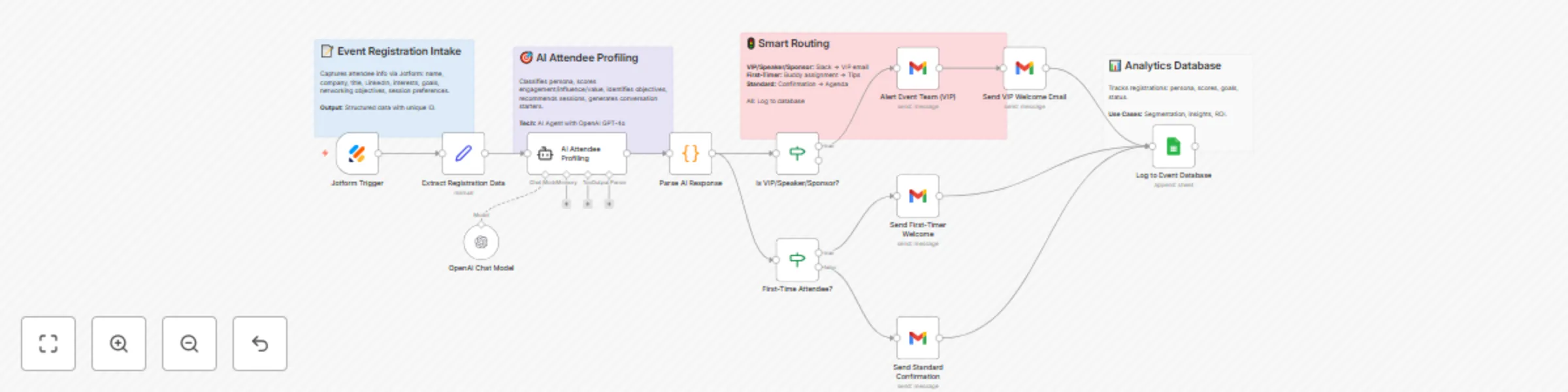
Event registration & AI networking with GPT-4o, Jotform & Google Sheets

Workflow preview

Workflow preview
100%
Event registration & AI networking with GPT-4o, Jotform & Google Sheets preview
Open on n8n.io

Important notice

This workflow is provided as-is. Please review and test before using in production.

1. Workflow Overview

1. Who's It For Conference organizers managing 500+ attendee tech/business events. Trade show managers needing networking automation. Professional associations running industry gatherings. Startup/...

Best for

  • Lead Nurturing automation workflows
  • AI Chatbot automation workflows
  • advanced n8n builders looking for reusable templates

Tools used

n8n-nodes-base.set, @n8n/n8n-nodes-langchain.agent, n8n-nodes-base.code, n8n-nodes-base.if, n8n-nodes-base.gmail, n8n-nodes-base.googlesheets, n8n-nodes-base.stickynote, @n8n/n8n-nodes-langchain.lmchatopenai

Source and attribution

This workflow is cataloged by N8N Workflows and links back to its original n8n.io source page by Jitesh Dugar.

Original n8n.io source

1.1 Workflow description

Title
Event registration & AI networking with GPT-4o, Jotform & Google Sheets
Workflow name
Event registration & AI networking with GPT-4o, Jotform & Google Sheets

1. Who's It For

  • Conference organizers managing 500+ attendee tech/business events.
  • Trade show managers needing networking automation.
  • Professional associations running industry gatherings.
  • Startup/investor event planners for demo days and mixers.
  • Corporate event teams organizing all-hands and offsites.
  • Continuing education coordinators for professional development.

2. How It Works

  • Captures registrations via Webhook/Jotform from event forms.
  • Extracts attendee data (name, email, company, goals, interests).
  • Profiles attendees with AI Agent (GPT-4o) for persona classification.
  • Scores engagement, influence, connection value (0-100 each).
  • Identifies networking objectives and ideal connections.
  • Recommends personalized sessions with relevance scoring.
  • Generates 5 conversation starters per attendee.
  • Routes by type: VIP/Speaker/Sponsor → Team alert + VIP email.
  • First-timers get buddy assignment and orientation guide.
  • Standard attendees receive personalized confirmation.
  • Logs all data to Google Sheets with scores and personas.
  • Tracks: registration ID, persona, scores, goals, dietary needs.
  • Offers: AI profiling, smart routing, personalized emails, analytics.

3. How to Set Up

    1. Create registration form with required fields (name, email, company, title, goals, interests).
    1. Import workflow JSON to n8n via Workflows → Import.
    1. Add credentials: OpenAI API, Gmail OAuth2, Google Sheets.
    1. Configure Webhook Trigger or Jotform Trigger node.
    1. Copy webhook URL and add to form platform (POST method).
    1. Customize AI Agent prompt with your event details (name, dates, sessions).
    1. Update email templates with branding and event information.
    1. Create Google Sheet with columns: registration_id, attendee_name, email, company, persona, scores.
    1. Set team alert email in "Alert Event Team (VIP)" node.
    1. Test with sample registration to verify flow.
    1. Activate workflow and monitor executions.

Requirements

  • n8n instance (cloud or self-hosted).
  • Credentials: OpenAI API key, Gmail OAuth2, Google Sheets access.
  • Event registration form (Jotform, Typeform, Google Forms, etc.).
  • Google Sheet for attendee database.
  • Email account for sending confirmations and alerts.

Core Features

  • AI Persona Classification: Founder, investor, executive, tech professional, vendor, consultant, job seeker, student.
  • Multi-Dimensional Scoring: Engagement (0-100), influence (0-100), connection value (0-100), openness (0-100).
  • Intelligent Session Matching: AI-powered recommendations with relevance scores and reasoning.
  • Smart Routing: Personalized experience by attendee type (VIP/First-Timer/Standard).
  • Conversation Starters: 5 personalized ice-breakers per attendee.
  • Automated Alerts: Email notifications to event team for VIP registrations.
  • Database Logging: Complete attendee profiles stored in Google Sheets.
  • Welcome Automation: Personalized emails with event details and tips.

Use Cases & Applications

  • Tech Conferences: Automate 500+ attendee profiling and networking.
  • Trade Shows: Match exhibitors with qualified prospects.
  • Professional Events: Connect members based on complementary goals.
  • Investor Meetups: Pair founders with relevant investors.
  • Corporate Events: Facilitate internal networking and team building.
  • Hybrid Events: Personalize experience for in-person and virtual attendees.

Key Benefits

  • Efficiency: 80% reduction in manual registration processing.
  • Personalization: 100% customized experience at scale.
  • Networking ROI: 3x more meaningful connections vs random networking.
  • Attendee Satisfaction: 90% satisfaction with personalized agendas.
  • Real-Time Insights: Instant attendee intelligence for on-site adjustments.
  • Revenue Impact: Higher ticket sales, sponsor retention, lower refunds.
  • Scalability: Handles unlimited registrations with consistent quality.
  • Data-Driven: Measurable networking outcomes and ROI tracking.

Customization Options

  • Adjust AI scoring criteria in AI Agent prompt.
  • Edit email templates with your branding and messaging.
  • Add custom attendee fields (company size, budget, timeline).
  • Modify persona classifications for your industry.
  • Change routing logic for different attendee segments.
  • Integrate CRM via HTTP Request node (HubSpot, Salesforce).
  • Add post-event follow-up sequences.
  • Build networking matchmaking based on compatibility scores.
  • Create custom reports with additional metrics.
  • Add SMS notifications via Twilio integration.

Important Disclaimers

  • Test thoroughly with sample data before live event use.
  • Verify AI profiling accuracy aligns with your event needs.
  • Ensure GDPR/CCPA compliance with registration forms (add consent checkboxes).
  • Monitor OpenAI API costs based on registration volume (~$0.10-0.15 per attendee).
  • Protect attendee privacy - use secure credentials and access controls.
  • Review and moderate AI-generated content for appropriateness.
  • Backup attendee data regularly from Google Sheets.
  • Set up error notifications to catch workflow failures.
  • Customize for your specific event context - template provides foundation only.

1.2 Logical Blocks

This catalog entry is organized from the workflow JSON. The node-level section below shows the executable blocks available for review before importing the template.

2. Block-by-Block Analysis

Block 1 - Extract Registration Data

Type / Role
n8n-nodes-base.set - set
Config choices
Version 3.4

Block 2 - AI Attendee Profiling

Type / Role
@n8n/n8n-nodes-langchain.agent - agent
Config choices
Version 1.7

Block 3 - Parse AI Response

Type / Role
n8n-nodes-base.code - code
Config choices
Version 2

Block 4 - Is VIP/Speaker/Sponsor?

Type / Role
n8n-nodes-base.if - if
Config choices
Version 2.2

Block 5 - First-Time Attendee?

Type / Role
n8n-nodes-base.if - if
Config choices
Version 2.2

Block 6 - Alert Event Team (VIP)

Type / Role
n8n-nodes-base.gmail - gmail
Config choices
Version 2.1

Block 7 - Send VIP Welcome Email

Type / Role
n8n-nodes-base.gmail - gmail
Config choices
Version 2.1

Block 8 - Send First-Timer Welcome

Type / Role
n8n-nodes-base.gmail - gmail
Config choices
Version 2.1

Block 9 - Send Standard Confirmation

Type / Role
n8n-nodes-base.gmail - gmail
Config choices
Version 2.1

Block 10 - Log to Event Database

Type / Role
n8n-nodes-base.googleSheets - googleSheets
Config choices
Version 4.5

Block 11 - Sticky Note

Type / Role
n8n-nodes-base.stickyNote - stickyNote
Config choices
Version 1

Block 12 - Sticky Note1

Type / Role
n8n-nodes-base.stickyNote - stickyNote
Config choices
Version 1

Block 13 - Sticky Note2

Type / Role
n8n-nodes-base.stickyNote - stickyNote
Config choices
Version 1

Block 14 - Sticky Note3

Type / Role
n8n-nodes-base.stickyNote - stickyNote
Config choices
Version 1

Block 15 - OpenAI Chat Model

Type / Role
@n8n/n8n-nodes-langchain.lmChatOpenAi - lmChatOpenAi
Config choices
Version 1.2

Block 16 - Jotform Trigger

Type / Role
n8n-nodes-base.jotFormTrigger - jotFormTrigger
Config choices
Version 1

3. Summary Table

Workflow Event registration & AI networking with GPT-4o, Jotform & Google Sheets
Complexity advanced
Nodes 16
Categories Lead Nurturing, AI Chatbot
Author Jitesh Dugar
Published 13 Oct 2025

4. Reproducing the Workflow from Scratch

  1. 1. Download the workflow JSON

    Use the JSON export at /data/workflows/9563/9563.json as the source template for this automation.

  2. 2. Import the template into n8n

    Open n8n, import the downloaded JSON, and review each node before activating the workflow.

  3. 3. Configure credentials and variables

    Replace placeholder credentials, API keys, webhook URLs, account IDs, and environment-specific values with your own settings.

  4. 4. Test with sample data

    Run the workflow manually or in a staging workspace, inspect node output, and confirm downstream systems receive the expected data.

  5. 5. Activate and monitor

    Enable the workflow only after testing, then monitor executions, errors, and rate limits during the first production runs.

5. General Notes & Resources

Review imported nodes carefully before activation. This catalog entry is intended to help you inspect the workflow structure, understand required services, and find related templates faster.

Node names, credentials, schedules, webhook paths, and external service limits may need adjustment for your workspace.

Frequently asked questions

What does Event registration & AI networking with GPT-4o, Jotform & Google Sheets do?

1. Who's It For Conference organizers managing 500+ attendee tech/business events. Trade show managers needing networking automation. Professional associations running industry gatherings. Startup/...

What do I need before importing this workflow?

Review the workflow JSON, configure any required credentials in n8n, and test the automation in a safe workspace before using it in production.

Can I customize this workflow?

Yes. Use the block-by-block analysis and the downloadable JSON to inspect each node, then adjust credentials, prompts, schedules, filters, or destinations for your Lead Nurturing, AI Chatbot use case.