Block 1 - Overview
- Type / Role
- n8n-nodes-base.stickyNote - stickyNote
- Config choices
- Version 1


 Early Deal
Facebook Page Negative Review Watchdog → Slack Escalation + Supabase Ticket This workflow automatically monitors Facebook Page reviews, detects negative feedback (≤ 2 stars), alerts the support tea...
n8n-nodes-base.stickynote, n8n-nodes-base.webhook, n8n-nodes-base.if, n8n-nodes-base.slack, n8n-nodes-base.supabase, n8n-nodes-base.set
This workflow is cataloged by N8N Workflows and links back to its original n8n.io source page by WeblineIndia.
Original n8n.io sourceThis workflow automatically monitors Facebook Page reviews, detects negative feedback (≤ 2 stars), alerts the support team via Slack and attempts to create a support record in Supabase with built-in error handling.
This workflow listens for Facebook Page reviews through a webhook. When a review with a rating of 2 stars or less is received, the workflow prepares and standardizes the incoming data, sends an immediate Slack alert to the support team and attempts to store the review as a support record in Supabase. If the database operation fails, a fallback Slack alert is triggered with the relevant error details.
You receive:
Ideal for customer support teams that want immediate visibility and structured tracking of negative customer feedback.
This workflow automates negative review handling:
This ensures no negative review is missed, even if downstream storage encounters issues.
This workflow is ideal for:
To run this workflow, you need:
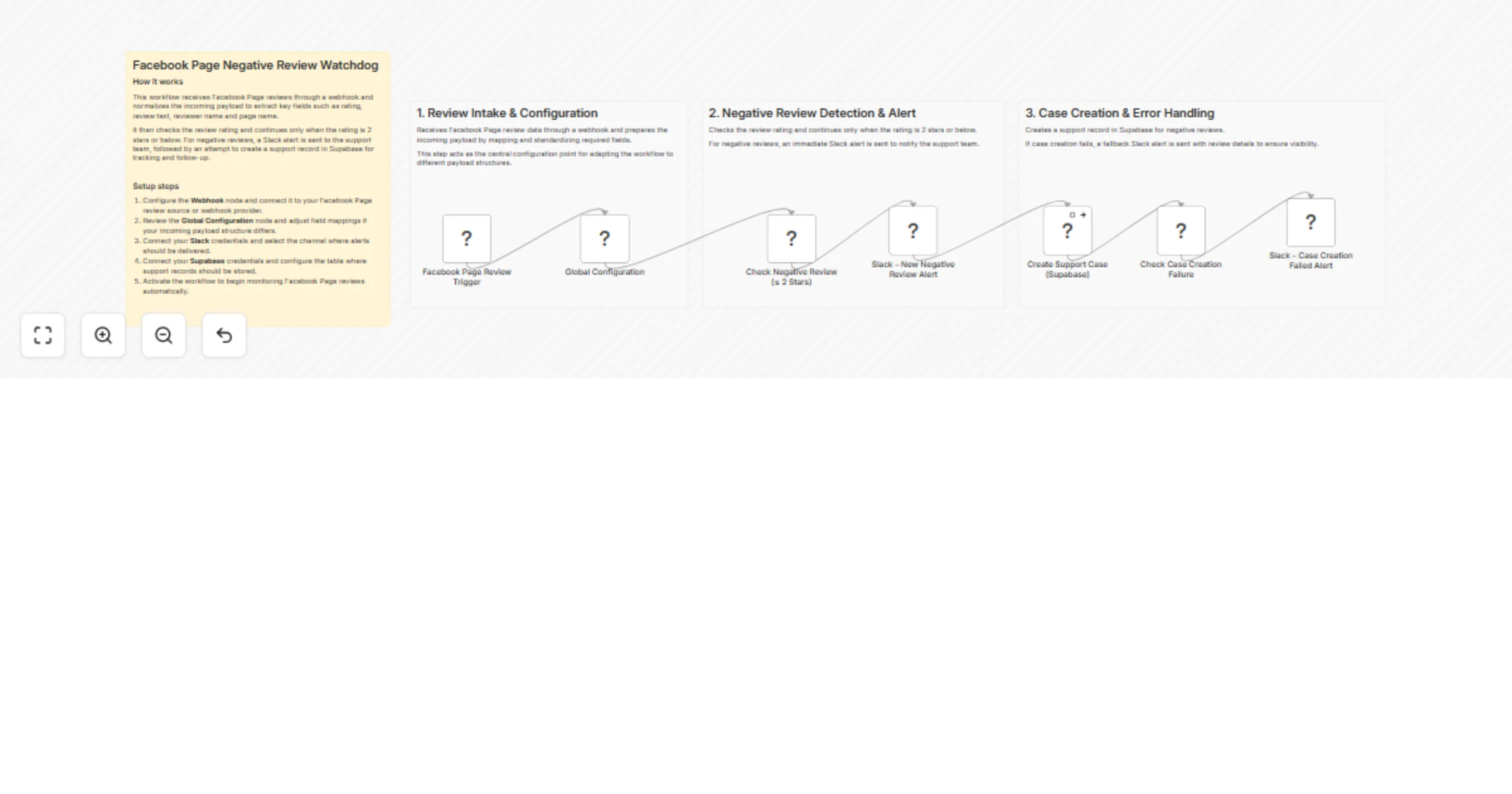
Facebook Page Review Trigger Receives new review data via POST webhook.
Global Configuration Maps and standardizes incoming review fields such as rating, review text, reviewer name and page name for consistent downstream usage.
Check Negative Review (≤ 2 Stars) Filters reviews and allows execution only for negative ratings.
Slack – New Negative Review Alert Sends an immediate Slack notification with:
Create Support Case (Supabase) Attempts to store the review as a support record.
Check Case Creation Failure Verifies whether the Supabase insert returned an error.
Slack – Case Creation Failed Alert Sends a fallback Slack alert including review context and Supabase error details.
Modify the Check Negative Review (≤ 2 Stars) IF node:
You may add:
@channel, @support)You can extend stored data with:
You can extend this workflow to:
Instant awareness of dissatisfied customers.
No need to manually check Facebook reviews.
Ensure negative feedback is logged and tracked.
Error alerts ensure failures never go unnoticed.
Capture recurring complaints for product improvement.
| Issue | Possible Cause | Solution |
|---|---|---|
| Slack alert not sent | Invalid Slack credentials | Reconnect Slack API |
| Storage insert fails | Table or permission issue | Verify table and access rules |
| Error alert always triggers | Incorrect IF condition | Validate error field mapping |
| Workflow not running | Workflow inactive | Activate workflow |
| Webhook not firing | Incorrect URL | Re-check webhook configuration |
If you need help extending or productionizing this workflow like adding retries, scaling alerts, improving error handling or integrating additional systems — our n8n automation team at WeblineIndia can assist with advanced automation and workflow design.
This catalog entry is organized from the workflow JSON. The node-level section below shows the executable blocks available for review before importing the template.
| Workflow | Escalate negative Facebook Page reviews to Slack and Supabase tickets |
|---|---|
| Complexity | intermediate |
| Nodes | 11 |
| Categories | Ticket Management, AI Summarization |
| Author | WeblineIndia |
| Published | 10 Feb 2026 |
Use the JSON export at /data/workflows/13273/13273.json as the source template for this automation.
Open n8n, import the downloaded JSON, and review each node before activating the workflow.
Replace placeholder credentials, API keys, webhook URLs, account IDs, and environment-specific values with your own settings.
Run the workflow manually or in a staging workspace, inspect node output, and confirm downstream systems receive the expected data.
Enable the workflow only after testing, then monitor executions, errors, and rate limits during the first production runs.
Review imported nodes carefully before activation. This catalog entry is intended to help you inspect the workflow structure, understand required services, and find related templates faster.
Node names, credentials, schedules, webhook paths, and external service limits may need adjustment for your workspace.
Facebook Page Negative Review Watchdog → Slack Escalation + Supabase Ticket This workflow automatically monitors Facebook Page reviews, detects negative feedback (≤ 2 stars), alerts the support tea...
Review the workflow JSON, configure any required credentials in n8n, and test the automation in a safe workspace before using it in production.
Yes. Use the block-by-block analysis and the downloadable JSON to inspect each node, then adjust credentials, prompts, schedules, filters, or destinations for your Ticket Management, AI Summarization use case.