Block 1 - Validate & Parse Input
- Type / Role
- n8n-nodes-base.code - code
- Config choices
- Version 2


 Early Deal
This workflow is provided as-is. Please review and test before using in production.
️ Community Node Disclaimer This template uses the Apify LinkedIn Profile Scraper, which is a community node only available in self hosted n8n installations. The LinkedIn scraping step is optional...
n8n-nodes-base.code, n8n-nodes-base.httprequest, n8n-nodes-base.perplexity, n8n-nodes-base.merge, n8n-nodes-base.switch, n8n-nodes-base.slack, n8n-nodes-base.gmail, n8n-nodes-base.hubspot
This workflow is cataloged by N8N Workflows and links back to its original n8n.io source page by Connor Provines.
Original n8n.io sourceThis template uses the Apify LinkedIn Profile Scraper, which is a community node only available in self-hosted n8n installations. The LinkedIn scraping step is optional and can be removed for n8n Cloud compatibility.
Sales and marketing teams processing 20+ leads daily who need to eliminate manual research and focus reps on hot prospects. Perfect for B2B companies wanting to qualify inbound leads at scale using AI-powered enrichment and scoring.
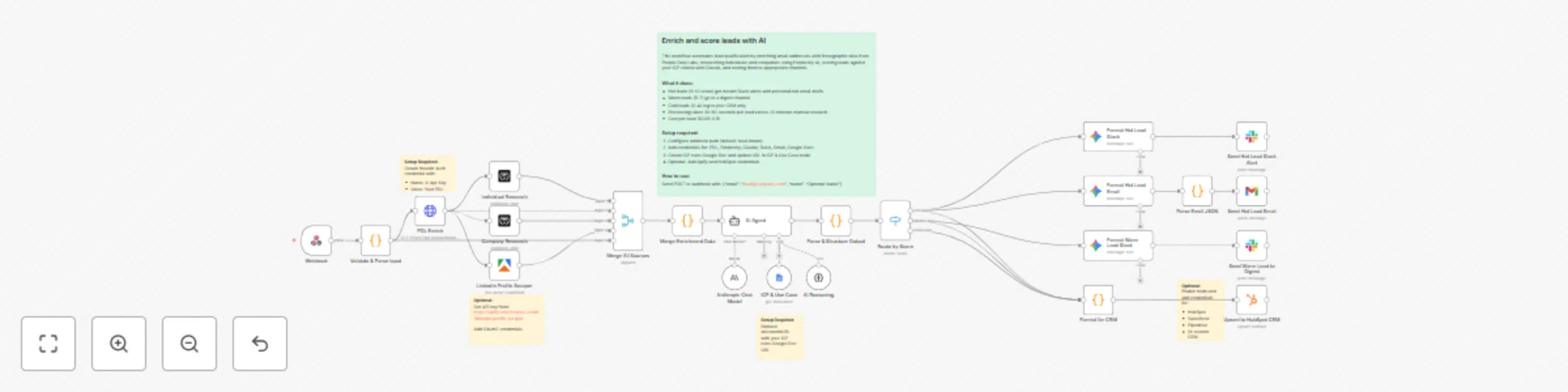
This workflow automates lead qualification by enriching email addresses with firmographic data from People Data Labs, researching individuals and companies using Perplexity AI, scoring leads against your ICP criteria with Claude, and routing them to appropriate channels. Hot leads (8-10 score) get instant Slack alerts with personalized email drafts. Warm leads (5-7) go to a digest channel. Cold leads (0-4) log to your CRM only. Processing takes 30-60 seconds per lead versus 20 minutes manual research, costing $0.08-0.15 per lead.
The webhook receives an email address and optional name. Multiple enrichment sources run in parallel: PDL fetches contact and firmographic data, Perplexity researches the individual's recent activity and company developments, and optionally Apify scrapes their LinkedIn profile. All data merges into a complete profile. Claude AI scores the lead against your ICP rules stored in Google Docs, calculating points for company fit, title fit, buying signals, and timing. Based on the total score, leads route to three tiers with different handling. Hot leads trigger immediate Slack alerts and generate personalized email drafts using Gemini. All qualified leads optionally sync to your CRM.
In the Webhook node, set your webhook path (default is "lead-intake"). Send POST requests with this JSON format:
{
  "email": "[email protected]",
  "name": "Optional Name"
}
People Data Labs: In the PDL Enrich node, click "Credential for Header Auth" → Create new credential → Add header name X-Api-Key with your PDL API key as the value. This uses n8n's credential management instead of hardcoding keys.
Perplexity: In both Individual Research and Company Research nodes, add your Perplexity API credentials.
Anthropic: In the Anthropic Chat Model node, add your Claude API credentials.
Slack: In both Slack nodes, set up OAuth2 and select your target channels. Hot and warm leads can route to different channels.
Gmail: In the Send Hot Lead Email node, configure OAuth2 credentials.
Google Docs: In the ICP & Use Case node, replace the documentURL with your Google Doc containing ICP scoring rules, then add OAuth2 credentials.
Optional - Apify: In LinkedIn Profile Scraper node, add your Apify OAuth2 credentials from https://apify.com/curious_coder/linkedin-profile-scraper
Optional - HubSpot: Enable the Upsert to HubSpot CRM node and add your credentials. Customize the customPropertiesValues array to match your fields.
Create a Google Doc with this structure:
COMPANY FIT (0-3 points):
- Company size: 50-500 employees = 3 points
- Industry: SaaS/Technology = 3 points
- Geography: North America = 3 points

TITLE FIT (0-3 points):
- VP/C-level = 3 points
- Director = 2 points
- Manager = 1 point

BUYING SIGNALS (0-2 points):
- Recent funding = 2 points
- New executive = 1 point

TIMING (0-2 points):
- Urgent need = 2 points
Copy the URL and paste it in the ICP & Use Case node's documentURL parameter.
Activate the workflow and send a test webhook. Monitor the execution to verify enrichment sources return data, AI scoring completes, routing works correctly, and notifications send to the right channels.
Swap enrichment sources: Replace the PDL Enrich node with Apollo or Clearbit HTTP Request nodes. Update the Merge Enrichment Data node to parse the new response format.
Adjust scoring thresholds: In the AI Agent node prompt, change the score ranges (currently 8-10 = hot, 5-7 = warm, 0-4 = cold) and add custom scoring factors like technology stack match or budget authority.
Change routing: In the Route by Score node, add new output conditions for additional tiers like VIP or modify existing thresholds.
Different notifications: Replace Slack nodes with Gmail or add Twilio nodes for SMS. Update the formatting nodes to create appropriate message templates.
Use different AI models: Swap the Anthropic Chat Model with OpenAI for GPT-4 or replace the Gemini formatting nodes with Claude for consistency.
Remove LinkedIn scraping: Delete the LinkedIn Profile Scraper node and adjust Merge All Sources to accept 4 inputs instead of 5 for n8n Cloud compatibility.
Connect different CRMs: Replace the HubSpot node with Salesforce, Pipedrive, or other CRM nodes. Update the Format for CRM node's field mappings to match your CRM's structure.
This catalog entry is organized from the workflow JSON. The node-level section below shows the executable blocks available for review before importing the template.
Showing the first 24 of 28 workflow blocks. Download the JSON for the full node graph.
| Workflow | Enrich and score leads automatically with Claude AI, PDL and Perplexity |
|---|---|
| Complexity | advanced |
| Nodes | 28 |
| Categories | Lead Generation, AI Summarization |
| Author | Connor Provines |
| Published | 09 Oct 2025 |
Use the JSON export at /data/workflows/9433/9433.json as the source template for this automation.
Open n8n, import the downloaded JSON, and review each node before activating the workflow.
Replace placeholder credentials, API keys, webhook URLs, account IDs, and environment-specific values with your own settings.
Run the workflow manually or in a staging workspace, inspect node output, and confirm downstream systems receive the expected data.
Enable the workflow only after testing, then monitor executions, errors, and rate limits during the first production runs.
Review imported nodes carefully before activation. This catalog entry is intended to help you inspect the workflow structure, understand required services, and find related templates faster.
Node names, credentials, schedules, webhook paths, and external service limits may need adjustment for your workspace.
️ Community Node Disclaimer This template uses the Apify LinkedIn Profile Scraper, which is a community node only available in self hosted n8n installations. The LinkedIn scraping step is optional...
Review the workflow JSON, configure any required credentials in n8n, and test the automation in a safe workspace before using it in production.
Yes. Use the block-by-block analysis and the downloadable JSON to inspect each node, then adjust credentials, prompts, schedules, filters, or destinations for your Lead Generation, AI Summarization use case.