Enrich and score Japanese B2B leads with gBizINFO, web scraping, and Gemini AI

Workflow preview

Workflow preview
100%
Enrich and score Japanese B2B leads with gBizINFO, web scraping, and Gemini AI preview
Open on n8n.io

1. Workflow Overview

Enrich and score Japanese company leads with government APIs, web scraping, and Gemini AI What this workflow does This workflow automates B2B lead research for Japanese companies. Submit a company ...

Best for

  • Lead Generation automation workflows
  • AI Summarization automation workflows
  • advanced n8n builders looking for reusable templates

Tools used

n8n-nodes-base.stickynote, n8n-nodes-base.formtrigger, n8n-nodes-base.httprequest, n8n-nodes-base.code, @n8n/n8n-nodes-langchain.chainllm, @n8n/n8n-nodes-langchain.lmchatgooglegemini, n8n-nodes-base.googlesheets, n8n-nodes-base.filter

Source and attribution

This workflow is cataloged by N8N Workflows and links back to its original n8n.io source page by Oka Hironobu.

Original n8n.io source

1.1 Workflow description

Title
Enrich and score Japanese B2B leads with gBizINFO, web scraping, and Gemini AI
Workflow name
Enrich and score Japanese B2B leads with gBizINFO, web scraping, and Gemini AI

Enrich and score Japanese company leads with government APIs, web scraping, and Gemini AI

What this workflow does

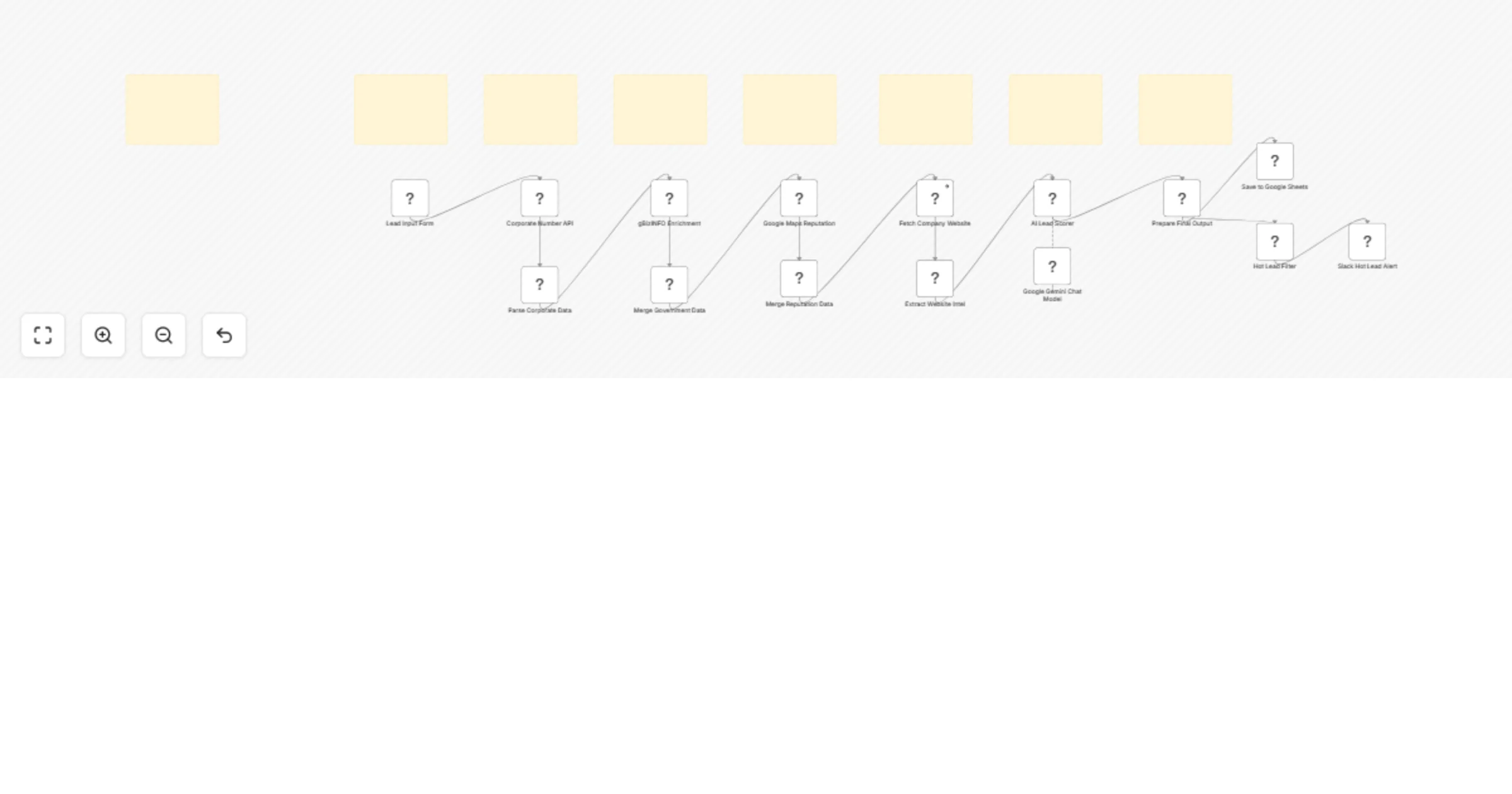
This workflow automates B2B lead research for Japanese companies. Submit a company name through a web form, and the workflow queries two free Japanese government APIs for corporate registry and business data, checks Google Maps for reputation, scrapes the company website for contact details and tech stack, and uses Gemini AI to score the lead and write a personalized outreach message in Japanese. Results are saved to Google Sheets, and high-scoring leads trigger a Slack alert.

How it works

  1. Lead input form — A sales rep submits a company name along with industry, prefecture, priority, and notes
  2. National Tax Agency API — Retrieves the official corporate number, registered name, address, and entity type using the free 法人番号 API
  3. gBizINFO API — Enriches the lead with employee count, capital, establishment date, representative, subsidies, certifications, patents, and business summary using the free Ministry of Economy API
  4. Google Maps Places API — Fetches the company's star rating, review count, and business status for reputation assessment
  5. Website scraping — Fetches the company homepage and extracts email addresses, Japanese phone numbers, tech stack (11 technologies including AWS, AI/ML, and DX), hiring signals, and social media links
  6. AI lead scoring — Gemini AI analyzes all collected data and produces a score from 0 to 100, three actionable insights, a personalized outreach message in Japanese, and a recommended next action
  7. Google Sheets — Saves 30+ data fields per lead for pipeline tracking and reporting
  8. Slack alert — Leads scoring 75 or higher trigger an instant notification with the full intelligence report

Tools used

Tool Purpose
Form trigger Lead submission interface
HTTP Request (National Tax Agency) Corporate registry lookup (free)
HTTP Request (gBizINFO) Government business data enrichment (free)
HTTP Request (Google Maps) Reputation and review data
HTTP Request (website) Homepage scraping for contact and tech intel
Code nodes (×4) Data parsing, merging, extraction, and output formatting
Google Gemini AI Lead scoring and outreach message generation
Google Sheets Lead database and pipeline tracking
Slack Hot lead alerts

Key features

  • Two free government data sources that Clay, Apollo, and ZoomInfo cannot access
  • Website intelligence with email, phone, tech stack, hiring signal, and social media extraction
  • 120-point trust score weighted across corporate registration, subsidies, certifications, reputation, and web presence
  • Company size classification using Japanese SME standards (大企業, 中堅企業, 中小企業, 小規模企業)
  • AI analysis in Japanese with personalized outreach messages referencing specific company details
  • 30+ structured data fields saved per lead for complete pipeline visibility

Setup

  1. Get a free Application ID from the National Tax Agency (法人番号 API)
  2. Get a free API token from gBizINFO (Ministry of Economy)
  3. Add a Google Maps API key with Places API enabled
  4. Connect Google Sheets via OAuth2 and create a lead tracking spreadsheet
  5. Connect your Slack workspace and select the notification channel
  6. Set your Google Gemini API key
  7. Activate the workflow and share the form URL with your sales team

1.2 Logical Blocks

This catalog entry is organized from the workflow JSON. The node-level section below shows the executable blocks available for review before importing the template.

2. Block-by-Block Analysis

Block 1 - Sticky Note

Type / Role
n8n-nodes-base.stickyNote - stickyNote
Config choices
Version 1

Block 2 - Sticky Note1

Type / Role
n8n-nodes-base.stickyNote - stickyNote
Config choices
Version 1

Block 3 - Sticky Note2

Type / Role
n8n-nodes-base.stickyNote - stickyNote
Config choices
Version 1

Block 4 - Sticky Note3

Type / Role
n8n-nodes-base.stickyNote - stickyNote
Config choices
Version 1

Block 5 - Sticky Note4

Type / Role
n8n-nodes-base.stickyNote - stickyNote
Config choices
Version 1

Block 6 - Sticky Note5

Type / Role
n8n-nodes-base.stickyNote - stickyNote
Config choices
Version 1

Block 7 - Sticky Note6

Type / Role
n8n-nodes-base.stickyNote - stickyNote
Config choices
Version 1

Block 8 - Sticky Note7

Type / Role
n8n-nodes-base.stickyNote - stickyNote
Config choices
Version 1

Block 9 - Lead Input Form

Type / Role
n8n-nodes-base.formTrigger - formTrigger
Config choices
Version 2.1

Block 10 - Corporate Number API

Type / Role
n8n-nodes-base.httpRequest - httpRequest
Config choices
Version 4.2

Block 11 - Parse Corporate Data

Type / Role
n8n-nodes-base.code - code
Config choices
Version 2

Block 12 - gBizINFO Enrichment

Type / Role
n8n-nodes-base.httpRequest - httpRequest
Config choices
Version 4.2

Block 13 - Merge Government Data

Type / Role
n8n-nodes-base.code - code
Config choices
Version 2

Block 14 - Google Maps Reputation

Type / Role
n8n-nodes-base.httpRequest - httpRequest
Config choices
Version 4.2

Block 15 - Merge Reputation Data

Type / Role
n8n-nodes-base.code - code
Config choices
Version 2

Block 16 - Fetch Company Website

Type / Role
n8n-nodes-base.httpRequest - httpRequest
Config choices
Version 4.2

Block 17 - Extract Website Intel

Type / Role
n8n-nodes-base.code - code
Config choices
Version 2

Block 18 - AI Lead Scorer

Type / Role
@n8n/n8n-nodes-langchain.chainLlm - chainLlm
Config choices
Version 1.4

Block 19 - Google Gemini Chat Model

Type / Role
@n8n/n8n-nodes-langchain.lmChatGoogleGemini - lmChatGoogleGemini
Config choices
Version 1

Block 20 - Prepare Final Output

Type / Role
n8n-nodes-base.code - code
Config choices
Version 2

Block 21 - Save to Google Sheets

Type / Role
n8n-nodes-base.googleSheets - googleSheets
Config choices
Version 4.5

Block 22 - Hot Lead Filter

Type / Role
n8n-nodes-base.filter - filter
Config choices
Version 2

Block 23 - Slack Hot Lead Alert

Type / Role
n8n-nodes-base.slack - slack
Config choices
Version 2.2

3. Summary Table

Workflow Enrich and score Japanese B2B leads with gBizINFO, web scraping, and Gemini AI
Complexity advanced
Nodes 23
Categories Lead Generation, AI Summarization
Author Oka Hironobu
Published 19 Feb 2026

4. Reproducing the Workflow from Scratch

  1. 1. Download the workflow JSON

    Use the JSON export at /data/workflows/13522/13522.json as the source template for this automation.

  2. 2. Import the template into n8n

    Open n8n, import the downloaded JSON, and review each node before activating the workflow.

  3. 3. Configure credentials and variables

    Replace placeholder credentials, API keys, webhook URLs, account IDs, and environment-specific values with your own settings.

  4. 4. Test with sample data

    Run the workflow manually or in a staging workspace, inspect node output, and confirm downstream systems receive the expected data.

  5. 5. Activate and monitor

    Enable the workflow only after testing, then monitor executions, errors, and rate limits during the first production runs.

5. General Notes & Resources

Review imported nodes carefully before activation. This catalog entry is intended to help you inspect the workflow structure, understand required services, and find related templates faster.

Node names, credentials, schedules, webhook paths, and external service limits may need adjustment for your workspace.

Frequently asked questions

What does Enrich and score Japanese B2B leads with gBizINFO, web scraping, and Gemini AI do?

Enrich and score Japanese company leads with government APIs, web scraping, and Gemini AI What this workflow does This workflow automates B2B lead research for Japanese companies. Submit a company ...

What do I need before importing this workflow?

Review the workflow JSON, configure any required credentials in n8n, and test the automation in a safe workspace before using it in production.

Can I customize this workflow?

Yes. Use the block-by-block analysis and the downloadable JSON to inspect each node, then adjust credentials, prompts, schedules, filters, or destinations for your Lead Generation, AI Summarization use case.