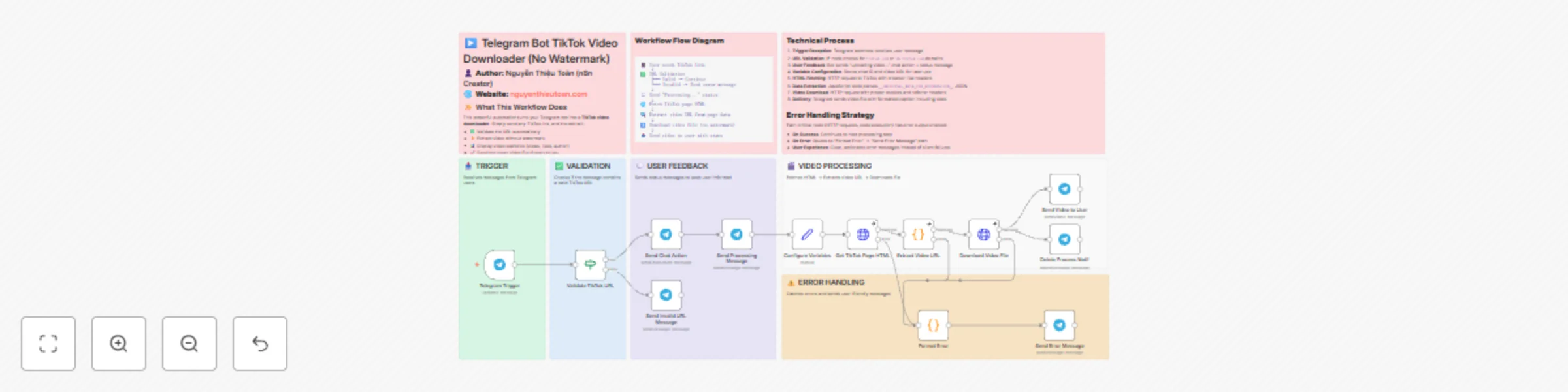
Download TikTok videos without watermarks via Telegram bot

Workflow preview

Workflow preview
100%
Download TikTok videos without watermarks via Telegram bot preview
Open on n8n.io

Important notice

This workflow is provided as-is. Please review and test before using in production.

1. Workflow Overview

TikTok Video Downloader (No Watermark) Telegram Bot Download TikTok videos instantly without watermarks via Telegram Fast, reliable, and user friendly automated workflow What This Wo...

Best for

  • Social Media automation workflows
  • advanced n8n builders looking for reusable templates

Tools used

n8n-nodes-base.telegramtrigger, n8n-nodes-base.if, n8n-nodes-base.telegram, n8n-nodes-base.set, n8n-nodes-base.httprequest, n8n-nodes-base.code, n8n-nodes-base.stickynote

Source and attribution

This workflow is cataloged by N8N Workflows and links back to its original n8n.io source page by Nguyễn Thiệu Toàn (Jay Nguyen).

Original n8n.io source

1.1 Workflow description

Title
Download TikTok videos without watermarks via Telegram bot
Workflow name
Download TikTok videos without watermarks via Telegram bot

🎬 TikTok Video Downloader (No Watermark) - Telegram Bot

> Download TikTok videos instantly without watermarks via Telegram
> Fast, reliable, and user-friendly automated workflow


✨ What This Workflow Does

This powerful automation turns your Telegram bot into a TikTok video downloader. Simply send any TikTok link, and the bot will:

  • ✅ Validate the URL automatically
  • ⚡ Extract video without watermark
  • 📊 Display video statistics (views, likes, author)
  • 🚀 Send the clean video file directly to you

No ads. No watermarks. Pure automation magic.


🎯 Key Features

Feature Description
🔍 Smart Validation Automatically checks if the link is a valid TikTok URL
💬 Real-time Feedback Keeps users informed with status messages at every step
⚠️ Error Handling Catches and explains errors in user-friendly language
📈 Video Analytics Shows author name, view count, and likes
🎥 High Quality Downloads original video quality without TikTok watermark
⚡ Fast Processing Optimized HTTP requests with proper headers and timeouts

🔧 How It Works

Workflow Flow Diagram

📱 User sends TikTok link
    ↓
✅ URL Validation
    ├─ Valid → Continue
    └─ Invalid → Send error message
    ↓
💬 Send "Processing..." status
    ↓
🌐 Fetch TikTok page HTML
    ↓
🔍 Extract video URL from page data
    ↓
⬇️ Download video file (no watermark)
    ↓
📤 Send video to user with stats

Technical Process

  1. Trigger Reception: Telegram webhook receives user message
  2. URL Validation: IF node checks for tiktok.com or vm.tiktok.com domains
  3. User Feedback: Bot sends "uploading video..." chat action + status message
  4. Variable Configuration: Stores chat ID and video URL for later use
  5. HTML Fetching: HTTP request to TikTok with browser-like headers
  6. Data Extraction: JavaScript code parses __UNIVERSAL_DATA_FOR_REHYDRATION__ JSON
  7. Video Download: HTTP request with proper cookies and referrer headers
  8. Delivery: Telegram sends video file with formatted caption including stats

Error Handling Strategy

Each critical node (HTTP requests, code execution) has error output enabled:

  • On Success: Continues to next processing step
  • On Error: Routes to "Format Error" → "Send Error Message" path
  • User Experience: Clear, actionable error messages instead of silent failures

🚀 Set Up Steps

Prerequisites

  • ✅ n8n instance (v1.116.0 or higher)
  • ✅ Telegram Bot Token (Create via @BotFather)
  • ✅ Basic understanding of n8n workflows

Step 1: Import Workflow

  1. Copy the workflow JSON
  2. In n8n, click "+ Add workflow""Import from JSON"
  3. Paste the JSON and click "Import"

Step 2: Configure Telegram Credentials

  1. Click on any Telegram node
  2. Select "Create New Credential" in the Credentials dropdown
  3. Enter your Bot Token from @BotFather
  4. Click "Save"
  5. All Telegram nodes will automatically use this credential

Step 3: Enable Error Handling ⚠️ CRITICAL

You MUST manually configure error outputs on these 3 nodes:

Node: "Get TikTok Page HTML"
  • Click the node → Settings tab
  • Find "On Error" section
  • Select "Continue With Error Output"
  • Click Save
Node: "Extract Video URL"
  • Click the node → Settings tab
  • Set "On Error" to "Continue With Error Output"
  • Click Save
Node: "Download Video File"
  • Click the node → Settings tab
  • Set "On Error" to "Continue With Error Output"
  • Click Save

> 💡 Why? n8n cannot import error handling settings via JSON. This manual step ensures errors are caught instead of crashing the workflow.

Step 4: Activate Workflow

  1. Click the "Active" toggle in the top-right corner
  2. The workflow is now listening for Telegram messages

Step 5: Test Your Bot

  1. Open Telegram and find your bot
  2. Send a TikTok link like: https://www.tiktok.com/@user/video/123456789
  3. Watch the magic happen! 🎉

🧪 Testing Scenarios

Test Case Input Expected Output
Valid Video Working TikTok link ✅ Video file + stats caption
Invalid URL hello world ❌ "Please send valid TikTok link"
Deleted Video Link to deleted video ❌ "Video data not found" error
Private Video Private account video ❌ "Video may be private" error
Short Link https://vm.tiktok.com/abc ✅ Resolves and downloads

🎨 Customization Ideas

Change Language

Edit text in Telegram nodes to translate messages:

"⏳ Downloading video..." → "⏳ Đang tải video..."

Add Video Compression

Insert a Compress node between "Download Video File" and "Send Video to User" for smaller files.

Store Statistics

Add a Google Sheets node after "Extract Video URL" to log:

  • Video URL
  • Author
  • Views/Likes
  • Download timestamp

Multi-Platform Support

Duplicate the workflow and modify URL validation + extraction logic for Instagram, YouTube Shorts, etc.

Rate Limiting

Add a Wait node (2 seconds) before "Get TikTok Page HTML" to avoid IP bans.


🐛 Troubleshooting

Problem: Bot doesn't respond

  • ✅ Check if workflow is Active
  • ✅ Verify Telegram credentials are correct
  • ✅ Check Executions tab for errors

Problem: "Video data not found" error

  • ✅ TikTok may have changed their HTML structure
  • ✅ Update the regex in "Extract Video URL" node
  • ✅ Check if video is actually deleted/private

Problem: Download fails

  • ✅ Ensure "On Error" is set to "Continue With Error Output"
  • ✅ Check if your IP is blocked by TikTok (use VPN)
  • ✅ Verify headers in "Download Video File" node

Problem: Error messages not appearing

  • ✅ Double-check error output connections (red dots)
  • ✅ Make sure "Format Error" node references correct variables
  • ✅ Test by intentionally breaking a node (invalid URL)

📊 Performance Metrics

Metric Value
Average Processing Time 5-10 seconds
Success Rate ~95% (valid public videos)
Max Video Size Limited by Telegram (50MB)
Concurrent Users Unlimited (webhook-based)

🔐 Privacy & Security

  • No Data Storage: Videos are streamed directly to users, not stored
  • No Logging: User IDs and links are processed in-memory only
  • Secure Headers: Mimics browser requests to avoid detection
  • Error Sanitization: Sensitive data is filtered from error messages

📚 Technical Stack

  • n8n Version: 1.116.0+
  • Node Types Used:
    • telegramTrigger (v1.2)
    • telegram (v1.2)
    • if (v2.2)
    • set (v3.4)
    • httpRequest (v4.2)
    • code (v2)
    • stickyNote (v1)
  • External APIs: TikTok CDN, Telegram Bot API

🎓 Learning Resources

Want to understand the workflow better? Check these concepts:


🤝 Contributing

Found a bug? Have an improvement idea?

  1. Test your changes thoroughly
  2. Document any new nodes or logic
  3. Share your enhanced workflow with the community
  4. Credit the original author (see below)

👨‍💻 About the Author

Nguyen Thieu Toan
n8n Automation Specialist & Workflow Creator

🌐 Website: nguyenthieutoan.com
📧 Contact: Available on website
🎯 Specialty: Building production-ready n8n workflows for real-world automation

> "I create workflows that just work. No fluff, no complexity—just reliable automation that saves time and solves problems."

Other Workflows by Nguyen Thieu Toan

  • 🎵 Spotify to YouTube Playlist Converter
  • 📸 Instagram Media Downloader Bot
  • 📊 Multi-Channel Social Media Scheduler
  • 🔄 Automated Content Repurposing Pipeline

Visit nguyenthieutoan.com for more automation workflows and tutorials.


📝 License & Attribution

This workflow is provided free of charge for personal and commercial use.

Required Attribution:

  • When sharing or modifying: Include author name and website link
  • When showcasing: Tag @nguyenthieutoan or link to nguyenthieutoan.com

Not Required But Appreciated:

  • Star the workflow on n8n community
  • Share your success story
  • Suggest improvements

🎉 Version History

Version Date Changes
2.0 2025-10-22 • Added comprehensive error handling
• Improved user feedback
• Added video statistics
• English language support
• Enhanced documentation
1.0 2025-10-21 • Initial release
• Basic download functionality

⭐ Support This Work

If this workflow saved you time:

  • ⭐ Star it on n8n community
  • 📢 Share with fellow automation enthusiasts
  • 💬 Leave feedback on nguyenthieutoan.com
  • ☕ Buy me a coffee (link on website)

Happy Automating! 🚀


Last Updated: October 22, 2025
Workflow Name: TikTok Video Downloader (No Watermark) - Telegram Bot
Author: Nguyen Thieu Toan

1.2 Logical Blocks

This catalog entry is organized from the workflow JSON. The node-level section below shows the executable blocks available for review before importing the template.

2. Block-by-Block Analysis

Block 1 - Telegram Trigger

Type / Role
n8n-nodes-base.telegramTrigger - telegramTrigger
Config choices
Version 1.2

Block 2 - Validate TikTok URL

Type / Role
n8n-nodes-base.if - if
Config choices
Version 2.2

Block 3 - Send Invalid URL Message

Type / Role
n8n-nodes-base.telegram - telegram
Config choices
Version 1.2

Block 4 - Send Chat Action

Type / Role
n8n-nodes-base.telegram - telegram
Config choices
Version 1.2

Block 5 - Send Processing Message

Type / Role
n8n-nodes-base.telegram - telegram
Config choices
Version 1.2

Block 6 - Configure Variables

Type / Role
n8n-nodes-base.set - set
Config choices
Version 3.4

Block 7 - Get TikTok Page HTML

Type / Role
n8n-nodes-base.httpRequest - httpRequest
Config choices
Version 4.2

Block 8 - Extract Video URL

Type / Role
n8n-nodes-base.code - code
Config choices
Version 2

Block 9 - Download Video File

Type / Role
n8n-nodes-base.httpRequest - httpRequest
Config choices
Version 4.2

Block 10 - Send Video to User

Type / Role
n8n-nodes-base.telegram - telegram
Config choices
Version 1.2

Block 11 - Format Error

Type / Role
n8n-nodes-base.code - code
Config choices
Version 2

Block 12 - Send Error Message

Type / Role
n8n-nodes-base.telegram - telegram
Config choices
Version 1.2

Block 13 - Note - Trigger

Type / Role
n8n-nodes-base.stickyNote - stickyNote
Config choices
Version 1

Block 14 - Note - Validation

Type / Role
n8n-nodes-base.stickyNote - stickyNote
Config choices
Version 1

Block 15 - Note - Feedback

Type / Role
n8n-nodes-base.stickyNote - stickyNote
Config choices
Version 1

Block 16 - Note - Processing

Type / Role
n8n-nodes-base.stickyNote - stickyNote
Config choices
Version 1

Block 17 - Note - Error

Type / Role
n8n-nodes-base.stickyNote - stickyNote
Config choices
Version 1

Block 18 - Sticky Note

Type / Role
n8n-nodes-base.stickyNote - stickyNote
Config choices
Version 1

Block 19 - Sticky Note1

Type / Role
n8n-nodes-base.stickyNote - stickyNote
Config choices
Version 1

Block 20 - Sticky Note2

Type / Role
n8n-nodes-base.stickyNote - stickyNote
Config choices
Version 1

Block 21 - Delete Process Notif

Type / Role
n8n-nodes-base.telegram - telegram
Config choices
Version 1.2

3. Summary Table

Workflow Download TikTok videos without watermarks via Telegram bot
Complexity advanced
Nodes 21
Categories Social Media
Author Nguyễn Thiệu Toàn (Jay Nguyen)
Published 21 Oct 2025

4. Reproducing the Workflow from Scratch

  1. 1. Download the workflow JSON

    Use the JSON export at /data/workflows/10001/10001.json as the source template for this automation.

  2. 2. Import the template into n8n

    Open n8n, import the downloaded JSON, and review each node before activating the workflow.

  3. 3. Configure credentials and variables

    Replace placeholder credentials, API keys, webhook URLs, account IDs, and environment-specific values with your own settings.

  4. 4. Test with sample data

    Run the workflow manually or in a staging workspace, inspect node output, and confirm downstream systems receive the expected data.

  5. 5. Activate and monitor

    Enable the workflow only after testing, then monitor executions, errors, and rate limits during the first production runs.

5. General Notes & Resources

Review imported nodes carefully before activation. This catalog entry is intended to help you inspect the workflow structure, understand required services, and find related templates faster.

Node names, credentials, schedules, webhook paths, and external service limits may need adjustment for your workspace.

Frequently asked questions

What does Download TikTok videos without watermarks via Telegram bot do?

TikTok Video Downloader (No Watermark) Telegram Bot Download TikTok videos instantly without watermarks via Telegram Fast, reliable, and user friendly automated workflow What This Wo...

What do I need before importing this workflow?

Review the workflow JSON, configure any required credentials in n8n, and test the automation in a safe workspace before using it in production.

Can I customize this workflow?

Yes. Use the block-by-block analysis and the downloadable JSON to inspect each node, then adjust credentials, prompts, schedules, filters, or destinations for your Social Media use case.