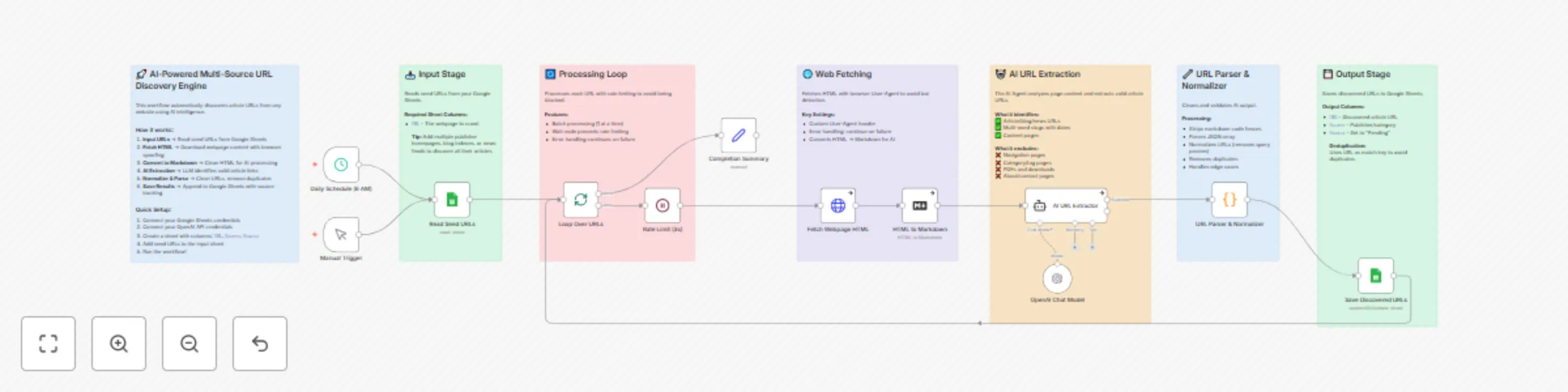
Discover article URLs from any website with GPT-5-mini and Google Sheets

Workflow preview

Workflow preview
100%
Discover article URLs from any website with GPT-5-mini and Google Sheets preview
Open on n8n.io

Important notice

This workflow is provided as-is. Please review and test before using in production.

1. Workflow Overview

Automatically discover and extract article URLs from any website using AI to identify valid content links while filtering out navigation, category pages, and irrelevant content—perfect for building...

Best for

  • Market Research automation workflows
  • AI Summarization automation workflows
  • advanced n8n builders looking for reusable templates

Tools used

n8n-nodes-base.stickynote, n8n-nodes-base.scheduletrigger, n8n-nodes-base.manualtrigger, n8n-nodes-base.googlesheets, n8n-nodes-base.splitinbatches, n8n-nodes-base.wait, n8n-nodes-base.httprequest, n8n-nodes-base.markdown

Source and attribution

This workflow is cataloged by N8N Workflows and links back to its original n8n.io source page by Omer Fayyaz.

Original n8n.io source

1.1 Workflow description

Title
Discover article URLs from any website with GPT-5-mini and Google Sheets
Workflow name
Discover article URLs from any website with GPT-5-mini and Google Sheets

Automatically discover and extract article URLs from any website using AI to identify valid content links while filtering out navigation, category pages, and irrelevant content—perfect for building content pipelines, news aggregators, and research databases.

What Makes This Different:

  • AI-Powered Intelligence - Uses GPT-5-mini to understand webpage context and identify actual articles vs navigation pages, eliminating false positives
  • Browser Spoofing - Includes realistic User-Agent headers and request patterns to avoid bot detection on publisher sites
  • Smart URL Normalization - Automatically strips tracking parameters (utm_*, fbclid, etc.), removes duplicates, and standardizes URLs
  • Source Categorization - AI assigns logical source names based on domain and content type for easy filtering
  • Rate Limiting Built-In - Configurable delays between requests prevent IP blocking and respect website resources
  • Deduplication on Save - Google Sheets append-or-update pattern ensures no duplicate URLs in your database

Key Benefits of AI-Powered Content Discovery:

  • Save 10+ Hours Weekly - Automate manual link hunting across dozens of publisher sites
  • Higher Quality Results - AI filters out 95%+ of junk links (nav pages, categories, footers) that rule-based scrapers miss
  • Scale Effortlessly - Add new seed URLs to your sheet and the same workflow handles any website structure
  • Industry Agnostic - Works for news, blogs, research papers, product pages—any content type
  • Always Up-to-Date - Schedule daily runs to catch new content as it's published
  • Full Audit Trail - Track discovered URLs with timestamps and sources in Google Sheets

Who's it for

This template is designed for content marketers, SEO professionals, researchers, media monitors, and anyone who needs to aggregate content from multiple sources. It's perfect for organizations that need to track competitor blogs, curate industry news, build research databases, monitor brand mentions, or aggregate content for newsletters without manually checking dozens of websites daily or writing complex scraping rules for each source.

How it works / What it does

This workflow creates an intelligent content discovery pipeline that automatically finds and extracts article URLs from any webpage. The system:

  1. Reads Seed URLs - Pulls a list of webpages to crawl from your Google Sheets (blog indexes, news feeds, publication homepages)
  2. Fetches with Stealth - Downloads each webpage's HTML using browser-like headers to avoid bot detection
  3. Converts for AI - Transforms messy HTML into clean Markdown that the AI can easily process
  4. AI Extraction - GPT-5-mini analyzes the content and identifies valid article URLs while filtering out navigation, categories, and junk links
  5. Normalizes & Saves - Cleans URLs (removes tracking params), deduplicates, and saves to Google Sheets with source tracking

Key Innovation: Context-Aware Link Filtering - Unlike traditional scrapers that rely on CSS selectors or URL patterns (which break when sites update), the AI understands the semantic difference between an article link and a navigation link. It reads the page like a human would, identifying content worth following regardless of the website's structure.

How to set up

1. Create Your Google Sheets Database

  • Create a new Google Spreadsheet with two sheets:
    • "Seed URLs" - Add column URL with webpages to crawl (blog homepages, news feeds, etc.)
    • "Discovered URLs" - Add columns: URL, Source, Status, Discovered At
  • Add 3-5 seed URLs to start (e.g., https://abc.com/, https://news.xyz.com/)

2. Connect Your Credentials

  • Google Sheets: Click the "Read Seed URLs" and "Save Discovered URLs" nodes → Select your Google Sheets account
  • OpenAI: Click the "OpenAI GPT-5-mini" node → Add your OpenAI API key
  • Select your spreadsheet and sheet names in both Google Sheets nodes

3. Customize the AI Prompt (Optional)

  • Open the "AI URL Extractor" node
  • Modify the system message to add industry-specific rules:
    // Example: Add to system message for tech blogs
    For tech sites, also extract:
    - Tutorial and guide URLs
    - Product announcement pages
    - Changelog and release notes
    
  • Adjust source naming conventions to match your taxonomy

4. Test Your Configuration

  • Click "Test Workflow" or use the Manual Trigger
  • Check the execution to verify:
    • Seed URLs are being read correctly
    • HTML is fetched successfully (check for 200 status)
    • AI returns valid JSON array of URLs
    • URLs are saved to your output sheet
  • Review the "Discovered URLs" sheet for results

5. Schedule and Monitor

  • Adjust the Schedule Trigger (default: daily at 6 AM)
  • Enable the workflow to run automatically
  • Monitor execution logs for errors:
    • Rate limiting: Increase wait time if sites block you
    • Empty results: Check if seed URLs have changed structure
    • AI errors: Review AI output in execution data
  • Set up error notifications via email or Slack (add nodes after Completion Summary)

Requirements

  • Google Sheets Account - OAuth2 connection for reading seed URLs and saving results
  • OpenAI API Key - For GPT-5-mini (or swap for any LangChain-compatible LLM)

1.2 Logical Blocks

This catalog entry is organized from the workflow JSON. The node-level section below shows the executable blocks available for review before importing the template.

2. Block-by-Block Analysis

Block 1 - Sticky Note - Introduction

Type / Role
n8n-nodes-base.stickyNote - stickyNote
Config choices
Version 1

Block 2 - Sticky Note - Input

Type / Role
n8n-nodes-base.stickyNote - stickyNote
Config choices
Version 1

Block 3 - Sticky Note - Loop

Type / Role
n8n-nodes-base.stickyNote - stickyNote
Config choices
Version 1

Block 4 - Sticky Note - Fetch

Type / Role
n8n-nodes-base.stickyNote - stickyNote
Config choices
Version 1

Block 5 - Sticky Note - AI

Type / Role
n8n-nodes-base.stickyNote - stickyNote
Config choices
Version 1

Block 6 - Sticky Note - Parser

Type / Role
n8n-nodes-base.stickyNote - stickyNote
Config choices
Version 1

Block 7 - Sticky Note - Output

Type / Role
n8n-nodes-base.stickyNote - stickyNote
Config choices
Version 1

Block 8 - Daily Schedule (6 AM)

Type / Role
n8n-nodes-base.scheduleTrigger - scheduleTrigger
Config choices
Version 1.2

Block 9 - Manual Trigger

Type / Role
n8n-nodes-base.manualTrigger - manualTrigger
Config choices
Version 1

Block 10 - Read Seed URLs

Type / Role
n8n-nodes-base.googleSheets - googleSheets
Config choices
Version 4.7

Block 11 - Loop Over URLs

Type / Role
n8n-nodes-base.splitInBatches - splitInBatches
Config choices
Version 3

Block 12 - Rate Limit (3s)

Type / Role
n8n-nodes-base.wait - wait
Config choices
Version 1.1

Block 13 - Fetch Webpage HTML

Type / Role
n8n-nodes-base.httpRequest - httpRequest
Config choices
Version 4.2

Block 14 - HTML to Markdown

Type / Role
n8n-nodes-base.markdown - markdown
Config choices
Version 1

Block 15 - AI URL Extractor

Type / Role
@n8n/n8n-nodes-langchain.agent - agent
Config choices
Version 2.2

Block 16 - URL Parser & Normalizer

Type / Role
n8n-nodes-base.code - code
Config choices
Version 2

Block 17 - Save Discovered URLs

Type / Role
n8n-nodes-base.googleSheets - googleSheets
Config choices
Version 4.7

Block 18 - Completion Summary

Type / Role
n8n-nodes-base.set - set
Config choices
Version 3.4

Block 19 - OpenAI Chat Model

Type / Role
@n8n/n8n-nodes-langchain.lmChatOpenAi - lmChatOpenAi
Config choices
Version 1.3

3. Summary Table

Workflow Discover article URLs from any website with GPT-5-mini and Google Sheets
Complexity advanced
Nodes 19
Categories Market Research, AI Summarization
Author Omer Fayyaz
Published 25 Nov 2025

4. Reproducing the Workflow from Scratch

  1. 1. Download the workflow JSON

    Use the JSON export at /data/workflows/11211/11211.json as the source template for this automation.

  2. 2. Import the template into n8n

    Open n8n, import the downloaded JSON, and review each node before activating the workflow.

  3. 3. Configure credentials and variables

    Replace placeholder credentials, API keys, webhook URLs, account IDs, and environment-specific values with your own settings.

  4. 4. Test with sample data

    Run the workflow manually or in a staging workspace, inspect node output, and confirm downstream systems receive the expected data.

  5. 5. Activate and monitor

    Enable the workflow only after testing, then monitor executions, errors, and rate limits during the first production runs.

5. General Notes & Resources

Review imported nodes carefully before activation. This catalog entry is intended to help you inspect the workflow structure, understand required services, and find related templates faster.

Node names, credentials, schedules, webhook paths, and external service limits may need adjustment for your workspace.

Frequently asked questions

What does Discover article URLs from any website with GPT-5-mini and Google Sheets do?

Automatically discover and extract article URLs from any website using AI to identify valid content links while filtering out navigation, category pages, and irrelevant content—perfect for building...

What do I need before importing this workflow?

Review the workflow JSON, configure any required credentials in n8n, and test the automation in a safe workspace before using it in production.

Can I customize this workflow?

Yes. Use the block-by-block analysis and the downloadable JSON to inspect each node, then adjust credentials, prompts, schedules, filters, or destinations for your Market Research, AI Summarization use case.