Discord daily digest for multiple Google Analytics accounts

Workflow preview

Workflow preview
100%
Discord daily digest for multiple Google Analytics accounts preview
Open on n8n.io

Important notice

This workflow is provided as-is. Please review and test before using in production.

1. Workflow Overview

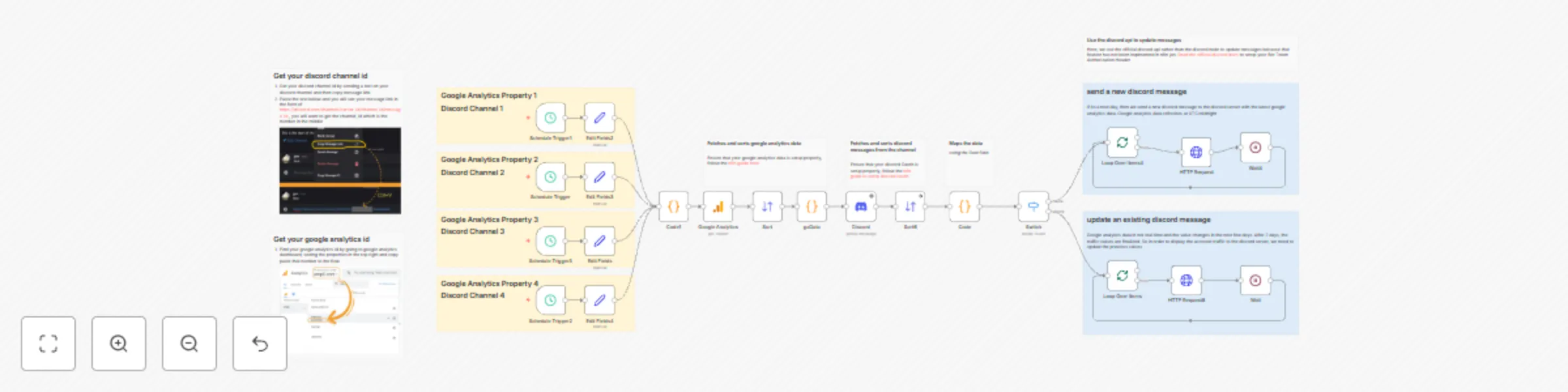
Fetch Multiple Google Analytics GA4 metrics daily, post to Discord, update previous day’s entry as GA data finalizes over seven days. ![Discord Daily Digest for Multiple Google Analytics Accounts](...

Best for

  • Market Research automation workflows
  • advanced n8n builders looking for reusable templates

Tools used

n8n-nodes-base.set, n8n-nodes-base.googleanalytics, n8n-nodes-base.scheduletrigger, n8n-nodes-base.sort, n8n-nodes-base.discord, n8n-nodes-base.code, n8n-nodes-base.stickynote, n8n-nodes-base.httprequest

Source and attribution

This workflow is cataloged by N8N Workflows and links back to its original n8n.io source page by Jay Emp0.

Original n8n.io source

1.1 Workflow description

Title
Discord daily digest for multiple Google Analytics accounts
Workflow name
Discord daily digest for multiple Google Analytics accounts

Overview

Fetch Multiple Google Analytics GA4 metrics daily, post to Discord, update previous day’s entry as GA data finalizes over seven days.

Benefits

  • Automates daily traffic reporting
  • Maintains single message per day, avoids channel clutter
  • Provides near–real-time updates by editing prior messages

Use Case

  • Teams tracking website performance via Discord (or any chat tool) without manual copy–paste. Marketing managers, community moderators, growth hackers.
  • If your manager asks you for daily marketing report every morning, you can now automate it

Notes

  • google analytics node in n8n does not provide real time data. The node updates previous values for the next 7 days
  • discord node on n8n does not have features to update an exisiting message by message id. So we have used the discord api for this
  • most businesses use multiple google analytics properties across their digital platforms

Core Logic

  1. Schedule trigger fires once a day.
  2. Google Analytics node retrieves metrics for date ranges (past 7 days)
  3. Aggregate node collates all records.
  4. Discord node fetches the last 10 messages in the broadcast channel
  5. Code node maps existing Discord messages by to the google analytics data using the date fields
  6. For each GA record:
    1. If no message exists → send new POST to the discord channel
    2. If message exists and metrics changed, send an update patch to the existing discord message
  7. Batch loops + wait nodes prevent rate-limit.

Setup Instructions

  1. Import workflow JSON into n8n.
  2. Follow the n8n guide to Create Google Analytics OAuth2 credential with access to all required GA accounts.
  3. Follow the n8n guide to Create Discord OAuth2 credential for “Get Messages” operations.
  4. Follow the Discord guide to Create HTTP Header Auth credential named “Discord-Bot” with header
Key: Authorization

Value: Bot <your-bot-token>
  1. In the two Set nodes in the beginning of the flow, assign discord_channel_id and google_analytics_id.

    1. Get your discord channel id by sending a text on your discord channel and then copy message link
    2. Paste the text below and you will see your message link in the form of https://discord.com/channels/server_id/channel_id/message_id , you will want to get the channel_id which is the number in the middle
    3. Find your google analytics id by going to google analytics dashboard, seeing the properties in the top right and copy paste that number to the flow
  2. Adjust schedule trigger times to your preferred report hour.

  3. Activate workflow.

Customization

Replace Discord HTTP Request nodes with Slack, ClickUp, WhatsApp, Telegram integrations by swapping POST/PATCH endpoints and authentication.

1.2 Logical Blocks

This catalog entry is organized from the workflow JSON. The node-level section below shows the executable blocks available for review before importing the template.

2. Block-by-Block Analysis

Block 1 - Edit Fields2

Type / Role
n8n-nodes-base.set - set
Config choices
Version 3.4

Block 2 - Edit Fields3

Type / Role
n8n-nodes-base.set - set
Config choices
Version 3.4

Block 3 - Google Analytics

Type / Role
n8n-nodes-base.googleAnalytics - googleAnalytics
Config choices
Version 2

Block 4 - Schedule Trigger

Type / Role
n8n-nodes-base.scheduleTrigger - scheduleTrigger
Config choices
Version 1.2

Block 5 - Schedule Trigger1

Type / Role
n8n-nodes-base.scheduleTrigger - scheduleTrigger
Config choices
Version 1.2

Block 6 - Sort

Type / Role
n8n-nodes-base.sort - sort
Config choices
Version 1

Block 7 - Discord

Type / Role
n8n-nodes-base.discord - discord
Config choices
Version 2

Block 8 - Code

Type / Role
n8n-nodes-base.code - code
Config choices
Version 2

Block 9 - Sticky Note

Type / Role
n8n-nodes-base.stickyNote - stickyNote
Config choices
Version 1

Block 10 - Sticky Note3

Type / Role
n8n-nodes-base.stickyNote - stickyNote
Config choices
Version 1

Block 11 - Code1

Type / Role
n8n-nodes-base.code - code
Config choices
Version 2

Block 12 - gaData

Type / Role
n8n-nodes-base.code - code
Config choices
Version 2

Block 13 - HTTP Request

Type / Role
n8n-nodes-base.httpRequest - httpRequest
Config choices
Version 4.2

Block 14 - HTTP Request8

Type / Role
n8n-nodes-base.httpRequest - httpRequest
Config choices
Version 4.2

Block 15 - Switch

Type / Role
n8n-nodes-base.switch - switch
Config choices
Version 3.2

Block 16 - Loop Over Items

Type / Role
n8n-nodes-base.splitInBatches - splitInBatches
Config choices
Version 3

Block 17 - Wait

Type / Role
n8n-nodes-base.wait - wait
Config choices
Version 1.1

Block 18 - Loop Over Items4

Type / Role
n8n-nodes-base.splitInBatches - splitInBatches
Config choices
Version 3

Block 19 - Wait4

Type / Role
n8n-nodes-base.wait - wait
Config choices
Version 1.1

Block 20 - Sticky Note1

Type / Role
n8n-nodes-base.stickyNote - stickyNote
Config choices
Version 1

Block 21 - Sticky Note2

Type / Role
n8n-nodes-base.stickyNote - stickyNote
Config choices
Version 1

Block 22 - Edit Fields

Type / Role
n8n-nodes-base.set - set
Config choices
Version 3.4

Block 23 - Edit Fields4

Type / Role
n8n-nodes-base.set - set
Config choices
Version 3.4

Block 24 - Schedule Trigger2

Type / Role
n8n-nodes-base.scheduleTrigger - scheduleTrigger
Config choices
Version 1.2

Showing the first 24 of 34 workflow blocks. Download the JSON for the full node graph.

3. Summary Table

Workflow Discord daily digest for multiple Google Analytics accounts
Complexity advanced
Nodes 34
Categories Market Research
Author Jay Emp0
Published 30 Jun 2025

4. Reproducing the Workflow from Scratch

  1. 1. Download the workflow JSON

    Use the JSON export at /data/workflows/5470/5470.json as the source template for this automation.

  2. 2. Import the template into n8n

    Open n8n, import the downloaded JSON, and review each node before activating the workflow.

  3. 3. Configure credentials and variables

    Replace placeholder credentials, API keys, webhook URLs, account IDs, and environment-specific values with your own settings.

  4. 4. Test with sample data

    Run the workflow manually or in a staging workspace, inspect node output, and confirm downstream systems receive the expected data.

  5. 5. Activate and monitor

    Enable the workflow only after testing, then monitor executions, errors, and rate limits during the first production runs.

5. General Notes & Resources

Review imported nodes carefully before activation. This catalog entry is intended to help you inspect the workflow structure, understand required services, and find related templates faster.

Node names, credentials, schedules, webhook paths, and external service limits may need adjustment for your workspace.

Frequently asked questions

What does Discord daily digest for multiple Google Analytics accounts do?

Fetch Multiple Google Analytics GA4 metrics daily, post to Discord, update previous day’s entry as GA data finalizes over seven days. ![Discord Daily Digest for Multiple Google Analytics Accounts](...

What do I need before importing this workflow?

Review the workflow JSON, configure any required credentials in n8n, and test the automation in a safe workspace before using it in production.

Can I customize this workflow?

Yes. Use the block-by-block analysis and the downloadable JSON to inspect each node, then adjust credentials, prompts, schedules, filters, or destinations for your Market Research use case.