Block 1 - Sticky Note
- Type / Role
- n8n-nodes-base.stickyNote - stickyNote
- Config choices
- Version 1


 Early Deal
This workflow is provided as-is. Please review and test before using in production.
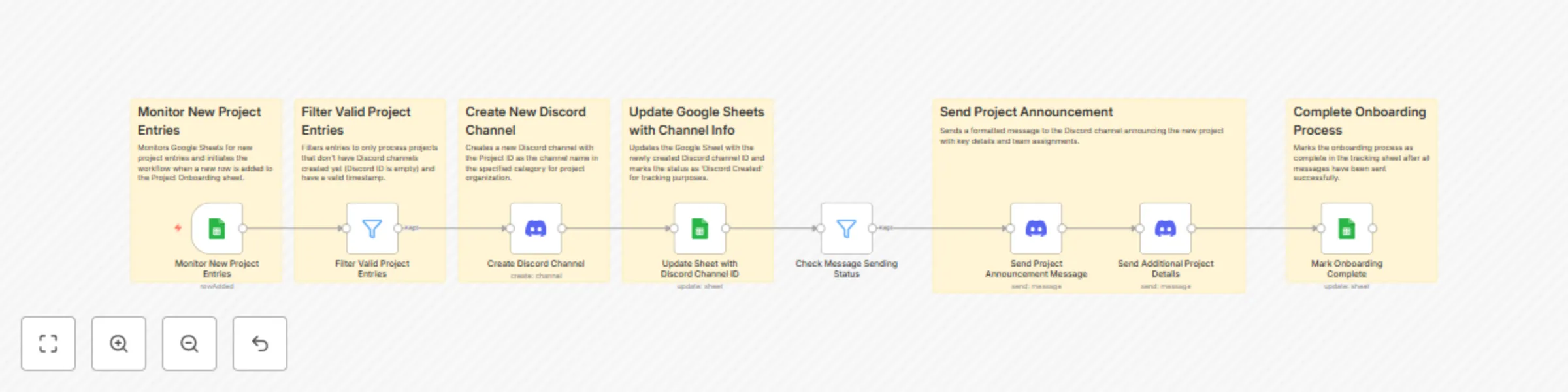
Discord Channel Creation Automation n8n Workflow A comprehensive n8n automation that monitors Google Sheets for new project entries, automatically creates dedicated Discord channels, and sends form...
n8n-nodes-base.stickynote, n8n-nodes-base.googlesheetstrigger, n8n-nodes-base.filter, n8n-nodes-base.discord, n8n-nodes-base.googlesheets
This workflow is cataloged by N8N Workflows and links back to its original n8n.io source page by Incrementors.
Original n8n.io sourceA comprehensive n8n automation that monitors Google Sheets for new project entries, automatically creates dedicated Discord channels, and sends formatted member notifications with all essential project details.
This workflow provides an automated Discord channel creation solution that eliminates manual channel setup and ensures consistent team communication. Perfect for agencies, development teams, and project-based organizations that need to streamline their Discord workspace management.
| Field | Description | Example |
|---|---|---|
| Entry ID | Unique identifier for the entry | ENTRY-2025-001 |
| Title/Name | Name or title from the sheet entry | New Marketing Campaign |
| Category/Type | Category or type of entry | Marketing Project |
| Discord Channel ID | ID of created Discord channel | 1234567890123456789 |
| Channel URL | Direct link to Discord channel | https://discord.com/channels/... |
| Creation Status | Current status of channel creation process | Discord Created, Message Sent |
| Timestamp | When the channel creation was completed | 2025-06-06T09:00:00Z |
Create Discord Bot:
Set up Discord credentials:
Configure Discord settings:
Create Channel Request Sheet:
https://docs.google.com/spreadsheets/d/SHEET_ID_HERE/editSet up Google Sheets credentials:
Prepare your data sheet with required columns:
Update Google Sheets nodes:
Update Discord nodes:
Configure notification settings:
[email protected] with actual email if neededAdd test entry:
Test the workflow:
The workflow uses intelligent status tracking:
To modify notification content, edit Discord message nodes:
@everyone with specific rolesEdit Google Sheets trigger and message nodes to include:
Customize channel organization:
// Example: Add category to channel name
"name": "{{ $json['Category/Type'] }}-{{ $json['Entry ID'] }}"

// Example: Set channel topic
"topic": "Channel for {{ $json['Title/Name'] }} - {{ $json['Category/Type'] }}"
| Issue | Cause | Solution |
|---|---|---|
| "Discord permission denied" | Bot lacks required permissions in Discord server | Ensure bot has "Manage Channels" and "Send Messages" permissions |
| "Google Sheets trigger not firing" | Incorrect sheet permissions or credential issues | Re-authenticate Google Sheets, check sheet sharing settings |
| "Channel creation failed" | Invalid guild ID, category ID, or duplicate channel names | Verify Discord IDs, ensure unique entry IDs |
| "Messages not sending" | Discord rate limiting or invalid channel references | Add delays between messages, verify channel creation success |
| "Workflow execution failed" | Missing data fields or validation errors | Ensure all required fields are populated |
Goal: Streamline project channel creation process
Goal: Organize events with dedicated Discord channels
Goal: Manage department or team-specific channels
Goal: Organize community groups and special interest channels
| Metric | Value |
|---|---|
| Processing time | 30-60 seconds per entry |
| Concurrent entries | 5-10 simultaneous (depends on Discord limits) |
| Success rate | 95%+ for valid data |
| Daily capacity | 100+ entries (depends on rate limits) |
Your workflow URL: https://your-n8n-instance.com/workflow/discord-channel-creation
🎯 Happy Channel Management! This workflow provides a solid foundation for automated Discord channel creation. Customize it to fit your specific team needs and communication requirements.
This catalog entry is organized from the workflow JSON. The node-level section below shows the executable blocks available for review before importing the template.
| Workflow | Discord Channel Creation from Google Sheets with Member Notifications |
|---|---|
| Complexity | intermediate |
| Nodes | 14 |
| Categories | Project Management |
| Author | Incrementors |
| Published | 06 Jun 2025 |
Use the JSON export at /data/workflows/4719/4719.json as the source template for this automation.
Open n8n, import the downloaded JSON, and review each node before activating the workflow.
Replace placeholder credentials, API keys, webhook URLs, account IDs, and environment-specific values with your own settings.
Run the workflow manually or in a staging workspace, inspect node output, and confirm downstream systems receive the expected data.
Enable the workflow only after testing, then monitor executions, errors, and rate limits during the first production runs.
Review imported nodes carefully before activation. This catalog entry is intended to help you inspect the workflow structure, understand required services, and find related templates faster.
Node names, credentials, schedules, webhook paths, and external service limits may need adjustment for your workspace.
Discord Channel Creation Automation n8n Workflow A comprehensive n8n automation that monitors Google Sheets for new project entries, automatically creates dedicated Discord channels, and sends form...
Review the workflow JSON, configure any required credentials in n8n, and test the automation in a safe workspace before using it in production.
Yes. Use the block-by-block analysis and the downloadable JSON to inspect each node, then adjust credentials, prompts, schedules, filters, or destinations for your Project Management use case.