Detect WooCommerce return surges in real-time with Slack alerts & Airtable logging

Workflow preview

Workflow preview
100%
Detect WooCommerce return surges in real-time with Slack alerts & Airtable logging preview
Open on n8n.io

Important notice

This workflow is provided as-is. Please review and test before using in production.

1. Workflow Overview

Real Time WooCommerce Return Surge Detection with Slack Alerts & Airtable Logging This n8n workflow monitors WooCommerce refund activity to detect unusual spikes in product returns at the SKU level...

Best for

  • Market Research automation workflows
  • advanced n8n builders looking for reusable templates

Tools used

n8n-nodes-base.scheduletrigger, n8n-nodes-base.if, n8n-nodes-base.slack, n8n-nodes-base.airtable, n8n-nodes-base.code, n8n-nodes-base.httprequest, n8n-nodes-base.set, n8n-nodes-base.stickynote

Source and attribution

This workflow is cataloged by N8N Workflows and links back to its original n8n.io source page by WeblineIndia.

Original n8n.io source

1.1 Workflow description

Title
Detect WooCommerce return surges in real-time with Slack alerts & Airtable logging
Workflow name
Detect WooCommerce return surges in real-time with Slack alerts & Airtable logging

Real-Time WooCommerce Return Surge Detection with Slack Alerts & Airtable Logging

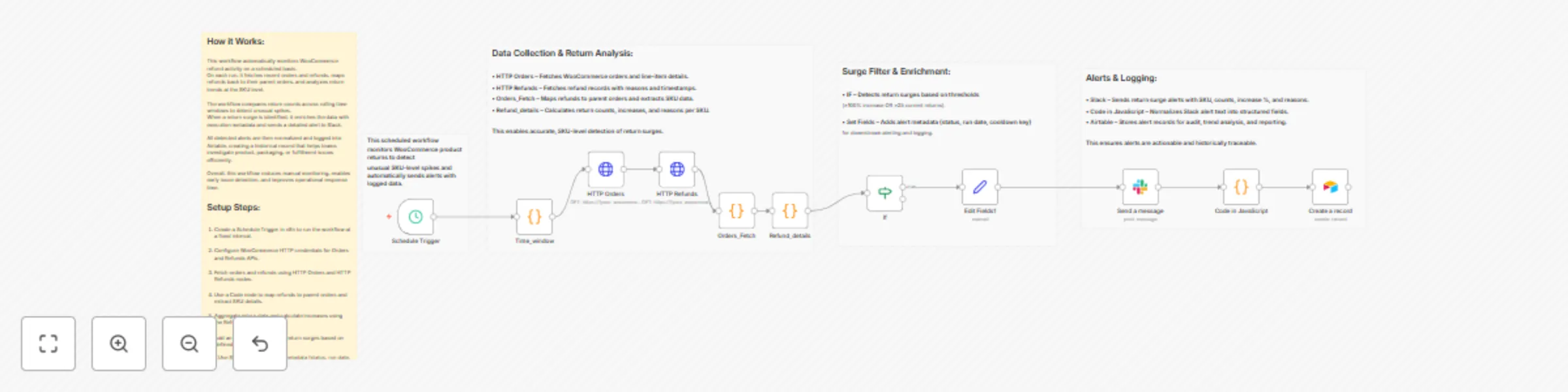
This n8n workflow monitors WooCommerce refund activity to detect unusual spikes in product returns at the SKU level. It compares return volumes across rolling 24-hour windows, alerts teams in Slack when defined thresholds are exceeded and logs all detected events into Airtable for tracking and analysis.

🚀 Quick Start – Get This Running Fast

  1. Import the workflow into n8n.
  2. Connect your WooCommerce API credentials.
  3. Configure Slack and Airtable credentials.
  4. Set your preferred schedule interval.
  5. Activate the workflow and start monitoring returns automatically.

What It Does

This workflow is designed to automatically detect abnormal return behavior in a WooCommerce store. On every scheduled run, it fetches recent orders and refunds directly from the WooCommerce REST API. Refund records are mapped back to their original orders to accurately identify affected SKUs.

Using a rolling time-window comparison, the workflow calculates current versus previous return counts per SKU. It identifies significant increases—either large percentage spikes or unusually high absolute return volumes. This ensures early detection of potential product quality, packaging or fulfillment issues.

When a return surge is detected, the workflow sends a structured alert to a Slack channel and stores the alert data in Airtable. This creates a searchable, historical log that supports investigations, trend analysis and operational decision-making.

Who’s It For

This workflow is ideal for:

  • eCommerce operations teams.
  • Quality assurance and product managers.
  • Customer support leads.
  • Supply chain and fulfillment teams.
  • Store owners running WooCommerce at scale.

Requirements to Use This Workflow

To use this workflow, you will need:

  • An active WooCommerce store with REST API access.
  • WooCommerce API credentials (Consumer Key & Secret).
  • An active Slack workspace with permission to post messages.
  • An Airtable base and table for logging alerts.
  • An n8n instance (self-hosted or cloud).

How It Works & How To Set Up

Workflow Execution Flow

  1. Schedule Trigger runs the workflow at a fixed interval.
  2. Time Window node defines current and previous 24-hour comparison windows.
  3. HTTP Orders fetches recent WooCommerce orders.
  4. HTTP Refunds fetches refund records.
  5. Orders_Fetch (Code) maps refunds to parent orders and extracts SKU-level data.
  6. Refund_details (Code) aggregates returns, compares windows, and calculates increases.
  7. IF Node checks surge conditions:
    • ≥100% increase OR
    • ≥25 current returns
  8. Set Fields enriches data with status, run date, and cooldown key.
  9. Slack Node sends a formatted alert message.
  10. Code Node normalizes Slack output into structured fields.
  11. Airtable Node stores alert records for future reference.

Setup Instructions

  • Replace {your_woocommerce_domain} with your actual store domain.
  • Verify WooCommerce API permissions allow order and refund access.
  • Select the correct Slack channel in the Slack node.
  • Ensure Airtable column names match the workflow mappings.

How To Customize Nodes

You can easily adapt this workflow by:

  • Changing the schedule frequency in the Schedule Trigger.
  • Adjusting WINDOW_HOURS in the Code nodes.
  • Modifying alert thresholds in the IF node.
  • Customizing the Slack message format.
  • Adding or removing Airtable fields for reporting needs.

Add-ons (Optional Enhancements)

This workflow can be extended with:

  • Email or Microsoft Teams notifications.
  • Jira or Linear ticket creation.
  • Product auto-pause for extreme return spikes.
  • Dashboard reporting using BI tools.
  • Cooldown logic to prevent repeated alerts per SKU.

Use Case Examples

Common use cases include:

  • Detecting defective product batches early.
  • Identifying packaging or shipping damage trends.
  • Monitoring supplier quality issues.
  • Supporting refund root-cause analysis.
  • Improving customer satisfaction metrics.

There can be many more operational and analytical use cases based on your business needs.

Troubleshooting Guide

Issue Possible Cause Solution
No Slack alerts Threshold not met Lower IF condition limits
Empty SKU values Missing SKU in WooCommerce Use product name or ID fallback
No data in Airtable Column mismatch Verify field names and types
API errors Invalid credentials Re-authorize WooCommerce API
Duplicate alerts Frequent schedule Add cooldown or deduplication logic

Need Help?

Need assistance setting this up or customizing it for your business? WeblineIndia can help you implement, extend or build similar automation workflows tailored to your operational needs.

Whether you want advanced alerting, deeper analytics or cross-system integrations, our team is ready to help you get the most out of n8n automation.

1.2 Logical Blocks

This catalog entry is organized from the workflow JSON. The node-level section below shows the executable blocks available for review before importing the template.

2. Block-by-Block Analysis

Block 1 - Schedule Trigger

Type / Role
n8n-nodes-base.scheduleTrigger - scheduleTrigger
Config choices
Version 1.2

Block 2 - If

Type / Role
n8n-nodes-base.if - if
Config choices
Version 2.2

Block 3 - Send a message

Type / Role
n8n-nodes-base.slack - slack
Config choices
Version 2.3

Block 4 - Create a record

Type / Role
n8n-nodes-base.airtable - airtable
Config choices
Version 2.1

Block 5 - Orders_Fetch

Type / Role
n8n-nodes-base.code - code
Config choices
Version 2

Block 6 - Refund_details

Type / Role
n8n-nodes-base.code - code
Config choices
Version 2

Block 7 - Time_window

Type / Role
n8n-nodes-base.code - code
Config choices
Version 2

Block 8 - HTTP Orders

Type / Role
n8n-nodes-base.httpRequest - httpRequest
Config choices
Version 4.3

Block 9 - HTTP Refunds

Type / Role
n8n-nodes-base.httpRequest - httpRequest
Config choices
Version 4.3

Block 10 - Edit Fields1

Type / Role
n8n-nodes-base.set - set
Config choices
Version 3.4

Block 11 - Code in JavaScript

Type / Role
n8n-nodes-base.code - code
Config choices
Version 2

Block 12 - Sticky Note

Type / Role
n8n-nodes-base.stickyNote - stickyNote
Config choices
Version 1

Block 13 - Sticky Note2

Type / Role
n8n-nodes-base.stickyNote - stickyNote
Config choices
Version 1

Block 14 - Sticky Note1

Type / Role
n8n-nodes-base.stickyNote - stickyNote
Config choices
Version 1

Block 15 - Sticky Note3

Type / Role
n8n-nodes-base.stickyNote - stickyNote
Config choices
Version 1

Block 16 - Sticky Note4

Type / Role
n8n-nodes-base.stickyNote - stickyNote
Config choices
Version 1

3. Summary Table

Workflow Detect WooCommerce return surges in real-time with Slack alerts & Airtable logging
Complexity advanced
Nodes 16
Categories Market Research
Author WeblineIndia
Published 19 Dec 2025

4. Reproducing the Workflow from Scratch

  1. 1. Download the workflow JSON

    Use the JSON export at /data/workflows/11945/11945.json as the source template for this automation.

  2. 2. Import the template into n8n

    Open n8n, import the downloaded JSON, and review each node before activating the workflow.

  3. 3. Configure credentials and variables

    Replace placeholder credentials, API keys, webhook URLs, account IDs, and environment-specific values with your own settings.

  4. 4. Test with sample data

    Run the workflow manually or in a staging workspace, inspect node output, and confirm downstream systems receive the expected data.

  5. 5. Activate and monitor

    Enable the workflow only after testing, then monitor executions, errors, and rate limits during the first production runs.

5. General Notes & Resources

Review imported nodes carefully before activation. This catalog entry is intended to help you inspect the workflow structure, understand required services, and find related templates faster.

Node names, credentials, schedules, webhook paths, and external service limits may need adjustment for your workspace.

Frequently asked questions

What does Detect WooCommerce return surges in real-time with Slack alerts & Airtable logging do?

Real Time WooCommerce Return Surge Detection with Slack Alerts & Airtable Logging This n8n workflow monitors WooCommerce refund activity to detect unusual spikes in product returns at the SKU level...

What do I need before importing this workflow?

Review the workflow JSON, configure any required credentials in n8n, and test the automation in a safe workspace before using it in production.

Can I customize this workflow?

Yes. Use the block-by-block analysis and the downloadable JSON to inspect each node, then adjust credentials, prompts, schedules, filters, or destinations for your Market Research use case.