Block 1 - Get Prs
- Type / Role
- n8n-nodes-base.github - github
- Config choices
- Version 1.1


 Early Deal
This workflow is provided as-is. Please review and test before using in production.
Team Wellness AI Burnout Detector Agent Demo [sample report ](https://github.com/suarifymy/adk...
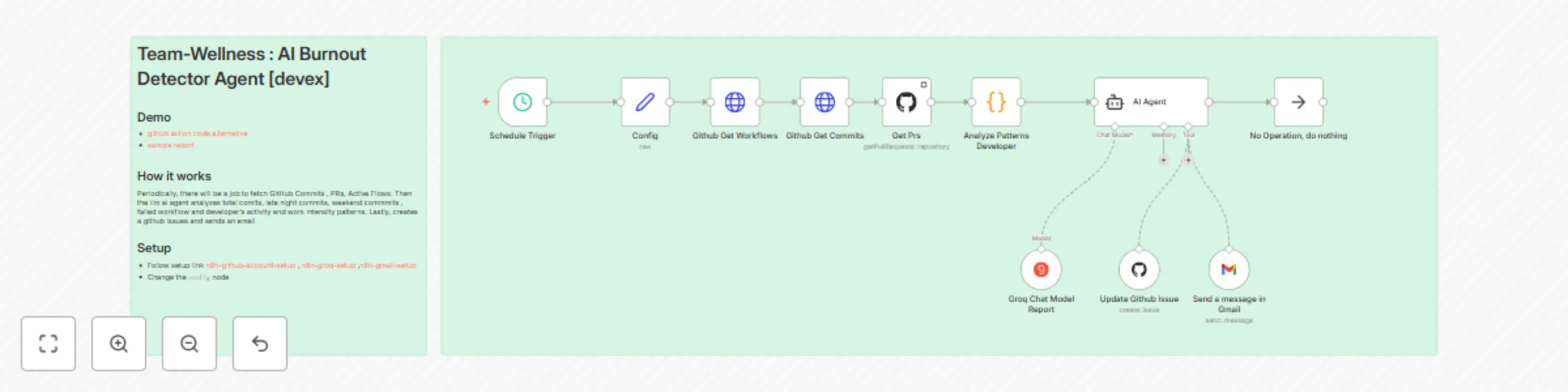
n8n-nodes-base.github, n8n-nodes-base.set, @n8n/n8n-nodes-langchain.agent, @n8n/n8n-nodes-langchain.lmchatgroq, n8n-nodes-base.gmailtool, n8n-nodes-base.noop, n8n-nodes-base.code, n8n-nodes-base.stickynote
This workflow is cataloged by N8N Workflows and links back to its original n8n.io source page by Sean Lon.
Original n8n.io sourcedevex githubA comprehensive n8n workflow that analyzes developer workload patterns from GitHub repositories to detect potential software engineering team burnout risks and provide actionable team wellness recommendations. This workflow automatically monitors team activity patterns, analyzes them using AI, and provides professional wellness reports with actionable recommendations which will automate GitHub issue creation and do email notifications for critical alerts.
# 📊 Team Health Report

## 📝 Summary
Overall, the team is maintaining a healthy delivery pace, but there are emerging signs of workload imbalance due to increased after-hours activity.

## 🔢 Health Score
- **Value:** 68 / 100
- **Confidence:** 87%
- **Limitations:** Based solely on commit and PR activity; meeting load and non-code tasks not captured.

## 🔍 Observed Patterns
- ⏰ **After-hours activity**
  - 29% of commits occurred between 10pm–1am (baseline: 12%).
  - Confidence: 0.90

## ⚠️ Systemic Risks
- Sustained after-hours work may indicate creeping burnout risk.
  - Evidence: 3 consecutive weeks of elevated late-night commits.
  - Confidence: 0.85

## ✅ Recommendations
- 📌 Facilitate a team discussion on workload distribution and sprint commitments. *(Priority: Medium)*
- 🔔 Introduce automated nudges discouraging late-night commits. *(Priority: Low)*
- 🛠️ Rotate PR review responsibilities or adopt lightweight review guidelines. *(Priority: High)*
Import Workflow
# Import the workflow JSON file into your n8n instance
Configure Credentials
Update Configuration
{
  "repoowner": "your-github-username",
  "reponame": "your-repository-name",
  "period": 7,
  "emailreport": "[email protected]"
}
Test Workflow
Schedule Automation
repoowner: GitHub username or organizationreponame: Repository nameperiod: Analysis period in days (default: 7)emailreport: Email address for critical alertsopenai/gpt-oss-120b (Groq)Schedule Trigger → Config → Github APIs → Pattern Analysis → AI Agent → Actions
GitHub API Rate Limits
AI Analysis Failures
Email Notifications Not Sending
Workflow Execution Errors
This project is licensed under the MIT License
⚠️ Important: This tool is designed for team wellness monitoring and should be used responsibly. Always respect team privacy and use the insights constructively to improve team health and productivity.
This catalog entry is organized from the workflow JSON. The node-level section below shows the executable blocks available for review before importing the template.
| Workflow | Detect team burnout with Groq AI analysis of GitHub activity for wellness reports |
|---|---|
| Complexity | intermediate |
| Nodes | 13 |
| Categories | Market Research, AI Summarization |
| Author | Sean Lon |
| Published | 12 Oct 2025 |
Use the JSON export at /data/workflows/9517/9517.json as the source template for this automation.
Open n8n, import the downloaded JSON, and review each node before activating the workflow.
Replace placeholder credentials, API keys, webhook URLs, account IDs, and environment-specific values with your own settings.
Run the workflow manually or in a staging workspace, inspect node output, and confirm downstream systems receive the expected data.
Enable the workflow only after testing, then monitor executions, errors, and rate limits during the first production runs.
Review imported nodes carefully before activation. This catalog entry is intended to help you inspect the workflow structure, understand required services, and find related templates faster.
Node names, credentials, schedules, webhook paths, and external service limits may need adjustment for your workspace.
Team Wellness AI Burnout Detector Agent Demo [sample report ](https://github.com/suarifymy/adk...
Review the workflow JSON, configure any required credentials in n8n, and test the automation in a safe workspace before using it in production.
Yes. Use the block-by-block analysis and the downloadable JSON to inspect each node, then adjust credentials, prompts, schedules, filters, or destinations for your Market Research, AI Summarization use case.