S

Sean Lon

5
Workflows

Workflows by Sean Lon
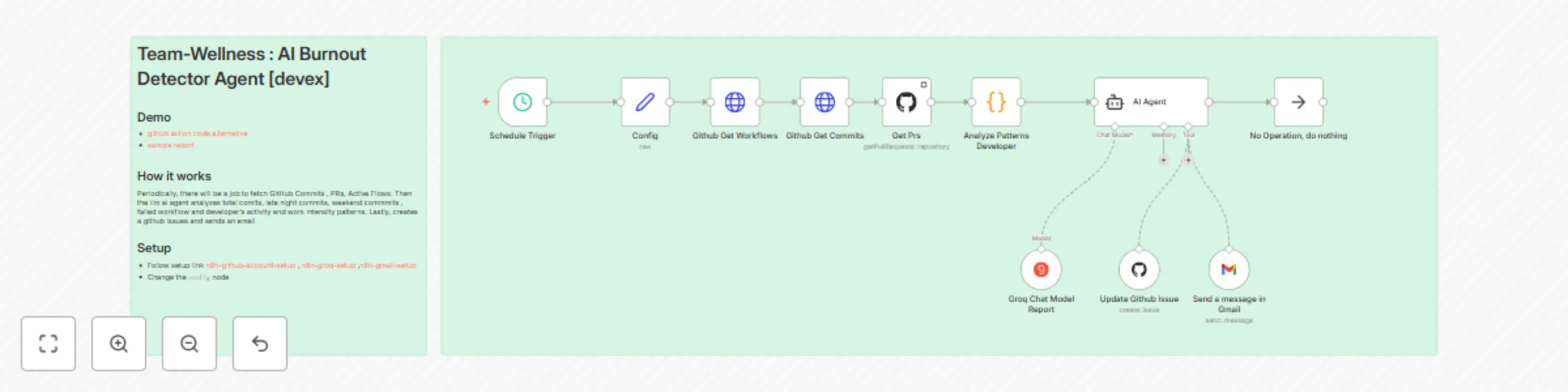
Workflow preview: Detect team burnout with Groq AI analysis of GitHub activity for wellness reports
Free intermediate

Detect team burnout with Groq AI analysis of GitHub activity for wellness reports

# Team Wellness - AI Burnout Detector Agent `devex` `github` ## 🎯 Demo ![Demo](https://raw.githubusercontent.com/suarifymy/adk-samples/refs/heads/main/documents/demo.gif) * [sample report ](https://github.com/suarifymy/adk-samples/issues/3/) * [github action code alternative ]( https://github.com/suarifymy/adk-samples/blob/main/.github/workflows/devex-ai-burnout-detector.yml) ![output](https://raw.githubusercontent.com/suarifymy/adk-samples/refs/heads/main/documents/report.png) ![output](https://raw.githubusercontent.com/suarifymy/adk-samples/refs/heads/main/documents/report2.png) ![output](https://raw.githubusercontent.com/suarifymy/adk-samples/refs/heads/main/documents/report3.png) ## How it works ## 🎯 Overview A comprehensive n8n workflow that analyzes developer workload patterns from GitHub repositories to detect potential software engineering team burnout risks and provide actionable team wellness recommendations. This workflow automatically monitors team activity patterns, analyzes them using AI, and provides professional wellness reports with actionable recommendations which will automate GitHub issue creation and do email notifications for critical alerts. ## ✨ Features - **Automated Data Collection**: Fetches commits, pull requests, and workflow data from GitHub - **Pattern Analysis**: Identifies late-night work, weekend activity, and workload distribution - **AI-Powered Analysis**: Uses Groq's LLM for professional burnout risk assessment - **Automated Actions**: Creates GitHub issues and sends email alerts based on criticality - **Professional Guardrails**: Ensures objective, evidence-based analysis with privacy protection - **Scheduled Monitoring**: Weekly automated wellness checks ## 🏗️ Architecture ### 1. Data Collection Layer - **GitHub Commits API**: Fetches commit history and timing data - **GitHub Pull Requests API**: Analyzes collaboration patterns - **GitHub Workflows API**: Monitors CI/CD pipeline health ### 2. Pattern Analysis Engine - **Work Pattern Signals**: Late-night commits, weekend activity - **Developer Activity**: Individual contribution analysis - **Workflow Health**: Pipeline success/failure rates - **Collaboration Metrics**: PR review patterns and merge frequency ### 3. AI Analysis Layer - **Professional Guardrails**: Objective, evidence-based assessments - **Risk Assessment**: Burnout risk classification (Low/Medium/High) - **Health Scoring**: Team wellness score (0-100) - **Recommendation Engine**: Actionable suggestions for improvement ## 📊 Sample Output ```markdown # 📊 Team Health Report ## 📝 Summary Overall, the team is maintaining a healthy delivery pace, but there are emerging signs of workload imbalance due to increased after-hours activity. ## 🔢 Health Score - **Value:** 68 / 100 - **Confidence:** 87% - **Limitations:** Based solely on commit and PR activity; meeting load and non-code tasks not captured. ## 🔍 Observed Patterns - ⏰ **After-hours activity** - 29% of commits occurred between 10pm–1am (baseline: 12%). - Confidence: 0.90 ## ⚠️ Systemic Risks - Sustained after-hours work may indicate creeping burnout risk. - Evidence: 3 consecutive weeks of elevated late-night commits. - Confidence: 0.85 ## ✅ Recommendations - 📌 Facilitate a team discussion on workload distribution and sprint commitments. *(Priority: Medium)* - 🔔 Introduce automated nudges discouraging late-night commits. *(Priority: Low)* - 🛠️ Rotate PR review responsibilities or adopt lightweight review guidelines. *(Priority: High)* ``` ## 🚀 Quick Start ### Prerequisites - n8n instance (cloud or self-hosted) - GitHub repository with API access - Groq API key - Gmail account (optional, for email notifications) ### Setup Instructions 1. **Import Workflow** ```bash # Import the workflow JSON file into your n8n instance ``` 2. **Configure Credentials** - **GitHub API**: Create a personal access token with repo access - **Groq API**: Get your API key from [Groq Console](https://console.groq.com/) - **Gmail OAuth2**: Set up OAuth2 credentials for email notifications 3. **Update Configuration** ```json { "repoowner": "your-github-username", "reponame": "your-repository-name", "period": 7, "emailreport": "[email protected]" } ``` 4. **Test Workflow** - Run the workflow manually to verify all connections - Check that data is being fetched correctly - Verify AI analysis is working 5. **Schedule Automation** - Enable the schedule trigger for weekly reports - Set up monitoring for critical alerts ## 🔧 Configuration ### Configuration Node Settings - `repoowner`: GitHub username or organization - `reponame`: Repository name - `period`: Analysis period in days (default: 7) - `emailreport`: Email address for critical alerts ### AI Model Settings - **Model**: `openai/gpt-oss-120b` (Groq) - **Temperature**: 0.3 (for consistent analysis) - **Max Tokens**: 2000 - **Safety Settings**: Professional content filtering ## 📈 Metrics Analyzed ### Repository-Level Metrics - Total commits count - Pull requests opened/closed - Workflow runs and success rate - Failed workflow percentage ### Work Pattern Signals - Late-night commits (10PM-6AM) - Weekend commits (Saturday-Sunday) - Work intensity patterns - Collaboration bottlenecks ### Developer-Level Activity - Individual commit counts - Late-night activity per developer - Weekend activity per developer - Workload distribution fairness ## 🛡️ Privacy & Ethics ### Professional Guardrails - Never makes personal judgments about individual developers - Only analyzes observable patterns in code activity data - Always provides evidence-based reasoning for assessments - Never suggests disciplinary actions or performance reviews - Focuses on systemic issues and team-level recommendations - Respects privacy and confidentiality of team members ### Data Protection - No personal information is stored or transmitted - Analysis is based solely on public repository data and public data - All recommendations are constructive and team-focused - Confidence scores indicate analysis reliability - There is added redaction prompt. Note that LLM is not deterministic and usually, you will need to refine your own prompt to enhance difference level of criticality of privacy you need censored or displayed. In some cases ,you will need the engineer account names to help identify f2f conversation. ## 🔄 Workflow Nodes ### Core Nodes 1. **Schedule Trigger**: Weekly automation (configurable) 2. **Config**: Repository and email configuration 3. **Github Get Commits**: Fetches commit history 4. **Github Get Workflows**: Retrieves workflow runs 5. **Get Prs**: Pulls pull request data 6. **Analyze Patterns Developer**: JavaScript pattern analysis 7. **AI Agent**: Groq-powered analysis with guardrails 8. **Update Github Issue**: Creates wellness tracking issues 9. **Send a message in Gmail**: Email notifications ### Data Flow ``` Schedule Trigger → Config → Github APIs → Pattern Analysis → AI Agent → Actions ``` ## 🚨 Alert Levels (Optional and Prompt configurable) ### Critical Alerts (Health Score < 90) - **GitHub Issue**: Automatic issue creation with detailed analysis - **Email Notification**: Immediate alert to team leads - **Slack Integration**: Critical team notifications ### Warning Alerts (Health Score 90-95) - **GitHub Issue**: Tracking issue for monitoring - **Slack Notification**: Team awareness message ### Normal Reports (Health Score > 95) - **Weekly Report**: Comprehensive team health summary - **Slack Summary**: Positive reinforcement message ## 🔧 Troubleshooting ### Common Issues 1. **GitHub API Rate Limits** - Solution: Use authenticated requests, implement rate limiting - Check: API token permissions and repository access 2. **AI Analysis Failures** - Solution: Verify Groq API key, check model availability - Check: Input data format and prompt structure 3. **Email Notifications Not Sending** - Solution: Verify Gmail OAuth2 setup, check email permissions - Check: SMTP settings and authentication 4. **Workflow Execution Errors** - Solution: Check node connections, verify data flow - Check: Error logs and execution history ## 🤝 Contributing ### Development Setup 1. Fork the repository link above demo part 2. Create a feature branch 3. Make your changes 4. Test thoroughly 5. Submit a pull request ### Testing - Test with different repository types - Verify AI analysis accuracy - Check alert threshold sensitivity - Validate email and GitHub integrations ## 📄 License This project is licensed under the MIT License ## 🙏 Acknowledgments - **Groq**: For providing the AI analysis capabilities - **GitHub**: For the comprehensive API ecosystem - **n8n**: For the powerful workflow automation platform - **Community**: For feedback and contributions ## 📞 Support ### Getting Help - **Issues**: Create a GitHub issue for bugs or feature requests - **Discussions**: Use GitHub Discussions for questions - **Documentation**: Check the comprehensive setup guides ### Contact - **Email**:[email protected] - **LinkedIn**: [SeanLon](https://www.linkedin.com/in/seanlon/?refer=n8nburnoutagent) --- **⚠️ Important**: This tool is designed for team wellness monitoring and should be used responsibly. Always respect team privacy and use the insights constructively to improve team health and productivity.

S
Sean Lon
Market Research
12 Oct 2025
58
0

Workflow preview: Complete booking system with Google Calendar, business hours & REST API
Free advanced

Complete booking system with Google Calendar, business hours & REST API

## GCalendar Smart Booking System ### Demo ![Demo](https://raw.githubusercontent.com/dragonjump/suarify-booking/main/full-demo-makebooking.gif) * [github code ](https://github.com/dragonjump/suarify-booking/blob/gh-pages/index.html/) * [Try yourself](https://dragonjump.github.io/suarify-booking/) ## 📋 **Description** Transform your booking chaos into streamlined automation with this production-ready GCalendar Smart Booking System. This comprehensive n8n workflow eliminates weeks of custom development by providing two powerful REST APIs that handle everything from input validation to calendar integration. **What makes this special?** Unlike basic booking forms, this system includes enterprise-grade features like intelligent conflict detection, public holiday awareness, business hours enforcement, and automatic Google Calendar integration with Meet links. It's battle-tested with real-world business logic including lunch breaks, timezone handling, and comprehensive error responses. ### **Privacy & Cost Benefits:** - **🔐 Privately yours & free** - No need to purchase expensive booking software or worry about data breaches. Your booking data stays secure in your own Google Calendar, completely under your control. - **🎯 All-in-One solution** - No manual invitation sending required. Google Calendar automatically handles attendee notifications and generates real Google Meet links for every booking, creating a seamless experience for both you and your clients. No need pay for API to get public holiday, use the google calendar free default . **Perfect for rapid deployment:** Whether you're building for clients, launching an MVP, or replacing expensive booking software, this template gets you from zero to production in under 15 minutes. The clean API design makes frontend integration effortless, while the robust validation ensures reliable operation at scale. **Two endpoints, endless possibilities:** - `/make-booking` - Complete booking creation with multi-layer validation - `/check-booking-date` - Real-time slot availability listing (comes with conflict detection, business hour checks) Built by developers, for developers - with comprehensive documentation, testing examples, and customization guides included. ### Purpose This workflow provides a webhook API endpoint that your frontend can easily integrate typically triggered by a submit button on a booking form. When the frontend calls this REST API, the workflow handles the booking logic by performing several key checks: - Valid Input — Ensures all required fields are present and correctly formatted. - Date & Time Validation — Confirms the requested slot falls within business hours, excludes lunch/dinner breaks, and respects public holidays. - Conflict Detection — Checks for any existing bookings at the requested time to prevent overlaps. - Calendar Integration — Once all checks pass, the workflow automatically creates a booking entry in your Google Calendar, keeping everything synced and visible. ## 🎯 **Target Audience** This template is perfect for: **🏥 Healthcare & Medical Professionals**: Clinics, dental offices, physiotherapy centers, and medical practices needing automated appointment scheduling with proper business hours validation and no-show reduction. **💼 Professional Service Providers**: Consultants, lawyers, accountants, financial advisors, and coaches who require sophisticated booking systems with calendar integration and conflict prevention. **🎓 Educational Institutions**: Universities, tutoring centers, training academies, and educational consultants needing student appointment scheduling with academic calendar integration. **🏢 Small to Medium Businesses**: Service-based businesses like salons, spas, repair services, and consulting firms looking to automate their booking process without expensive software subscriptions. **👨‍💻 Software Development Teams**: Developers and engineering teams who need to rapidly deploy booking functionality for client projects without building from scratch. **🌐 Digital Agencies**: Web development agencies, marketing firms, and digital consultancies building booking solutions for multiple clients across different industries. **🏨 Hospitality & Events**: Meeting room booking, event venue scheduling, equipment rental companies, and co-working spaces requiring intelligent availability management. **🔧 Freelancers & Solo Entrepreneurs**: Independent professionals like designers, photographers, personal trainers, and contractors who need professional booking systems on a budget. **📊 Product Managers**: Teams building SaaS products that require booking/scheduling features as part of their core functionality or user experience. **🚀 Startup Founders**: Early-stage companies needing to validate booking-related business models quickly without significant development investment. **🎨 Creative Professionals**: Photographers, videographers, music instructors, and artists who need client appointment scheduling with portfolio integration possibilities. **⚙️ Technical Operations Teams**: DevOps engineers and system administrators who need to implement booking systems for internal resource allocation (servers, equipment, meeting rooms). *This template eliminates weeks of development time while providing enterprise-grade validation, making it ideal for anyone who values rapid deployment, reliability, and professional functionality in their booking systems.* ## ⚙️ **How It Works** ### **🔄 Booking Flow (Step-by-Step)** #### **Phase 1: Input Validation** ```javascript // Real validation logic from the workflow ✅ Name, email, phone, date, time validation ✅ Email format verification (RFC compliant) ✅ Phone number format checking ✅ Date/time format standardization (YYYY-MM-DD, HH:MM) ``` #### **Phase 2: Business Logic Validation** ```javascript // Business hours: Monday-Friday, 9AM-9PM (customizable) ✅ Weekend blocking ✅ Business hours enforcement ✅ Lunch break exclusion (12PM-2PM) ✅ Dinner break exclusion (6PM-8PM) ✅ Timezone handling (Malaysia/UTC+8 default) ``` #### **Phase 3: Intelligent Conflict Detection** ```javascript // Multi-calendar checking ✅ Public holiday calendar integration ✅ Main booking calendar conflict detection ✅ Real-time availability verification ✅ Overlap prevention algorithms ``` #### **Phase 4: Calendar Integration** ```javascript // Google Calendar automation ✅ Event creation with attendee invitation ✅ Google Meet link generation ✅ Custom event descriptions and summaries ✅ Calendar color coding ``` ### **🕒 Availability API Flow** 1. **Date Input** → Validates YYYY-MM-DD format 2. **Weekend/Holiday Check** → Blocks non-working days 3. **Slot Generation** → Creates available time slots 4. **Conflict Mapping** → Marks booked vs available slots 5. **Response Formatting** → Returns structured availability data --- ## 🛠️ **Quick Start Guide** ### **Prerequisites** - n8n instance (cloud or self-hosted) - Google Cloud Project with Calendar API enabled - Google Calendar credentials ### **Simple Setup Guide** #### **Step 1: Import the Workflow** ⬇️ 1. Download the `smart-booking-system.json` file 2. In your n8n instance: **Workflows** → **Import from File** 3. Select the downloaded JSON file 4. Click **Import** #### **Step 2: Set Up Google Calendar Credentials** 🔑 1. **Create Google Cloud Project:** - Go to [Google Cloud Console](https://console.cloud.google.com/) - Create new project or select existing one - Enable **Google Calendar API** 2. **Configure n8n Credentials:** - In n8n: **Credentials** → **Add Credential** → **Google Calendar OAuth2 API** - Enter your Google Cloud **Client ID** and **Client Secret** - Save as "Google Calendar account" 3. **Update Workflow Nodes:** - Find nodes: `Create Calendar Event`, `Check Calendar Availability`, etc. - Select your Google Calendar credential in each node #### **Step 3: Configure Your Calendars** 📅 1. **Main Booking Calendar:** - Create a dedicated Google Calendar for bookings - Copy the Calendar ID (found in Calendar Settings) - Replace `[email protected]` in these nodes: - `Create Calendar Event` - `Check Calendar Availability - Main` - `Check Calendar Availability` 2. **Holiday Calendar (Optional):** - Add your country's holiday calendar to Google Calendar - Find the calendar ID (e.g., `en.usa#[email protected]`) - Update `Check Calendar Availability - public holiday` and `Check Public Holiday Calendar` nodes #### **Step 4: Customize Business Hours** ⏰ 1. **Find the ConfigTimeSlots node** 2. **Edit the time slots array:** ```javascript [ { "time": "09:30", "display": "9:30 AM - 10:30 AM", "available": true }, { "time": "10:30", "display": "10:30 AM - 11:30 AM", "available": true }, { "time": "11:30", "display": "11:30 AM - 12:30 PM", "available": true }, { "time": "14:30", "display": "2:30 PM - 3:30 PM", "available": true }, { "time": "15:30", "display": "3:30 PM - 4:30 PM", "available": true }, { "time": "16:30", "display": "4:30 PM - 5:30 PM", "available": true }, { "time": "17:30", "display": "5:30 PM - 6:30 PM", "available": true }, { "time": "20:30", "display": "8:30 PM - 9:30 PM", "available": true } ] ``` #### **Step 5: Activate & Test** 🚀 1. **Activate the workflow:** Toggle the workflow **Active** switch 2. **Get your webhook URLs:** - Booking: `https://your-n8n-domain/webhook/suarify-make-booking` - Availability: `https://your-n8n-domain/webhook/suarify-check-booking-date` 3. **Test with sample requests:** ```bash # Test booking creation curl -X POST 'https://your-n8n-domain/webhook/suarify-make-booking' \ -H 'Content-Type: application/json' \ -d '{ "name": "John Doe", "email": "[email protected]", "phone": "+1234567890", "date": "2024-03-15", "time": "14:30" }' # Test availability checking curl -X POST 'https://your-n8n-domain/webhook/suarify-check-booking-date' \ -H 'Content-Type: application/json' \ -d '{"date": "2024-03-15"}' ``` #### **Step 6: Integrate with Your Frontend** 💻 - Use the webhook URLs in your booking form - Handle the JSON responses for success/error states - Display available time slots from the availability API **🎉 You're ready to start taking bookings!** --- ## 📋 **API Documentation** ### **📤 Booking Creation API** **Endpoint:** `POST /webhook/make-booking` **Request Body:** ```json { "name": "John Doe", "email": "[email protected]", "phone": "+1234567890", "date": "2024-03-15", "time": "14:30", "source": "Website Form" } ``` **Success Response (200):** ```json { "success": true, "message": "Booking confirmed successfully!", "bookingDetails": { "name": "John Doe", "email": "[email protected]", "phone": "+1234567890", "date": "2024-03-15", "time": "14:30", "eventId": "abc123def456", "eventLink": "https://calendar.google.com/event?eid=...", "calendarEvent": { /* Full calendar event object */ } }, "confirmationMessage": "Hi John Doe, your booking has been confirmed for 2024-03-15 at 14:30. You will receive a calendar invitation shortly." } ``` **Error Response (400):** ```json { "success": false, "error": "Invalid email format", "message": "Booking request failed validation", "details": { /* Error context */ } } ``` ### **📅 Availability Check API** **Endpoint:** `POST /webhook/check-booking-date` **Request Body:** ```json { "date": "2024-03-15" } ``` **Success Response (200):** ```json { "success": true, "isWorkingDay": true, "isWeekend": false, "holidayName": "", "availableSlots": [ { "time": "09:30", "display": "9:30 AM - 10:30 AM", "available": true }, { "time": "10:30", "display": "10:30 AM - 11:30 AM", "available": false, "status": "booked" } ], "totalConflicts": 3 } ``` --- ## 🎛️ **Customization Guide** ### **Business Hours Configuration** Edit the `ConfigTimeSlots` node to modify available booking times: ```javascript const timeSlots = [ { time: '09:00', display: '9:00 AM - 10:00 AM', available: true }, { time: '10:00', display: '10:00 AM - 11:00 AM', available: true }, // Lunch break automatically excluded { time: '14:00', display: '2:00 PM - 3:00 PM', available: true }, // Customize as needed... ]; ``` ### **Timezone Adjustment** Modify the `Business Hours Check` node: ```javascript // Change from Malaysia (UTC+8) to your timezone const timezone = 'America/New_York'; // UTC-5 const timezoneOffset = '-05:00'; ``` ### **Holiday Calendar** Update calendar ID in holiday checking nodes: ```javascript // Replace with your country's holiday calendar "value": "en.usa#[email protected]" ``` ### **Business Rules** Customize validation in the `Business Hours Check` node: ```javascript // Business hours: Mon-Fri, 9am-6pm (example) const isWithinBusinessHours = timeInMinutes >= 540 && timeInMinutes <= 1080; // Remove lunch breaks if not needed const isNotLunchBreak = true; // Always allow ``` --- **Start automating in under 15 minutes!** 🎉 --- *Made with ❤️ for the engineering community. Star this repo if it saves you time!*

S
Sean Lon
Support Chatbot
16 Sep 2025
2210
0

Workflow preview: Automated resume screening & ranking with Llama 4 AI and Google Workspace
Free advanced

Automated resume screening & ranking with Llama 4 AI and Google Workspace

# Target Audience You will find this workflow or template perfect if you are in the internal talent acquisition teams, recruitment agencies, HR professionals, and hiring managers seeking to bulk automate the initial screening of CVs and resumes. ``` Eg. Automatically get result of candidate who has been shortlisted/rejected with its rationale and score automatically. ``` By eliminating manual evaluation and screening, you get smart AI-Agent helping you to have standardized efficient, and scalable solution for handling large volumes of applications. With bulk automation, you can focus strategic decision-making rather than tedious screening tasks, ensuring a faster, more accurate, and fair hiring process. ### Key focus This workflow focusses on having a more organized file-folder management, trackable candidate cv, maintainable job description, autonomous ai-agent. - Organized Folder-File Structure – CVs are automatically categorized based on their status, ensuring a structured workflow and easy retrieval - Candidate Tracker – A real-time tracking system records the state of each CV, allowing recruiters to monitor the shortlisted, rejected, or KIV (Keep in View) candidates. - AI Agent for Decision Automation – The AI autonomously orchestrates screening decisions, replacing manual LLM configurations with dynamic AI-driven evaluations for scalability and accuracy. - Maintainable Job Description Management – A structured job description file ensures continuous updates, keeping hiring criteria flexible and aligned with recruitment needs. - Email Notifications – The system automatically sends receipt confirmations upon processing completion, providing timely updates to recruiters. # Features - Workflow ### **Automated Resume Screening Workflow** This workflow leverages **Groq Llama4 for intelligent resume analysis**, speeding the screening process by generating a **matching score, result (shortlisted/rejected/kiv), and key insights/rationale** into their suitability for provided **job description**. #### **Step-by-Step Process:** - **Monitors Google Drive:** Listens and checks for new resume cv in google drive . - **Retrieve Resume:** Downloads the CV resumes from google drive . - **Extract Resume Data:** Extract **text content** from CV resume PDF files - **Extract Job Description Data:** Extract **text content** from job description - **Analyze with Groq:** - Generate a **matching score** based on job requirements. [SCORE: 1-10] - Provide **decision** into their job suitability. [SHORTLISTED/REJECTED/KIV] - Provide **actionable insights** into their job suitability. [REASON] This ensures a **fast, efficient, and accurate screening process**, eliminating manual evaluation. # Setup Guide ### **Step-by-Step Instructions** Ensure all credentials are ready and setup (groq, gdrive ,gmail, gsheet, gdoc) View official n8n documentation on node setup accordingly. See also the notes of setup . ### **Folder & File Setup** ### 1. Create a google-drive folder like this [View directory example](https://drive.google.com/drive/folders/1Uh7VdJORE03YBJkCmvr1TXg_esbiNnTV?dmr=1&ec=wgc-drive-hero-goto) ![Directory EXAMPLE](https://github.com/dragonjump/n8n-ai-agent-screening/blob/main/screenshot1.png?raw=true) ### 2. Create a job description like this [View file example](https://docs.google.com/document/d/12dv1AXaotpJ3ST1nUI-QgCoi5SJjM52zeHmjhwZUtvs/edit?usp=drive_link) ![Directory EXAMPLE](https://github.com/dragonjump/n8n-ai-agent-screening/blob/main/screenshot2.png?raw=true) ### 3. Configure a tracker like this ( Candidate Name, AI Score,AI Verdict, AI Reason) [View file example](https://docs.google.com/spreadsheets/d/1SwnbH_dnqPMho7SqX1LKAjFMc0YvLBGok4I1AdgrJjE/edit?gid=843593464#gid=843593464) email conversations report as you like. You are ready to go!

S
Sean Lon
HR
3 May 2025
3350
0
Workflow preview: Build an AI-powered tech radar advisor with SQL DB, RAG, and routing agents
Free advanced

Build an AI-powered tech radar advisor with SQL DB, RAG, and routing agents

# AI-Powered Tech Radar Advisor This project is built on top of the famous open source [ThoughtWorks Tech Radar](https://radar.thoughtworks.com/). You can use this template to build your own AI-Powered Tech Radar Advisor for your company or group of companies. ![Tech Constellation](https://raw.githubusercontent.com/dragonjump/techconstellation/refs/heads/gh-pages/build-your-own-radar-master/src/images/image.png) ![Tech Radar Constellation](https://raw.githubusercontent.com/dragonjump/techconstellation/refs/heads/gh-pages/build-your-own-radar-master/src/images/demo.png) ## Target Audience This template is perfect for: - **Tech Audit & Governance Leaders:** Those seeking to build a tech landscape AI platform portal. - **Tech Leaders & Architects:** Those aiming to provide modern AI platforms that help others understand the rationale behind strategic technology adoption. - **Product Managers:** Professionals looking to align product innovation with the company's current tech trends. - **IT & Engineering Teams:** Teams that need to aggregate, analyze, and visualize technology data from multiple sources efficiently. - **Digital Transformation Experts:** Innovators aiming to leverage AI for actionable insights and strategic recommendations. - **Data Analysts & Scientists:** Individuals who want to combine structured SQL analysis with advanced semantic search using vector databases. - **Developers:** Those interested in integrating RAG chatbot functionality with conversation storage. --- # 1. Description **Tech Constellation** is an AI-powered Tech Radar solution designed to help organizations visualize and steer their technology adoption strategy. It seamlessly ingests data from a Tech Radar Google Sheet—converting it into both a MySQL database and a vector index—to consolidate your tech landscape in one place. The platform integrates an interactive AI chat interface powered by four specialized agents: - **AI Agent Router:** Analyzes and routes user queries to the most suitable processing agent. - **SQL Agent:** Executes precise SQL queries on structured data. - **RAG Agent:** Leverages semantic, vector-based search for in-depth insights. - **Output Guardrail Agent:** Validates responses to ensure they remain on-topic and accurate. This powerful template is perfect for technology leaders, product managers, engineering teams, and digital transformation experts looking to make data-driven decisions aligned with strategic initiatives across groups of parent-child companies. --- # 2. Features ### Data Ingestion - A Google Sheet containing tech radar data is used as the primary source. - The data is ingested and converted into a MySQL database. - Simultaneously, the data is indexed into a vector database for semantic (vector-based) search. ### Interactive AI Chat - **Chat Integration:** An AI-powered chat interface allows users to ask questions about the tech radar. - **Customizable AI Agents:** 1. **AI Agent Router:** Determines the query type and routes it to the appropriate agent. 2. **SQL Agent:** Processes queries using SQL on structured data. 3. **RAG Agent:** Performs vector-based searches on document-like data. 4. **Output Guardrail Agent:** Validates queries and ensures that the responses remain on-topic and accurate. --- ## Usage Examples 1. Tell me, is TechnologyABC adopted or on hold, and why? 2. List all the tools that are considered part of the strategic direction for company3 but are not adopted. --- ## Project Links & Additional Details - **GitHub Repository (Frontend Interface Source Code):** [github.com/dragonjump/techconstellation](https://github.com/dragonjump/techconstellation) - **Try It:** [https://scaler.my](https://scaler.my)

S
Sean Lon
Internal Wiki
13 Mar 2025
14647
0

Workflow preview: Personal portfolio CV  Rag chatbot - with conversation store and email summary
Free advanced

Personal portfolio CV Rag chatbot - with conversation store and email summary

## Personal Portfolio CV Rag Chatbot - with Conversation Store and Email Summary ### Target Audience This template is perfect for: Individuals looking to create a working professional and interactive personal portfolio chatbot. Developers interested in integrating RAG Chatbot functionality with conversation storage. ### 1. Description Create a stunning Personal Portfolio CV with integrated RAG Chatbot capabilities, including conversation storage and daily email summaries. ### 2.Features: #### Training: Setup Ingestion stage Upload your CV to Google Drive and let the Drive trigger updates to read your resume cv and convert it into your vector database (RAG purpose). Modify any parts as needed. #### Chat & Track: Use any frontend/backend interface to call the chat API and chat history API. #### Reporting Daily Chat Conversations: Receive daily automatic summaries of chat conversations. Data stored via NocoDB. ### 3.Setup Guide: #### Step-by-Step Instructions: Ensure all credentials are ready. Follow the notes provided. 1. Ingestion: Upload your CV to Google Drive. The Drive triggers RAG update in your vector database. You can change the folder name, files and indexname of the vector database accordingly. 2. Chat: Use any frontend/backend interface to call the chat API (refer to the notes for details) . [optional] Use any frontend/backend interface to call the update chat history API (refer to the notes for details). 3.Tracking Chat: Get daily automatic summaries of chat conversations.Format email conversations report as you like. You are ready to go!

S
Sean Lon
Personal Productivity
23 Feb 2025
4316
0