Block 1 - Webhook – Receive Product Payload
- Type / Role
- n8n-nodes-base.webhook - webhook
- Config choices
- Version 2.1


 Early Deal
This workflow is provided as-is. Please review and test before using in production.
AI Powered Fake Review Detection Workflow Using n8n & Airtable This workflow automates the detection of potentially fake or manipulated product reviews using n8n, Airtable, OpenAI and Slack. It fet...
n8n-nodes-base.webhook, n8n-nodes-base.splitinbatches, n8n-nodes-base.httprequest, n8n-nodes-base.splitout, n8n-nodes-base.if, n8n-nodes-base.code, n8n-nodes-base.airtable, n8n-nodes-base.openai
This workflow is cataloged by N8N Workflows and links back to its original n8n.io source page by WeblineIndia.
Original n8n.io sourceThis workflow automates the detection of potentially fake or manipulated product reviews using n8n, Airtable, OpenAI and Slack. It fetches reviews for a given product, standardizes the data, generates a unique hash to avoid duplicates, analyzes each review using an AI model, updates the record in Airtable and alerts the moderation team if the review appears suspicious.
reviews table.This workflow provides an automated pipeline to analyze product reviews and determine whether they may be fake or manipulated. It begins with a webhook that accepts product information and a scraper API URL. Using this information, the workflow fetches associated reviews.
Each review is then expanded into separate items and normalized to maintain a consistent structure. The workflow generates a hash for deduplication, preventing multiple entries of the same review. New reviews are stored in Airtable and subsequently analyzed by OpenAI. The resulting risk score, explanation and classification are saved back into Airtable.
If a review's score exceeds a predefined threshold, a structured Slack alert is sent to the moderation team. This ensures that high-risk reviews are escalated promptly while low-risk reviews are simply stored for recordkeeping.
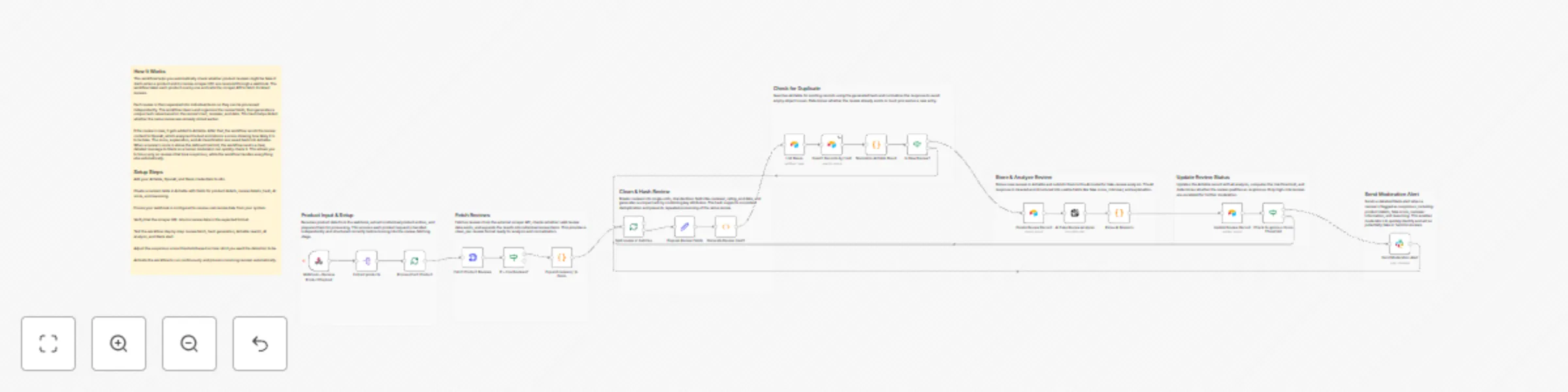
The workflow starts with the Webhook – Receive Product Payload, which accepts a list of products and their scraper URLs.
Extract products separates the list into individual items.
Process Each Product ensures that each product’s reviews are processed one at a time.
Fetch Product Reviews calls the scraper API.
IF – Has Reviews? determines whether any reviews were returned.
Expand reviews[] to items splits reviews into individual items.
Prepare Review Fields ensures consistent review structure.
Generate Review Hash1 produces a deterministic hash based on review text, reviewer ID, and date.
Search Records by Hash checks whether the review already exists.
Normalize Airtable Result cleans Airtable’s inconsistent empty output.
Is New Review? decides if the review should be inserted or skipped.
Create Review Record inserts new reviews into Airtable.
AI Fake Review Analysis sends relevant review fields to OpenAI.
Parse AI Response ensures the output is valid JSON.
Update Review Record stores the AI’s score, classification, and reasoning.
Check Suspicious Score Threshold evaluates if the fake score exceeds a defined limit.
If so, Send Moderation Alert posts a detailed message to Slack.
Fake Score Threshold
Modify threshold in Check Suspicious Score Threshold.
Slack Message Format
Adjust text fields in Send Moderation Alert.
AI Prompt Instructions
Edit the instructions inside AI Fake Review Analysis.
Airtable Fields
Update mappings in both Create Review Record and Update Review Record.
Additional Checks Insert enrichment steps before AI analysis, such as:
There can be many more scenarios where this workflow helps identify misleading product reviews.
| Issue | Possible Cause | Solution |
|---|---|---|
| No data after review fetch | Scraper API returned empty response | Validate scraper URL and structure |
| Duplicate reviews inserted | Hash mismatch | Ensure Generate Review Hash1 uses the correct fields |
| Slack alert not triggered | Bot not added to channel | Add bot to the target Slack channel |
| AI response fails to parse | Model returned non-JSON response | Strengthen "JSON only" prompt in AI analysis |
| Airtable search inconsistent | Airtable returns empty objects | Rely on Normalize Airtable Result for correction |
If you need assistance customizing this workflow, integrating additional systems or designing advanced review moderation solutions, our n8n workflow development team at WeblineIndia is available to help. We offer support for:
Feel free to contact us for guidance, implementation or to build similar automated systems tailored to your needs.
This catalog entry is organized from the workflow JSON. The node-level section below shows the executable blocks available for review before importing the template.
Showing the first 24 of 27 workflow blocks. Download the JSON for the full node graph.
| Workflow | Detect fake product reviews with OpenAI and send alerts to Slack via Airtable |
|---|---|
| Complexity | advanced |
| Nodes | 27 |
| Categories | Market Research, AI Summarization |
| Author | WeblineIndia |
| Published | 25 Dec 2025 |
Use the JSON export at /data/workflows/12129/12129.json as the source template for this automation.
Open n8n, import the downloaded JSON, and review each node before activating the workflow.
Replace placeholder credentials, API keys, webhook URLs, account IDs, and environment-specific values with your own settings.
Run the workflow manually or in a staging workspace, inspect node output, and confirm downstream systems receive the expected data.
Enable the workflow only after testing, then monitor executions, errors, and rate limits during the first production runs.
Review imported nodes carefully before activation. This catalog entry is intended to help you inspect the workflow structure, understand required services, and find related templates faster.
Node names, credentials, schedules, webhook paths, and external service limits may need adjustment for your workspace.
AI Powered Fake Review Detection Workflow Using n8n & Airtable This workflow automates the detection of potentially fake or manipulated product reviews using n8n, Airtable, OpenAI and Slack. It fet...
Review the workflow JSON, configure any required credentials in n8n, and test the automation in a safe workspace before using it in production.
Yes. Use the block-by-block analysis and the downloadable JSON to inspect each node, then adjust credentials, prompts, schedules, filters, or destinations for your Market Research, AI Summarization use case.