Daily tech news digest from Google News summarized with Llama AI and email delivery
Workflow preview

$20/month : Unlimited workflows
2500 executions/month

THE #1 IN WEB SCRAPING
Scrape any website without limits
HOSTINGER  Early Deal
DISCOUNT 20% Try free
Early DealDISCOUNT 20%
Self-hosted n8n
Unlimited workflows - from $4.99/mo

#1 hub for scraping, AI & automation
6000+ actors - $5 credits/mo
Important notice
This workflow is provided as-is. Please review and test before using in production.
Overview
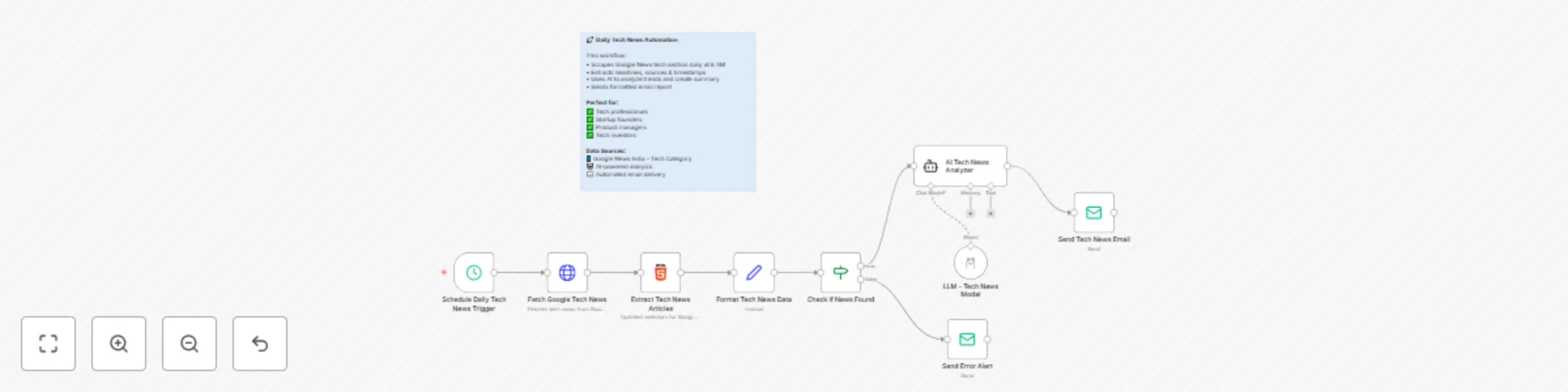
This n8n workflow automatically fetches top technology news from Google News, summarizes it using AI, and sends a daily email with key updates. Users get a concise overview of important tech developments every morning.
Good to know:
- Focuses specifically on technology news.
- Summarizes multiple sources into one concise email.
- Ensures consistent and easy-to-read formatting.
- Handles updates from different websites reliably.
How it works
Trigger: Schedule Daily Tech News
- Runs automatically every morning at 8 AM.
Fetch Google Tech News
- Retrieves the latest tech news from Google News.
Extract Tech News Articles
- Parses the HTML to extract headlines, source, and timestamps.
Format Tech News Data
- Prepares structured data ready for AI analysis.
Check If News Found
- If no news is found, sends an error alert email.
- Otherwise, continues to AI summarization.
AI Tech News Analyzer
- Uses an AI model to summarize and highlight key trends.
Send Tech News Email
- Sends a formatted daily email with summarized tech news.
Send Error Alert (optional)
- Sends an alert email if no news can be found.
Email Examples
Output Email Example:
Subject: 🌐 Daily Tech News Summary - August 14, 2025

📌 Top Technology Headlines Today:

1. AI-powered tools are revolutionizing cloud computing. (Source: TechCrunch)
2. Startup funding in India sees record growth. (Source: Economic Times)
3. New smartphone launches include innovative camera features. (Source: The Verge)
4. Cybersecurity threats increase amid remote work trends. (Source: Wired)

🗓️ Summary Date: August 14, 2025
How to use
Setup Instructions:
- Import workflow into your n8n instance.
- Configure SMTP credentials for sending emails.
- Set the schedule to run daily at your preferred time.
- Test the workflow to ensure news is fetched and the email is sent correctly.
Requirements:
- n8n instance (cloud or self-hosted).
- Email account with SMTP access.
- Reliable internet connection.
- Access to Google News.
Troubleshooting:
- No news found: Check internet connection and Google News accessibility.
- Email not sent: Verify SMTP credentials.
- AI summarization errors: Check model credentials and API usage.