Daily team progress checks & reports with Slack, ChatGPT and Google Sheets

Workflow preview

Workflow preview
100%
Daily team progress checks & reports with Slack, ChatGPT and Google Sheets preview
Open on n8n.io

Important notice

This workflow is provided as-is. Please review and test before using in production.

1. Workflow Overview

This workflow is a daily progress check flow that runs automatically at 17:00 . It integrates Google Sheets, Slack, and ChatGPT to automate progress inquiries to team members and generate daily rep...

Best for

  • Project Management automation workflows
  • AI Chatbot automation workflows
  • advanced n8n builders looking for reusable templates

Tools used

n8n-nodes-base.function, n8n-nodes-base.stickynote, n8n-nodes-base.cron, n8n-nodes-base.googlesheets, n8n-nodes-base.if, n8n-nodes-base.slack, n8n-nodes-base.wait, @n8n/n8n-nodes-langchain.openai

Source and attribution

This workflow is cataloged by N8N Workflows and links back to its original n8n.io source page by Satoshi.

Original n8n.io source

1.1 Workflow description

Title
Daily team progress checks & reports with Slack, ChatGPT and Google Sheets
Workflow name
Daily team progress checks & reports with Slack, ChatGPT and Google Sheets

Overview

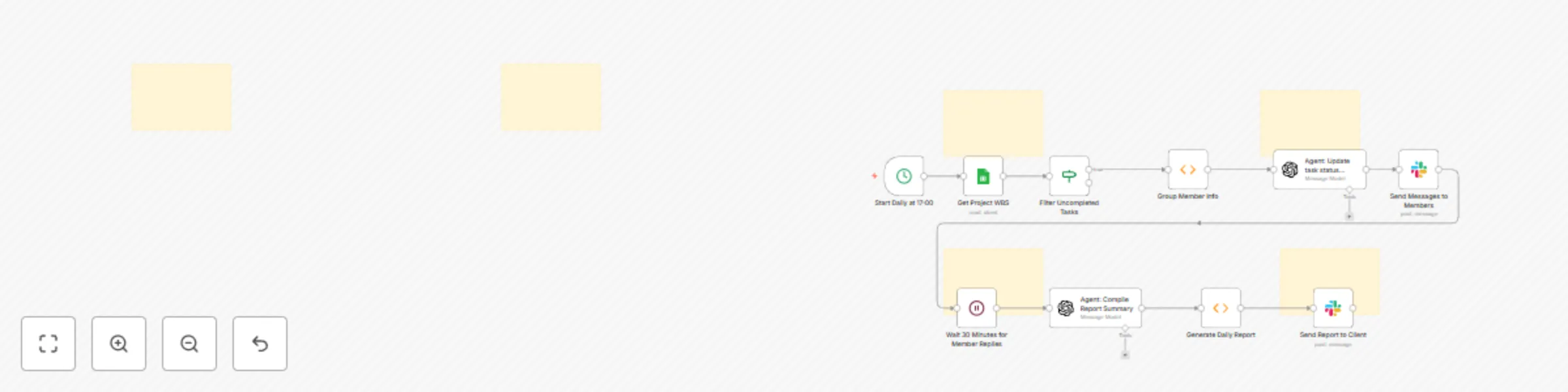
This workflow is a daily progress check flow that runs automatically at 17:00. It integrates Google Sheets, Slack, and ChatGPT to automate progress inquiries to team members and generate daily reports.


Overall Workflow Steps

  • Triggered every day at 17:00.
  • Reads the specified WBS management sheet.
  • Automatically sends a Slack DM to each member based on their Slack ID.
  • After 30 minutes, retrieves and aggregates progress information for the day.
  • Sending Report to Slack Channel (e.g., "#daily-report").
  • The report includes the date, each member’s progress, comments, etc.

Sample Output

  • Individual Member DM
    “Hello Sato-san, could you briefly share today’s progress?”

  • Team Report Sample

📅 2025/10/20 Daily Progress Report
✅ Sato: Task A completed, B at 80%
✅ Suzuki: Design review completed
⚠️ Tanaka: API test delayed (Reason: data not received)

Maintenance Tips

  • To avoid Slack rate limits, it is recommended to add a few seconds delay between messages
  • Update node settings when Google Sheets column names change
  • When using ChatGPT API, adjust temperature and max_tokens as needed

Setup Instructions

  1. Google Sheets API authenticated (OAuth2)
    • Obtain the Spreadsheet ID of the target sheet.
  2. Slack Bot Token with chat:write, users:read, im:write permissions
  3. OpenAI API Key registered
  4. WBS sheet must include the following columns:
    • Name
    • Slack ID or Email
    • Today Progress
    • Remarks


日次進捗チェック自動化フロー

概要

本ワークフローは、毎日 17:00 に自動実行される日次進捗チェックフロー です。Google Sheets・Slack・ChatGPT を連携させ、チームメンバーへの進捗確認と報告作成を自動化します。


フロー全体の流れ

  • トリガーは 毎日 17:00 に実行
  • 指定された WBS 管理シートを読み込み。
  • 各メンバーの Slack ID を元に、Slack の DM を自動送信。
  • 全メンバーへの送信完了後、30分間待機
  • メンバーが Slack 上で進捗を入力する時間を確保。
  • Slack グループへの報告送信(例:「#daily-report」など)。
  • 投稿には日付・メンバーごとの進捗・コメントなどが含まれます。

実行結果のイメージ

  • メンバー個別DM 「こんにちは佐藤さん、今日の進捗を簡単に教えてくださいね😊」
  • チーム報告投稿(例)
  📅 2025/10/20 日次進捗報告
  ✅ 佐藤:タスクA完了、Bは80%
  ✅ 鈴木:設計レビュー完了
  ⚠️ 田中:APIテスト遅延(原因:データ未受領)

メンテナンスTips

  • Slack rate limit 回避のため、メッセージ間に数秒の遅延を設定推奨
  • Google Sheets の列名変更時はノード設定を更新
  • ChatGPT API 使用時は temperaturemax_tokens を調整可

セットアップ手順

  1. Google Sheets API 認証済み(OAuth2)

    • 対象シートの Spreadsheet ID を取得しておく。
  2. Slack Bot Tokenchat:write, users:read, im:write 権限付与)

  3. OpenAI API Key 登録済み。

  4. WBS シートに以下の列が存在すること:

    • Name
    • Slack ID または Email
    • Today Progress
    • Remarks

1.2 Logical Blocks

This catalog entry is organized from the workflow JSON. The node-level section below shows the executable blocks available for review before importing the template.

2. Block-by-Block Analysis

Block 1 - Group Member Info

Type / Role
n8n-nodes-base.function - function
Config choices
Version 1

Block 2 - Sticky Note2

Type / Role
n8n-nodes-base.stickyNote - stickyNote
Config choices
Version 1

Block 3 - Sticky Note4

Type / Role
n8n-nodes-base.stickyNote - stickyNote
Config choices
Version 1

Block 4 - Sticky Note6

Type / Role
n8n-nodes-base.stickyNote - stickyNote
Config choices
Version 1

Block 5 - Sticky Note7

Type / Role
n8n-nodes-base.stickyNote - stickyNote
Config choices
Version 1

Block 6 - Sticky Note8

Type / Role
n8n-nodes-base.stickyNote - stickyNote
Config choices
Version 1

Block 7 - Start Daily at 17:00

Type / Role
n8n-nodes-base.cron - cron
Config choices
Version 1

Block 8 - Get Project WBS

Type / Role
n8n-nodes-base.googleSheets - googleSheets
Config choices
Version 1

Block 9 - Filter Uncompleted Tasks

Type / Role
n8n-nodes-base.if - if
Config choices
Version 2.2

Block 10 - Send Messages to Members

Type / Role
n8n-nodes-base.slack - slack
Config choices
Version 1

Block 11 - Wait 30 Minutes for Member Replies

Type / Role
n8n-nodes-base.wait - wait
Config choices
Version 1

Block 12 - Agent: Compile Report Summary

Type / Role
@n8n/n8n-nodes-langchain.openAi - openAi
Config choices
Version 1.8

Block 13 - Generate Daily Report

Type / Role
n8n-nodes-base.function - function
Config choices
Version 1

Block 14 - Send Report to Client

Type / Role
n8n-nodes-base.slack - slack
Config choices
Version 1

Block 15 - Agent: Update task status reminders

Type / Role
@n8n/n8n-nodes-langchain.openAi - openAi
Config choices
Version 1.8

Block 16 - Sticky Note

Type / Role
n8n-nodes-base.stickyNote - stickyNote
Config choices
Version 1

3. Summary Table

Workflow Daily team progress checks & reports with Slack, ChatGPT and Google Sheets
Complexity advanced
Nodes 16
Categories Project Management, AI Chatbot
Author Satoshi
Published 29 Nov 2025

4. Reproducing the Workflow from Scratch

  1. 1. Download the workflow JSON

    Use the JSON export at /data/workflows/11345/11345.json as the source template for this automation.

  2. 2. Import the template into n8n

    Open n8n, import the downloaded JSON, and review each node before activating the workflow.

  3. 3. Configure credentials and variables

    Replace placeholder credentials, API keys, webhook URLs, account IDs, and environment-specific values with your own settings.

  4. 4. Test with sample data

    Run the workflow manually or in a staging workspace, inspect node output, and confirm downstream systems receive the expected data.

  5. 5. Activate and monitor

    Enable the workflow only after testing, then monitor executions, errors, and rate limits during the first production runs.

5. General Notes & Resources

Review imported nodes carefully before activation. This catalog entry is intended to help you inspect the workflow structure, understand required services, and find related templates faster.

Node names, credentials, schedules, webhook paths, and external service limits may need adjustment for your workspace.

Frequently asked questions

What does Daily team progress checks & reports with Slack, ChatGPT and Google Sheets do?

This workflow is a daily progress check flow that runs automatically at 17:00 . It integrates Google Sheets, Slack, and ChatGPT to automate progress inquiries to team members and generate daily rep...

What do I need before importing this workflow?

Review the workflow JSON, configure any required credentials in n8n, and test the automation in a safe workspace before using it in production.

Can I customize this workflow?

Yes. Use the block-by-block analysis and the downloadable JSON to inspect each node, then adjust credentials, prompts, schedules, filters, or destinations for your Project Management, AI Chatbot use case.