Daily Google Search Console SEO pulse: Catch top movers across keyword segments
Workflow preview

$20/month : Unlimited workflows
2500 executions/month

THE #1 IN WEB SCRAPING
Scrape any website without limits
HOSTINGER  Early Deal
DISCOUNT 20% Try free
Early DealDISCOUNT 20%
Self-hosted n8n
Unlimited workflows - from $4.99/mo

#1 hub for scraping, AI & automation
6000+ actors - $5 credits/mo
Important notice
This workflow is provided as-is. Please review and test before using in production.
Overview
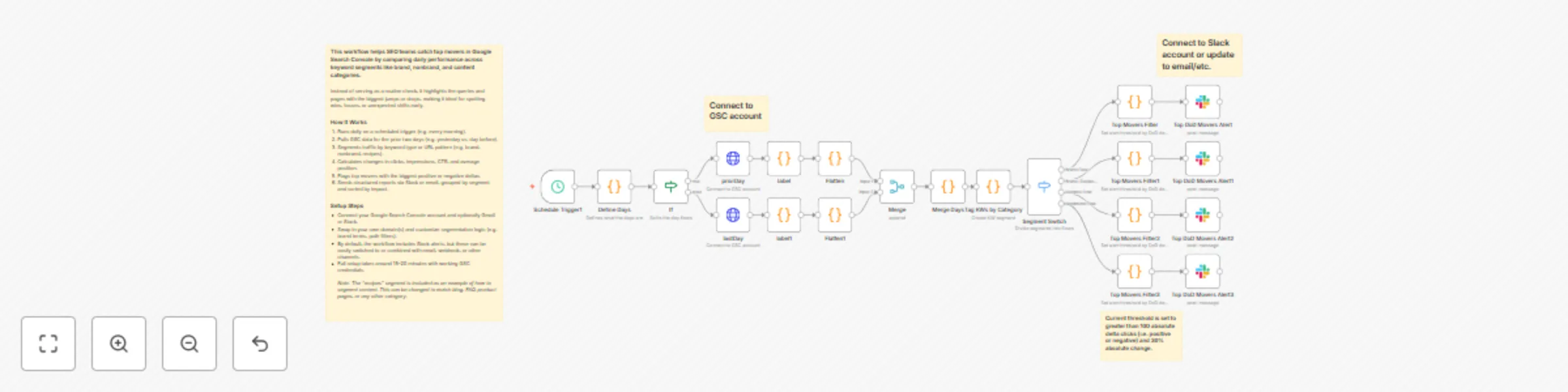
This workflow helps SEO teams catch top movers in Google Search Console by comparing daily performance across keyword segments like brand, nonbrand, and content categories.
Instead of serving as a routine check, it highlights the queries and pages with the biggest jumps or drops, making it ideal for spotting wins, losses, or unexpected shifts early.
How It Works
- Runs daily on a scheduled trigger (e.g. every morning).
- Pulls GSC data for the prior two days (e.g. yesterday vs. day before).
- Segments traffic by keyword type or URL pattern (e.g. brand, nonbrand, recipes, blogs, etc.).
- Calculates changes in clicks, impressions, CTR, and average position.
- Flags top movers with the biggest positive or negative deltas.
- Sends structured reports via Slack or email, grouped by segment and sorted by impact.
Setup Steps
- Connect your Google Search Console account and optionally Gmail or Slack.
- Swap in your own domain(s) and customize segmentation logic (e.g. brand terms, path filters).
- By default, the workflow includes Slack alerts, but these can be easily switched to or combined with email, webhook, or other channels.
- Full setup takes around 15–20 minutes with working GSC credentials.
Note: The “recipes” segment is included as an example of how to segment content. This can be changed to match blog, FAQ, product pages, or any other category.