Block 1 - Sticky Note
- Type / Role
- n8n-nodes-base.stickyNote - stickyNote
- Config choices
- Version 1


 Early Deal
This workflow is provided as-is. Please review and test before using in production.
Description Automatically compiles a daily HTML report of all RedOps simulations (Modules 1–5), summarizing offensive activity, response logs, and module effectiveness. Designed for GRC teams, Red/...
n8n-nodes-base.stickynote, n8n-nodes-base.manualtrigger, n8n-nodes-base.googlesheets, n8n-nodes-base.code, n8n-nodes-base.gmail
This workflow is cataloged by N8N Workflows and links back to its original n8n.io source page by Adnan Tariq.
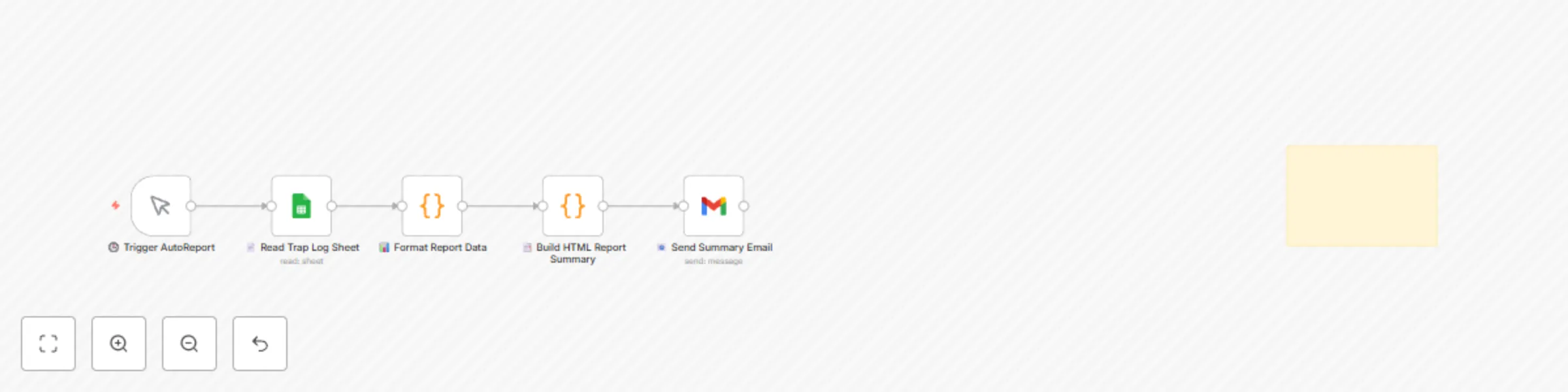
Original n8n.io sourceAutomatically compiles a daily HTML report of all RedOps simulations (Modules 1–5), summarizing offensive activity, response logs, and module effectiveness. Designed for GRC teams, Red/Purple teams, and internal auditors — no manual formatting required.
Red Teams running daily simulations
Purple Teams reviewing impact and response
CISOs, SOCs, or compliance teams requiring summaries
Trigger manually or on schedule (e.g., daily cron)
Reads simulation logs from a shared Google Sheet
Filters data by time or module
Formats data into an HTML summary table
Sends email with report or uploads to Drive/S3
Gmail or SMTP node for email
Google Sheets connected (OAuth)
Date, Module, Action, Result, StatusUnified log format for RedOps Modules 1–5
RedOps_AutoReport_Log_Template.xlsx
email module payload status response timestamp
Set filtering timeframe (24h, 7d) in JavaScript node
Modify the table style in the HTML generator
Connect to PDF node or S3 for exporting to other tools
This workflow is designed for internal reporting only. It does not simulate attacks or initiate actions. Use for audit logs, red team reviews, and awareness tracking only.
[email protected] as a placeholder).Supports:
NIST 800-53 AU-6, AU-12
ISO 27001 A.16.1.6
ACSC Essential Eight reporting practices
🔗 Part of the CYBERPULSE RedOps Suite 🌐 https://cyberpulsesolutions.com 📧 [email protected]
This catalog entry is organized from the workflow JSON. The node-level section below shows the executable blocks available for review before importing the template.
| Workflow | CYBERPULSE AI RedOps: generate daily RedOps security simulation reports |
|---|---|
| Complexity | intermediate |
| Nodes | 6 |
| Categories | SecOps |
| Author | Adnan Tariq |
| Published | 27 Jul 2025 |
Use the JSON export at /data/workflows/6511/6511.json as the source template for this automation.
Open n8n, import the downloaded JSON, and review each node before activating the workflow.
Replace placeholder credentials, API keys, webhook URLs, account IDs, and environment-specific values with your own settings.
Run the workflow manually or in a staging workspace, inspect node output, and confirm downstream systems receive the expected data.
Enable the workflow only after testing, then monitor executions, errors, and rate limits during the first production runs.
Review imported nodes carefully before activation. This catalog entry is intended to help you inspect the workflow structure, understand required services, and find related templates faster.
Node names, credentials, schedules, webhook paths, and external service limits may need adjustment for your workspace.
Description Automatically compiles a daily HTML report of all RedOps simulations (Modules 1–5), summarizing offensive activity, response logs, and module effectiveness. Designed for GRC teams, Red/...
Review the workflow JSON, configure any required credentials in n8n, and test the automation in a safe workspace before using it in production.
Yes. Use the block-by-block analysis and the downloadable JSON to inspect each node, then adjust credentials, prompts, schedules, filters, or destinations for your SecOps use case.