Block 1 - Sticky Note
- Type / Role
- n8n-nodes-base.stickyNote - stickyNote
- Config choices
- Version 1


 Early Deal
This workflow is provided as-is. Please review and test before using in production.
Description: Simulate a phishing login page to test user behavior and SOC response. This controlled workflow sends trap links to predefined targets and logs simulated interaction results—without...
n8n-nodes-base.stickynote, n8n-nodes-base.manualtrigger, n8n-nodes-base.googlesheets, n8n-nodes-base.if, n8n-nodes-base.set
This workflow is cataloged by N8N Workflows and links back to its original n8n.io source page by Adnan Tariq.
Original n8n.io source## 📝 Description: Simulate a phishing login page to test user behavior and SOC response. This controlled workflow sends trap links to predefined targets and logs simulated interaction results—without capturing real credentials.
Red Teams conducting phishing awareness campaigns
SOCs validating alert triggers for credential-based phishing
GRC/Compliance teams performing control testing
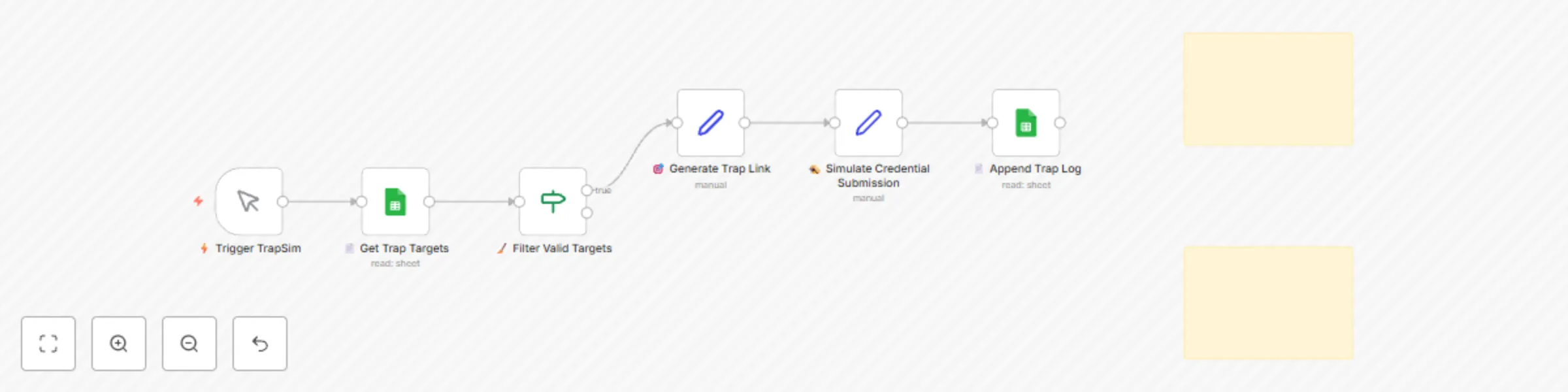
Loads test targets from Google Sheets
Generates trap page URLs (non-malicious)
Fakes login interaction upon click
Logs timestamped event and status to Google Sheet
Google Sheets credentials
Optional: Use Vercel/托管平台 to deploy a real HTML page for advanced simulation
No sensitive data is collected
RedOps_CredentialTrapSim_Log_Template.xlsx
email name team payload response status module timestamp [email protected] Jane Doe HR fake-login.com User clicked Simulated Credential_Trap_Sim 2025-07-27T11:00:00Z
Change trap content using a public static site
Connect to real EDR/alert system for end-to-end SOC validation
Adjust payload wording for different awareness campaigns
This module is 100% simulated and does not capture real credentials. Use only in authorized environments with informed consent. It is designed for training, awareness, and control testing under ethical guidelines.
🔗 Part of the CYBERPULSE AI RedOps Suite 🌐 https://cyberpulsesolutions.com 📧 [email protected]
This catalog entry is organized from the workflow JSON. The node-level section below shows the executable blocks available for review before importing the template.
| Workflow | CYBERPULSE AI redOps: credential trap sim: fake login page simulation |
|---|---|
| Complexity | intermediate |
| Nodes | 8 |
| Categories | SecOps |
| Author | Adnan Tariq |
| Published | 27 Jul 2025 |
Use the JSON export at /data/workflows/6510/6510.json as the source template for this automation.
Open n8n, import the downloaded JSON, and review each node before activating the workflow.
Replace placeholder credentials, API keys, webhook URLs, account IDs, and environment-specific values with your own settings.
Run the workflow manually or in a staging workspace, inspect node output, and confirm downstream systems receive the expected data.
Enable the workflow only after testing, then monitor executions, errors, and rate limits during the first production runs.
Review imported nodes carefully before activation. This catalog entry is intended to help you inspect the workflow structure, understand required services, and find related templates faster.
Node names, credentials, schedules, webhook paths, and external service limits may need adjustment for your workspace.
Description: Simulate a phishing login page to test user behavior and SOC response. This controlled workflow sends trap links to predefined targets and logs simulated interaction results—without...
Review the workflow JSON, configure any required credentials in n8n, and test the automation in a safe workspace before using it in production.
Yes. Use the block-by-block analysis and the downloadable JSON to inspect each node, then adjust credentials, prompts, schedules, filters, or destinations for your SecOps use case.