Block 1 - Webhook
- Type / Role
- n8n-nodes-base.webhook - webhook
- Config choices
- Version 2
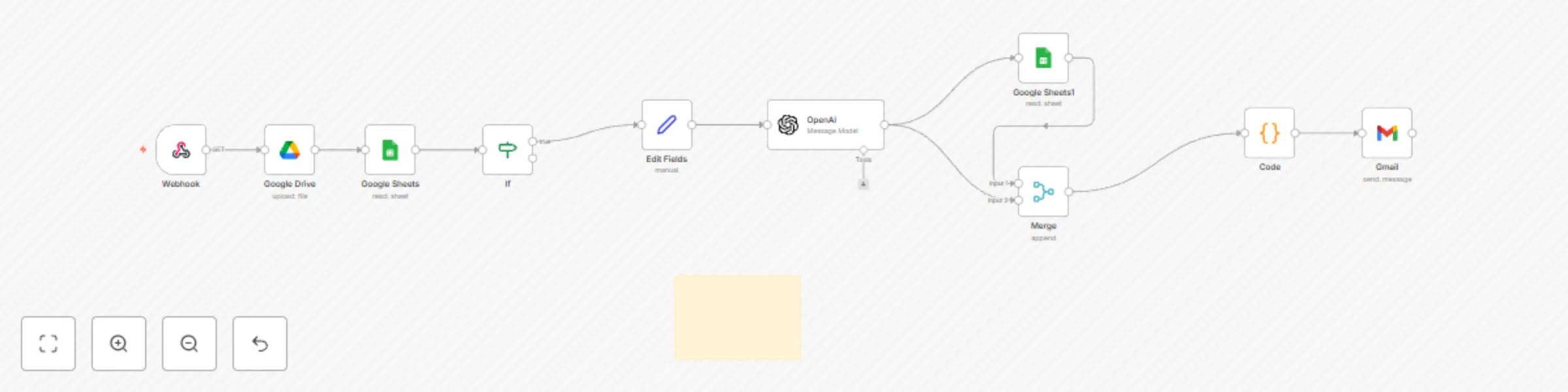


 Early Deal
This workflow is provided as-is. Please review and test before using in production.
Description Automates vendor/customer security questionnaire responses. It ingests a questionnaire (Sheet/CSV/XLSX), matches each question to your approved answers and evidence, and writes a clean ...
n8n-nodes-base.webhook, n8n-nodes-base.googlesheets, n8n-nodes-base.set, @n8n/n8n-nodes-langchain.openai, n8n-nodes-base.if, n8n-nodes-base.merge, n8n-nodes-base.code, n8n-nodes-base.gmail
This workflow is cataloged by N8N Workflows and links back to its original n8n.io source page by Adnan Tariq.
Original n8n.io sourceDescription
Automates vendor/customer security questionnaire responses. It ingests a questionnaire (Sheet/CSV/XLSX), matches each question to your approved answers and evidence, and writes a clean “Auto-Fill” sheet ready to review and send back. Optional alerts nudge reviewers and track progress to completion.
Who’s It For
GRC / Compliance teams responding to customer security reviews
Security engineers and sales engineers supporting questionnaires
Startups that need fast, consistent, audit-ready answers
How It Works
Trigger
Run manually, on a schedule, or when a questionnaire file/row is added.
Ingest & Normalize
Reads questions from Google Sheets/CSV/XLSX.
Normalizes columns (e.g., question, category, customer_notes) and de-duplicates.
Classify
Detects question type (Yes/No, multi-select, free text).
Tags topics (encryption, access control, incident response, privacy, HR, etc.).
Answer Retrieval
Looks up approved answers from your Answer Library sheet (mapped by keywords/category/control).
Falls back to templates (short form/long form) when no exact match exists.
Evidence Linking
Inserts Drive links for policies, diagrams, SOC2/ISO docs (from your evidence folder).
Adds version/date so reviewers can verify what was sent.
Auto-Fill Output
Writes a new sheet with columns like: question, proposed_answer, rationale/notes, evidence_link, control_ref, owner, status, confidence, last_updated.
Review & Notifications
Emails the reviewer/owner with a link to the output sheet for quick approval edits.
Status can move from draft → reviewed → ready to send.
Export
Optional export to CSV/XLSX to match customer’s template.
Optional PDF of responses for audit trail.
Requirements
Google Sheets & Drive credentials
Destination Sheet & Evidence folder (env vars used in the template):
GSHEET_ID, GSHEET_SHEET
DRIVE_FOLDER_ID (or keep SANITIZED and set after import)
Alert email: GRC_ALERT_EMAIL
File Templates
GRC_SQ_AutoFill_Template.xlsx – target sheet with the output columns above
Answer_Library.xlsx / Sheet tab – key-value pairs: keywords/category → approved answers
Control_Mapping.xlsx / Sheet tab – optional mapping to ISO 27001, SOC2, NIST CSF
Output
A populated Auto-Fill sheet ready to review/share
Evidence links with versioning
Email notification to the reviewer with next steps
Customization Tips
Add your framework tags (ISO/SOC2/NIST) to enable quick mapping in the output.
Set owners per topic (e.g., “Encryption → Security Eng”, “Privacy → Legal”).
Add a confidence score threshold to flag answers needing human review.
Enable “strict mode” to prevent sending answers without evidence links.
Schedule a weekly run to pre-fill common questionnaires and keep answers fresh.
This catalog entry is organized from the workflow JSON. The node-level section below shows the executable blocks available for review before importing the template.
| Workflow | Cyberpulse AI GRC: Automate security questionnaire responses |
|---|---|
| Complexity | intermediate |
| Nodes | 11 |
| Categories | SecOps, Multimodal AI |
| Author | Adnan Tariq |
| Published | 14 Aug 2025 |
Use the JSON export at /data/workflows/7349/7349.json as the source template for this automation.
Open n8n, import the downloaded JSON, and review each node before activating the workflow.
Replace placeholder credentials, API keys, webhook URLs, account IDs, and environment-specific values with your own settings.
Run the workflow manually or in a staging workspace, inspect node output, and confirm downstream systems receive the expected data.
Enable the workflow only after testing, then monitor executions, errors, and rate limits during the first production runs.
Review imported nodes carefully before activation. This catalog entry is intended to help you inspect the workflow structure, understand required services, and find related templates faster.
Node names, credentials, schedules, webhook paths, and external service limits may need adjustment for your workspace.
Description Automates vendor/customer security questionnaire responses. It ingests a questionnaire (Sheet/CSV/XLSX), matches each question to your approved answers and evidence, and writes a clean ...
Review the workflow JSON, configure any required credentials in n8n, and test the automation in a safe workspace before using it in production.
Yes. Use the block-by-block analysis and the downloadable JSON to inspect each node, then adjust credentials, prompts, schedules, filters, or destinations for your SecOps, Multimodal AI use case.