Block 1 - Get MediaMarkt Offers Website
- Type / Role
- n8n-nodes-brightdata.brightData - brightData
- Config choices
- Version 1


 Early Deal
This workflow is provided as-is. Please review and test before using in production.
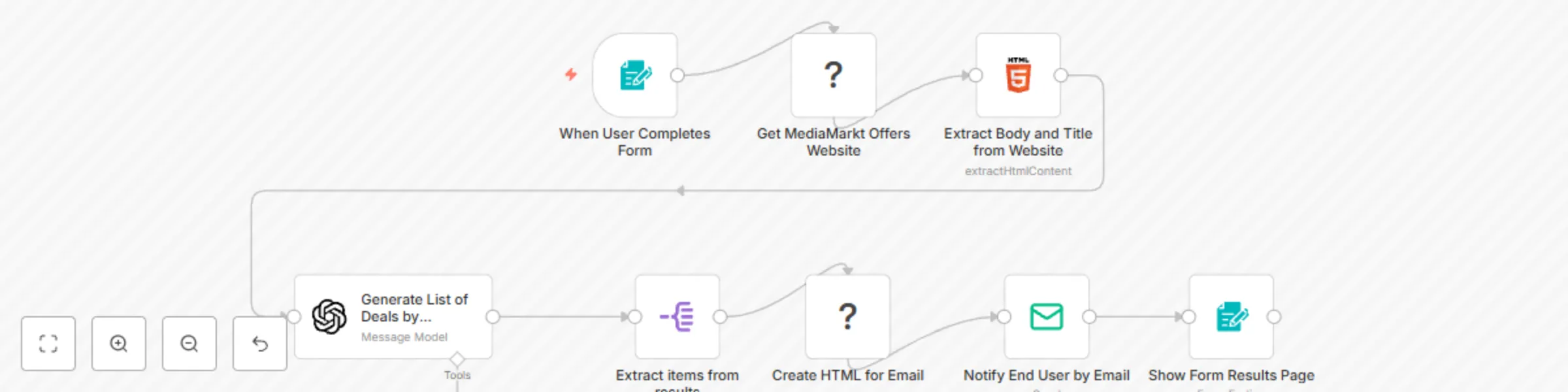
This n8n workflow template automates the process of collecting and delivering the "Top Deals of the Day" from MediaMarkt , tailored to user preferences. By combining user ...
n8n-nodes-brightdata.brightdata, n8n-nodes-document-generator.documentgenerator, n8n-nodes-base.splitout, n8n-nodes-base.emailsend, n8n-nodes-base.form, n8n-nodes-base.html, @n8n/n8n-nodes-langchain.openai, n8n-nodes-base.formtrigger
This workflow is cataloged by N8N Workflows and links back to its original n8n.io source page by Miquel Colomer.
Original n8n.io sourceThis n8n workflow template automates the process of collecting and delivering the "Top Deals of the Day" from MediaMarkt, tailored to user preferences. By combining user-submitted forms, Bright Data web scraping, GPT-4o-mini deal generation, and email delivery, this workflow sends personalized product recommendations straight to a user’s inbox.
> ⚠️ Note: This workflow uses community nodes (Bright Data and Document Generator) which only work on self-hosted n8n instances.
We created and used the following community nodes:
These nodes are not available in n8n Cloud and require self-hosted n8n.
Install Community Nodes
Make sure you're on a self-hosted n8n instance. Install:
n8n-nodes-brightdatan8n-nodes-document-generatorConfigure Credentials
Customize the Form
Adapt the form node to collect desired categories and email addresses. Typical categories include appliances, phones, laptops, etc.
Design Your HTML Template
In the Document Generator node, you can tweak the HTML/CSS to change how deals appear in the final email.
Test the Workflow
Submit the form with test data and check that the entire flow—from scraping to email—executes as expected.
User Interaction via Form
Users select product categories and enter their email. This triggers the workflow.
Data Extraction via Bright Data
Bright Data scrapes the MediaMarkt offers page and returns HTML content.
HTML Parsing
Key elements like product names, prices, and links are extracted for processing.
GPT-4o-mini Recommendation Generation
The extracted data is sent to OpenAI (GPT-4o-mini), which filters, ranks, and enhances deals based on the user’s preferences.
Data Structuring & Split
The result is split into individual deal items to be formatted.
HTML Document Creation
Document Generator populates a clean HTML template with the top recommended deals.
Email Delivery
The final document is emailed via SMTP to the user with a friendly message.
Users receive a custom HTML email featuring a curated list of top MediaMarkt deals based on their selected categories.
Template and node created by Miquel Colomer and n8nhackers.com.
Need help customizing or deploying? Contact us for consulting and support.
This catalog entry is organized from the workflow JSON. The node-level section below shows the executable blocks available for review before importing the template.
| Workflow | Custom deal recommendations by email using Forms, Bright Data & GPT-4o-mini |
|---|---|
| Complexity | intermediate |
| Nodes | 8 |
| Categories | Social Media, AI Summarization |
| Author | Miquel Colomer |
| Published | 24 Mar 2025 |
Use the JSON export at /data/workflows/3304/3304.json as the source template for this automation.
Open n8n, import the downloaded JSON, and review each node before activating the workflow.
Replace placeholder credentials, API keys, webhook URLs, account IDs, and environment-specific values with your own settings.
Run the workflow manually or in a staging workspace, inspect node output, and confirm downstream systems receive the expected data.
Enable the workflow only after testing, then monitor executions, errors, and rate limits during the first production runs.
Review imported nodes carefully before activation. This catalog entry is intended to help you inspect the workflow structure, understand required services, and find related templates faster.
Node names, credentials, schedules, webhook paths, and external service limits may need adjustment for your workspace.
This n8n workflow template automates the process of collecting and delivering the "Top Deals of the Day" from MediaMarkt , tailored to user preferences. By combining user ...
Review the workflow JSON, configure any required credentials in n8n, and test the automation in a safe workspace before using it in production.
Yes. Use the block-by-block analysis and the downloadable JSON to inspect each node, then adjust credentials, prompts, schedules, filters, or destinations for your Social Media, AI Summarization use case.