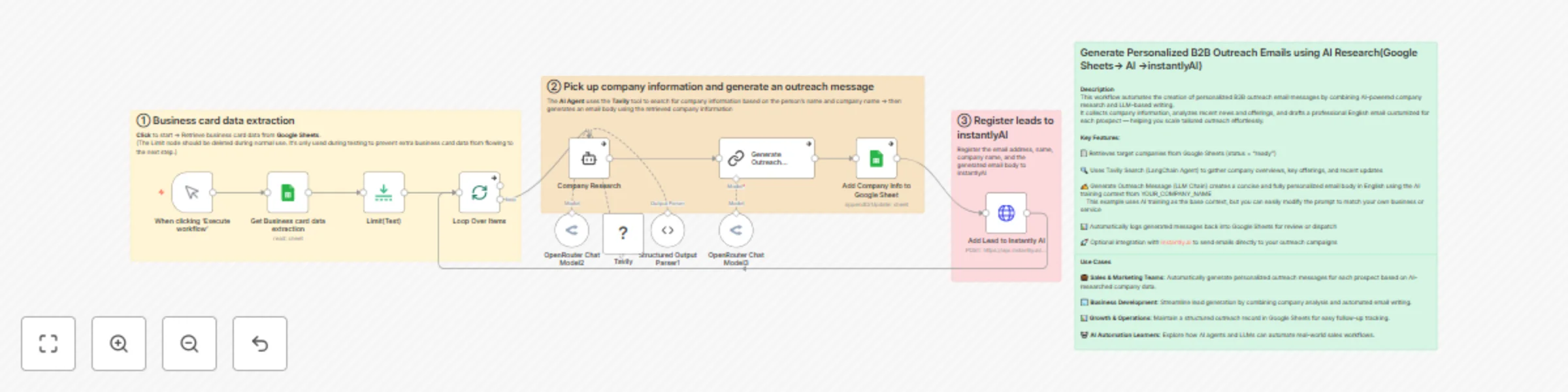
Create personalized B2B outreach emails with Tavily Research & OpenRouter LLM

Workflow preview

Workflow preview
100%
Create personalized B2B outreach emails with Tavily Research & OpenRouter LLM preview
Open on n8n.io

Important notice

This workflow is provided as-is. Please review and test before using in production.

1. Workflow Overview

About this workflow This workflow automatically generates personalized B2B outreach email messages by combining AI based company research and text generation. It’s designed to help sales and mar...

Best for

  • Lead Nurturing automation workflows
  • Multimodal AI automation workflows
  • advanced n8n builders looking for reusable templates

Tools used

n8n-nodes-base.httprequest, n8n-nodes-base.googlesheets, @n8n/n8n-nodes-langchain.outputparserstructured, @n8n/n8n-nodes-langchain.chainllm, @n8n/n8n-nodes-langchain.agent, @tavily/n8n-nodes-tavily.tavilytool, @n8n/n8n-nodes-langchain.lmchatopenrouter, n8n-nodes-base.splitinbatches

Source and attribution

This workflow is cataloged by N8N Workflows and links back to its original n8n.io source page by Haruki Kuwai.

Original n8n.io source

1.1 Workflow description

Title
Create personalized B2B outreach emails with Tavily Research & OpenRouter LLM
Workflow name
Create personalized B2B outreach emails with Tavily Research & OpenRouter LLM

🧠 About this workflow

This workflow automatically generates personalized B2B outreach email messages by combining AI-based company research and text generation.
It’s designed to help sales and marketing professionals automate the creation of tailored cold emails for prospects.


⚙️ How it works

  1. Get rows from Google Sheets — Retrieves companies marked as “ready” for outreach.
  2. Loop Over Items — Processes each company individually.
  3. Company Research (LangChain Agent) — Uses the Tavily search tool to collect key company insights such as overview, offerings, and recent news.
  4. Generate Outreach Message (LLM Chain) — Drafts a professional, concise, and fully personalized email body in English using the AI training context from YOUR_COMPANY_NAME.
    This example uses an AI training and automation service context, but you can easily modify the prompt to fit your own company’s products, services, or industry.
  5. Add to Google Sheets — Writes the generated messages back into the sheet.
  6. (Optional) Add to Instantly.ai — Sends the finalized lead data to your Instantly campaign for cold email distribution.

👥Use Cases

💼Sales & CRM:Automatically build and update your client database from received business cards

🏢Back Office & Admin: Digitize incoming cards for unified company records

📧Marketing Teams: Collect and manage leads efficiently

📚 AI / OCR Research: Build structured datasets for training AI models or internal automation


🧩 Troubleshooting

If the workflow does not generate emails or data fails to appear in Google Sheets, please check the following:

  1. Google Sheets credentials — Ensure that the connected account has edit permissions and the document ID and sheet name are correctly set.
  2. API keys — Verify that your OpenRouter and Tavily API credentials are valid and not expired.
  3. Rate limits — Tavily and OpenRouter may throttle requests when processing multiple records. Try lowering the batch size in the “Limit” node.
  4. Empty company background — If the “Company Research” node returns no output, make sure the input company name is correct and includes sufficient context (e.g., full company name, not abbreviation).
  5. LLM output format — Ensure the “Generate Outreach Message” node is set to return plain text, not JSON or markdown.
  6. Instantly.ai integration (optional) — If leads are not added, confirm that your API key and campaign ID are valid, and that the node is not disabled.

If the issue persists, enable “Always Output Data” in key nodes (such as Company Research and Generate Outreach Message) to debug intermediate results.
You can also use the Execution Log to inspect where the flow stops or returns an empty output.


⚠️ Disclaimer

This workflow uses AI language models and third-party APIs (OpenRouter, Tavily).
Ensure that you add your own API credentials securely and verify all AI-generated content before sending emails.

1.2 Logical Blocks

This catalog entry is organized from the workflow JSON. The node-level section below shows the executable blocks available for review before importing the template.

2. Block-by-Block Analysis

Block 1 - Add Lead to Instantly AI

Type / Role
n8n-nodes-base.httpRequest - httpRequest
Config choices
Version 4.2

Block 2 - Add Company Info to Google Sheet

Type / Role
n8n-nodes-base.googleSheets - googleSheets
Config choices
Version 4.5

Block 3 - Structured Output Parser1

Type / Role
@n8n/n8n-nodes-langchain.outputParserStructured - outputParserStructured
Config choices
Version 1.2

Block 4 - Generate Outreach Message

Type / Role
@n8n/n8n-nodes-langchain.chainLlm - chainLlm
Config choices
Version 1.6

Block 5 - Company Research

Type / Role
@n8n/n8n-nodes-langchain.agent - agent
Config choices
Version 1.7

Block 6 - Tavily

Type / Role
@tavily/n8n-nodes-tavily.tavilyTool - tavilyTool
Config choices
Version 1

Block 7 - OpenRouter Chat Model2

Type / Role
@n8n/n8n-nodes-langchain.lmChatOpenRouter - lmChatOpenRouter
Config choices
Version 1

Block 8 - OpenRouter Chat Model3

Type / Role
@n8n/n8n-nodes-langchain.lmChatOpenRouter - lmChatOpenRouter
Config choices
Version 1

Block 9 - Loop Over Items

Type / Role
n8n-nodes-base.splitInBatches - splitInBatches
Config choices
Version 3

Block 10 - When clicking ‘Execute workflow’

Type / Role
n8n-nodes-base.manualTrigger - manualTrigger
Config choices
Version 1

Block 11 - Sticky Note

Type / Role
n8n-nodes-base.stickyNote - stickyNote
Config choices
Version 1

Block 12 - Sticky Note1

Type / Role
n8n-nodes-base.stickyNote - stickyNote
Config choices
Version 1

Block 13 - Sticky Note2

Type / Role
n8n-nodes-base.stickyNote - stickyNote
Config choices
Version 1

Block 14 - Sticky Note3

Type / Role
n8n-nodes-base.stickyNote - stickyNote
Config choices
Version 1

Block 15 - Sticky Note4

Type / Role
n8n-nodes-base.stickyNote - stickyNote
Config choices
Version 1

Block 16 - Limit(Test)

Type / Role
n8n-nodes-base.limit - limit
Config choices
Version 1

Block 17 - Get Business card data extraction

Type / Role
n8n-nodes-base.googleSheets - googleSheets
Config choices
Version 4.7

3. Summary Table

Workflow Create personalized B2B outreach emails with Tavily Research & OpenRouter LLM
Complexity advanced
Nodes 17
Categories Lead Nurturing, Multimodal AI
Author Haruki Kuwai
Published 22 Oct 2025

4. Reproducing the Workflow from Scratch

  1. 1. Download the workflow JSON

    Use the JSON export at /data/workflows/10009/10009.json as the source template for this automation.

  2. 2. Import the template into n8n

    Open n8n, import the downloaded JSON, and review each node before activating the workflow.

  3. 3. Configure credentials and variables

    Replace placeholder credentials, API keys, webhook URLs, account IDs, and environment-specific values with your own settings.

  4. 4. Test with sample data

    Run the workflow manually or in a staging workspace, inspect node output, and confirm downstream systems receive the expected data.

  5. 5. Activate and monitor

    Enable the workflow only after testing, then monitor executions, errors, and rate limits during the first production runs.

5. General Notes & Resources

Review imported nodes carefully before activation. This catalog entry is intended to help you inspect the workflow structure, understand required services, and find related templates faster.

Node names, credentials, schedules, webhook paths, and external service limits may need adjustment for your workspace.

Frequently asked questions

What does Create personalized B2B outreach emails with Tavily Research & OpenRouter LLM do?

About this workflow This workflow automatically generates personalized B2B outreach email messages by combining AI based company research and text generation. It’s designed to help sales and mar...

What do I need before importing this workflow?

Review the workflow JSON, configure any required credentials in n8n, and test the automation in a safe workspace before using it in production.

Can I customize this workflow?

Yes. Use the block-by-block analysis and the downloadable JSON to inspect each node, then adjust credentials, prompts, schedules, filters, or destinations for your Lead Nurturing, Multimodal AI use case.