Block 1 - Schedule Trigger
- Type / Role
- n8n-nodes-base.scheduleTrigger - scheduleTrigger
- Config choices
- Version 1.2


 Early Deal
This workflow is provided as-is. Please review and test before using in production.
Staying up to date with fast moving topics like AI, machine learning, research, or your specific industry can be tricky. To solve this for myself (for me, it is mostly AI and automation topics), I ...
n8n-nodes-base.scheduletrigger, n8n-nodes-base.httprequest, n8n-nodes-base.telegram, n8n-nodes-base.splitout, @n8n/n8n-nodes-langchain.outputparserstructured, @tavily/n8n-nodes-tavily.tavilytool, n8n-nodes-base.aggregate, n8n-nodes-base.set
This workflow is cataloged by N8N Workflows and links back to its original n8n.io source page by Felix Kemeth.
Original n8n.io sourceStaying up to date with fast-moving topics like AI, machine learning, research, or your specific industry can be tricky.
To solve this for myself (for me, it is mostly AI and automation topics), I built and use this n8n workflow: it pulls fresh articles using NewsAPI based on my topics of interest, lets an AI agent pick the 5 most relevant ones, enriches them with a Tavily search engine, and sends a clean, readable newsletter straight to Telegram - in the language you specify.
In this post, I'll:
After following this guide, you'll end up with a fully automated weekly newsletter that delivers relevant news on the topics you care about - without any manual work.
This is ideal if you already run n8n and want a mostly no‑code way to get a curated weekly digest in Telegram.
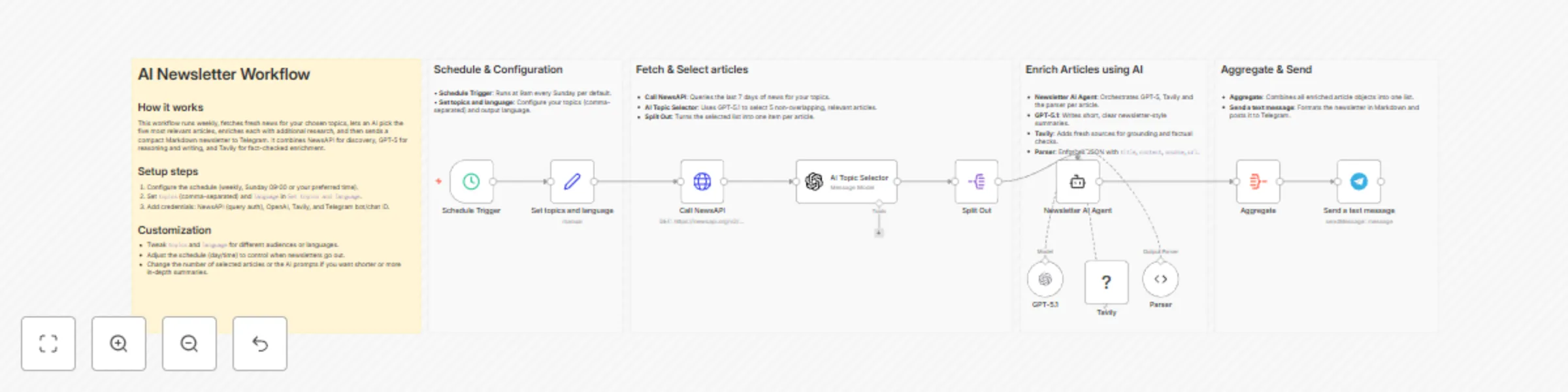
At a high level, this workflow:
The result: every week you get an AI-picked, enriched mini-newsletter with the latest news based on your own interests - delivered in Telegram.
To run this workflow, you need:
The exact logic of the workflow is as follows:
Set node that defines topics (my default is AI,n8n - use a comma-separated list) and language (here I have English, but choose what you prefer). Change these to match your interests (e.g. health,fitness, macroeconomics,markets, climate,policy, or anything you care about).from: last 7 days¹ q: the query, built from your topics (topics like AI,n8n become AI OR n8n expected by the API)² sortBy: relevancy - the most relevant ones at the top of the results returnedhttpQueryAuth credential, where your NewsAPI key is passed as a query parameter.OpenAI - Message a model node using gpt-5.1 via your OpenAI API key with the following prompt:You are an assistant that selects the most relevant news articles for a user.
Instructions:
1. Choose the **5 most relevant non-overlapping articles** based on the user topics.
2. For each article, provide:
- title
- short summary (1–2 sentences)
- source name
- url
3. Output the results in the language specified by the user.
Output as a "articles" JSON array of objects, each with "title", "summary", "source" and "url".
User topics of interest: {{ $('Set topics and language').item.json.topics }}
Output language: {{ $('Set topics and language').item.json.language }}
NewsAPI articles:
{{
$json.articles.map(
article =>
`Title: ${article.title}
Description: ${article.description}
Content: ${article.content}
Source: ${article.source.name}
URL: ${article.url}`
).join('\n---\n')
}}
The prompt instructs the model to read your topics and language, look at all articles from the NewsAPI call (it returns a maximum of 100), select the 5 most relevant, non-overlapping articles, and output a JSON array with title, summary, source and url.
Split Out
Splits out the AI message so each article becomes its own item. This lets the downstream AI agent work on each article individually.
Under the hood, we parse the JSON array returned by the AI into individual items, so that each article becomes its own item in n8n. This lets the AI Agent node enrich each article separately.
Newsletter AI Agent
An AI Agent node with gpt-5.1 as model, again accessed via your OpenAI API key. The agent takes the initial title, summary, source and url, uses the Tavily search tool to find 2–3 reliable, recent sources, and writes a concise 1–3 sentence article in the language you specified. The prompt for the model is shown below.
You are a research writer that updates short news summaries into concise, factual articles.

**Input:**
Title: {{ $json["title"] }}
Summary: {{ $json["summary"] }}
Source: {{ $json["source"] }}
Original URL: {{ $json["url"] }}
Language: {{ $('Set topics and language').item.json.language }}

**Instructions:**

1. Use **Tavily Search** to gather 2–3 reliable, recent, and relevant sources on this topic.
2. Update the **title** if a more accurate or engaging one exists.
3. Write **1–3 sentences** summarizing the topic, combining the original summary and information from the new sources.
4. Return the original source name and url as well.

**Output (JSON):**

{
  "title": "final article title",
  "content": "concise 1–3 sentence article content",
  "source": "the name of the original source",
  "url": "the url of the original source"
}

**Rules:**

* Ensure the topic is relevant, informative, and timely.
* Translate the article if necessary to comply with the desired language {{ $('Set topics and language').item.json.language }}.
In particular, the prompt instructs the model to
title, content, source and url as fields.Because the model is allowed to adjust titles, you may occasionally see slightly different titles than in the original feed; if you prefer minimal changes, you can tighten the prompt to only allow small tweaks.
output field from the agent. Combines the individual article objects back into one array to be used for messaging.Telegram - Send a text message node that uses your Telegram bot credentials and chatId. Renders each article as title, content plus Source: [source](url).> To adjust this workflow for your needs, open the Set topics and language node to tweak topics (comma-separated, like AI,startups,LLMs or web dev,TypeScript,n8n) and switch the language to any target language, then inspect the Schedule Trigger to adjust interval and time, e.g. weekly at 07:30. These two tweaks control the content topics of your newsletter and when you will receive it.
language) lets you specify the output language, while the Schedule Trigger lets you set the frequency.Here are concrete directions to take this workflow further:
This workflow shows how I use n8n, NewsAPI, Tavily, OpenAI, and Telegram to create a personal weekly newsletter. It’s mostly no-code, easy to customize, and something I rely on myself to stay informed without spending time browsing news manually.
Contact me here, visit my website, or connect with me on LinkedIn.
={{ DateTime.fromISO($json.timestamp).minus({ days: 7 }) }}{{ $json.topics.replaceAll("," , " OR ") }}This catalog entry is organized from the workflow JSON. The node-level section below shows the executable blocks available for review before importing the template.
| Workflow | Create AI-curated news digests with GPT-5.1, NewsAPI, Tavily & Telegram |
|---|---|
| Complexity | advanced |
| Nodes | 16 |
| Categories | Social Media, AI Summarization |
| Author | Felix Kemeth |
| Published | 21 Nov 2025 |
Use the JSON export at /data/workflows/11092/11092.json as the source template for this automation.
Open n8n, import the downloaded JSON, and review each node before activating the workflow.
Replace placeholder credentials, API keys, webhook URLs, account IDs, and environment-specific values with your own settings.
Run the workflow manually or in a staging workspace, inspect node output, and confirm downstream systems receive the expected data.
Enable the workflow only after testing, then monitor executions, errors, and rate limits during the first production runs.
Review imported nodes carefully before activation. This catalog entry is intended to help you inspect the workflow structure, understand required services, and find related templates faster.
Node names, credentials, schedules, webhook paths, and external service limits may need adjustment for your workspace.
Staying up to date with fast moving topics like AI, machine learning, research, or your specific industry can be tricky. To solve this for myself (for me, it is mostly AI and automation topics), I ...
Review the workflow JSON, configure any required credentials in n8n, and test the automation in a safe workspace before using it in production.
Yes. Use the block-by-block analysis and the downloadable JSON to inspect each node, then adjust credentials, prompts, schedules, filters, or destinations for your Social Media, AI Summarization use case.