Felix Kemeth
Workflows by Felix Kemeth
Create personalized news digests with GPT-5.1, SerpAPI, and Telegram delivery
## Overview Staying up to date with fast-moving topics like AI, machine learning, or your specific industry can be overwhelming. You either drown in daily noise or miss important developments between weekly digests. This **AI News Agent** workflow delivers a curated newsletter only when there's genuinely relevant news. I use it myself for AI and n8n topics. **Key features:** - **AI-driven send decision**: An AI agent evaluates whether today's news is worth sending. - **Deduplication**: Compares candidate articles against past newsletters to avoid repetition. - **Real-time news**: Uses [SerpAPI's DuckDuckGo News engine](https://serpapi.com/duckduckgo-news-api) for fresh results. - **Frequency guardrails**: Configure minimum and maximum days between newsletters. In this post, I'll walk you through the complete workflow, explain each component, and show you how to set it up yourself. ## What this workflow does At a high level, the AI News Agent: 1. **Fetches fresh news** twice daily via SerpAPI's DuckDuckGo News engine. 2. **Stores articles** in a persistent data table with automatic deduplication. 3. **Filters for freshness** - only considers articles newer than your last newsletter. 4. **Applies frequency guardrails** - respects your min/max sending preferences. 5. **Makes an editorial decision** - AI evaluates if the news is worth sending. 6. **Enriches selected articles** - uses Tavily web search for fact-checking and depth. 7. **Delivers via Telegram** - sends a clean, formatted newsletter. 8. **Remembers what it sent** - stores each edition to prevent future repetition. This allows you to get newsletters **only when there's genuinely relevant news** - in contrast to a fixed schedule. ## Requirements To run this workflow, you need: - **SerpAPI key** Create an account at [serpapi.com](https://serpapi.com) and generate an API key. They offer 250 free searches/month. - **Tavily API key** Sign up at [app.tavily.com](https://app.tavily.com) and create an API key. Generous free tier available. - **OpenAI API key** Get one from [OpenAI](https://platform.openai.com) - required for AI agent calls. - **Telegram bot + chat ID** A free Telegram bot (via BotFather) and the chat/channel ID where you want the newsletter. See [Telegram's bot tutorial](https://core.telegram.org/bots/tutorial) for setup. ## How it works The workflow is organized into five logical stages. ### Stage 1: Schedule & Configuration - **Schedule Trigger** Runs the workflow on a cron schedule. Default: `0 0 9,17 * * *` (twice daily at 9:00 and 17:00). These frequent checks enable the AI to send newsletters at these times when it observes actually relevant news, not only once a week. _I picked 09:00 and 17:00 as natural check‑in points at the start and end of a typical workday, so you see updates when you’re most likely to read them without being interrupted in the middle of deep work. With SerpAPI’s 250 free searches/month, running twice per day with a small set of topics (e.g. 2–3) keeps you comfortably below the limit; if you add more topics or increase the schedule frequency, either tighten the cron window or move to a paid SerpAPI plan to avoid hitting the cap._ - **Set topics and language** A `Set` node that defines your configuration: - `topics`: comma-separated list (e.g., `AI, n8n`) - `language`: output language (e.g., `English`) - `minDaysBetween`: minimum days to wait (0 = no minimum) - `maxDaysBetween`: maximum days without sending (triggers a "must-send" fallback) ### Stage 2: Fetch & Store News - **Build topic queries** Splits your comma-separated topics into individual search queries: _In DuckDuckGo News via SerpAPI, a query like `AI,n8n` looks for news where both “AI” and “n8n” appear. For a niche tool like `n8n`, this is often almost identical to just searching for `n8n` ([docs](https://serpapi.com/duckduckgo-news-api)). It’s therefore better to split the topics, search for each of them separately, and let the AI later decide which news articles to select._ ```javascript return $input.first().json.topics.split(',').map(topic => ({ json: { topic: topic.trim() } })); ``` - **Fetch news from SerpAPI (DuckDuckGo News)** HTTP Request node calling SerpAPI with: - `engine`: `duckduckgo_news` - `q`: your topic - `df`: `d` (last day) Auth is handled via `httpQueryAuth` credentials with your SerpAPI key. _SerpAPI also offers other news engines such as the Google News API ([see here](https://serpapi.com/google-news-api)). DuckDuckGo News is used here because, unlike Google News, it returns an excerpt/snippet in addition to the title, source, and URL ([see here](https://serpapi.com/duckduckgo-news-api))—giving the AI more context to work with._ _Another option is NewsAPI, but its [free tier delays articles by 24 hours](https://newsapi.org/pricing), so you miss the freshness window that makes these twice-daily checks valuable. DuckDuckGo News through SerpAPI keeps the workflow real-time without that lag._ _n8n has official SerpAPI nodes, but as of writing there is no dedicated node for the DuckDuckGo News API. That’s why this workflow uses a custom `HTTP Request` node instead, which works the same under the hood while giving you full control over the DuckDuckGo News parameters._ - **Split SerpAPI results into articles** Expands the `results` array so each article becomes its own item. - **Upsert articles into News table** Stores each article in an n8n data table with fields: `title`, `source`, `url`, `excerpt`, `date`. Uses **upsert** on title + URL to avoid duplicates. Date is normalized to ISO UTC: ```javascript DateTime.fromSeconds(Number($json.date), {zone: 'utc'}).toISO() ``` ### Stage 3: Filtering & Frequency Guardrails This is where the workflow gets smart about *what* to consider and *when* to send. - **Get previous newsletters → Sort → Get most recent** Pulls all editions from the `Newsletters` table and isolates the latest one with its `createdAt` timestamp. - **Combine articles with last newsletter metadata** Attaches the last newsletter timestamp to each candidate article. - **Filter articles newer than last newsletter** Keeps only articles published *after* the last edition. Uses a safe default date (`2024-01-01`) if no previous newsletter exists: ```javascript $json.date_2 > ($json.createdAt_1 || DateTime.fromISO('2024-01-01T00:00:00.000Z')) ``` - **Stop if last newsletter is too recent** Compares `createdAt` against your `minDaysBetween` setting. If you're still in the "too soon to send" window, the workflow short-circuits here. ### Stage 4: AI Editorial Decision This is the core intelligence of the workflow - an AI that decides *whether* to send and *what* to include. This stage is also the actual agentic part of the workflow, where the system makes its own decisions instead of just following a fixed schedule. - **Aggregate candidate articles for AI** Bundles today's filtered articles into a compact list with `title`, `excerpt`, `source`, and `url`. - **Limit previous newsletters to last 5 → Aggregate** Prepares the last 5 newsletter contents for the AI to check against for repetition. - **Combine candidate articles with past newsletters** Merges both lists so the AI sees "today's candidates" + "recent history" side by side. - **AI: decide send + select articles** The heart of the workflow. A GPT-5.1 call with a comprehensive editorial prompt: ```text You are an **AI Newsletter Editor**. Your job is to decide whether today’s newsletter edition should be sent, and to select the best articles. You will receive a list of articles with: 'title', 'excerpt', `source`, `url`. You will also receive content of **previously sent newsletters** (markdown). # Your Tasks ## 1. Decide whether to send the newsletter Output "YES" only if all of the following are satisfied **OR** the fallback rule applies: ### **Base Criteria** 1. There are **at least 3 meaningful articles**. *Meaningful = not trivial, not purely promotional, not clickbait, contains actual informational value.* 2. Articles must be **non-duplicate and non-overlapping**: * Not the same topic/headline rephrased * Not reporting identical events with minor variations * Not the same news covered by multiple sources without distinct insights 3. Articles must be **relevant to the user's topics**: **{{ $('Set topics and language').item.json.topics }}** 4. Articles must be **novel** relative to the **topics in previous newsletters**: * Compare against all previous newsletters below * Exclude articles that discuss topics already substantially covered 5. Articles must offer **clear value**: * New information * Impact that matters to the user * Insight, analysis, or meaningful expansion ### **Fallback rule: Newsletter frequency requirement** If **at least 1 relevant article exists** *and* the last newsletter was sent **more than {{ $('Set topics and language').item.json.maxDaysBetween }} days ago**, then you **MUST** return "YES" as a decision even if the other criteria are not completely met. Last newsletter was sent {{ $('Get most recent newsletter').item.json.createdAt ? Math.floor($now.diff(DateTime.fromISO($('Get most recent newsletter').item.json.createdAt), 'days').days) : 999 }} days ago. ### Otherwise → "NO" ## **2. If "YES": Select Articles** Select the **top 3–5** articles that best fulfill the criteria above. For each selected article, output: * **title** (rewrite for clarity, conciseness, and impact) * **summary** (1–2 sentences; written in the output language) * **source** * **url** All summaries **must** be written in: **{{ $('Set topics and language').item.json.language }}** --- # **Output Format (JSON)** { "decision": "YES or NO", "articles": [ { "title": "...", "summary": "...", "source": "...", "url": "..." } ] } When "decision": "NO", return an empty array for "articles". # **Article Input** Use these articles: {{ $json.results.map( article => `Title: ${article.title_2} Excerpt: ${article.excerpt_2} Source: ${article.source_2} URL: ${article.url_2}` ).join('\n---\n') }} You must also consider the topics already covered in previous newsletters to avoid repetition: {{ $json.newsletters.map(x => `Newsletter: ${x.content}`).join('\n---\n') }} ``` The AI outputs structured JSON: ```json { "decision": "YES", "articles": [ { "title": "...", "summary": "...", "source": "...", "url": "..." } ] } ``` - **If AI decided to send newsletter** Routes based on `decision === "YES"`. If NO, the workflow ends gracefully. ### Stage 5: Content Enrichment & Delivery - **Split selected articles for enrichment** Each selected article becomes its own item for individual processing. - **AI: enrich & write article** An AI Agent node with GPT-5.1 + Tavily web search tool. For each article: ```text You are a research writer that updates short news summaries into concise, factual articles. **Input:** Title: {{ $json["title"] }} Summary: {{ $json["summary"] }} Source: {{ $json["source"] }} Original URL: {{ $json["url"] }} Language: {{ $('Set topics and language').item.json.language }} **Instructions:** 1. Use **Tavily Search** to gather 2–3 reliable, recent, and relevant sources on this topic. 2. Update the **title** if a more accurate or engaging one exists. 3. Write **1–2 sentences** summarizing the topic, combining the original summary and information from the new sources. 4. Return the original source name and url as well. **Output (JSON):** { "title": "final article title", "content": "concise 1–2 sentence article content", "source": "the name of the original source", "url": "the url of the original source" } **Rules:** * Ensure the topic is relevant, informative, and timely. * Translate the article if necessary to comply with the desired language {{ $('Set topics and language').item.json.language }}. ``` The **Output Parser** enforces the JSON schema with `title`, `content`, `source`, and `url` fields. - **Aggregate enriched articles** Collects all enriched articles back into a single array. - **Insert newsletter content into Newsletters table** Stores the final markdown content for future deduplication: ```javascript $json.output.map(article => { const title = JSON.stringify(article.title).slice(1, -1); const content = JSON.stringify(article.content).slice(1, -1); const source = JSON.stringify(article.source).slice(1, -1); const url = JSON.stringify(article.url).slice(1, -1); return `*${title}*\n${content}\nSource: [${source}](${url})`; }).join('\n\n') ``` - **Send newsletter to Telegram** Sends the formatted newsletter to your Telegram chat/channel. ## Why this workflow is powerful - **Intelligent send decisions** The AI evaluates news quality before sending, leading to a less noisy and more relevant news digest. - **Memory across editions** By persisting newsletters and comparing against history, the workflow avoids repetition. - **Frequency guardrails with flexibility** Set boundaries (e.g., "at least 1 day between sends" and "must send within 5 days"), but let the AI decide the optimal moment within those bounds. - **Source-level deduplication** The news table with upsert prevents the same article from being considered multiple times across runs. - **Grounded in facts** SerpAPI provides real news sources; Tavily enriches with additional verification. The newsletter stays factual. - **Configurable and extensible** Change topics, language, frequency - all in one `Set` node. In addition, the workflow is modular, allowing to add new news sources or new delivery channels without touching the core logic. ## Configuration guide To customize this workflow for your needs: 1. **Topics and language** Open `Set topics and language` and modify: - `topics`: your interests (e.g., `machine learning, startups, TypeScript`) - `language`: your preferred output language 2. **Frequency settings** - `minDaysBetween`: minimum days between newsletters (0 = no limit) - `maxDaysBetween`: maximum gap before forcing a send - For very high-volume topics (such as `"AI"`), expect the workflow to send almost every time once `minDaysBetween` has passed, because the content-quality criteria are usually met. 3. **Schedule** Modify the `Schedule Trigger` cron expression. Default runs twice daily at 9:00 am and 5:00 pm; adjust to your preference. 4. **Telegram** Update the `chatId` in the Telegram node to your chat/channel. 5. **Credentials** Set up credentials for: SerpAPI (httpQueryAuth), Tavily, OpenAI, Telegram. ## Next steps and improvements Here are concrete directions to take this workflow further: - **Multi-agent architecture** Split the current AI calls into specialized agents: signal detection, relevance scoring, editorial decision, content enhancement, and formatting - each with a single responsibility. - **1:1 personalization** Move from static topics to weighted preferences. Learn from click behavior and feedback. - **Telegram feedback buttons** Add inline buttons (👍 Useful / 👎 Not relevant / 🔎 More like this) and feed signals back into ranking. - **Email with HTML template** For more flexibility, send the newsletter via email. - **Incorporating other news APIs or RSS feeds** Add more sources such as other news APIs and RSS feeds from blogs, newsletters, or communities. - **Adjust for arxiv paper search and research news** Swap SerpAPI for arxiv search or other academic sources to obtain a personal research digest newsletter. - **Images and thumbnails** Fetch representative images for each article and include them in the newsletter. - **Web archive** Auto-publish each edition as a web page with permalinks. - **Retry logic and error handling** Add exponential backoff for external APIs and route failures to an error workflow. - **Prompt versioning** Move prompts to a data table with versioning for A/B testing and rollback. - **Audio and video news** Use audio or video models for better news communication. ## Wrap-up This AI News Agent workflow represents a significant evolution from simple scheduled newsletters. By adding **intelligent send decisions**, **historical deduplication**, and **frequency guardrails**, you get a newsletter that respects the quality of available news. I use this workflow myself to stay informed on AI and automation topics without the overload of daily news or the delayed delivery caused by a fixed newsletter schedule. Need help with your automations? [Contact me here](https://akribic.com/contact).
Create AI-curated news digests with GPT-5.1, NewsAPI, Tavily & Telegram
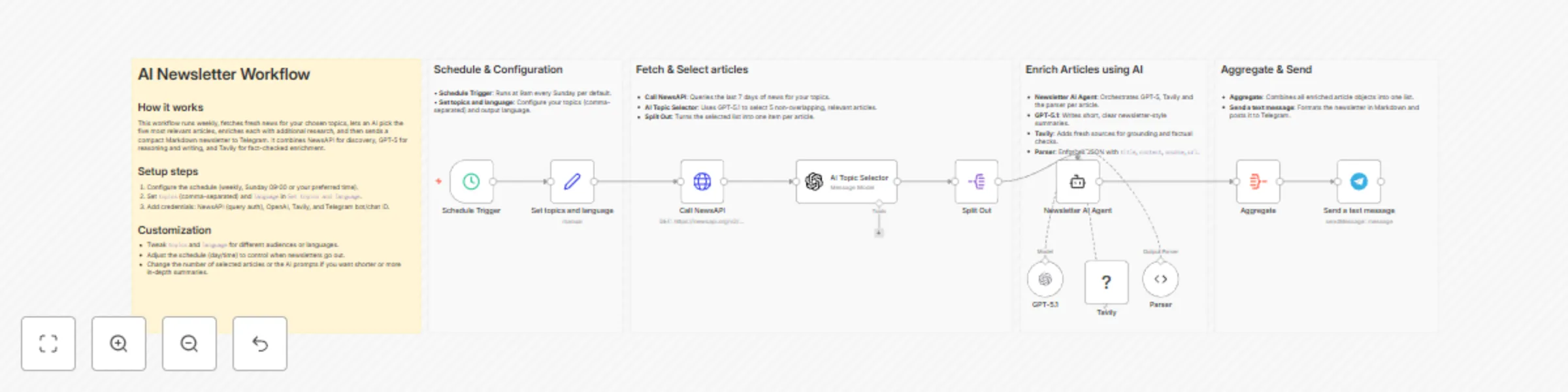
## Overview Staying up to date with fast-moving topics like AI, machine learning, research, or your specific industry can be tricky. To solve this for myself (for me, it is mostly AI and automation topics), I built and use this n8n workflow: it **pulls fresh articles** using NewsAPI based on my topics of interest, lets an AI agent **pick the 5 most relevant ones**, enriches them with a Tavily search engine, and **sends a clean, readable newsletter straight to Telegram** - in the language you specify. In this post, I'll: - Explain what the workflow does and why it's useful - Show you how to import and configure it step by step - Highlight the main advantages and common customisations - Outline concrete next steps and improvements After following this guide, you'll end up with a fully automated weekly newsletter that delivers relevant news on the topics you care about - without any manual work. This is ideal if you already run n8n and want a mostly no‑code way to get a curated weekly digest in Telegram. ## What this workflow does At a high level, this workflow: - Runs on a schedule (weekly at 9:00 on Sundays by default) - Automatically finds recent, relevant news via NewsAPI for your topics of interest - Lets AI select the top 5 most relevant news - Uses a Tavily-powered AI agent to fact-check and enrich each article - Aggregates the final results into a compact newsletter in the language you specify - Sends them as a Markdown-formatted Telegram message The result: every week you get an AI-picked, enriched mini-newsletter with the latest news based on your own interests - delivered in Telegram. ## Requirements To run this workflow, you need: - **NewsAPI key** Create an account [here](https://newsapi.org) and generate an API key - it is free. - **Tavily API key** You can sign up [here](https://app.tavily.com) and create an API key. They also have a generous free tier. - **OpenAI API key** Get one from OpenAI - we need this for the LLM agent calls. - **Telegram bot + chat ID** A Telegram bot (via BotFather) and the chat/channel ID where you want the newsletter. It is also free. See for example [here](https://core.telegram.org/bots/tutorial) how to set that up. ## How it works The exact logic of the workflow is as follows: - **Schedule Trigger** Runs the workflow on a fixed interval (in this version: weekly, at 9:00 on Sundays). - **Set topics and language** A `Set` node that defines topics (my default is `AI,n8n` - use a comma-separated list) and language (here I have English, but choose what you prefer). Change these to match your interests (e.g. `health,fitness`, `macroeconomics,markets`, `climate,policy`, or anything you care about). - **Call NewsAPI** HTTP Request node calling the NewsAPI API. It uses as arguments: - `from`: last 7 days¹ - `q`: the query, built from your topics (topics like `AI,n8n` become `AI OR n8n` expected by the API)² - `sortBy`: `relevancy` - the most relevant ones at the top of the results returned Auth is handled via an `httpQueryAuth` credential, where your NewsAPI key is passed as a query parameter. - **AI Topic Selector** An `OpenAI - Message a model` node using `gpt-5.1` via your OpenAI API key with the following prompt: ``` You are an assistant that selects the most relevant news articles for a user. Instructions: 1. Choose the **5 most relevant non-overlapping articles** based on the user topics. 2. For each article, provide: - title - short summary (1–2 sentences) - source name - url 3. Output the results in the language specified by the user. Output as a "articles" JSON array of objects, each with "title", "summary", "source" and "url". User topics of interest: {{ $('Set topics and language').item.json.topics }} Output language: {{ $('Set topics and language').item.json.language }} NewsAPI articles: {{ $json.articles.map( article => `Title: ${article.title} Description: ${article.description} Content: ${article.content} Source: ${article.source.name} URL: ${article.url}` ).join('\n---\n') }} ``` The prompt instructs the model to read your topics and language, look at all articles from the NewsAPI call (it returns a maximum of 100), select the 5 most relevant, non-overlapping articles, and output a JSON array with `title`, `summary`, `source` and `url`. - **Split Out** Splits out the AI message so each article becomes its own item. This lets the downstream AI agent work on each article individually. Under the hood, we parse the JSON array returned by the AI into individual items, so that each article becomes its own item in n8n. This lets the AI Agent node enrich each article separately. - **Newsletter AI Agent** An AI Agent node with `gpt-5.1` as model, again accessed via your OpenAI API key. The agent takes the initial title, summary, source and url, uses the Tavily search tool to find 2–3 reliable, recent sources, and writes a concise 1–3 sentence article in the language you specified. The prompt for the model is shown below. ``` You are a research writer that updates short news summaries into concise, factual articles. **Input:** Title: {{ $json["title"] }} Summary: {{ $json["summary"] }} Source: {{ $json["source"] }} Original URL: {{ $json["url"] }} Language: {{ $('Set topics and language').item.json.language }} **Instructions:** 1. Use **Tavily Search** to gather 2–3 reliable, recent, and relevant sources on this topic. 2. Update the **title** if a more accurate or engaging one exists. 3. Write **1–3 sentences** summarizing the topic, combining the original summary and information from the new sources. 4. Return the original source name and url as well. **Output (JSON):** { "title": "final article title", "content": "concise 1–3 sentence article content", "source": "the name of the original source", "url": "the url of the original source" } **Rules:** * Ensure the topic is relevant, informative, and timely. * Translate the article if necessary to comply with the desired language {{ $('Set topics and language').item.json.language }}. ``` In particular, the prompt instructs the model to 1. Use **Tavily Search** to gather 2–3 reliable, recent, and relevant sources on this topic. 2. Update the **title** if a more accurate or engaging one exists 3. Write **1–3 sentences** summarizing the topic, combining the original summary and information from the new sources 4. Reply in a pre-defined JSON format including the original source name and url. The **Output Parser** enforces a structured JSON output with `title`, `content`, `source` and `url` as fields. Because the model is allowed to adjust titles, you may occasionally see slightly different titles than in the original feed; if you prefer minimal changes, you can tighten the prompt to only allow small tweaks. - **Aggregate** Aggregate node collecting the `output` field from the agent. Combines the individual article objects back into one array to be used for messaging. - **Send a text message** A `Telegram - Send a text message` node that uses your Telegram bot credentials and `chatId`. Renders each article as title, content plus `Source: [source](url)`. > To adjust this workflow for your needs, open the `Set topics and language` node to tweak topics (comma-separated, like `AI,startups,LLMs` or `web dev,TypeScript,n8n`) and switch the language to any target language, then inspect the `Schedule Trigger` to adjust interval and time, e.g. weekly at 07:30. These two tweaks control the content topics of your newsletter and when you will receive it. ## Why this workflow is powerful - **End-to-end automation** From news discovery to curated delivery, everything is automated. - **AI-driven topic relevance** Instead of naïvely listing every headline the AI filters for relevance to your topics and avoids overlapping or duplicate stories. - **Grounded in facts** By using NewsAPI and Tavily, the newsletter stays fact-based, i.e. you get short, factual summaries grounded in multiple sources. - **Flexibility** A single parameter (`language`) lets you specify the output language, while the Schedule Trigger lets you set the frequency. - **Low friction and mobile-first** Using Telegram as a consumption surface provides quick, low-friction reading, with push notifications as notifiers. ## Next steps Here are concrete directions to take this workflow further: - **RAG-workflow for better topic selection** Use a Retrieval-Augmented Generation pattern to let the model better choose topics that align with your evolving preferences. Right now, all news articles go into the prompt, which may bias the model to pick articles that appear first. - **Prompt iteration and evaluation framework** Systematically experiment with different selection criteria (e.g. "more technical", "more beginner-friendly"), tone and length of the newsletter. - **Logging using n8n data tables** Persist previous newsletter to avoid repetition and for better debugging. Using the source links provided in the newsletter, track which articles were clicked to enable 1:1 personalization. - **Email with HTML template** For more flexibility, send the newsletter via email. - **Trigger based on news relevance** Instead of (or in addition to) a fixed schedule, compute a "relevance score" or "novelty score" across articles. Trigger only when the score crosses a threshold. - **Incorporating other news APIs or RSS feeds** Add more sources such as other news APIs and RSS feeds from blogs, newsletters, or communities. - **Adjust for arxiv paper search and research news** Swap NewsAPI for arxiv search or other academic sources to obtain a personal research digest newsletter. - **Add 1:1 personalization by tracking URL clicks** Use n8n data tables to track which URLs have been clicked. Use this information as input to future AI runs to refine the news suggestions. - **Audio and video news** Use audio or video models for better news communication. ## Wrap-up This workflow shows how I use n8n, NewsAPI, Tavily, OpenAI, and Telegram to **create a personal weekly newsletter**. It’s mostly no-code, easy to customize, and something I rely on myself to stay informed without spending time browsing news manually. [Contact me here](https://akribic.com/contact?subject=AI%20newsletter%20n8n%20workflow), visit my [website](https://akribic.com), or connect with me on [LinkedIn](https://www.linkedin.com/in/felixkemeth). ## Footnotes 1. we do that here with the JS expression `={{ DateTime.fromISO($json.timestamp).minus({ days: 7 }) }}` 2. we do that here with the JS expression `{{ $json.topics.replaceAll("," , " OR ") }}`