Block 1 - OpenAI Chat Model
- Type / Role
- @n8n/n8n-nodes-langchain.lmChatOpenAi - lmChatOpenAi
- Config choices
- Version 1.2


 Early Deal
This workflow is provided as-is. Please review and test before using in production.
AI Customer Support Agent with Google Docs Knowledge (Telegram + OpenAI) This no code workflow turns your Telegram bot into an intelligent, always on AI support agent that references your busine...
@n8n/n8n-nodes-langchain.lmchatopenai, @n8n/n8n-nodes-langchain.memorybufferwindow, n8n-nodes-base.googledocstool, n8n-nodes-base.telegramtrigger, n8n-nodes-base.telegram, n8n-nodes-base.stickynote, @n8n/n8n-nodes-langchain.agent
This workflow is cataloged by N8N Workflows and links back to its original n8n.io source page by Automate With Marc.
Original n8n.io source🤖 AI Customer Support Agent with Google Docs Knowledge (Telegram + OpenAI)
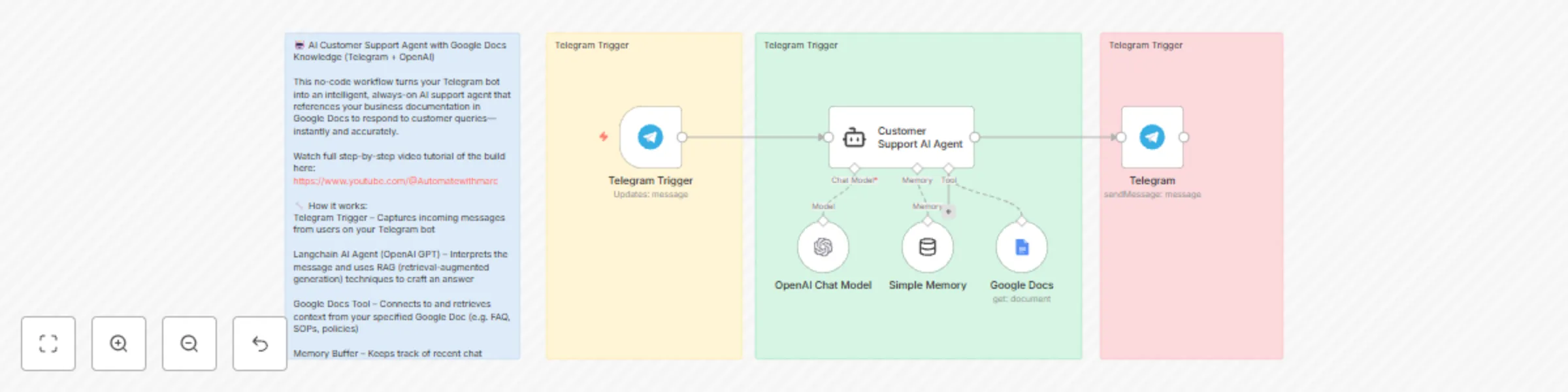
This no-code workflow turns your Telegram bot into an intelligent, always-on AI support agent that references your business documentation in Google Docs to respond to customer queries—instantly and accurately.
Watch full step-by-step video tutorial of the build here: https://youtu.be/Mlv7CjGO7wI
🔧 How it works: Telegram Trigger – Captures incoming messages from users on your Telegram bot
Langchain AI Agent (OpenAI GPT) – Interprets the message and uses RAG (retrieval-augmented generation) techniques to craft an answer
Google Docs Tool – Connects to and retrieves context from your specified Google Doc (e.g. FAQ, SOPs, policies)
Memory Buffer – Keeps track of recent chat history for more human-like conversations
Telegram Reply Node – Sends the AI-generated response back to the user
💡 Use Cases: E-commerce customer service
SaaS product onboarding
Internal helpdesk bot for teams
WhatsApp-style support for digital businesses
🧠 What makes this powerful: Supports complex questions by referencing a live Google Doc knowledge base
Works in plain conversational language (no buttons or forms needed)
Runs 24/7 with zero code
Easily extendable to Slack, WhatsApp, or email support
🛠️ Tools used: Telegram Node (trigger + send)
Langchain Agent with OpenAI GPT
Google Docs Tool
Memory Buffer
Sticky Notes for easy understanding
This catalog entry is organized from the workflow JSON. The node-level section below shows the executable blocks available for review before importing the template.
| Workflow | Create a Telegram customer support bot with GPT4-mini and Google Docs knowledge |
|---|---|
| Complexity | intermediate |
| Nodes | 10 |
| Categories | Support Chatbot, AI RAG |
| Author | Automate With Marc |
| Published | 11 Jun 2025 |
Use the JSON export at /data/workflows/4875/4875.json as the source template for this automation.
Open n8n, import the downloaded JSON, and review each node before activating the workflow.
Replace placeholder credentials, API keys, webhook URLs, account IDs, and environment-specific values with your own settings.
Run the workflow manually or in a staging workspace, inspect node output, and confirm downstream systems receive the expected data.
Enable the workflow only after testing, then monitor executions, errors, and rate limits during the first production runs.
Review imported nodes carefully before activation. This catalog entry is intended to help you inspect the workflow structure, understand required services, and find related templates faster.
Node names, credentials, schedules, webhook paths, and external service limits may need adjustment for your workspace.
AI Customer Support Agent with Google Docs Knowledge (Telegram + OpenAI) This no code workflow turns your Telegram bot into an intelligent, always on AI support agent that references your busine...
Review the workflow JSON, configure any required credentials in n8n, and test the automation in a safe workspace before using it in production.
Yes. Use the block-by-block analysis and the downloadable JSON to inspect each node, then adjust credentials, prompts, schedules, filters, or destinations for your Support Chatbot, AI RAG use case.