Create a context-aware Slack assistant with Google Sheets, Pinecone & GPT-4o

Workflow preview

Workflow preview
100%
Create a context-aware Slack assistant with Google Sheets, Pinecone & GPT-4o preview
Open on n8n.io

Important notice

This workflow is provided as-is. Please review and test before using in production.

1. Workflow Overview

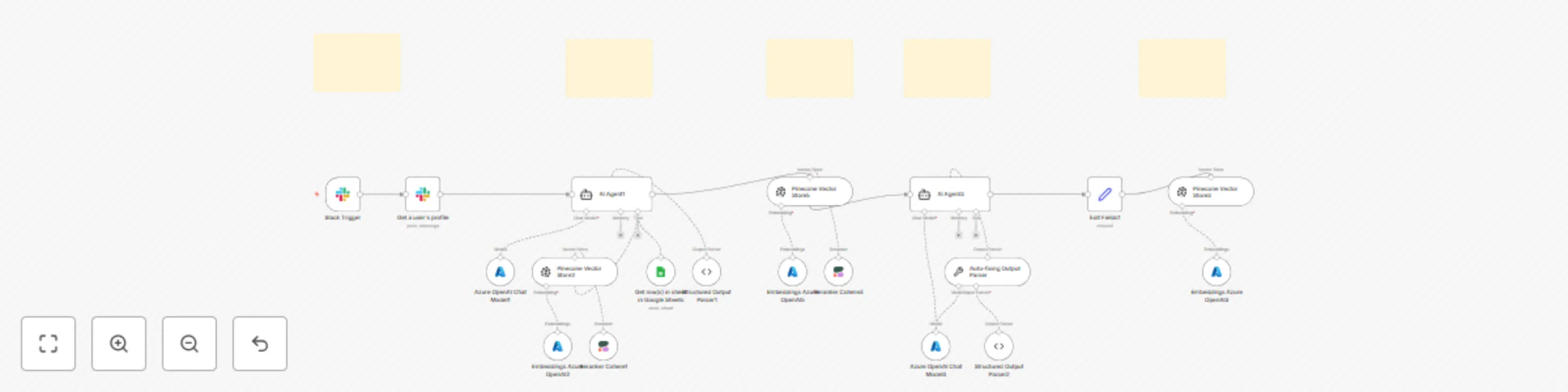
This advanced n8n automation template empowers your Slack bot to act as an intelligent assistant: when a user asks a question or requests a suggestion (by mentioning the bot), it automatically retr...

Best for

  • Internal Wiki automation workflows
  • AI RAG automation workflows
  • advanced n8n builders looking for reusable templates

Tools used

n8n-nodes-base.slacktrigger, @n8n/n8n-nodes-langchain.agent, @n8n/n8n-nodes-langchain.lmchatazureopenai, n8n-nodes-base.slack, @n8n/n8n-nodes-langchain.vectorstorepinecone, @n8n/n8n-nodes-langchain.embeddingsazureopenai, n8n-nodes-base.googlesheetstool, @n8n/n8n-nodes-langchain.rerankercohere

Source and attribution

This workflow is cataloged by N8N Workflows and links back to its original n8n.io source page by Rahul Joshi.

Original n8n.io source

1.1 Workflow description

Title
Create a context-aware Slack assistant with Google Sheets, Pinecone & GPT-4o
Workflow name
Create a context-aware Slack assistant with Google Sheets, Pinecone & GPT-4o

This advanced n8n automation template empowers your Slack bot to act as an intelligent assistant: when a user asks a question or requests a suggestion (by mentioning the bot), it automatically retrieves the user’s historical data and previous interactions from both Google Sheets and Pinecone. Using GPT-4o, the bot analyzes past updates, status reports, and context to generate a personalized, context-aware response—directly in Slack. Perfect for teams seeking instant, data-driven support, this workflow transforms your Slack bot into a smart knowledge assistant that references your own organizational history to provide relevant answers and suggestions.

What This Template Does (Step-by-Step)

Slack Bot Mention Trigger

  • Listens for message or app_mention events where a user asks a question or requests a suggestion.
  • Captures the message body and user ID.

User Profile & Data Fetch

  • Uses the Slack API to retrieve the user’s profile.
  • Queries Google Sheets and Pinecone to collect the user’s historical updates and interactions.

Contextual AI Lookup

  • GPT-4o reviews the user’s past status reports, messages, and activity.
  • Synthesizes a contextually relevant answer or suggestion based on prior data.

Personalized Response Generation

  • The bot replies in Slack with a tailored answer, referencing the user’s previous updates and current context.

Auto-Fix & Schema Validation

  • Ensures the generated response is well-structured and matches your organization’s data schema.

Document Update (Optional)

  • Optionally logs the new interaction or suggestion back to Pinecone for future reference.

Required Integrations

  • Slack Bot with channels:history, app_mentions:read, and users.profile:read
  • Google Sheets OAuth2 (for lead or user status records)
  • Pinecone Vector Store (for storing user status documents)
  • Azure OpenAI or OpenAI GPT-4o (for document generation and merging)
  • Cohere API (optional) for reranking relevance in vector search

Ideal For

  • Remote teams running async daily standups
  • People ops tracking onboarding or churn signals
  • Founders building internal GPT-powered tools
  • Managers consolidating Slack-based updates across teams
  • Teams wanting a Slack bot that provides personalized answers and suggestions based on past activity
  • Managers and team members seeking quick, AI-powered support and insights from their own work history
  • Organizations aiming to leverage internal data for smarter, context-aware assistance in Slack

1.2 Logical Blocks

This catalog entry is organized from the workflow JSON. The node-level section below shows the executable blocks available for review before importing the template.

2. Block-by-Block Analysis

Block 1 - Slack Trigger

Type / Role
n8n-nodes-base.slackTrigger - slackTrigger
Config choices
Version 1

Block 2 - AI Agent1

Type / Role
@n8n/n8n-nodes-langchain.agent - agent
Config choices
Version 2

Block 3 - Azure OpenAI Chat Model1

Type / Role
@n8n/n8n-nodes-langchain.lmChatAzureOpenAi - lmChatAzureOpenAi
Config choices
Version 1

Block 4 - Get a user's profile

Type / Role
n8n-nodes-base.slack - slack
Config choices
Version 2.3

Block 5 - Pinecone Vector Store2

Type / Role
@n8n/n8n-nodes-langchain.vectorStorePinecone - vectorStorePinecone
Config choices
Version 1.3

Block 6 - Embeddings Azure OpenAI2

Type / Role
@n8n/n8n-nodes-langchain.embeddingsAzureOpenAi - embeddingsAzureOpenAi
Config choices
Version 1

Block 7 - Get row(s) in sheet in Google Sheets

Type / Role
n8n-nodes-base.googleSheetsTool - googleSheetsTool
Config choices
Version 4.6

Block 8 - Pinecone Vector Store3

Type / Role
@n8n/n8n-nodes-langchain.vectorStorePinecone - vectorStorePinecone
Config choices
Version 1.3

Block 9 - Embeddings Azure OpenAI3

Type / Role
@n8n/n8n-nodes-langchain.embeddingsAzureOpenAi - embeddingsAzureOpenAi
Config choices
Version 1

Block 10 - Reranker Cohere1

Type / Role
@n8n/n8n-nodes-langchain.rerankerCohere - rerankerCohere
Config choices
Version 1

Block 11 - Structured Output Parser1

Type / Role
@n8n/n8n-nodes-langchain.outputParserStructured - outputParserStructured
Config choices
Version 1.3

Block 12 - Pinecone Vector Store5

Type / Role
@n8n/n8n-nodes-langchain.vectorStorePinecone - vectorStorePinecone
Config choices
Version 1.3

Block 13 - Embeddings Azure OpenAI5

Type / Role
@n8n/n8n-nodes-langchain.embeddingsAzureOpenAi - embeddingsAzureOpenAi
Config choices
Version 1

Block 14 - Reranker Cohere3

Type / Role
@n8n/n8n-nodes-langchain.rerankerCohere - rerankerCohere
Config choices
Version 1

Block 15 - AI Agent3

Type / Role
@n8n/n8n-nodes-langchain.agent - agent
Config choices
Version 2

Block 16 - Azure OpenAI Chat Model3

Type / Role
@n8n/n8n-nodes-langchain.lmChatAzureOpenAi - lmChatAzureOpenAi
Config choices
Version 1

Block 17 - Auto-fixing Output Parser

Type / Role
@n8n/n8n-nodes-langchain.outputParserAutofixing - outputParserAutofixing
Config choices
Version 1

Block 18 - Structured Output Parser2

Type / Role
@n8n/n8n-nodes-langchain.outputParserStructured - outputParserStructured
Config choices
Version 1.3

Block 19 - Edit Fields1

Type / Role
n8n-nodes-base.set - set
Config choices
Version 3.4

Block 20 - Sticky Note

Type / Role
n8n-nodes-base.stickyNote - stickyNote
Config choices
Version 1

Block 21 - Sticky Note2

Type / Role
n8n-nodes-base.stickyNote - stickyNote
Config choices
Version 1

Block 22 - Sticky Note3

Type / Role
n8n-nodes-base.stickyNote - stickyNote
Config choices
Version 1

Block 23 - Sticky Note4

Type / Role
n8n-nodes-base.stickyNote - stickyNote
Config choices
Version 1

Block 24 - Sticky Note5

Type / Role
n8n-nodes-base.stickyNote - stickyNote
Config choices
Version 1

3. Summary Table

Workflow Create a context-aware Slack assistant with Google Sheets, Pinecone & GPT-4o
Complexity advanced
Nodes 24
Categories Internal Wiki, AI RAG
Author Rahul Joshi
Published 15 Jul 2025

4. Reproducing the Workflow from Scratch

  1. 1. Download the workflow JSON

    Use the JSON export at /data/workflows/6020/6020.json as the source template for this automation.

  2. 2. Import the template into n8n

    Open n8n, import the downloaded JSON, and review each node before activating the workflow.

  3. 3. Configure credentials and variables

    Replace placeholder credentials, API keys, webhook URLs, account IDs, and environment-specific values with your own settings.

  4. 4. Test with sample data

    Run the workflow manually or in a staging workspace, inspect node output, and confirm downstream systems receive the expected data.

  5. 5. Activate and monitor

    Enable the workflow only after testing, then monitor executions, errors, and rate limits during the first production runs.

5. General Notes & Resources

Review imported nodes carefully before activation. This catalog entry is intended to help you inspect the workflow structure, understand required services, and find related templates faster.

Node names, credentials, schedules, webhook paths, and external service limits may need adjustment for your workspace.

Frequently asked questions

What does Create a context-aware Slack assistant with Google Sheets, Pinecone & GPT-4o do?

This advanced n8n automation template empowers your Slack bot to act as an intelligent assistant: when a user asks a question or requests a suggestion (by mentioning the bot), it automatically retr...

What do I need before importing this workflow?

Review the workflow JSON, configure any required credentials in n8n, and test the automation in a safe workspace before using it in production.

Can I customize this workflow?

Yes. Use the block-by-block analysis and the downloadable JSON to inspect each node, then adjust credentials, prompts, schedules, filters, or destinations for your Internal Wiki, AI RAG use case.